


Power Consumption Analysis#
This section provides a comprehensive analysis of power consumption for the Amazon Sidewalk protocol, encompassing the three physical layers: BLE, FSK, and CSS. This section details the testing procedures and methodologies applied to each radio layer. Every step of the process is thoroughly explained to ensure the ability to replicate the measurements. Finally, this section culminates in presenting the results for each radio layer, highlighting the average power consumption for fundamental events such as transmission (TX), reception (RX), and idle power, among others.
For more information on Energy modes for Silicon Labs platforms, see the dedicated documentation on Power Manager.
Testing Scenario#
In this section are example use cases for each physical layer: BLE (Bluetooth Low Energy), FSK (Frequency-Shift Keying), and CSS (Chirp Spread Spectrum). In each scenario, for each uplink with payload of 19 bytes sent to the cloud, the cloud answered with an ACK message (0 bytes payload). Default parameters for each radio layer are provided. Tests were run on those default configurations to extract Amazon Sidewalk performance out of the box.
Hardware#
To perform the necessary tests, various platforms were selected for each physical layer (PHY).
Reference platforms include:
For BLE: the EFR32xG24 radio board along with our mainboard
For FSK:
the EFR32xG28 radio board along with our mainboard
the KG100S radio board along with our mainboard
a combination of the EFR32xG24 radio board and the Semtech LR1110 radio module
For CSS:
a combination of the EFR32xG24 radio board and the Semtech SX1262 radio module
the KG100S radio board along with our mainboard
a combination of the EFR32xG24 radio board and the Semtech LR1110 radio module
Creating a Power Optimized Application#
This study requires a fundamental application that is optimized for power efficiency while still running the Amazon Sidewalk stack. This application was derived from the Hello Neighbor sample application, with only minor modifications implemented. By default, the Hello Neighbor application operates in EM2 energy mode when idle. The initial modification involved disabling the CLI to remove the periodic RTT task.
Create a Hello Neighbor Application#
Follow public documentation to create the Hello Neighbor application here.
Disable CLI in Hello Neighbor#
When using RTT with the CLI enabled, a periodic task is created to check whether a CLI command has been entered in the terminal. By default, this task runs every 50 ms and wakes the device from EM2, which increases power consumption. As a first step, we disable the CLI to eliminate this periodic wake-up and reduce energy usage.
To disable CLI in Hello Neighbor, follow these steps:
Navigate to Software Components and search for cli.
Remove the CLI component.
Remove the
app_cli.cfile from your application.
Power Consumption Setup#
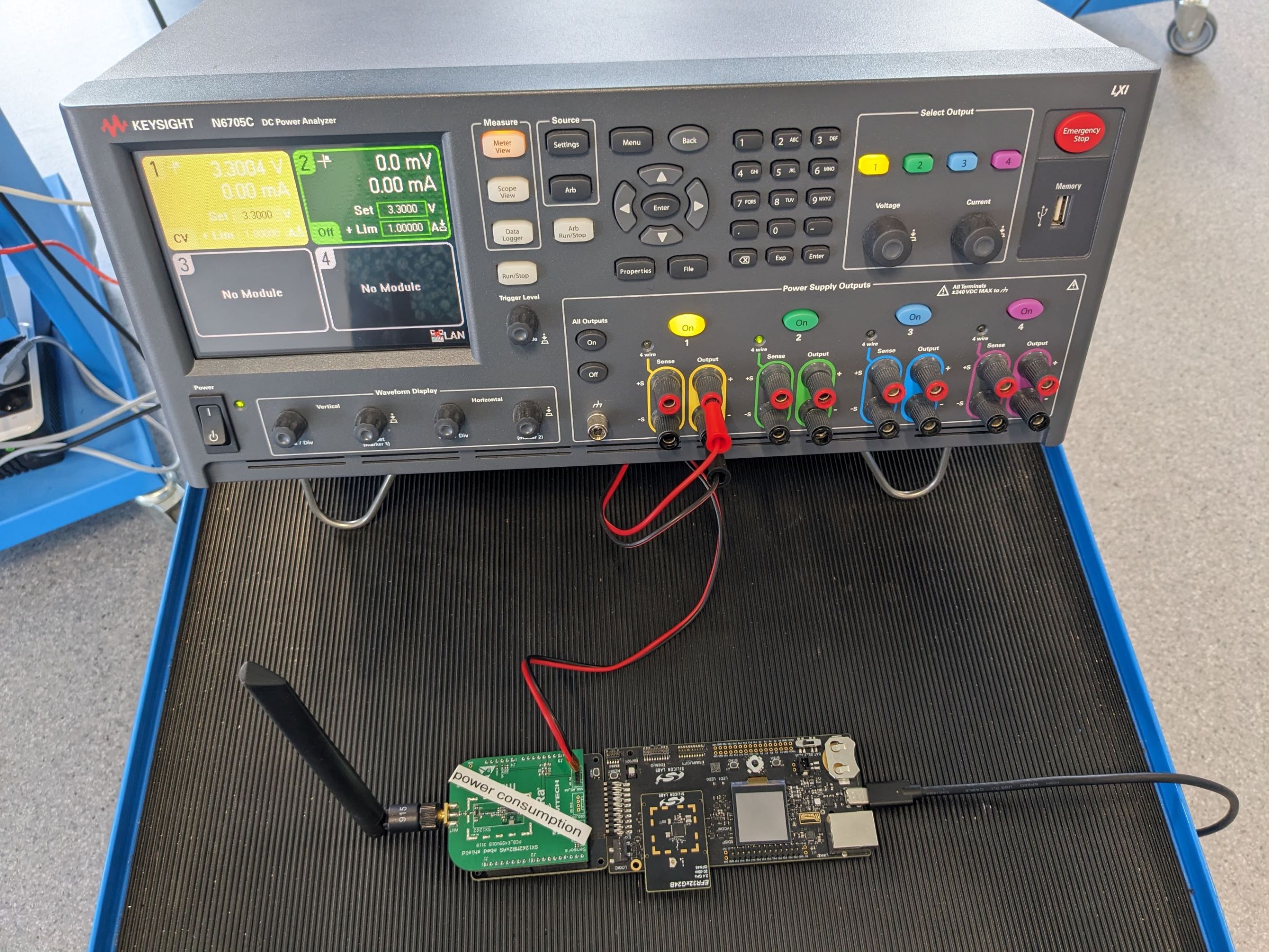
For each of the three physical layers, the Simplicity Studio Energy Profiler was used to assess power consumption. The power usage of the Semtech SX1262 was evaluated independently with a DC/DC power Analyzer from Keysight. To conduct the power analysis on the Semtech radio module, a minor hardware alteration was required to facilitate an external power source, as the module derives power from the DC/DC power Analyzer's supply.
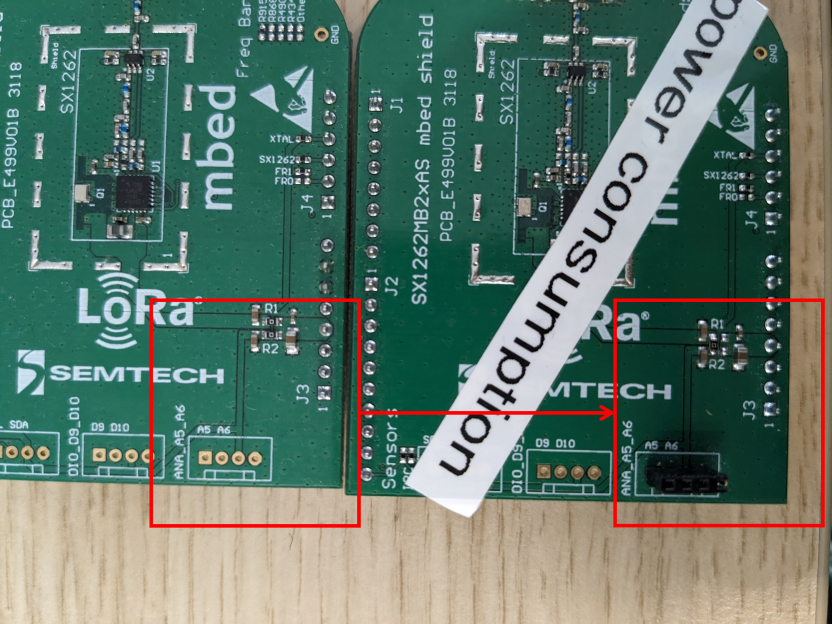
Semtech SX1262 Radio Module Modification
A 0 ohm resistor needed to be removed and another shifted to redirect power supply from the mainboard to the DC/DC Power Analyzer, as shown in the following picture.
The final setup with the DC/DC Power Analyzer looks like the picture below.
Once all the necessary tools are in place, review each physical layer power consumption.
BLE#
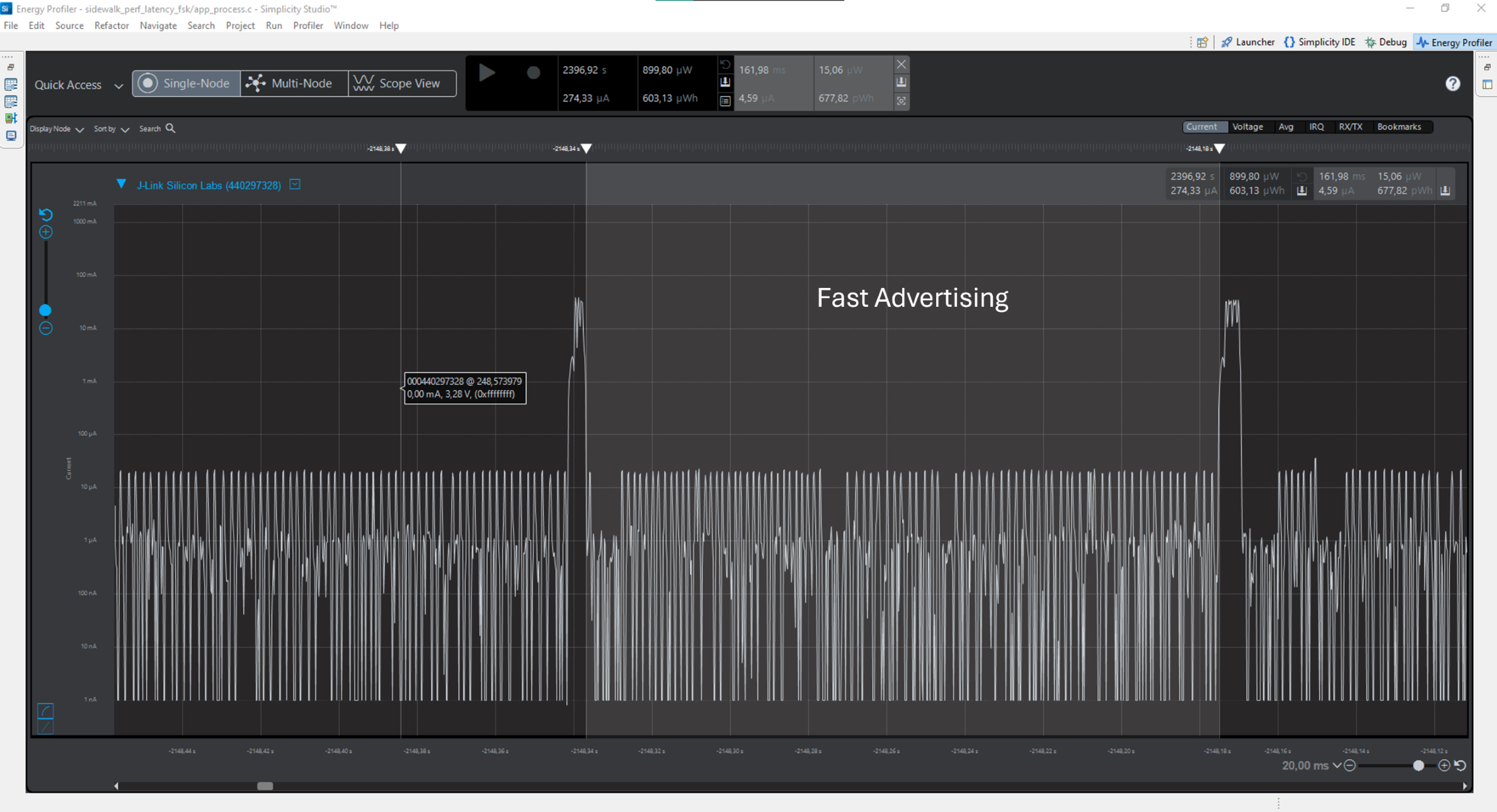
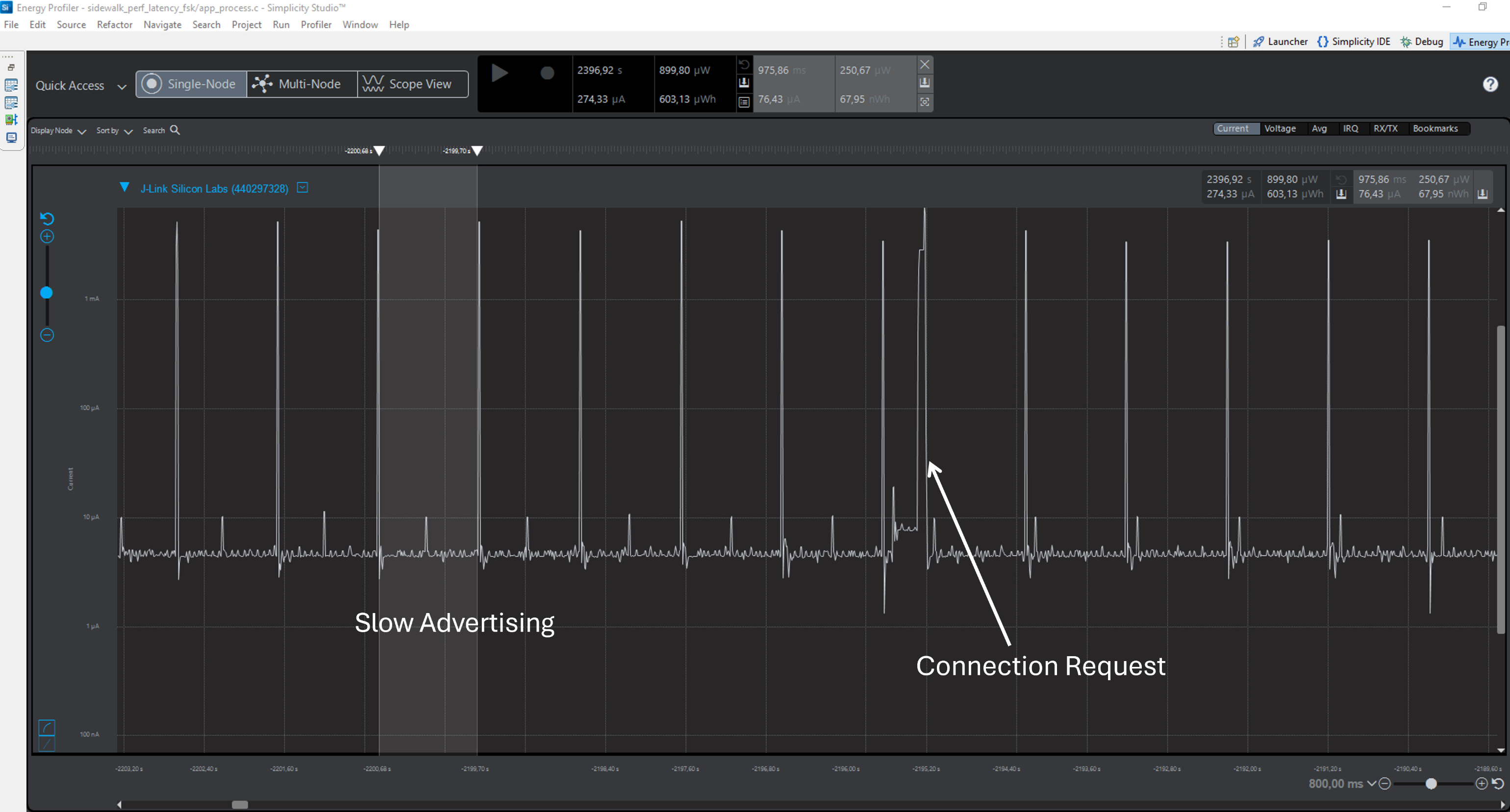
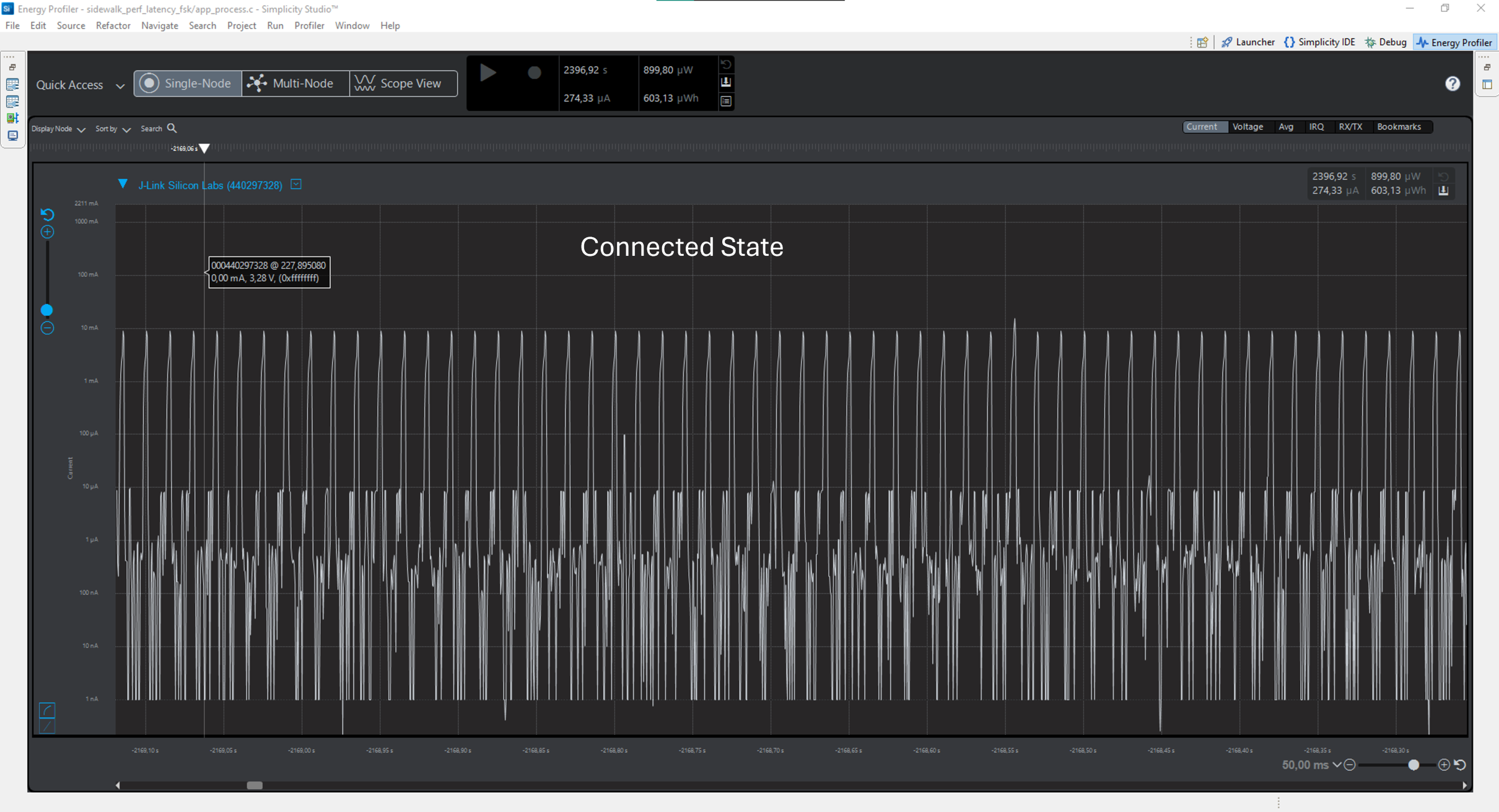
Per Amazon’s guidelines, the process begins with a Fast Advertising phase that lasts for 30 seconds, emitting an advertising beacon every 160 milliseconds. This phase is succeeded by Slow Advertising, during which the beacon is broadcasted every second. Subsequently, the BLE endpoint and the gateway can establish a connection to exchange messages. This connected state is maintained for a minimum of 30 seconds, with a default connection interval of 30 milliseconds.
The following picture shows the endpoint power consumption graph during fast advertising.
The following picture shows the endpoint power consumption graph during slow advertising.
The following picture shows the endpoint power consumption graph while connected to the GW.
FSK#
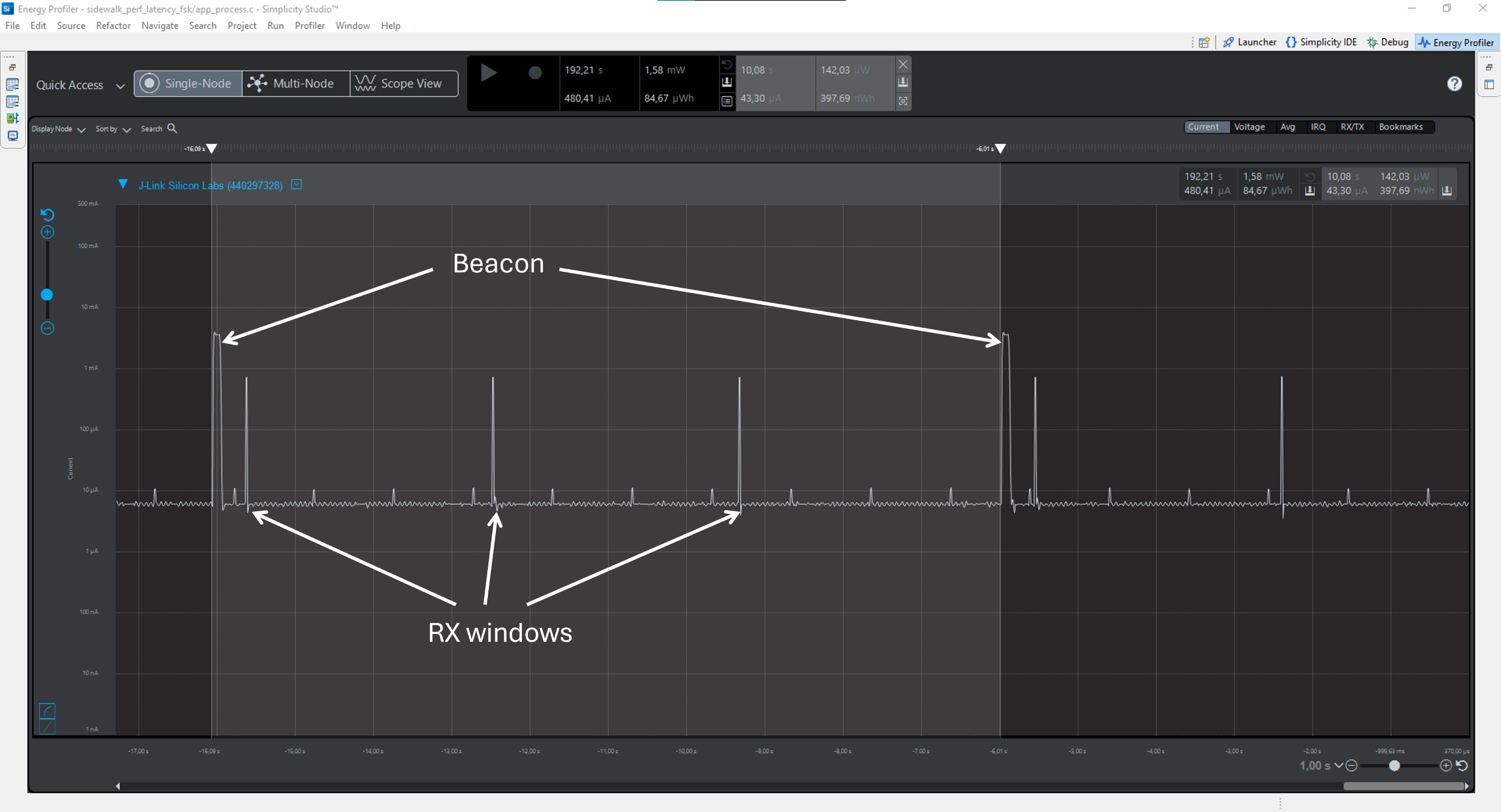
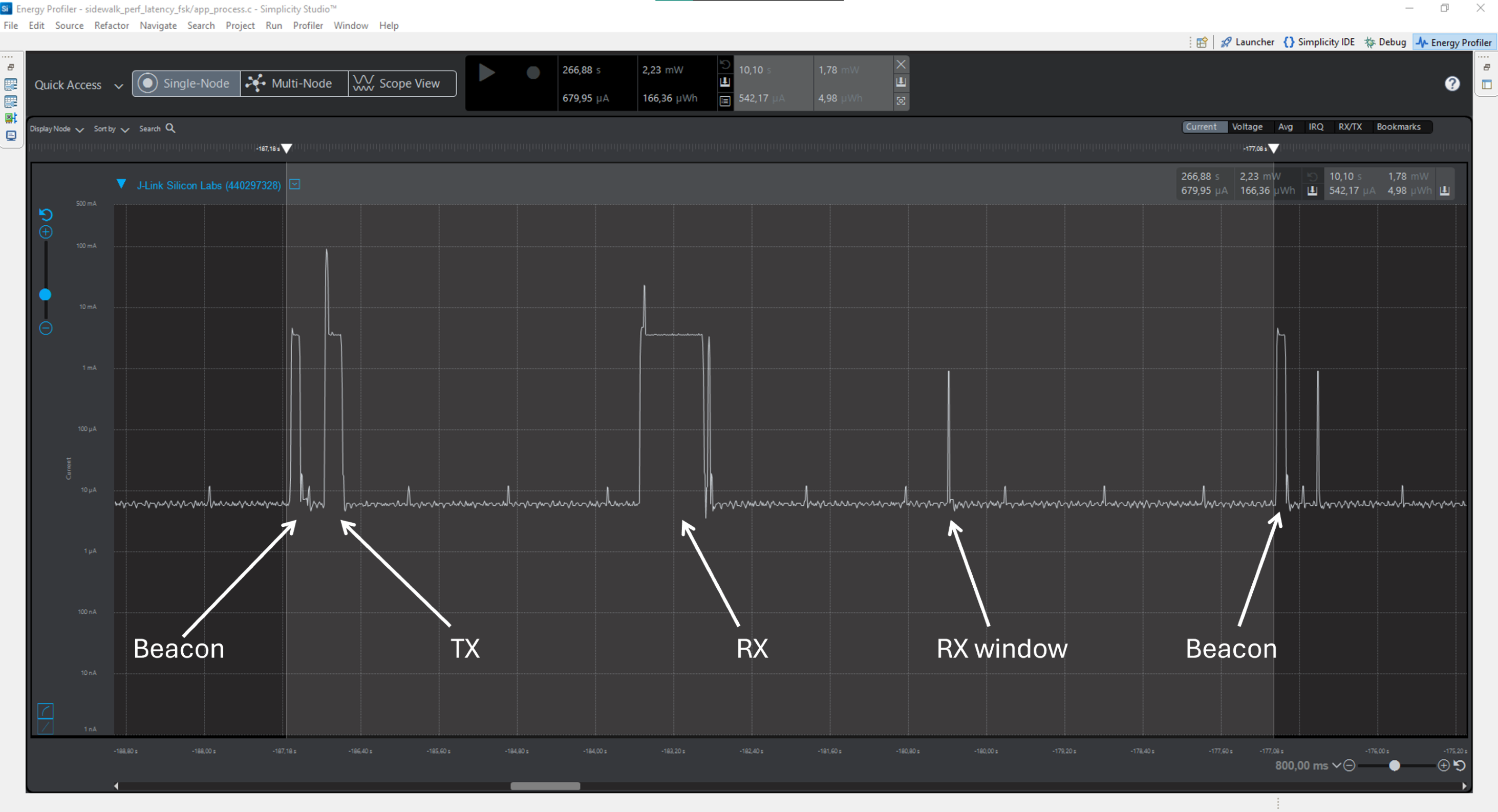
As per Amazon’s standards for FSK, the connection with the gateway is sustained by sending beacons at 10-second intervals. The default configuration permits three opportunities for listening in the time between each beacon. Transmissions may occur at any point between beacons when the device is not in a listening window.
The following picture shows the endpoint power consumption graph between 2 beacons.
The following picture shows the endpoint power consumption graph between 2 beacons with a transmission and a reception.
CSS#
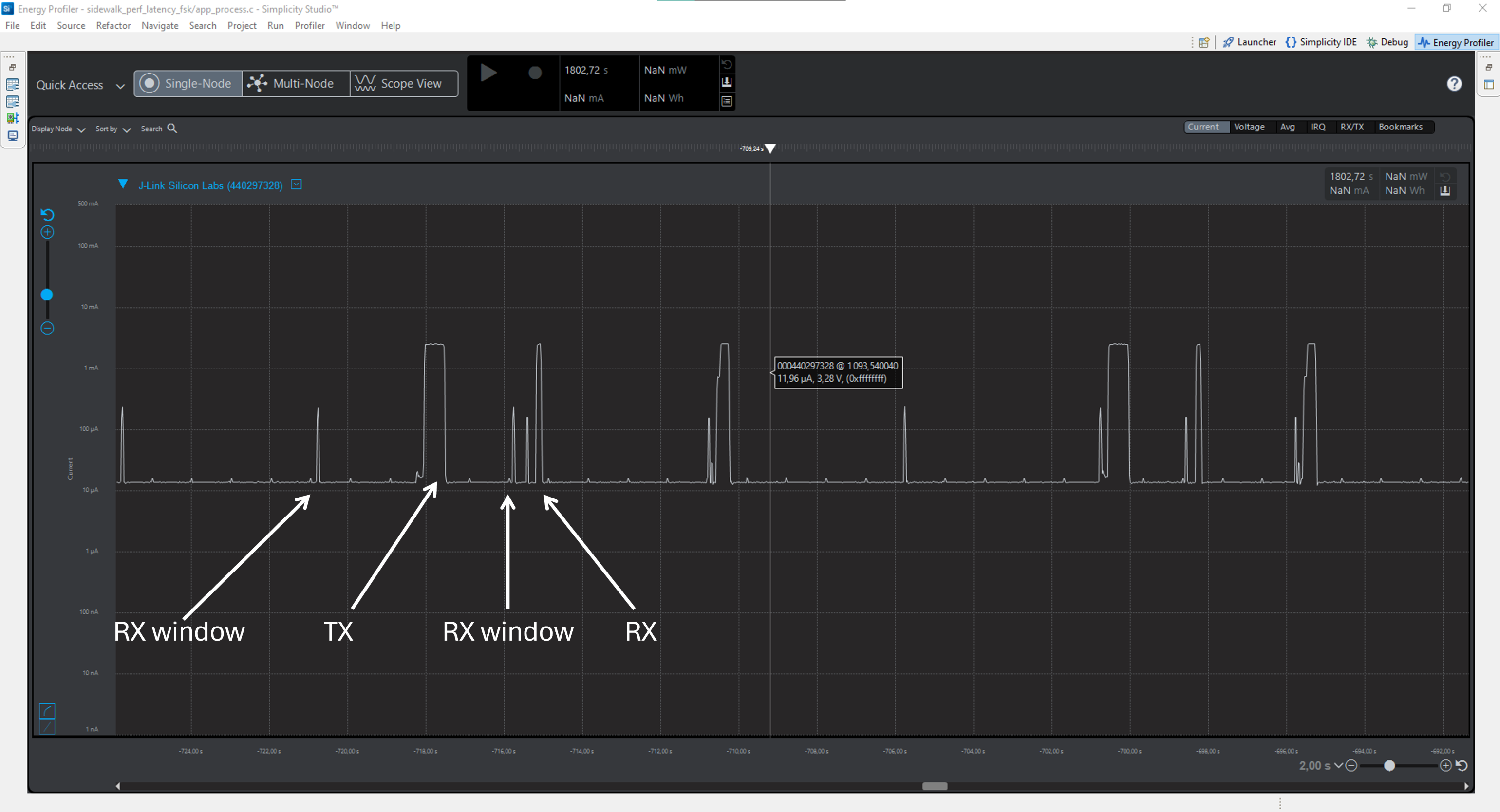
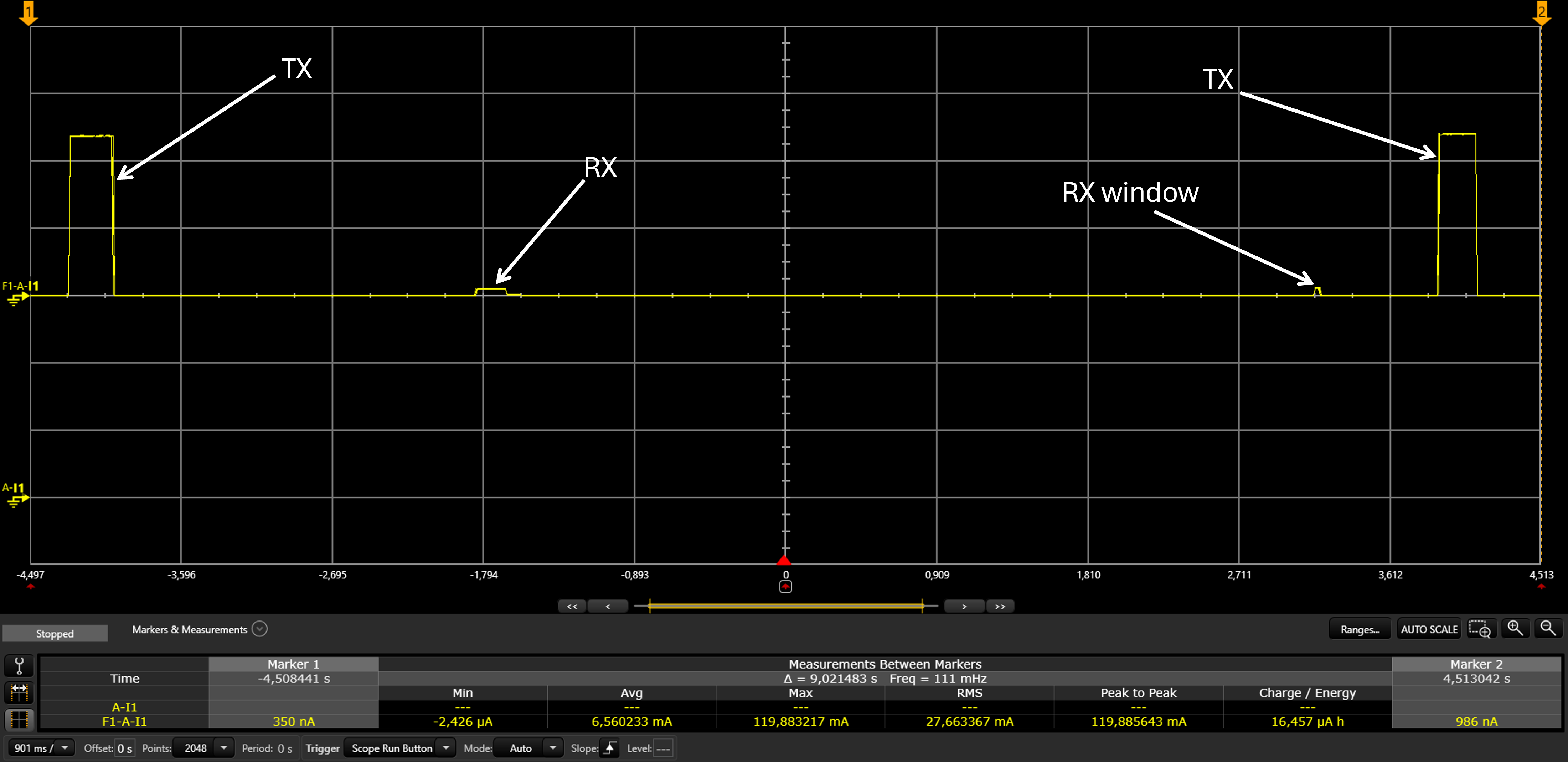
CSS operates on an asynchronous protocol, aligning its timing with the gateway as needed and executing transmissions when necessary. Listening windows are set to activate every 5 seconds consistently, or they can be triggered after a transmission, depending on the selected power profile. The default power profile utilized in the subsequent graphs is profile B.
The following picture shows the endpoint power consumption of the EFR32xG24 radio board during a transmission and a reception.
The following picture shows the endpoint power consumption of the SX1262 radio module during a transmission and a reception.
Power Consumption Results#
The results of the average power consumption study on fundamental events are provided in the following tables. These include:
BLE Advertising
BLE Connected State
TX
RX
Idle State
BLE#
BLE Physical Layer | Details |
|---|---|
Radio Board | xG24 |
Physical Layer | BLE |
Output Power | 20 dBm |
TX Payload Size | 19 bytes |
RX Payload Size | 0 byte |
Fast Advertising Interval | 160 ms |
Slow Advertising Interval | 1000 ms |
Connected State Minimal Duration | 30 s |
Fundamental Events Average Power Consumption | Results |
|---|---|
Fast Advertisement | 367.03 µA |
Slow Advertisement | 64.61 µA |
Connected State | 156.21 µA |
Idle State | 5.13 µA |
TX 19 bytes | 3.18 mA |
RX 0 byte | 3.21 mA |
FSK#
FSK Physical Layer | Details |
|---|---|
Radio Board | xG28 |
Radio Layer | FSK |
Output Power | 20 dBm |
TX Payload Size | 19 bytes |
RX Payload Size | 0 byte |
Number of RX Window in-between Beacons | 3 |
Fundamental Events Average Power Consumption | Results |
|---|---|
Idle State | 5.37 µA |
TX 19 bytes | 29.77 mA |
RX 0 byte | 2.94 mA |
10 Seconds Loop Average | 77.21 µA |
FSK Physical Layer | Details |
|---|---|
Radio Board | KG100S |
Radio Layer | FSK |
Output Power | 20 dBm |
TX Payload Size | 19 bytes |
RX Payload Size | 0 byte |
Number of RX Window in-between Beacons | 3 |
Fundamental Events Average Power Consumption | Results |
|---|---|
Idle State | 8 µA |
TX 19 bytes | 35.55 mA |
RX 0 byte | 4.42 mA |
10 Seconds Loop Average | 23.21 µA |
FSK Physical Layer | Details |
|---|---|
Radio Board | xG24 + LR1110 |
Radio Layer | FSK |
Output Power | 20 dBm |
TX Payload Size | 19 bytes |
RX Payload Size | 0 byte |
Number of RX Window in-between Beacons | 3 |
Fundamental Events Average Power Consumption | Results |
|---|---|
Idle State | 15.97 µA |
TX 19 bytes | 52.03 mA |
RX 0 byte | 5.21 mA |
10 Seconds Loop Average | 39.94 µA |
CSS#
CSS Physical Layer | Details |
|---|---|
Radio Board | xG24 + SX1262 |
Radio Layer | CSS |
Output Power | 20 dBm |
TX Payload Size | 19 bytes |
RX Payload Size | 0 byte |
Fundamental Events Average Power Consumption | Results |
|---|---|
Idle State | 14.03 µA |
TX 19 bytes | 91.14 mA |
RX 0 bytes | 4.14 mA |
20 RX windows after TX | 48.54 µA |
CSS Physical Layer | Details |
|---|---|
Radio Board | KG100S |
Radio Layer | CSS |
Output Power | 20 dBm |
TX Payload Size | 19 bytes |
RX Payload Size | 0 byte |
Fundamental Events Average Power Consumption | Results |
|---|---|
Idle State | 8.06 µA |
TX 19 bytes | 66.83 mA |
RX 0 bytes | 4.79 mA |
20 RX windows after TX | 47.18 µA |
CSS Physical Layer | Details |
|---|---|
Radio Board | xG24 + LR1110 |
Radio Layer | CSS |
Output Power | 20 dBm |
TX Payload Size | 19 bytes |
RX Payload Size | 0 byte |
Fundamental Events Average Power Consumption | Results |
|---|---|
Idle State | 16.07 µA |
TX 19 bytes | 98.70 mA |
RX 0 bytes | 5.49 mA |
20 RX windows after TX | 70.27 µA |
Going Further#
For each physical layer, several parameters can be tweaked to influence the protocol behavior, thus impacting average power consumption. Below are the most commonly thought after parameters and where to change them.
BLE#
The BLE configuration can be seen in the file sidewalk_<version>/component/sidewalk_radio_config/ble/app_ble_config.c of your sample application. Most enumeration related to Sidewalk BLE are defined in sidewalk_<version>/component/amazon/projects/sid/sal/common/public/sid_ifc/sid_ble_cfg/sid_ble_config_ifc.h. The default device BLE name is "SL_SIDEWALK", MTU size is 247 bytes, and MAC address type is random private resolvable. BLE connection parameters are chosen by the gateway and the connection timeout is 30 seconds.
Advertising is divided into two behaviors:
Fast advertising: transmit beacons every 160 ms for 30 seconds after boot
Slow advertising: transmit beacons every 1 s after fast advertising
You can check the following structures in the API Reference:
sid_ble_cfg_adv_param_t: for advertising parameterssid_ble_cfg_conn_param_t: for the connection parameterssid_ble_cfg_gatt_profile_t: for the GATT profile parameterssid_ble_config_t: for more generic configuration parameters
For more information on Silicon Labs BLE stack and power consumption, see the following pages:
FSK#
The FSK radio configuration can be seen in the file sidewalk_<version>/component/sidewalk_radio_config/subghz/rail/app_subghz_config.c of your sample application for Silicon Labs hardware andsidewalk_<version>/component/sidewalk_radio_config/subghz/semtech/sx1262/app_subghz_config.c respectively sidewalk_<version>/component/sidewalk_radio_config/subghz/semtech/lr1110/app_subghz_config.c for the different Semtech hardwares. Most Sidewalk FSK enumeration are defined in sidewalk_<version>/component/amazon/projects/sid/sal/common/public/sid_ifc/sid_900_cfg/sid_900_cfg.h. While running with FSK, your EFR32 will be either in EM2 or EM0 energy modes depending on radio events. During radio events like beacons, RX, or TX, your EFR32 will run in EM0 energy mode and in EM2 outside of those events.
For more power optimization, check Amazon Sidewalk power profiles for FSK.
CSS#
The CSS radio configuration can be seen in the file sidewalk_<version>/component/sidewalk_radio_config/subghz/rail/app_subghz_config.c of your sample application for Silicon Labs hardware andsidewalk_<version>/component/sidewalk_radio_config/subghz/semtech/sx1262/app_subghz_config.c respectively sidewalk_<version>/component/sidewalk_radio_config/subghz/semtech/lr1110/app_subghz_config.c for the different Semtech hardwares. While running with CSS, your EFR32 will be either in EM2 or EM0 energy modes depending on radio events. During radio events like RX or TX your EFR32 will run in EM0 energy mode and in EM2 outside of those events.
For more power optimization, check Amazon Sidewalk power profiles for CSS.