


Silicon Labs Matter#
The Matter protocol leverages existing IP technologies, including Wi-Fi and Thread, to build a unified wireless connectivity ecosystem for smart homes. Internet Protocol (IP)-based networking provides manufacturers with simplified development while improving device compatibility for consumers.
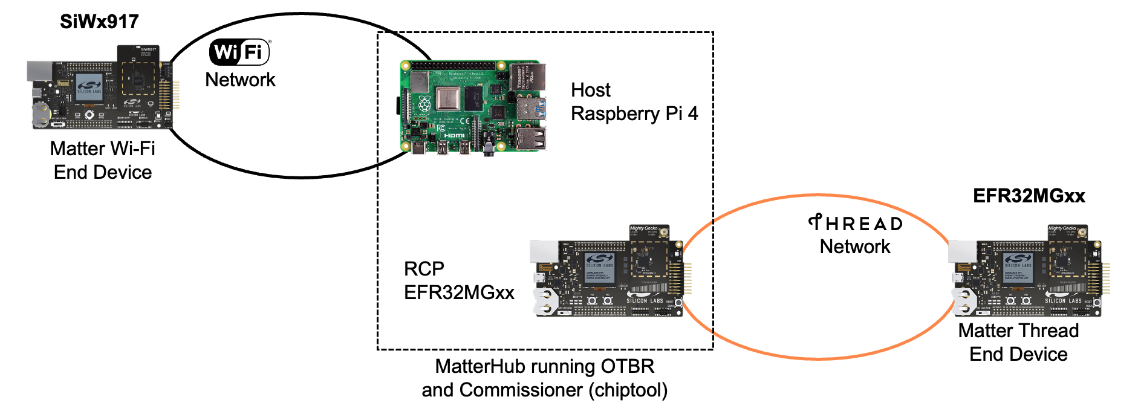
Silicon Labs supports Matter on both 802.15.4 (Thread) and 802.11 (Wi-Fi) transport protocols. The Thread development use case differs from Wi-Fi because the Thread protocol requires an OpenThread Border Router (OTBR).
Path for Development#
These pages are for developing Matter applications with the Matter Extension. The Matter Extension is the preferred development path and is available through Simplicity Studio and Standalone via SLC-CLI. The Matter Extension was previously released as an extension of the Gecko SDK (GSDK). Moving forward, the Matter Extension will be an extension of Silicon Labs Simplicity SDK (SiSDK).
Simplicity Studio is a GUI-based development experience in which you can create production-ready projects from a well-tested library. The Simplicity Studio development path also natively supports development on the Windows operating system. As a result, Windows users should use Simplicity Studio for their development environment. SLC-CLI offers command-line access to application configuration and generation of the Matter Extension.
Getting Started: Development Workflow#
Want to get a Matter application up and running quickly? Here's a high-level overview of the typical workflow from setup to a working commissioned device:
Understanding the Matter Protocol
Read documentation to undertsand the basics of Matter: Matter Fundamentals
Install Studio and Setup Development Environment
Follow the quick-start guide for overview and setup: Matter Overview
Covers hardware and software requirements, Simplicity Studio installation, Matter Extension setup, and tools
Create Sample Application/Solution
Choose Wi-Fi or Thread as desired protocol to create, build, and flash your Matter application
Follow the quick-start documentation for creating a demo for desired wireless protocol: Quick-Start Demos
Note: If you plan on implementing custom app behavior, proceed to step 4 after generating project and before building and flashing
[Optional] Customize Matter App Behavior and Logic
Use Project Configurator and other Studio tools to customize your app logic: Developing with Project Configurator
If necessary, add custom source files for your application logic
Follow documentation to develop a custom matter device with ZAP and corresponding callbacks: Custom Matter Device Development
Build and Flash
Refer back to documentation for quick-start demo for your desired protocol, and complete steps for building and flashing app
Ensure bootloader is present on the device
Bootloader is included for solution based examples
If you are not using a solution based example, flash the bootloader from Matter Software Artifacts
Follow Commander instructions for flashing this bootloader through CLI: Device Flashing
Commission
Commission your device using a Matter commissioner (e.g. matterhub): Commissioning
Other Resources#
To see release notes containing a list of features and known issues, go to Matter Release Notes on Silicon Labs Matter Extension.
If you are new to Matter or would like more information about Silicon Labs Matter-based products, see the Matter content on silabs.com.
For background information on the Matter standard, see the Connectivity Standard Alliance page.