


Time, Timestamping, and Scheduling#
Timing is an important aspect of most wireless protocols. While it's possible to use a generic timer for most of the required tasks, Silicon Labs' Wireless MCUs provide a protocol timer, which works together with the radio state machine, providing many advantages. This protocol timer is the base of all RAIL timing features.
Using the protocol timer, you can completely eliminate interrupt latencies, and you can get more accurate and more repeatable timing, even if you update the SDK version. Using the protocol timer in dynamic multiprotocol (DMP) is highly recommended as it tells the radio scheduler what you are planning to use the radio for.
RAIL Time#
RAIL timebase (or the resolution of RAIL time) is 1 µs regardless of the
oscillator's frequency, counted from boot. The same timebase is used for
everything (timestamping and absolute timers). It's stored in
RAIL_Time_t,
currently implemented as uint32_t, what means that it wraps every 1.19 hours.
Note that different hardware might run at different speeds, which is converted
to this universal 1 µs timebase. For this reason, you should never compare
RAIL times with equality operators (== and !=) as it might skip values.
RAIL provides the usual getter/setter for this:
RAIL_Time_t RAIL_GetTime();
RAIL_Status_t RAIL_SetTime(RAIL_Time_t time);
Note that it's generally a bad practice to use RAIL_SetTime(): It can cause serious issues when timers are running. Also, RAIL time is one of the few shared resources between protocols in dynamic multiprotocol mode.
Timestamps#
By default, each Tx and Rx packet is timestamped with the RAIL time on a fixed position of the packet.
While it would be possible to save the value of a timer at a specific RAIL event (like RAIL_EVENT_TX_PACKET_SENT, RAIL_EVENT_RX_SYNC1_DETECT, RAIL_EVENT_RX_PACKET_RECEIVED, etc.) this isn't recommended.
The reason is that at the RAIL API level, there's no way to guarantee time accuracy between the transmission/reception routine is called and the event is raised. Moreover, this would not be possible if radio interrupts are disabled.
Acquire Tx Timestamp#
To get the timestamp of transmitted packets, use RAIL_GetTxPacketDetails() or - for smaller code size - RAIL_GetTxPacketDetailsAlt2() in the context of the RAIL_EVENT_TX_PACKET_SENT event:
if ( events & RAIL_EVENT_TX_PACKET_SENT ){
  RAIL_TxPacketDetails_t packetDetails;
  packetDetails.isAck = false;
  packetDetails.timeSent.timePosition = RAIL_PACKET_TIME_AT_PACKET_END;
  packetDetails.timeSent.totalPacketBytes = 16;
  RAIL_GetTxPacketDetails(rail_handle, &packetDetails);
}
When using this API take care of the value passed by the packetDetails.timeSent.totalPacketBytes. It must account for all bytes sent over the air after the Preamble and Sync word(s) including payload CRC bytes and a potential header (length). If the packet is coded, e.g., with Manchester or FEC, it could also mean that the packet over the air is longer than the packet length reported by RAIL. In this case, it is recommended to validate the timestamp accuracy.
The same timestamp can be acquired by using the alternative API:
if ( events & RAIL_EVENT_TX_PACKET_SENT ){
  RAIL_TxPacketDetails_t packetDetails;
  packetDetails.isAck = false;
  RAIL_GetTxPacketDetailsAlt2(rail_handle, &packetDetails);
  // ...
  // Timestamp position discussed later
}
Though, there is a RAIL_GetTxPacketDetailsAlt() API, we don't recommend to use it because it has a more complicated argument list.
Note that in case of using
RAIL_GetTxPacketDetails()
the fields initialized in packetDetails before passing it to the function. The
first two
(isAck
and
timeSent.timePosition)
must always be initialized to get proper timestamp;
timeSent.totalPacketBytes
is not mandatory, but not all time positions work without it.
For the alternate API, you only have to know if the packet is ACK or not, but you have to convert the timestamp later.
We return to the time positions soon, but first, let's see how to get the timestamp of a received packet.
Acquire Rx Timestamp#
Similarly to Tx, RAIL defines RAIL_GetRxPacketDetails() and RAIL_GetRxPacketDetailsAlt() APIs for Rx, and you should use them quite similarly:
RAIL_RxPacketInfo_t packetInfo;
RAIL_RxPacketDetails_t packetDetails;
RAIL_RxPacketHandle_t packetHandle = RAIL_GetRxPacketInfo(rail_handle, RAIL_RX_PACKET_HANDLE_NEWEST, &packetInfo);
packetDetails.timeReceived.timePosition = RAIL_PACKET_TIME_AT_SYNC_END;
packetDetails.timeReceived.totalPacketBytes = packetInfo.packetBytes + 2; /* 2 Byte CRC is used on this example setup, what we need to calculate in here. */
RAIL_GetRxPacketDetails(rail_handle, packetHandle, &packetDetails);
Or using the alternative API:
RAIL_RxPacketInfo_t packetInfo;
RAIL_RxPacketDetails_t packetDetails;
RAIL_RxPacketHandle_t packetHandle = RAIL_GetRxPacketInfo(rail_handle, RAIL_RX_PACKET_HANDLE_NEWEST, &packetInfo);
RAIL_GetRxPacketDetailsAlt(rail_handle, packetHandle, &packetDetails);
Just like for Tx, timeReceived.timePosition must always be initialized to get a proper timestamp, while timeReceived.totalPacketBytes is not mandatory, but not all time positions work without it. However, it's relatively simple to get the length of a received packet, so there's not much gain avoiding it.
The alternative API doesn't need any initialization, but requires conversion
later. Note that a packetHandle was used to identify the packet we need to be
timestamped. This means that the timestamp of the received packet is stored as
long as the packet is not released either automatically or by calling
RAIL_ReleaseRxPacket()
after
RAIL_HoldRxPacket().
As a result, these routines do not need to be called in the RAIL event handler
(interrupt context).
This means that the Tx timestamps can only be obtained in the RAIL event handler (interrupt context), as opposed to the RX timestamps, which persist until the received packets are released.
Timestamp Positions#
Position Conversions with Time Positions#
The following RAIL_PacketTimePosition_t time positions are available for timestamps:
The first three are self-explanatory. RAIL_PACKET_TIME_DEFAULT is the hardware implementation, which never needs the totalPacketBytes. If default was passed, the function will update the timePosition to one of the first three, which is the default on the hardware.
On EFR32 Series 1, this will be RAIL_PACKET_TIME_AT_SYNC_END for Rx and RAIL_PACKET_TIME_AT_PACKET_END for Tx packet.
On EFR32 Series 2, RAIL_PACKET_TIME_AT_PACKET_END is used for both Tx and Rx.
In some cases, totalPacketBytes is required to convert the default timestamp position to the requested one. The function will update timePosition, if the totalPacketBytes was used on the following:
This can be used to recognize an inaccurate timestamp, if totalPacketBytes is unknown.
Position Conversions with the Alternative APIs#
The alternative APIs store the timestamp for a non-defined position. To convert it to timestamp in a given position, one of the following APIs must be called:
//Rx APIs:
RAIL_Status_t RAIL_GetRxTimeFrameEndAlt(RAIL_Handle_t rail_handle, RAIL_RxPacketDetails_t *pPacketDetails);
RAIL_Status_t RAIL_GetRxTimePreambleStartAlt(RAIL_Handle_t rail_handle, RAIL_RxPacketDetails_t *pPacketDetails);
RAIL_Status_t RAIL_GetRxTimeSyncWordEndAlt(RAIL_Handle_t rail_handle, RAIL_RxPacketDetails_t *pPacketDetails);
//Tx APIs:
RAIL_Status_t RAIL_GetTxTimeFrameEndAlt(RAIL_Handle_t rail_handle, RAIL_TxPacketDetails_t *pPacketDetails);
RAIL_Status_t RAIL_GetTxTimePreambleStartAlt(RAIL_Handle_t rail_handle, RAIL_TxPacketDetails_t *pPacketDetails);
RAIL_Status_t RAIL_GetTxTimeSyncWordEndAlt(RAIL_Handle_t rail_handle, RAIL_TxPacketDetails_t *pPacketDetails);
These alternative conversion APIs all need the pPacketDetails previously used
by the
RAIL_GetTxPacketDetailsAlt2()
or
RAIL_GetRxPacketDetailsAlt()
APIs as an input parameter.
Advantages of Using the Alternative APIs#
The alternative timestamping APIs may have some benefit over the regular RAIL_GetTxPacketDetails() and RAIL_GetRxPacketDetails() APIs:
If you don't want to convert the timestamp in interrupt context (i.e., the event handler) in case of Rx, or you don't want to access some variables, like the packet length from interrupt context, you can choose the alternative functions.
You might only want timestamps on specific packets, depending on the payload. Using the alternate API can save CPU time and RAM as you only do the complex timestamp conversion on those specific packets.
You can obtain a packet timestamp on an ongoing transmitted packet utilizing RAIL_GetTxTimePreambleStartAlt() handling an RAIL_EVENT_TX_STARTED event. Note that this event does not apply to ACK transmits (currently).
Also, these are useful, if you want to reduce code size.
General Purpose Timer#
By default, you can set up a single general purpose timer on the RAIL timebase. The following APIs are usable for this timer (for the detailed arguments, please check the API documentation):
RAIL_SetTimer(RAIL_Handle_t, RAIL_Time_t, RAIL_TimeMode_t, RAIL_TimerCallback_t)
RAIL_GetTimer(RAIL_Handle_t)
RAIL_CancelTimer(RAIL_Handle_t)
RAIL_IsTimerExpired(RAIL_Handle_t)
RAIL_IsTimerRunning(RAIL_Handle_t)
There are a few parameters that require explanation. RAIL_TimerCallback_t is a function pointer type to the function which will be called when the timer fires. RAIL_TimeMode_t can take two values in this case:
If RAIL_TIME_ABSOLUTE is used, RAIL interprets the timing in radio time base
absolute time. On the other hand, if RAIL_TIME_DELAY is used, the time
specified is a delay starting from the the function call in the RAIL timebase.
However, RAIL_TIME_DELAY only guarantees that at least the specified delay
is elapsed; it does not compensate the API processing time. If you need accurate
timing, you should use RAIL_TIME_ABSOLUTE:
RAIL_Time_t anchor = RAIL_GetTime();
RAIL_SetTimer(rail_handle, anchor + 1000, RAIL_TIME_ABSOLUTE, timerCb);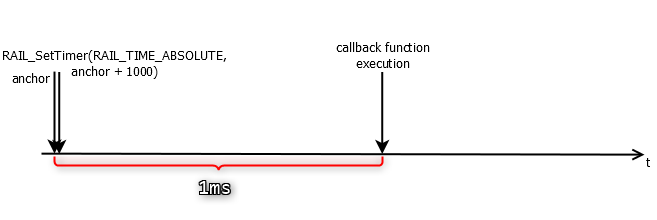
You can notice that the timer starts from the anchor and not from the
RAIL_SetTimer()
function call. If RAIL_TIME_DELAY were used, this is how it would look like,
with the small processing time added to the delay:
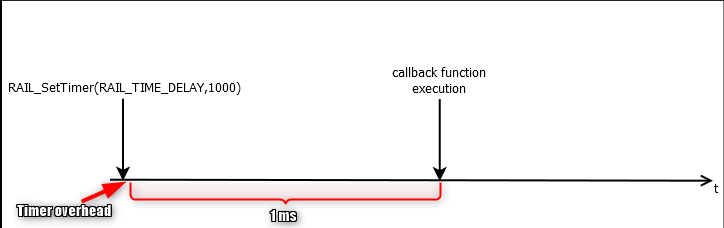
Note though, that this processing time is consistent in the same environment. So
if for some reason, you cannot get an anchor point, you can use a
RAIL_TIME_DELAY, measure it, and compensate from the application. However, if
you update RAIL, or change the part the code is running on, the delay might
change.
Restarting timers (i.e., to change the timeout) is not allowed. If the timer might be running when you set it, you should call RAIL_CancelTimer() first.
Multi-timer#
RAIL provides timer virtualization over RAIL timer. In single protocol mode, it's
not enabled to save code space. To enable it, call
RAIL_ConfigMultiTimer()
with true argument.
Multi-timer is always enabled in dynamic multiprotocol (DMP) mode.
It provides basically the same APIs and the same precision as the regular RAIL timer:
RAIL_SetMultiTimer(RAIL_MultiTimer_t*, RAIL_Time_t, RAIL_TimeMode_t, RAIL_MultiTimerCallback_t, void*)
RAIL_GetMultiTimer(RAIL_MultiTimer_t*)
RAIL_CancelTimer(RAIL_MultiTimer_t*)
RAIL_IsTimerExpired(RAIL_MultiTimer_t*)
RAIL_IsTimerRunning(RAIL_MultiTimer_t*)
There are only two differences:
Each API needs a RAIL_MultiTimer_t
timerHandle. Every timer you plan to use should have its unique handler statically allocated.The callback function has a customizable,
void*argument.
The regular RAIL timer can still be used when multi-timer is enabled. It's still implemented as a multi-timer, but its handle is allocated by RAIL. For more information on how RAIL can be used to implement multi-protocol, refer to the Dynamic Multiprotocol User's Guide.
Note: multi-protocol does not necessarily mean multi PHYs. For more information on the differences between the two, refer to the article about multi PHYs and multiprotocol
Scheduling Tx#
Scheduling transmissions on the RAIL time is quite simple:
RAIL_ScheduleTxConfig_t scheduleConfig = {
  .when = 1000,
  .mode = RAIL_TIME_DELAY,
  .txDuringRx = RAIL_SCHEDULED_TX_DURING_RX_POSTPONE_TX,
};
RAIL_StartScheduledTx(rail_handle, 0, RAIL_TX_OPTIONS_DEFAULT, &scheduleConfig, NULL);
The parameters of
RAIL_StartScheduledTx()
are the same as the parameters of
RAIL_StartTx(),
except the
RAIL_ScheduleTxConfig_t
pointer config argument, which works just like running the RAIL timer. The
only new argument field here is
txDuringRx;
it can have the following values:
If you have the radio in receive mode, and when your scheduled packet starts
transmitting, you might be in the middle of receiving a packet. In this case,
RAIL_SCHEDULED_TX_DURING_RX_POSTPONE_TX will start the transmission when the
reception receives, so transmission will be delayed from the intended
scheduling. RAIL_SCHEDULED_TX_DURING_RX_ABORT_TX on the other hand cancels the
transmission.
Scheduling Rx#
Scheduling Rx is similar to scheduling Tx, but it provides more options:
RAIL_ScheduleRxConfig_t scheduleConfig = {
  .start = 1000,
  .startMode = RAIL_TIME_DELAY,
  .end = 10000,
  .endMode = RAIL_TIME_DELAY,
  .rxTransitionEndSchedule = false,
  .hardWindowEnd = false
};
RAIL_ScheduleRx(rail_handle, 0, RAIL_TX_OPTIONS_DEFAULT, &scheduleConfig, NULL);
The following illustrates the scheduled reception as defined above:
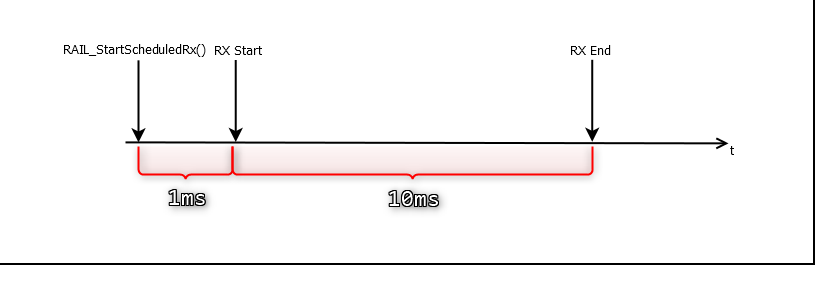
The arguments start and startMode work just like the Tx scheduling setup (or a regular timer), but for Rx, we can also configure when to end and return to idle mode. In the case above, the delay starts when the receiver starts, so the config above will start receiving 1 ms after the API call, and stop it 11 ms after the API call, closing a 10 ms Rx window.
The end timer is just an option: You can use RAIL_TIME_DISABLED, in which case the radio will stay in Rx mode indefinitely. However, keep in mind that auto state transitions affect scheduled Rx mode as well; if a packet is received, it can go to idle or Tx automatically, or it can go back to Rx, in which case it will wait until the original end time, and go to idle at that point.
When the end timer fires, RAIL will trigger the RAIL_EVENT_RX_SCHEDULED_RX_END event.
The last two parameters are rarely used; see the API documentation for it.
Note also that this is one of the few APIs that behave differently in Dynamic multiprotocol (DMP) mode. For details, see the article on DMP.
Multiple Radio Operations#
It is not possible to schedule multiple radio operations, whether Rx or Tx. Only one operation is possible to scheduled at a time; the next one can be scheduled when the current one is finished.
Although Dynamic multiprotocol does essentially allow it, it is, in reality rarely needed. For more info, see the introductory article on DMP.
State Timing#
RAIL lets you configure the delays needed for each radio state transitions described below. This is useful, in effect, in cases expecting ACKs to be received after a determined time following a transmission. The radio transceiver doesn't need to be turned on immediately, hence, saving power.
RAIL defines a few configurable transition times in RAIL_StateTiming_t:
idleToRx: delay from scheduled time of Rx to actual Rx
idleToTx: delay from scheduled time of Tx to actual Tx
TxToRx: delay from Tx to Rx in auto state transition
RxToTx: delay from Rx to Tx in auto state transition
All of these are configurable with RAIL_SetStateTiming(). By default, all of them are set to a delay the chip can guarantee. This is somewhere between 100 µs and 150 µs, depending on the part number.
You can set it to 0, which is best effort. It is the fastest possible though not guaranteed switch time. It is however consistent within the same major part number (e.g., all EFR32xG23), rail version and radio config, so it can be used for tight timings.
Normal (not scheduled) Rx/Tx will also use the above configuration, but they have some additional delay because the MCU has to process the command, and might need to change the channel, which could take longer.
Calling RAIL_StartTx() while the radio is in receive mode is not an Rx to Tx transition: It will first go to idle, then Tx.
There are two other delays that are not configurable:
anything to idle
Rx to Rx (i.e., return to Rx on the same channel, after receiving a packet)
Anything to idle usually takes about 20 µs, while Rx to Rx is about 10 µs, these are always best effort delays.
Search Timeout#
You can change two search timeouts as well with RAIL_SetStateTiming():
rxSearchTimeoutdefines the length of time the radio will search for a packet when coming from idle.
txToRxSearchTimeoutdefines length of time the radio will search for a packet when coming from Tx.
Both of these means that Rx will turn off automatically if the radio does not receive a sync word until the timeout. The timeout will trigger a RAIL_EVENT_RX_TIMEOUT event. This is especially useful in the second case, e.g., you can set up to wait 5 ms for acknowledgment. If you combine it with RAIL_SetStateTiming(), you can configure a 5 ms Rx window 1 ms after transmitted packets.
Energy Modes and Sleep#
By default, RAIL timers only work in EM0 and EM1. When configured correctly, RAIL can use an RTC, which enables the timers to work almost seamlessly in EM2.
The hardware provides very accurate synchronization with RTC. Since RTC runs much slower than the radio timer (1-32 kHz vs 1 MHz), this is not as simple as saving the value of both timers at the same time: It saves the timer's value when RTC changes its value, eliminating errors caused by the synchronization.
For details, see the article about timer synchronization.