


Transmitting a Packet#
This tutorial is the continuation of a series started with Introduction.
Please read it first if you haven't.
The completed example for this article is available on GitHub. You can either import this example, as documented in the readme on Github, or follow this article and modify a RAIL - SoC Empty example. Note that the code snippets here just like the code on Github is missing a lot of error handling for easier readability. Therefore, it shouldn't be used as a base of development.
In this tutorial, we're going to modify the project RAIL - SoC Empty to transmit a packet. We're going to use the default, fixed length 16 Bytes payload configuration first.
This tutorial references some more advanced articles - we don't recommend reading them yet if you just started learning RAIL. They are only linked to highlight the connection.
Code snippets in this example are for illustration only. Refer to the attached files for reference code.
Buffer Handling#
Setting Up the Packet Buffer#
RAIL requires a buffer (usually called FIFO) to be configured for Tx. First, we have to allocate some memory for that buffer:
#define SL_TUTORIAL_TRANSMIT_BUFFER_LENGTH         256
SL_ALIGN(RAIL_FIFO_ALIGNMENT) static uint8_t tx_buffer[SL_TUTORIAL_TRANSMIT_BUFFER_LENGTH] SL_ATTRIBUTE_ALIGN(RAIL_FIFO_ALIGNMENT);
Note that you can't use any arbitrary size; EFR32 creates a FIFO ring buffer on this memory area, and it can only handle buffer sizes of power of 2 between 64 and 4096 (i.e., 64, 128, 256, 512, 1024, 2048, or 4096).
On all Series 2 chips, except EFR32xG21, RAIL requires a 4 bytes aligned FIFO.
In the code above, we used RAIL_FIFO_ALIGNMENT which guarantees good alignment
on any EFR32.
The Tx buffer can hold more than one packet, which can be useful if you need to send out a lot of messages quickly. To load the payload of the packet to the buffer, we have two options: write it via RAIL APIs or write to the memory directly.
Writing to the Buffer Directly#
In app_process.c:
#define SL_TUTORIAL_TRANSMIT_PAYLOAD_LENGTH 16
#define SL_TUTORIAL_TRANSMIT_BUFFER_LENGTH 256
uint8_t payload[SL_TUTORIAL_TRANSMIT_PAYLOAD_LENGTH] =
    {0x00, 0x01, 0x02, 0x03, 0x04, 0x05, 0x06, 0x07,
     0x08, 0x09, 0x0a, 0x0b, 0x0c, 0x0d, 0x0e, 0x0F};

SL_ALIGN(RAIL_FIFO_ALIGNMENT) static uint8_t tx_buffer[SL_TUTORIAL_TRANSMIT_BUFFER_LENGTH] SL_ATTRIBUTE_ALIGN(RAIL_FIFO_ALIGNMENT);

void load_payload_directly(RAIL_Handle_t rail_handle) {
  memcpy(tx_buffer,
         payload,
         SL_TUTORIAL_TRANSMIT_PAYLOAD_LENGTH);
  RAIL_SetTxFifo(rail_handle,
                 tx_buffer,
                 SL_TUTORIAL_TRANSMIT_PAYLOAD_LENGTH,
                 SL_TUTORIAL_TRANSMIT_BUFFER_LENGTH);
}
The memcpy() is just a standard C function to write to buffers, and we use
RAIL_SetTxFifo() to pass that buffer to RAIL. We also tell RAIL how long the
buffer is, and how much data it has already in it.
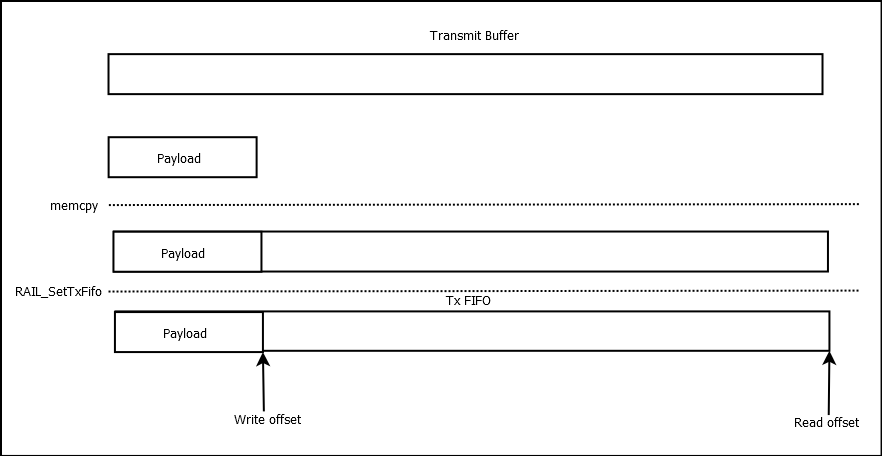
Note : This illustrates the simple case of one RAIL_SetTxFifo() call. In
effect, different buffers are used for Rx and Tx.
Writing to the Buffer Indirectly#
In app_init.c:
#define SL_TUTORIAL_TRANSMIT_BUFFER_LENGTH         256
SL_ALIGN(RAIL_FIFO_ALIGNMENT) static uint8_t tx_buffer[SL_TUTORIAL_TRANSMIT_BUFFER_LENGTH] SL_ATTRIBUTE_ALIGN(RAIL_FIFO_ALIGNMENT);

RAIL_Handle_t app_init(void)
{
  // Get RAIL handle, used later by the application
  RAIL_Handle_t rail_handle = sl_rail_util_get_handle(SL_RAIL_UTIL_HANDLE_INST0);

  RAIL_SetTxFifo(rail_handle, tx_buffer, 0, SL_TUTORIAL_TRANSMIT_BUFFER_LENGTH);
  return rail_handle;
}
In app_process.c:
#define SL_TUTORIAL_TRANSMIT_PAYLOAD_LENGTH 16
uint8_t payload[SL_TUTORIAL_TRANSMIT_PAYLOAD_LENGTH] =
    {0x00, 0x01, 0x02, 0x03, 0x04, 0x05, 0x06, 0x07,
     0x08, 0x09, 0x0a, 0x0b, 0x0c, 0x0d, 0x0e, 0x0F};

static void loadPayloadIndirectly(RAIL_Handle_t rail_handle) {
  RAIL_WriteTxFifo(rail_handle,
                   payload,
                   SL_TUTORIAL_TRANSMIT_PAYLOAD_LENGTH,
                   false);
}
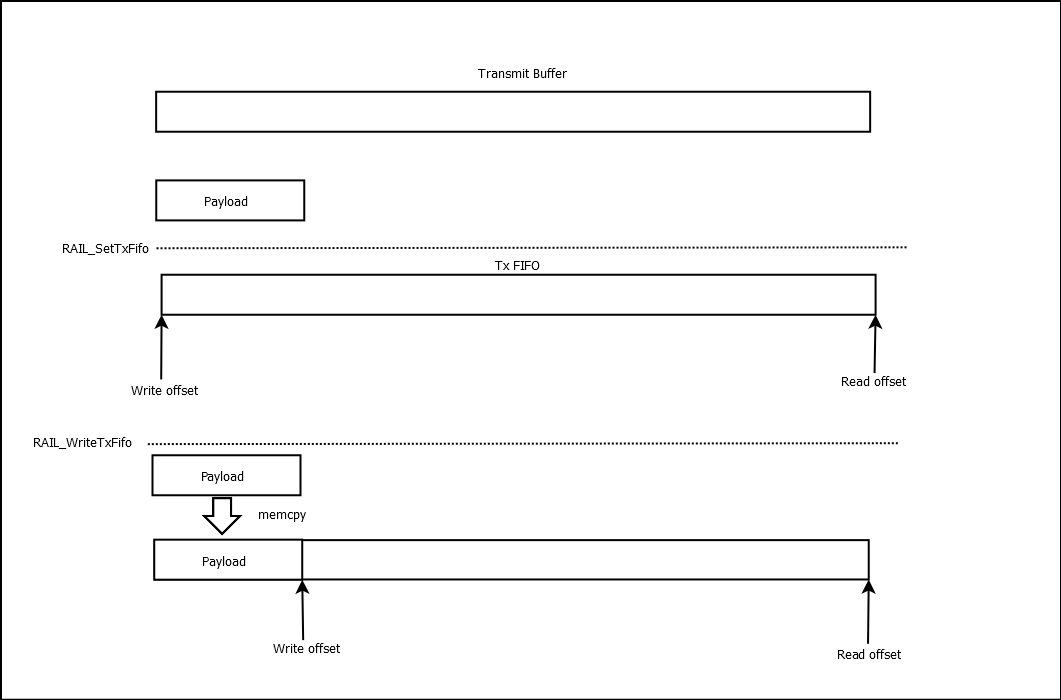
In this case, we pass the buffer to RAIL when it's still empty, and we write to
that buffer using a RAIL API. Note that using memcpy() instead of WriteTxFifo
would not work: while it would write the memory itself, it wouldn't change the
read and write pointers of the FIFO, handled by RAIL, so RAIL would still think
the buffer is empty.
Direct or Indirect#
There are four main factors that could decide which method to use to write the FIFO:
With indirect mode, the buffer can be used for partial packets. It is simpler to use for multiple packets. Buffer wrapping is also supported internally by RAIL.
Calling
RAIL_SetTxFifo()does not move any memory, just sets a few registers, while callingRAIL_WriteTxFifo()does need some time to copy the payload to the buffer.Calling
RAIL_SetTxFifo()is not allowed during transmission. Whereas using RAIL_WriteTxFifo() is safe to use, even when radio transmission is occurring.Indirect mode clearly separates init and process code.
For simpler applications, RAIL_SetTxFifo() can be a better option. If you want
to send almost the same packet, with just a few bytes modification, it's much
better, since you don't have to write the whole packet again. (Note that if you
want to transmit the exact same message over and over, you should use
RAIL_TX_OPTION_RESEND, detailed in a later
article).
On the other hand, the separation in RAIL examples between app_init and
app_process works nicely with the indirect method, and in most real cases,
you need to move memory anyway. If you want to send longer packets than your
buffer, you must use RAIL_WriteTxFifo(), as you can call it during transmit.
It's also useful if you want to send out a lot of packets: Use
RAIL_WriteTxFifo() to load each message one after the other, then send them
out quickly without any buffer operation.
The attached code uses indirect mode mainly for the clear separation.
FIFO Reset#
The last parameter of RAIL_WriteTxFifo can reset the FIFO, which means it will
invalidate the data already in there. This is also possible with
RAIL_ResetFifo.
It's a good idea to run some tests without resetting the FIFO, as it can mask small errors, e.g., writing more to the FIFO than needed. However, in production, it's a good idea to reset the FIFO if you think it should be empty, as in production, masking errors are beneficial.
Transmitting the Packet#
Starting the transmission is simple:
RAIL_StartTx(rail_handle, 0, RAIL_TX_OPTIONS_DEFAULT, NULL);This instructs RAIL to start transmitting the data stored in the FIFO on channel 0 (second parameter). The third parameter can change various options, like using the second configured sync word (see an article on the topic). The last parameter is only required for DMP (dynamic multiprotocol) mode.
Changing the Packet Length#
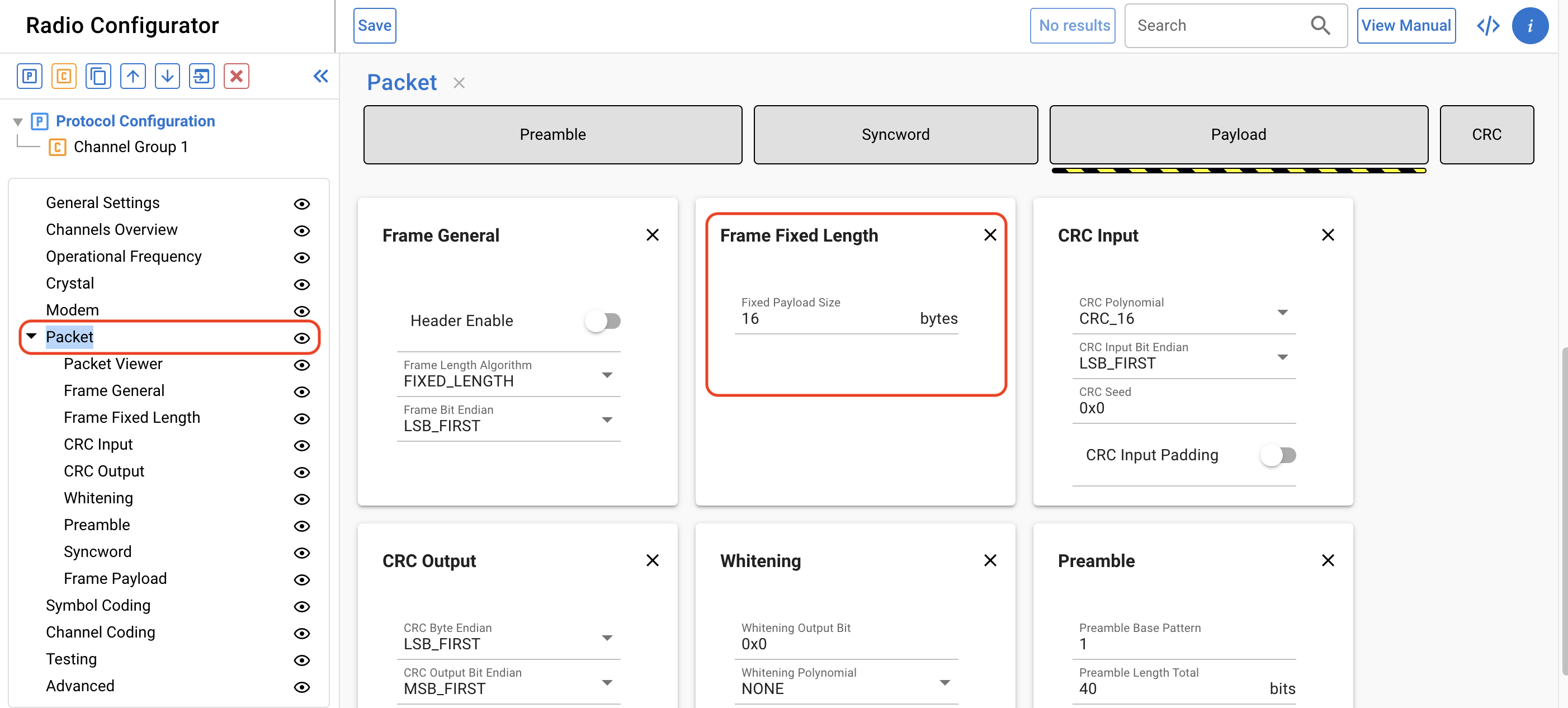
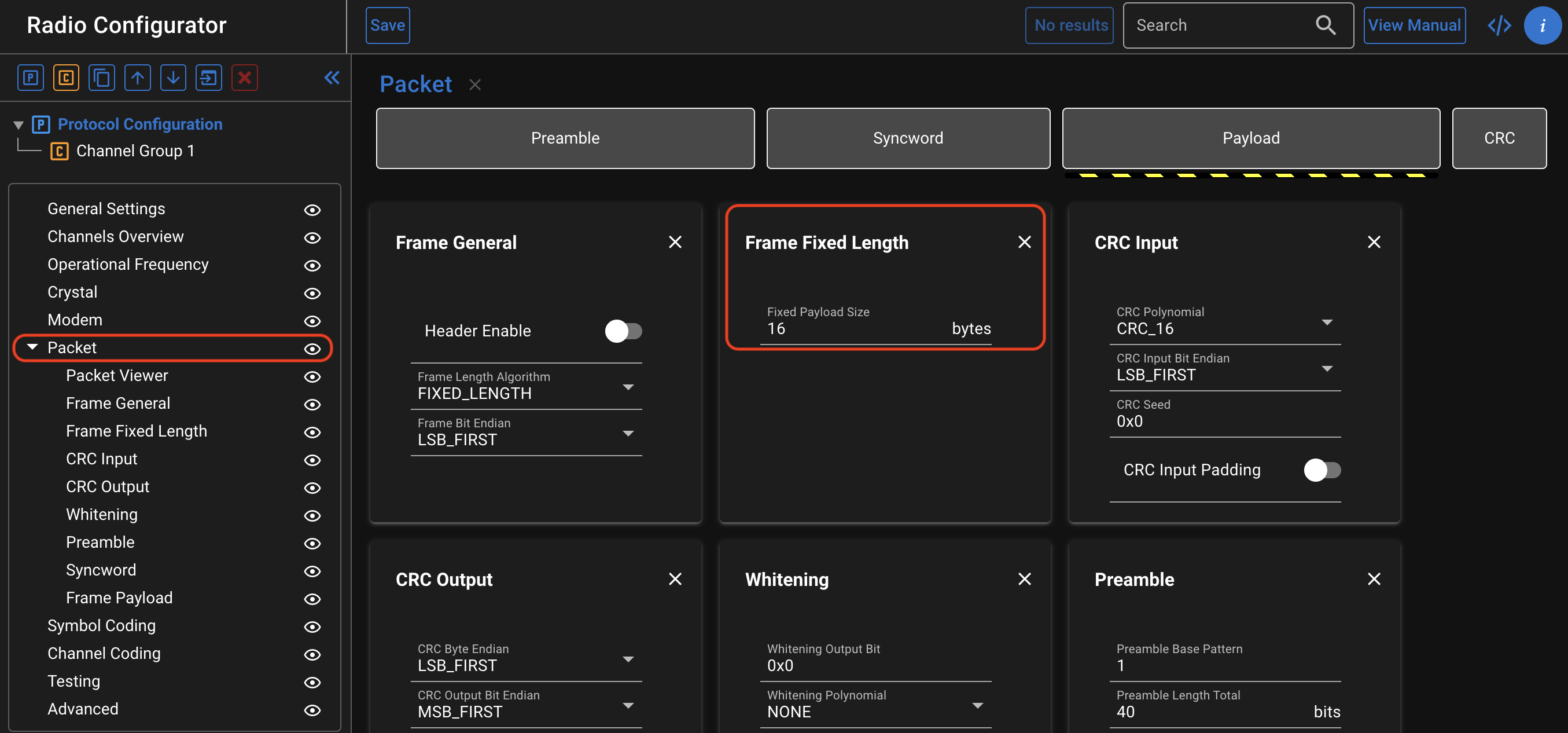
You can change the configured fixed length on the Radio Configurator, but that's obviously not possible at runtime, which is often needed. Note that the amount of data loaded into the FIFO does not matter as long as it's equal to or greater than the length of the frame.
Changing Packet Length with a Fixed Length Configuration#
With the API RAIL_SetFixedLength(), it's possible to change the pre-configured
length (stored in rail_config.c) at runtime. Note that this changes the length
of the packets on the Rx side as well. If you want to return to the
pre-configured value, you can use
RAIL_SetFixedLength(rail_handle, RAIL_SETFIXEDLENGTH_INVALID).
Using Variable Length Configurations#
A lot of protocols store the length of the packet in the header of the frame. For example, in IEEE 802.15.4, the first byte stores the length (and the maximum is 127). To set this up, use the following settings in the Radio Configurator:
Set Frame Length Algorithm to VARIABLE_LENGTH
This automatically enables the Header
Set the length of the header to 1
Set variable length bit size to 8
Set the maximum length to 127
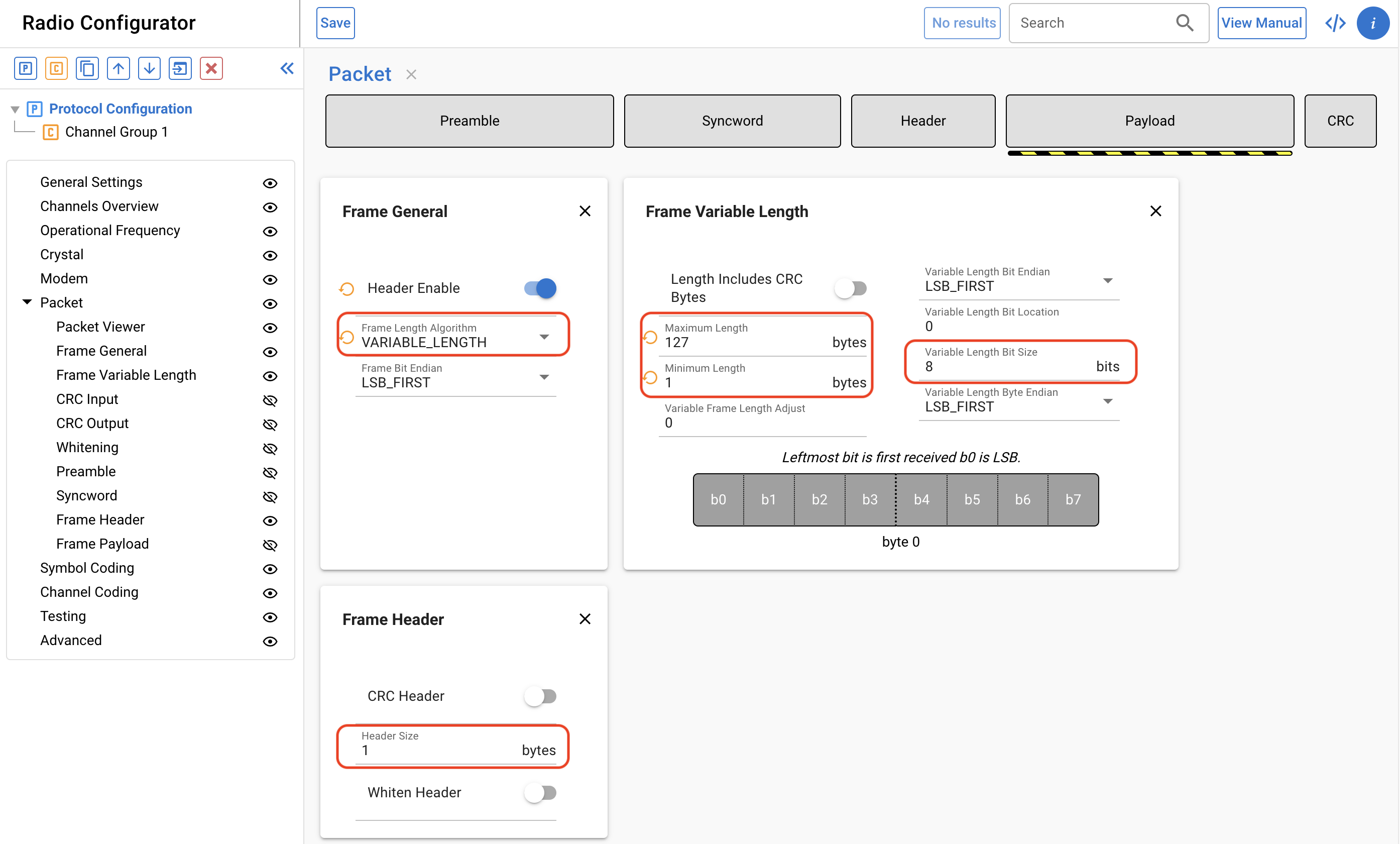
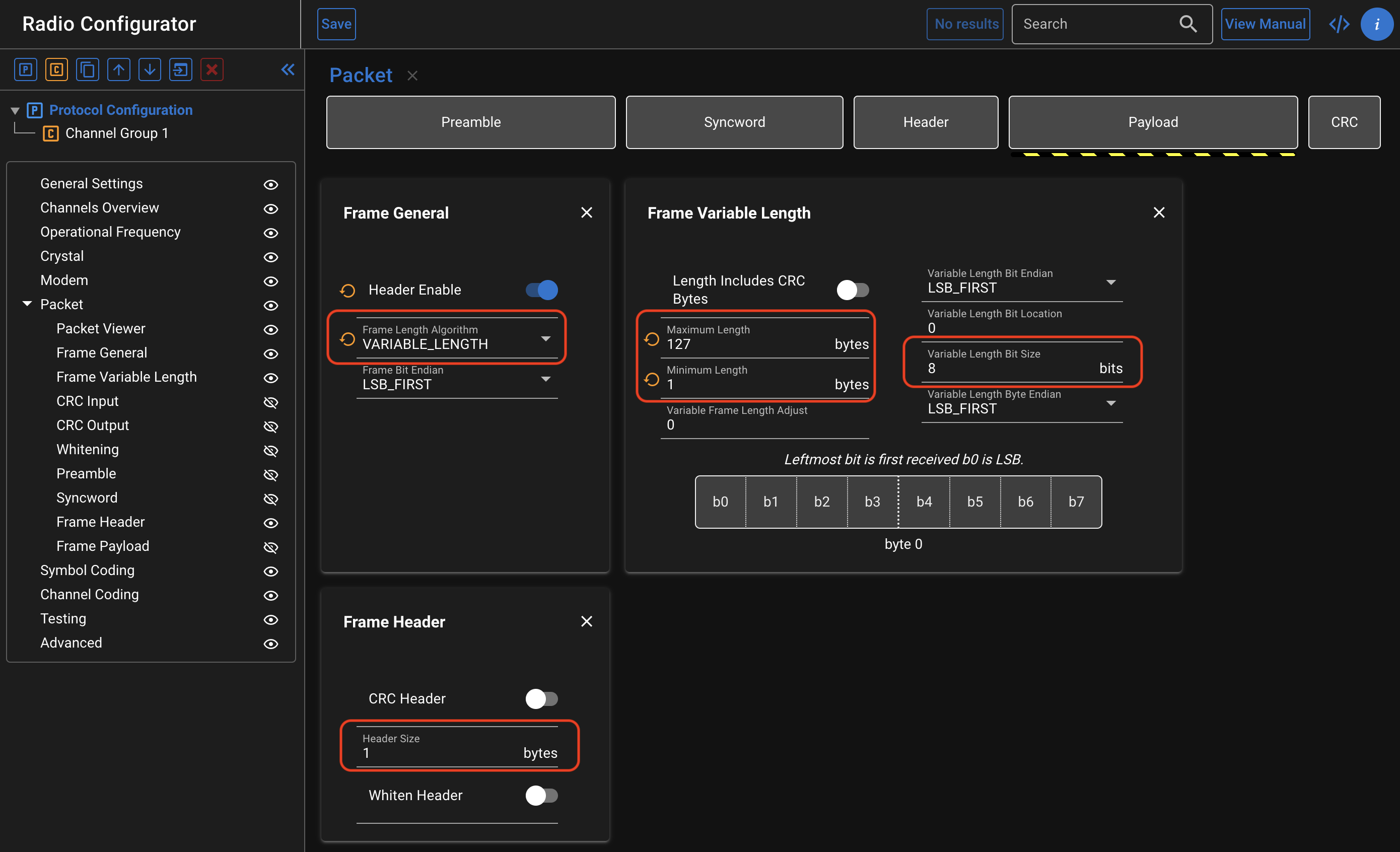
For more information on this setup, and on more advanced variable length configs, see AN1253. Note that the above configuration is not fully IEEE 802.15.4 compatible to make it simpler.
Length decoding works the same way for both Rx and Tx. This means that during Tx, we have to make sure that the committed length in the header matches the number of bytes you load into the FIFO. It also means that if we set the length field to more than 127, we will get a transmit error.
This would be a valid 16 bytes frame, both for the above described variable length and 16 bytes fixed length mode, so this is used in the attached sample code:
uint8_t payload[SL_TUTORIAL_TRANSMIT_PAYLOAD_LENGTH] =
    {SL_TUTORIAL_TRANSMIT_PAYLOAD_LENGTH-1, 0x01, 0x02, 0x03, 0x04, 0x05, 0x06, 0x07,
     0x08, 0x09, 0x0a, 0x0b, 0x0c, 0x0d, 0x0e, 0x0F};
We use SL_TUTORIAL_TRANSMIT_PAYLOAD_LENGTH-1 in the length field, since the 1 byte length field
itself shouldn't be counted.
The routine RAIL_SetFixedLength() is available in variable length mode, and it
changes the radio to fixed length operation (again, both for Rx and Tx). Calling
RAIL_SetFixedLength(rail_handle, RAIL_SETFIXEDLENGTH_INVALID) will restore it
to variable length mode.
Setting up the Example#
Button Handling
The linked example sets the tx fifo on init, loads, and sends the packet on any button press. This is implemented using the Simple Button component on btn0, and implementing its callback:
In app_process.c (to get access to the button instance, now declared in
autogen/sl_simple_button_instances.h):
#include "sl_simple_button_instances.h"Also add the button callback code (the callback is already declared in
sl_button.h):
void sl_button_on_change(const sl_button_t* handle){
  if ( sl_button_get_state(handle) == SL_SIMPLE_BUTTON_PRESSED ){
      send_packet = true;
  }
}
By default, the Simple Button is configured for a pin which matches the development kit's PB0 button.
Since this callback is in interrupt context, we avoid using RAIL API directly.
It is safe in almost all cases, but calling RAIL_StartTx() from interrupt
context should be done carefully.
Instead, we set the volatile send_packet variable to true,
and call RAIL APIs from app_process_action() only:
void app_process_action(RAIL_Handle_t rail_handle)
{
  if (send_packet) {
    send_packet = false;
    // Increment the last byte of the payload
    payload[SL_TUTORIAL_TRANSMIT_PAYLOAD_LENGTH - 1]++;
    RAIL_WriteTxFifo(rail_handle,
                     payload,
                     SL_TUTORIAL_TRANSMIT_PAYLOAD_LENGTH,
                     false);
    RAIL_StartTx(rail_handle,
                 SL_TUTORIAL_TRANSMIT_DEFAULT_CHANNEL,
                 RAIL_TX_OPTIONS_DEFAULT,
                 NULL);
  }
}
In the above snippet, we're also incrementing the last byte of the payload before every transmit.
Conclusion#
We didn't care about possible errors generated by RAIL: we do that next time, which also provides hints for receiving packets.