


Real Time Traces (RTT)#
Introduction#
The Wi-SUN stack provides a logging mechanism based on the Segger RTT feature, which uses a ring buffer in RAM.
For more details, see the RTT Knowledge Base page.
APIs are available to set the trace level of different Wi-SUN groups, allowing finer control over tracing.
Note: These logs can be used to report issues to Silicon Labs Support.
Installation#
Install and open the J-Link RTT Viewer.
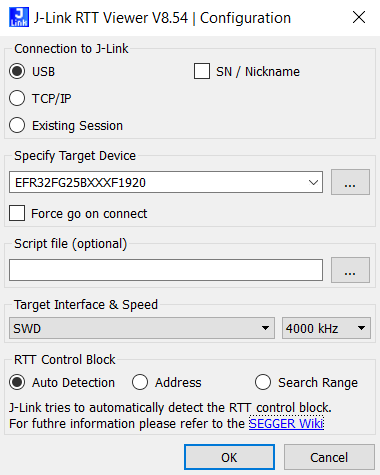
In the Configuration panel, under Connection to J-Link, select USB.
In the Specify Target Device list, select the connected part (for example:
EFR32FG25BXXXF1920).In the Target Interface & Speed panel, select SWD and 4000 kHz.
In the RTT Control Block panel, select Auto Detection.
Click OK.
If several boards are connected, a list appears. To monitor multiple devices, open a separate RTT Viewer instance for each device.
Select a WSTK board running the Wi-SUN stack (border router or node).
Click OK.
A terminal window opens, and the Wi-SUN stack traces are displayed as shown below:
[DBG ][wisun]: net_init_core: 0
[DBG ][wisun]: sli_wisun_task_event_handler_id: 2
[DBG ][SLRF]: sli_wisun_driver_register()
[DBG ][SLRF]: sli_wisun_driver_register() - driver_id: 0
[DBG ][SLRF]: rf_address_write: PHY_MAC_64BIT: 00:0d:6f:ff:fe:20:bd:95
[DBG ][mlme]: SW-MAC driver support rf extension 50000 symbol/seconds 20 us symbol time length
[DBG ][swm ]: Set MAC mode to IEEE 802.15.4-2011, MTU size: 127
[DBG ][SLRF]: rf_address_write: PHY_MAC_64BIT: 00:0d:6f:ff:fe:20:bd:95
[DBG ][wisun]: arm_nwk_interface_lowpan_init: 1Note: The RTT Viewer must be disconnected from the device before flashing it again.
The quickest way to disconnect is to press F3, perform the flash, and then press F2 to reconnect.
By default, RTT Viewer automatically restores the previous settings.
Configuration#
The application must install the Wi-SUN Stack Debug & Traces Plugin component.
This automatically installs the SEGGER RTT component.
Wi-SUN provides APIs for stack trace levels and filters.
For more information, see the Wi-SUN Stack Traces and Debug API.
Example: setting the trace level to DEBUG for the MAC group:
sl_status_t ret;
sl_wisun_trace_group_config_t trace_config;

trace_config.group_id = SL_WISUN_TRACE_GROUP_MAC;
trace_config.trace_level = SL_WISUN_TRACE_LEVEL_DEBUG;
ret = sl_wisun_set_trace_level(1, &trace_config);
Final Thoughts#
Wi-SUN stack traces provide an efficient and flexible way to understand and debug the network.
The main limitation of RTT is that it requires a debugger.
If the debugger adapter port is not accessible during network testing, the Direct Connect solution can forward Wi-SUN traces over the air.