


Router (FFN)#
Introduction#
The Wi-SUN FAN stack supports router nodes, which are a type of Full Function Node (FFN). As described in the specification, a router must support the following functionalities:
Join network and communicate with other nodes securely through authentication, encryption, and key management.
Forward packets between nodes and toward the border router following RPL protocol.
Maintain links with neighboring nodes and manage network topology with self-healing capabilities.
Extend the network by enabling parent-child relationships with other nodes.
Architecture#
Once router nodes have joined the network, they enable parent-child relationships with other nodes both inside and outside the network. A router advertises network information and can establish parent-child links with new routers and/or LFNs (starting from FAN 1.1), provided they meet authentication requirements.
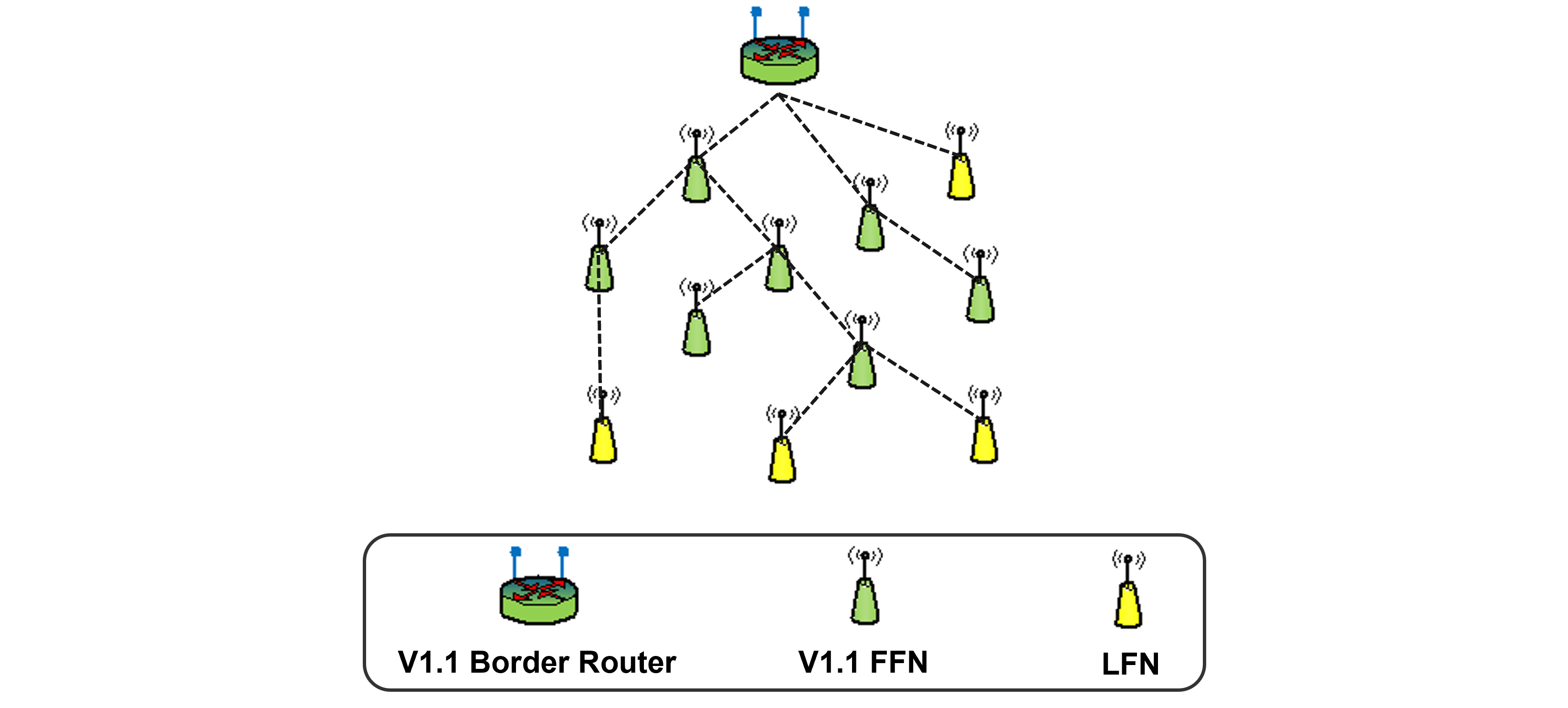
Router Characteristics#
Router evaluates the overall link quality with the Border Router and switches to a new parent in the network if necessary. Router can also transmit this information to potential new child, allowing them to choose the best parent following RPL protocol.
Router performs continuous listening with channel hopping following Wi-SUN PAN PHY configuration. Since the router is always listening, it cannot enter deep sleep mode and achieve the ultra-low power capabilities of an LFN.
Router receives and transmits multicast message following broadcast interval imposed by Border Router. It includes forward multicast messages to neighbors following MPL protocol.
The main difference between a Router and a Border Router is that the Router does not maintain source routing tables for all nodes within its PAN. Instead, it maintains a limited routing table containing its child nodes and its primary and secondary parents. To communicate with unknown address, the router forwards packets upward to the border router, which maintains routing information for all nodes in the network. Then the packet is forwarded downward to the targeted node on the FAN network or outside FAN depending of address.
Supported Hardware#
Router feature is supported on all the Wi-SUN capable devices listed at Wi-SUN Wireless SoCs.
Router Node in Silicon Labs Wi-SUN Stack#
The Wi-SUN Stack fully supports Router FFN.
On the latest SiSDK, Router nodes are supported on the following sample apps by default:
Wi-SUN – CLI example
Wi-SUN – SoC Coap Collector
Wi-SUN – SoC Coap Meter
Wi-SUN – SoC Network Measurement
Wi-SUN – SoC Ping
Wi-SUN – SoC Socket
Wi-SUN – SoC Empty
Router Configuration#
The Wi-SUN - CLI example supports changing the device settings using the command line interface. Router can also be settled through the Wi-SUN configurator and API.
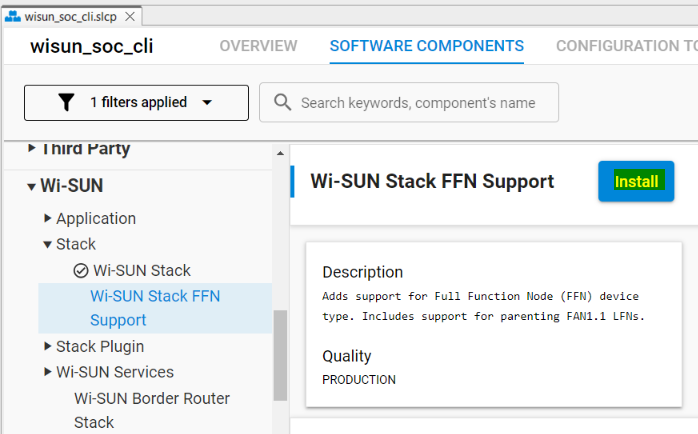
Note: In your project, ensure that Wi-SUN Stack FFN Support component is installed.
Device Type#
By default, the device type is configured as FFN. To change the device type, use the following command that allows setting the device type to either LFN or FFN:
wisun set wisun.device_type FFN#Related API:
sl_status_t sl_wisun_set_device_type(sl_wisun_device_type_t device_type);Note: For this command to take effect after a join either as an FFN or an LFN, a board reset is mandatory.
Network Size#
The Network Size can also be set through the command line, using the following command that allows choosing between three sizes:
small: Less than 100 nodes.
medium: 100 to 800 nodes.
large: 800 to 1500 nodes.
wisun set wisun.network_size small#Related API:
sl_status_t sl_wisun_set_connection_parameters(const sl_wisun_connection_params_t *params);Note: The Network Size parameter allows automatic customization of connection settings. Depending on the number of devices in the network, these parameters should be adjusted to maintain reliable connection. All devices in the network must use the same Network Size (same connection parameters) value to ensure consistency and stability. The Larger the network is, the longer the join time is.
Unicast Dwell Interval#
Dwell interval refers to the amount of time a device stays on a specific frequency channel before hopping to the next one in a frequency-hopping sequence.
CLI:
[interval] = [15,255] ms
wisun set wisun.unicast_dwell_interval [interval]
#Related API:
sl_status_t sl_wisun_set_unicast_settings(uint8_t dwell_interval_ms);Routers LFN Parenting#
To support LFN parenting introduced in FAN1.1, Router should belong FAN1.1 PAN with LFN parenting enabled over PAN (set by Border Router).
On the SiSDK 2025.6.0 and later, LFN parenting is supported by all FFN and Border Router devices.
The number of supported LFNs by each FFN is 10 by default on all applications supporting LFN parenting.
CLI:
wisun set_lfn_support [Max number of LFNs]
#Related API:
sl_status_t sl_wisun_set_lfn_support(uint8_t lfn_limit);The maximum number of LFN nodes that can be supported by an FFN is 10.
Using Wi-SUN Configurator#
Except for the Wi-SUN - SoC CLI example, the other sample applications support the Wi-SUN Configurator Application panel.
Router's available configuration
Network Name
Network Size
Unicast Dwell Interval
TX output Power
Broadcast Retransmissions