


Vendor-Specific HCI Commands and Events#
The Silicon Labs HCI and Controller support some vendor-specific commands and events as described in the following two sections. Additional vendor-specific commands can also be implemented, as described in Custom Commands.
Vendor-Specific HCI Commands#
The Silicon Labs HCI and Controller support the following vendor-specific HCI commands.
HCI VS_SiliconLabs_Forcefully_Kill_Connection – Command Parameters
HCI_VS_SiliconLabs_Set_Connection_Config_Bits – Command Parameters
HCI_VS_Silabs_Read_Current_TX_Power_Configuration – Command Parameters
HCI_VS_SiliconLabs_Set_Advertising_Config_Bits – Command Parameters
HCI_VS_SiliconLabs_Clear_Advertising_Config_Bits – Command Parameters
HCI_VS_SiliconLabs_Set_Max_Low_Tx_Power – Command Parameters
HCI_VS_SiliconLabs_Allocate_PeriodicScan – Command Parameter
HCI_VS_SiliconLabs_Periodic_Advertising_Update_Sync_Parameters – Command
HCI_VS_SiliconLabs_Periodic_Advertising_Update_Sync_Parameters – Command Parameters
HCI_VS_SiliconLabs_Set_CS_Antenna_Config – Command Parameters
HCI_VS_Siliconlabs_Set_Connection_Tx_Power – Command Parameters
HCI_VS_SiliconLabs_Read_Connection_Statistics – Commands Parameters
HCI_VS_SiliconLabs_Sniff_Connection_Packets – Command Parameters
HCI_VS_SiliconLabs_Stop_Sniff_Connection_Packets – Command Parameters
HCI_VS_SiliconLabs_Stop_Sniff_Connection_Packets – Command Parameters
HCI_VS_SiliconLabs_Read_AFH_Channel_Map_Quality – Command Parameters
HCI_VS_SiliconLabs_Event_Info_Reporting_Enable – Command Parameters
HCI VS_SiliconLabs_Forcefully_Kill_Connection – Command#
Command | Command Value (OGF/OCF) | Command Parameters | Return Parameters |
|---|---|---|---|
HCI_VS_SiliconLabs_Forcefully_Kill_Connection | 0x3f/0x04 | handle | status |
HCI VS_SiliconLabs_Forcefully_Kill_Connection – Command Parameters#
| Parameter | Size | Description |
|---|---|---|
handle | 2 | Connection handle |
status | 1 | Success (0x0), |
HCI_VS_SiliconLabs_Set_Connection_Config_Bits – Command#
Command | Command Value (OGF/OCF) | Command Parameters | Return Parameters |
|---|---|---|---|
HCI_VS_SiliconLabs_Set_Connection_Config_Bits | 0x3f/0x05 | handleconfig_bits | status |
HCI_VS_SiliconLabs_Set_Connection_Config_Bits – Command Parameters#
| Parameter | Size | Description |
|---|---|---|
handle | 2 | Connection handle |
config_bits | 4 | Configure the connection. Supported values: |
status | 1 | Success (0x0), |
HCI_VS_SiliconLabs_Clear_Connection_Config_Bits – Command#
Command | Command Value (OGF/OCF) | Command Parameters | Return Parameters |
|---|---|---|---|
HCI_VS_SiliconLabs_Clear_Connection_Config_Bits | 0x3f/0x06 | handle | status |
HCI_VS_SiliconLabs_Clear_Connection_Config_Bits – Command Parameters#
Parameter | Size | Description |
|---|---|---|
handle | 2 | Connection handle |
config_bits | 4 | Clears the connection configuration. The supported values are the same as the |
status | 1 | Success (0x00), |
HCI_VS_SiliconLabs_Configure – Command#
Command | Command Value (OGF/OCF) | Command Parameters | Return Parameters |
|---|---|---|---|
HCI_VS_SiliconLabs_Configure | 0x3f/0x07 | key, | status |
HCI_VS_SiliconLabs_Configure – Command Parameters#
Parameter | Size | Description |
|---|---|---|
key | 1 | Configuration parameter key. |
configuration data length | 1 | Length of the configuration data field. |
data | 0-255 | Configuration data related to the configuration parameter (key). |
status | 1 | Success (0x0), |
HCI_VS_SiliconLabs_Configure – Parameter Key#
Configuration parameter key [key value] | Parameters [size] | Description |
|---|---|---|
CONFIG_KEY_HALT [1] | halt [1] | Halt (1) or resume (0) the radio |
CONFIG_KEY_PRIORITY_RANGE [2] | rail_mapping_offset [2], | Sets the RAIL priority_mapping offset field of the link layer priority configuration structure to the first byte of the value field. Used with multiprotocol. |
CONFIG_KEY_SCAN_CHANNELS [3] | channel_map [1] | Set primary channels to be scanned. Only the three least significant bits are meaningful. 0x1 = Channel 37, 0x2 = Channel 38, 0x4 = Channel 39 |
CONFIG_KEY_SET_FLAGS [4] | flags [4] | Sets the link layer configuration flags. The value is a little endian 32-bit integer. Currently supported flag values: |
CONFIG_KEY_CLR_FLAGS [5] | flags [4] | Clear the link layer configuration flags. The supported values are the same as with CONFIG_KEY_SET_FLAGS. |
CONFIG_KEY_SET_AFH_INTERVAL [7] | scanning_interval [1] | Set the AFH scanning interval. The unit is 0.1 secs. |
CONFIG_KEY_PERIODIC_ADV_STATUS_EVENT [8] | handle [1], | handle: Advertising handle |
CONFIG_KEY_SET_PRIORITY_TABLE [9] | scan_min [1], | Configure link layer task priorities. |
(1) CONFIG_KEY_SET_RX_PACKET_FILTERING [10] | filter_count [1], | Enable and configure, or disable, RX packet filtering. |
(1) CONFIG_KEY_SET_SIMULTANEOUS_SCANNING [11] | enable [1] | Enable (1) or disable (0) simultaneous 1M and Coded PHY scanning feature. |
CONFIG_KEY_SET_CHANNELMAP_FLAGS [12] | flags [4] | Configure channel map flags. Supported flag values: |
CONFIG_KEY_POWER_CONTROL_GOLDEN_RANGE [16] | golden_rssi_min_1m [1], | Configure the golden range values of the power control feature |
CONFIG_KEY_ACTIVE_SCANNER_BACKOFF_UPPER_LIMIT [17] | backoff_upper_limit [2] | Sets a new maximum for the scanner backoff upper limit. This value is used to mitigate collisions between different scanners in a busy environment. Lower value implies a more aggressive scanner. |
CONFIG_KEY_AFH_RSSI_THRESHOLD [18] | threshold [1] | Configure the cutoff RSSI used to block channels. |
CONFIG_KEY_AFH_CHANNEL_COOLDOWN [19] | cooldown [2] | Configure the cooldown value when a channel is blocked. |
CONFIG_KEY_SET_REPORT_ALL_SCAN_RSPS [20] | enable [1] | Enable (1) or disable (0) all received SCAN_RSP reporting |
(1) Supported only by EFR32XG22/24 devices.
HCI_VS_SiliconLabs_Get_Timing – Command#
Command | Command Value (OGF/OCF) | Command Parameters | Return Parameters |
|---|---|---|---|
HCI_VS_SiliconLabs_Get_Timing | 0x3f/0x08 | timers | status |
HCI_VS_SiliconLabs_Get_Timing – Command Parameters#
Parameter | Size | Description |
|---|---|---|
timers | 1 | Select timer. |
clear_timers | 1 | 0 – Do not clear timers |
status | 1 | Success (0x0) |
HCI_VS_SiliconLabs_Change_Periodic_Advertising_Parameters – Command#
Command | Command Value (OGF/OCF) | Command Parameters | Return Parameters |
|---|---|---|---|
HCI_VS_SiliconLabs_Change_Periodic_Advertising_Parameters | 0x3f/0x09 | advertising_handle | advertising_handle |
HCI_VS_SiliconLabs_Change_Periodic_Advertising_Parameters – Command Parameters#
Parameter | Size | Description |
|---|---|---|
advertising_handle | 1 | Advertising handle |
interval_min | 2 | Minimum periodic advertising interval |
Interval_max | 2 | Maximum periodic advertising interval |
periodic_advertising_properties | 2 | Bitmap describing properties. |
num_subevents | 1 | Number of subevents in one event |
subevent_interval | 1 | Interval between subevents. |
response_slot_delay | 1 | Delay to the first response slot. |
response_slot_spacing | 1 | Duration of response slot to update |
num_response_slots | 1 | Response slots used. |
new_phy | 1 | New PHY for the PAwR train |
repeat_count | 1 | Number of times the new train parameters is sent on subevents before new set is taken into use |
HCI_VS_Siliconlabs_Periodic_Advertising_Set_Info_Transfer – Command#
Command | Command Value (OGF/OCF) | Command Parameters | Return Parameters |
|---|---|---|---|
HCI_VS_Siliconlabs_Periodic_Advertising_Set_Info_Transfer | 0x3f/0x0a | source_advertising_handle | status |
HCI_VS_Siliconlabs_Periodic_Advertising_Set_Info_Transfer – Command Parameters#
Parameter | Size | Description |
|---|---|---|
Source_advertising_handle | 1 | Advertising handle of the source train |
Service_data | 2 | A value provided by the application for use by the peer device |
Target_advertising_handle | 1 | Advertising handle of the target train |
Repeat_count | 1 | Number of times the new train parameters are sent to synchroniser the new set is taken into use. |
Subevents_length | 1 | Number of subevents in one event to send new train info |
subevents | 1 | Subevents list to send new train info |
status | 1 | Success (0x0) |
HCI_VS_SiliconLabs_Config_Flags – Command#
Command | Command Value (OGF/OCF) | Command Parameters | Return Parameters |
|---|---|---|---|
HCI_VS_SiliconLabs_Config_Flags | 0x3f/0x11 | set | flags |
HCI_VS_SiliconLabs_Config_Flags – Command Parameters#
Parameter | Size | Description |
|---|---|---|
set | 4 | Enable the link layer flags. Supported values are listed in Table 4.9, CONFIG_KEY_SET_FLAGS. |
clr | 4 | Clear the link layer flags. |
read | 4 | Return link layer configuration flags with bitmask applied as determined by this field. |
flags | 4 | Return the flags. |
status | 1 | Success (0x0) |
HCI_VS_SiliconLabs_Get_Counters – Command#
Command | Command Value (OGF/OCF) | Command Parameters | Return Parameters |
|---|---|---|---|
HCI_VS_SiliconLabs_Get_Counters | 0x3f/0x12 | reset | status |
HCI_VS_SiliconLabs_Get_Counters – Command Parameters#
Parameter | Size | Description |
|---|---|---|
reset | 1 | Reset counters after reading them |
status | 1 | Success (0x0) |
tx_packets | 2 | Number of transmitted radio packets. |
Rx_packets | 2 | Number of received radio packets. |
Crc_errors | 2 | Number of received packets detected with a CRC error. |
Failures | 2 | Number of radio failures, indicating errors in radio resource scheduling. |
HCI_VS_Silabs_Sleep – Command#
Command | Command Value (OGF/OCF) | Command Parameters | Return Parameters |
|---|---|---|---|
HCI_VS_Silabs_Sleep | 0x3f/0x13 | sleep | status |
HCI_VS_Silabs_Sleep – Command Parameters#
Parameter | Size | Description |
|---|---|---|
sleep | 1 | Set to 1 to enter sleep mode. Returns 0 if sleep request unsuccessful. |
Status | 1 | Success (0x0) |
HCI_VS_Silabs_Set_Min_Max_TX_Power – Command#
Command | Command Value (OGF/OCF) | Command Parameters | Return Parameters |
|---|---|---|---|
HCI_VS_Silabs_Set_Min_Max_Tx_Power | 0x3f/0x14 | min_tx_power | status |
HCI_VS_Silabs_Set_Min_Max_TX_Power – Command Parameters#
Parameter | Size | Description |
|---|---|---|
min_tx_power | 2 | Minimum TX power to be used. The unit is in deci-dBm and the value must be within the range min_supported_tx_power—max_supported_tx_power. See HCI_VS_SiliconLabs_Read_Current_TX_Power_Configuration |
max_tx_power | 2 | Maximum TX power to be used. The unit is in deci-dBm and the value must be within the range min_supported_tx_power—max_supported_tx_power. See HCI_VS_SiliconLabs_Read_Current_TX_Power_Configuration |
status | 1 | Success (0x0) |
HCI_VS_Silabs_Set_Cte_Transmit_Enable – Command#
Command | Command Value (OGF/OCF) | Command Parameters | Return Parameters |
|---|---|---|---|
HCI_VS_Silabs_Set_Cte_Transmit_Enable | 0x3f/0x15 | advertising_handle | status |
HCI_VS_Silabs_Set_Cte_Transmit_Enable – Command Parameters#
Parameter | Size | Description |
|---|---|---|
advertising_handle | 1 | Handle of the advertiser used for CTE transmission. |
Cte_enable | 1 | Enable (1) or disable (0) CTE transmission. If transmission is disabled, the remaining parameters can be omitted. |
Cte_length | 1 | Length of the CTE. Valid range 0x2 – 0x14. |
Cte_type | 1 | Type of the CTE (0x0 or 0x1). |
Cte_count | 1 | CTE count. Valid range 0x1 – 0x10. |
Switching_pattern_length | 1 | Length of the switching pattern. |
Antenna_ids | variable | Antenna identifiers for CTE transmission (number of IDs must equal switching_pattern_length). |
Status | 1 | Success (0x0) |
HCI_VS_Silabs_Set_Iq_Sampling_Enable – Command#
Command | Command Value (OGF/OCF) | Command Parameters | Return Parameters |
|---|---|---|---|
HCI_VS_Silabs_Set_Iq_Sampling_Enable | 0x3f/0x16 | sampling_enable | status |
HCI_VS_Silabs_Set_Iq_Sampling_Enable – Command Parameters#
Parameter | Size | Description |
|---|---|---|
sampling_enable | 1 | Enable (1) or disable (0) IQ sampling. If sampling is disabled, the remaining parameters can be omitted. |
Slot_durations | 1 | CTE slot durations. |
Max_sampled_ctes | 1 | Currently always 0. |
Switching_pattern_length | 1 | Length of the switching pattern. |
Antenna_ids | variable | Antenna identifiers for IQ sampling (number of IDs must equal switching_pattern_length). |
Status | 1 | Success (0x0) |
HCI_VS_Silabs_Read_Current_TX_Power_Configuration – Command#
Command | Command Value (OGF/OCF) | Command Parameters | Return Parameters |
|---|---|---|---|
HCI_VS_Silabs_Read_Current_TX_Power_Configuration | 0x3f/0x17 | - | Status |
HCI_VS_Silabs_Read_Current_TX_Power_Configuration – Command Parameters#
Parameter | Size | Description |
|---|---|---|
status | 1 | Success (0x0) |
min_supported_tx_power | 2 | Minimum TX power supported by the radio. The unit is deci-dBm. |
Max_support_tx_power | 2 | Maximum TX power supported by the radio. The unit is deci-dBm |
min_configured_tx_power | 2 | Minimum TX power configured to be used. The unit is in deci-dBm and value must be within the range min_supported_tx_power—max_supported_tx_power. |
Max_configured_tx_power | 2 | Maximum TX power configured to be used. The unit is in deci-dBm and value must be within the range min_supported_tx_power—max_supported_tx_power. |
Tx_rf_path_compensation | 2 | Currently configured TX RF path compensation in deci-dBms. |
HCI_VS_Silabs_Enter_Bootloader_Mode – Command#
Command | Command Value (OGF/OCF) | Command Parameters | Return Parameters |
|---|---|---|---|
HCI_VS_Silabs_Enter_Bootloader_Mode | 0x3f/0x18 | - | - |
Note: the controller does not reply with a Command Complete event.
HCI_VS_SiliconLabs_Set_Advertising_Config_Bits – Command#
Command | Command Value (OGF/OCF) | Command Parameters | Return Parameters |
|---|---|---|---|
HCI_VS_SiliconLabs_Set_Advertising_Config_Bits | 0x3f/0x19 | advertising_handle | status |
HCI_VS_SiliconLabs_Set_Advertising_Config_Bits – Command Parameters#
Parameter | Size | Description |
|---|---|---|
advertising_handle | 1 | Advertising handle |
config_bits | 4 |
0x00000001 – Force public address usage in advertising packets. |
Status | 1 | Success (0x0) |
HCI_VS_SiliconLabs_Clear_Advertising_Config_Bits – Command#
Command | Command Value (OGF/OCF) | Command Parameters | Return Parameters |
|---|---|---|---|
HCI_VS_SiliconLabs_Clear_Advertising_Config_Bits | 0x3f/0x1a | advertising_handle | - |
HCI_VS_SiliconLabs_Clear_Advertising_Config_Bits – Command Parameters#
Parameter | Size | Description |
|---|---|---|
advertising_handle | 1 | Advertising handle |
config_bits | 4 | 0x00000001 – Remove requirement of public address usage in advertising packets. |
Status | 1 | Success (0x0) |
HCI_VS_SiliconLabs_Set_Max_Low_Tx_Power – Command#
Command | Command Value (OGF/OCF) | Command Parameters | Return Parameters |
|---|---|---|---|
HCI_VS_SiliconLabs_Set_Max_Low_Tx_Power | 0x3f/0x1b | max_1m_low_power | - |
HCI_VS_SiliconLabs_Set_Max_Low_Tx_Power – Command Parameters#
Parameter | Size | Description |
|---|---|---|
max_1m_low_power | 2 | The maximum power in low-power mode (DTS mode) for 1M PHY set to a level allowed by the region. |
max_2m_low_power | 2 | The maximum power in low-power mode (DTS mode) for 2M PHY set to a level allowed by the region. |
max_125k_low_power | 2 | The maximum power in low-power mode (DTS mode) for 125k PHY set to a level allowed by the region. |
max_500k_low_power | 2 | The maximum power in low-power mode (DTS mode) for 500k PHY set to a level allowed by the region. |
HCI_VS_SiliconLabs_Allocate_Connections – Command#
Command | Command Value (OGF/OCF) | Command Parameters | Return Parameters |
|---|---|---|---|
HCI_VS_SiliconLabs_Allocate_Connections | 0x3f/0x20 | num_connections | - |
HCI_VS_SiliconLabs_Allocate_Connections – Command Parameter#
Parameter | Size | Description |
|---|---|---|
num_connections | 1 | The number of connections for which memory will be allocated. |
HCI_VS_SiliconLabs_Allocate_Advertisers – Command#
Command | Command Value (OGF/OCF) | Command Parameters | Return Parameters |
|---|---|---|---|
HCI_VS_SiliconLabs_Allocate_Advertisers | 0x3f/0x21 | num_advertisers | - |
HCI_VS_SiliconLabs_Allocate_Advertisers – Command Parameter#
Parameter | Size | Description |
|---|---|---|
num_advertisers | 1 | The number of advertisers for which memory will be allocated. |
HCI_VS_SiliconLabs_Allocate_Addresses – Command#
Command | Command Value (OGF/OCF) | Command Parameters | Return Parameters |
|---|---|---|---|
HCI_VS_SiliconLabs_Allocate_Addresses | 0x3f/0x22 | num_addresses | - |
HCI_VS_SiliconLabs_Allocate_Addresses – Command Parameter#
Parameter | Size | Description |
|---|---|---|
num_addresses | 1 | The number of addresses for which memory will be allocated. |
HCI_VS_SiliconLabs_Allocate_PeriodicAdv – Command#
Command | Command Value (OGF/OCF) | Command Parameters | Return Parameters |
|---|---|---|---|
HCI_VS_SiliconLabs_Allocate_PeriodicAdv | 0x3f/0x23 | num_periodicadv | - |
HCI_VS_SiliconLabs_Allocate_PeriodicAdv – Command Parameter#
| Parameter | Size | Description |
|---|---|---|
| num_periodicadv | 1 | The number of periodic advertisers for which memory will be allocated. |
HCI_VS_SiliconLabs_Allocate_PeriodicScan – Command#
Command | Command Value (OGF/OCF) | Command Parameters | Return Parameters |
|---|---|---|---|
HCI_VS_SiliconLabs_Allocate_PeriodicScan | 0x3f/0x24 | num_periodicscan | - |
HCI_VS_SiliconLabs_Allocate_PeriodicScan – Command Parameter#
| Parameter | Size | Description |
|---|---|---|
| num_periodicscan | 1 | The number of periodic advertisement synchronizations for which memory will be allocated. |
HCI_VS_SiliconLabs_Deinit – Command#
Command | Command Value (OGF/OCF) | Command Parameters | Return Parameters |
|---|---|---|---|
HCI_VS_SiliconLabs_Deinit | 0x3f/0x25 | - | - |
HCI_VS_SiliconLabs_MemBufResize – Command#
Command | Command Value (OGF/OCF) | Command Parameters | Return Parameters |
|---|---|---|---|
HCI_VS_SiliconLabs_MemBufResize | 0x3f/0x26 | buffer_memory | status |
HCI_VS_SiliconLabs_MemBufResize – Command Parameters#
Parameter | Size | Description |
|---|---|---|
buffer_memory | 4 | Size of memory to allocate |
status | 1 | Success (0x0), |
buffers_allocated | 4 | Number of memory buffers allocated |
HCI_VS_SiliconLabs_ExtScanPHYsAllowed – Command#
Command | Command Value (OGF/OCF) | Command Parameters | Return Parameters |
|---|---|---|---|
HCI_VS_SiliconLabs_ExtScanPHYsAllowed | 0x3f/0x27 | phys | status |
HCI_VS_SiliconLabs_ExtScanPHYsAllowed – Command Parameters#
Parameter | Size | Description |
|---|---|---|
phys | 1 | Bitfield: |
status | 1 | Success (0x0), |
HCI_VS_SiliconLabs_Set_Public_Address – Command#
| Command | Command Value (OGF/OCF) | Command Parameters | Return Parameters |
|---|---|---|---|
| HCI_VS_SiliconLabs_Set_Public_Address | 0x3f/0x28 | bdaddr[6] | status |
HCI_VS_SiliconLabs_Set_Public_Address – Command Parameters#
| Parameter | Size | Description |
|---|---|---|
| bdaddr[6] | 1 | Address to set the public address. If NULL, device unique address is used. |
| status | 1 | Success (0x0) |
HCI_VS_SiliconLabs_Periodic_Advertising_Update_Sync_Parameters – Command#
Command | Command Value (OGF/OCF) | Command Parameters | Return Parameters |
|---|---|---|---|
HCI_VS_SiliconLabs_Periodic_Advertising_Update_Sync_Parameters | 0x3f/0x29 | sync_handle | status |
HCI_VS_SiliconLabs_Periodic_Advertising_Update_Sync_Parameters – Command Parameters#
Parameter | Size | Description |
|---|---|---|
sync_handle | 2 | Periodic advertising sync handle |
skip | 2 | New value for the skip parameter |
sync_timeout | 2 | New timeout value |
status | 1 | Success (0x0), |
HCI_VS_SiliconLabs_Get_Conn_Params – Command#
Command | Command Value (OGF/OCF) | Command Parameters | Return Parameters |
|---|---|---|---|
HCI_VS_SiliconLabs_Get_Conn_Params | 0x3f/0x2a | handle | status |
HCI_VS_SiliconLabs_Get_Conn_Params – Command Parameters#
Parameter | Size | Description |
|---|---|---|
handle | 2 | Connection handle |
status | 1 | Success (0x0), |
interval | 2 | Connection interval |
access_address | 4 | Access Address Field of packet |
crc_init | 4 | Value used to initialize the CRC algorithm |
start_time | 4 | Start time of the connection task |
event_counter | 2 | Number of connection events |
channel | 1 | Channel on which next event will occur |
flags | 1 | Bit 1 set if Channel Selection Algorithm #2 in use |
hop | 1 | Channel hop value |
central_phy | 1 | PHY in use on Central device |
peripheral_phy | 1 | PHY in use on Peripheral device |
channel_map[5] | 1 | Bitmap of valid channels |
Central_sca | 1 | Sleep clock accuracy |
Supervision_timeout | 2 | Connection supervision timeout configured for the connection |
HCI_VS_SiliconLabs_Allocate_ResolvingList – Command#
Command | Command Value (OGF/OCF) | Command Parameters | Return Parameters |
|---|---|---|---|
HCI_VS_SiliconLabs_Allocate_ResolvingList | 0x3f/0x2c | entries | - |
HCI_VS_SiliconLabs_Set_CS_Antenna_Config – Command#
Command | Command Value (OGF/OCF) | Command Parameters | Return Parameters |
|---|---|---|---|
HCI_VS_SiliconLabs_Set_CS_Antenna_Config | 0x3f/0x2d | num_antenna_elements | status |
HCI_VS_SiliconLabs_Set_CS_Antenna_Config – Command Parameters#
Parameter | Size | Description |
|---|---|---|
num_antenna_elements | 1 | Number of antennas |
antenna_element_offset[] | 2 | Antenna offset in cm. Array size is length of antenna elements. |
status | 1 | Success (0x0), |
HCI_VS_SiliconLabs_Allocate_PawrAdv – Command#
Command | Command Value (OGF/OCF) | Command Parameters | Return Parameters |
|---|---|---|---|
HCI_VS_SiliconLabs_Allocate_PawrAdv | 0x3f/0x2e | num_pawradv | status |
HCI_VS_SiliconLabs_Allocate_PawrAdv – Command Parameter#
Parameter | Size | Description |
|---|---|---|
num_pawradv | 1 | Allocate memory to the specified number of PAwR advertisers |
status | 1 | Success (0x0), |
HCI_VS_SiliconLabs_Allocate_PawrSync – Command#
Command | Command Value (OGF/OCF) | Command Parameters | Return Parameters |
|---|---|---|---|
HCI_VS_SiliconLabs_Allocate_PawrSync | 0x3f/0x2f | num_pawrsync | status |
HCI_VS_SiliconLabs_Allocate_PawrSync – Command Parameter#
Parameter | Size | Description |
|---|---|---|
num_pawrsync | 1 | Allocate memory to the specified number of PAwR synchronizers. |
Status | 1 | Success (0x0), |
HCI_VS_Siliconlabs_Set_Connection_Tx_Power – Command#
Command | Command Value (OGF/OCF) | Command Parameters | Return Parameters |
|---|---|---|---|
HCI_VS_Siliconlabs_Set_Connection_Tx_Power | 0x3f/0x30 | handle | tx_power |
HCI_VS_Siliconlabs_Set_Connection_Tx_Power – Command Parameters#
Parameter | Size | Description |
|---|---|---|
handle | 2 | Connection handle |
Tx_power | 2 | TX power in deci-dBm |
status | 1 | Success (0x0), |
HCI_VS_SiliconLabs_Read_Connection_Statistics – Command#
Command | Command Value (OGF/OCF) | Command Parameters | Return Parameters |
|---|---|---|---|
HCI_VS_SiliconLabs_Read_Connection_Statistics | 0x3f/0x31 | handle | - |
HCI_VS_SiliconLabs_Read_Connection_Statistics – Commands Parameters#
| Parameter | Size | Description |
|---|---|---|
| handle | 2 | Connection handle |
| reset | 1 | Reset the connection parameters |
HCI_VS_SiliconLabs_Sniff_Connection_Packets – Command#
Command | Command Value (OGF/OCF) | Command Parameters | Return Parameters |
|---|---|---|---|
HCI_VS_SiliconLabs_Sniff_Connection_Packets | 0x3f/0x32 | interval | sniffer_handle |
HCI_VS_SiliconLabs_Sniff_Connection_Packets – Command Parameters#
Parameter | Size | Description |
|---|---|---|
interval | 2 | Connection interval |
access_address | 4 | Access Address Field of packet |
crc_init | 4 | Value used to initialize the CRC algorithm |
start_time | 4 | Start time of the connection task |
event_counter | 2 | Number of connection events |
channel | 1 | Channel on which next event will occur |
options | 1 | Bit 1 – Channel Selection Algorithm #2 in use |
hop | 1 | Channel hop value |
central_phy | 1 | PHY in use on Central device |
peripheral_phy | 1 | PHY in use on Peripheral device |
channel_map[5] | 1 | Bitmap of valid channels |
central_sca | 1 | Sleep clock accuracy |
supervision_timeout | 2 | Connection supervision timeout |
sniffer_handle | 1 | Index of sniffer |
HCI_VS_SiliconLabs_Get_Stack_Space – Command#
Command | Command Value (OGF/OCF) | Command Parameters | Return Parameters |
|---|---|---|---|
HCI_VS_SiliconLabs_Get_Stack_Space | 0x3f/0x33 | - | transport_thr_stack_space |
HCI_VS_SiliconLabs_Get_Stack_Space – Command Parameters#
Parameter | Size | Description |
|---|---|---|
transport_thr_stack_space | 4 | Stack space of transport thread in a RTOS |
linklayer_thr_stack_space | 4 | Stack space of link layer thread in a RTOS |
status | 1 | Success (0x0) |
HCI_VS_SiliconLabs_Stop_Sniff_Connection_Packets – Command#
| Command | Command Value (OGF/OCF) | Command Parameters | Return Parameters |
|---|---|---|---|
| HCI_VS_SiliconLabs_Stop_Sniff_Connection_Packets | 0x3f/0x34 | sniffer_handle | status |
HCI_VS_SiliconLabs_Stop_Sniff_Connection_Packets – Command Parameters#
Parameter | Size | Description |
|---|---|---|
sniffer_handle | 1 | Index of sniffer to stop |
status | 1 | Success (0x0) |
HCI_VS_SiliconLabs_Read_AFH_Channel_Map_Quality – Command#
Command | Command Value (OGF/OCF) | Command Parameters | Return Parameters |
|---|---|---|---|
HCI_VS_SiliconLabs_Read_AFH_Channel_Map_Quality | 0x3f/0x35 | operation_mode | status |
HCI_VS_SiliconLabs_Read_AFH_Channel_Map_Quality – Command Parameters#
Parameter | Size | Description |
|---|---|---|
mode | 1 | Operation mode to select what the output will contain |
status | 1 | Success (0x0) |
quality_map | 40 | Channel map quality score for each data channel (first 37 bytes) and the 3 advertisement channels (last 3 bytes) |
HCI_VS_SiliconLabs_Event_Info_Reporting_Enable – Command#
Command | Command Value (OGF/OCF) | Command Parameters | Return Parameters |
|---|---|---|---|
HCI_VS_SiliconLabs_Event_Info_Reporting_Enable | 0x3f/0x36 | enable | status |
HCI_VS_SiliconLabs_Event_Info_Reporting_Enable – Command Parameters#
Parameter | Size | Description |
|---|---|---|
enable | 1 | Enable (1) or disable (0) event info reporting |
configuration | 4 | Bitfield for configuration options |
procedure_type | 1 | Type of procedure for reporting |
procedure_identifier_length | 1 | Length of procedure identifier data array for the procedure type |
procedure_identifier[] | 1 | Procedure identifier data |
status | 1 | Success (0x0) |
response: procedure_type | 1 | Type of procedure |
response: procedure_identifier_length | 1 | Length of procedure identifier array |
response: procedure_identifier[] | variable | Procedure identifier data |
Vendor-Specific HCI Events#
The Silicon Labs HCI and Controller support the following vendor-specific HCI events.
HCI_Event_VS_SiliconLabs_Connection_Statistics – Event Parameters
HCI_Event_ VS_Siliconlabs_Periodic_Advertising_Sync_Transfer_Received – Event
HCI_Event_ VS_Siliconlabs_Periodic_Advertising_Sync_Transfer_Received – Event Parameters
Note: The vendor-specific events use the Vendor-Specific HCI Event code (0xFF). The first event parameter,
subevent_code, contains the vendor-specific subevent identifier (subcode) that selects the concrete event. Legacy behaviour of using 0x3F as vendor specific event code can be configure by SL_BT_CONTROLLER_USE_LEGACY_VENDOR_SPECIFIC_EVENT_CODE option in HCI controller configuration.
HCI_Event_Le_Silabs_IQ_Report – Event#
Event | Event Value | Event Parameters |
|---|---|---|
HCI_Event_Le_Silabs_IQ_Report | 0xff | subevent_code |
HCI_Event_Le_Silabs_IQ_Report – Event Parameters#
| Parameter | Size | Description |
|---|---|---|
| subevent_code | 1 | Vendor-specific subevent identifier (subcode) for this event. Value: 0xEE. |
| address_type | 1 | Bluetooth address type |
| address | 6 | Bluetooth address |
| rx_phy | 1 | Used PHY |
| channel_index | 1 | Channel index for the report. |
| rssi | 1 | RSSI |
| rssi_antenna_id | 1 | ID of the antenna where the samples are collected. |
| cte_type | 1 | CTE type |
| slot_durations | 1 | Slot duration |
| packet_status | 1 | Status of received packets |
| packet_counter | 2 | Number of received packets |
| sample_count | 1 | Number of samples |
| sample | variable | IQ samples |
HCI_Event_Le_Silabs_Sk_Request – Event#
Event | Event Value | Event Parameters |
|---|---|---|
HCI_Event_Le_Silabs_Sk_Request | 0xff | subevent_code |
HCI_Event_Le_Silabs_Sk_Request – Event Parameters#
| Parameter | Size | Description |
|---|---|---|
| subevent_code | 1 | Vendor-specific subevent identifier (subcode) for this event. Value: 0xED. |
| Handle | 2 | Connection handle |
| Random | 1 | Random data |
| Diversifier | 2 | Encryption diversifier |
| SKD | 1 | Session key diversifier |
HCI_Event_VS_SiliconLabs_Connection_Statistics Event#
Event | Event Value | Event Parameters |
|---|---|---|
HCI_Event_VS_SiliconLabs_Connection_Statistics | 0xff | subevent_code |
HCI_Event_VS_SiliconLabs_Connection_Statistics Event Parameters#
Parameter | Size | Description |
|---|---|---|
subevent_code | 1 | Vendor-specific subevent identifier (subcode) for this event. Value: 0xEF. |
handle | 2 | Connection handle |
rssi_min | 1 | Minimum RSSI received in connection packets. |
rssi_max | 1 | Maximum RSSI receiver in connection packets. |
events_total | 4 | Total number of connection events |
events_success | 4 | Number of successful connection events |
events_missed | 4 | Number of missed connection events |
crc_errors | 4 | Increased when packet with bad crc is received |
HCI_Event_Le_Silabs_Sniff_Connection – Event#
Event | Event Value | Event Parameters |
|---|---|---|
HCI_Event_Le_Silabs_Sniff_Connection | 0xff | subevent_code |
HCI_Event_Le_Silabs_Sniff_Connection – Event Parameters#
| Parameter | Size | Description |
|---|---|---|
| subevent_code | 1 | Vendor-specific subevent identifier (subcode) for this event. Value: 0xF0. |
| central_rssi | 1 | Central packet RSSI |
| peripheral_rssi | 1 | Peripheral packet RSSI |
| flags | 1 | Sniffer flags |
| sniffer_handle | 1 | Sniffer instance handle |
HCI_Event_Le_Silabs_Sniff_Complete – Event#
Event | Event Value | Event Parameters |
|---|---|---|
HCI_Event_Le_Silabs_Sniff_Complete | 0xff | subevent_code |
HCI_Event_Le_Silabs_Sniff_Complete – Event Parameters#
| Parameter | Size | Description |
|---|---|---|
| subevent_code | 1 | Vendor-specific subevent identifier (subcode) for this event. Value: 0xF1. |
| sniffer_handle | 1 | Index of sniffer |
| reason | 1 | Reason to stop |
HCI_Event_ VS_Siliconlabs_Periodic_Advertising_Sync_Transfer_Received – Event#
Event | Event Value | Event Parameters |
|---|---|---|
HCI_Event_ | 0xff | subevent_code |
HCI_Event_ VS_Siliconlabs_Periodic_Advertising_Sync_Transfer_Received – Event Parameters#
| Parameter | Size | Description |
|---|---|---|
| subevent_code | 1 | Vendor-specific subevent identifier (subcode) for this event. Value: 0xEC. |
| status | 1 | Status when device tried to synchronize |
| receiving_sync_handle | 2 | The sync handle after synchronization established |
| service_data | 2 | Identification of PAwR train |
| sync_handle | 2 | Sync handle for the sync |
| avertising_sid | 1 | Advertising SID |
| advertiser_address_type | 1 | Type of advertiser |
| advertiser_address | 1 | Advertiser’s address |
| advertiser_phy | 1 | Advertiser’s PHY |
| periodic_advertising_interval | 2 | Periodic advertising interval |
| advertiser_clock_accuracy | 1 | Advertiser’s sleep clock accuracy |
| num_subevents | 1 | Number of subevents in PAwR train |
| subevent_interval | 1 | Subevent interval |
| response_slot_delay | 1 | Response slot delay |
| response_slot_spacing | 1 | Response slot spacing |
HCI_VS_SiliconLabs_Event_Info_Report - Event#
Event |
Event Value |
Event Parameters |
|---|---|---|
|
HCI_VS_SiliconLabs_Event_Info_Report
|
0xff |
subevent_code |
HCI_VS_SiliconLabs_Event_Info_Report - Event Parameters#
| Parameter | Size | Description |
|---|---|---|
| subevent_code | 1 | Vendor-specific subevent identifier (subcode) for this event. Value: 0xF2. |
| configuration | 4 | Configuration value |
| procedure_type | 1 | Type of procedure |
| procedure_identifier_length | 1 | Length (in bytes) of procedure_identifier. |
| procedure_identifier | Variable | Procedure identifier. Length is procedure_identifier_length bytes. |
| event_info_length | 1 | Length (in bytes) of event_info. |
| event_info | Variable | Event information. Length is event_info_length bytes. |
Custom Commands#
On RCP builds it is possible to hook custom message handlers to the message processing. The Application needs to allocate the sl_btctrl_command_handler_t structure in the heap and implement a callback function. The stack adds this to the list of message handlers, and calls it during message processing. When the handler receives a message, if it does not handle it must return false. If the message is processed, the handler must return true. If no handler handles the HCI command, then a Command Complete event with 0x01 (Unknown HCI Command) is returned to the host.
Silicon Labs uses opcodes starting from 0xfc00 forward. To prevent collisions with these opcodes, use opcodes starting from 0xff00 in your applications.
Example#
This example implements a simple vendor-specific HCI command with opcode 0xff00 that receives a 32-bit number, then returns the same number increased by one.
Include this header in the application file:
#include "sl_btctrl_hci_handler.h"Allocate the structure in heap:
struct sl_btctrl_command_handler custom_handler;Implement the callback function:
bool custom_message_handler(struct sl_btctrl_hci_message * msg) { uint16_t opcode; if(sl_btctrl_hci_message_get_opcode(msg, &opcode) != SL_STATUS_OK){ return false; } size_t length; if(sl_btctrl_hci_message_get_length(msg, &length) != SL_STATUS_OK){ return false; } switch(opcode) { case 0xff00:{ uint32_t params; if(sl_btctrl_hci_message_get_parameters(msg, (uint8_t*)¶ms, sizeof(params)) != SL_STATUS_OK){ sl_btctrl_hci_message_set_response(msg, 0x12, NULL, 0); // 0x12 is "Invalid HCI Command Parameters"-error. // Set response only fails if NULL pointers or too long data is passed }else{ params++;//Increase sl_btctrl_hci_message_set_response(msg, 0x0, (uint8_t*)¶ms, sizeof(params)); } } return true;//Command is handled } return false; ```Register handler in startup code:
sl_btctrl_hci_register_handler(&custom_handler, &custom_message_handler);Custom Commands Provided as Software Components#
Some Silicon Labs specific features are provided as software components. They implement custom command handling for different functionalities.
HCI Get Version#
Add the software component HCI Get Version Vendor Specific Command to the project. The Opcode for this vendor specific command can be defined in the component. By default, it is 0xFF10.
Return parameters:
| Parameter | Size | Description |
|---|---|---|
| major | 2 | The major version number |
| minor | 2 | The minor version number |
| patch | 2 | The patch version number |
| build | 2 | The build number of the version |
The return parameter structure is defined in the file sl_bt_hci_version_config.h.
HCI Coex#
Add the component HCI Coex Vendor Specific Commands to the project. The Opcodes for this vendor specific command can be defined in the component.
The provided commands have the same inputs and return parameters as the Coex commands defined in SoC projects: https://docs.silabs.com/bluetooth/latest/bluetooth-stack-api/sl-bt-coex
HCI Extended Advertisement Filtering#
Add the software components HCI Event(s) Filtering and HCI Extended Advertisement Filtering in the project to enable filtering of advertisements using RSSI and/or UUID (16-bit and 32-bit).
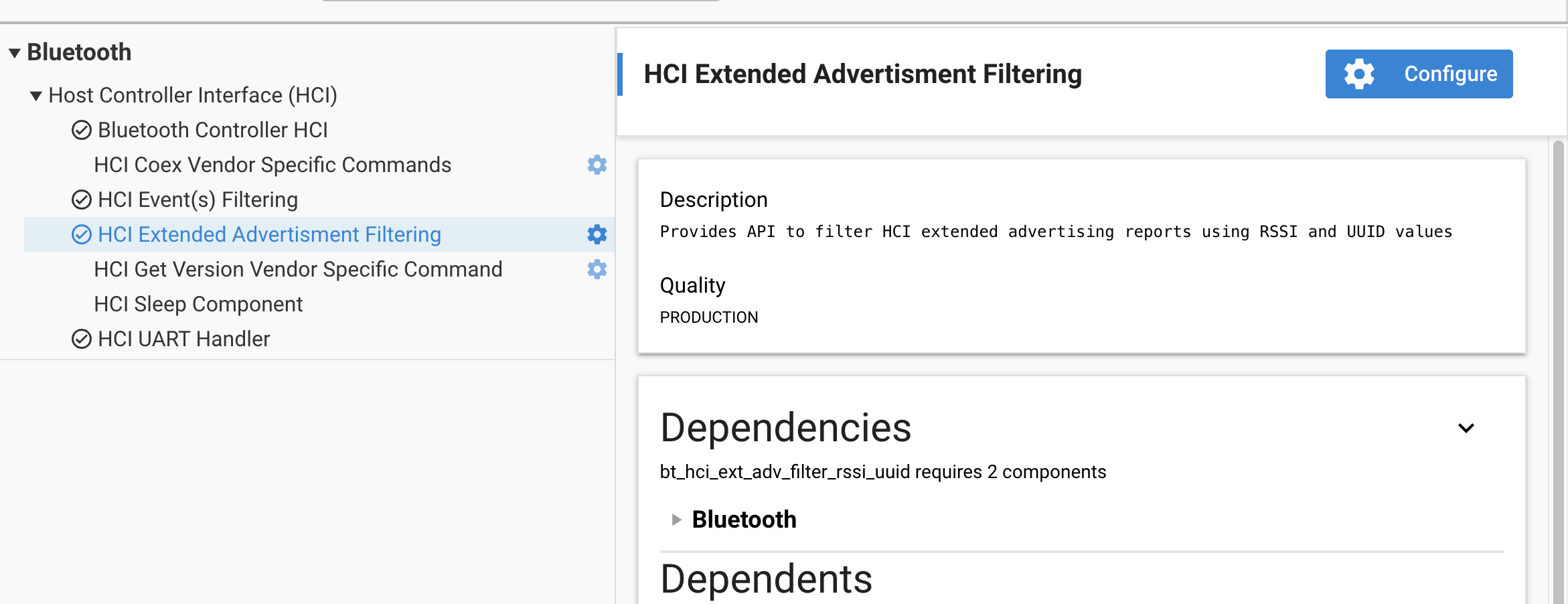
The default filter configuration can be set in the HCI Extended Advertisement Filtering component configuration, if needed.
Note: The number of UUIDs to be included in the advertisement report must be configured in the component in order to allocate the memory for the maximum UUID array size.
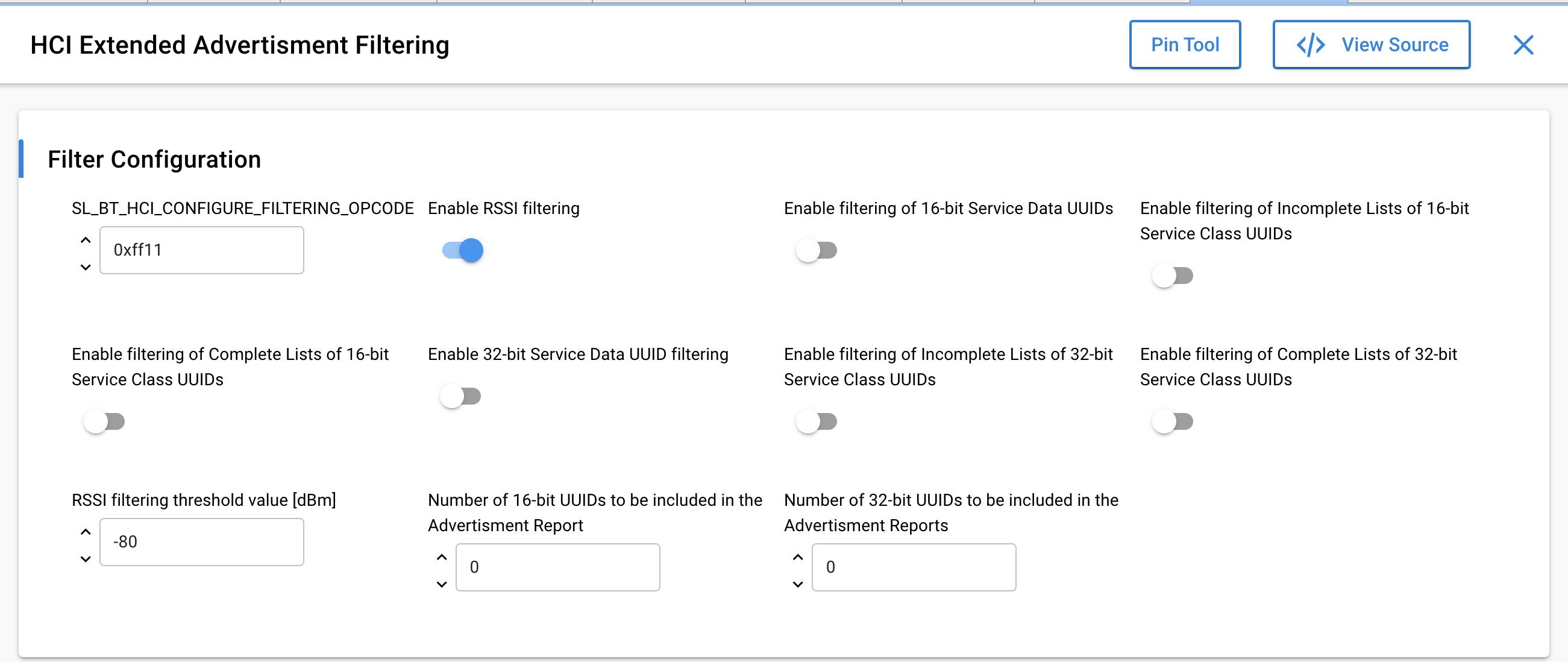
The Opcode for this vendor specific command can be defined in the component. By default, it is 0xFF11.
Command parameters:
Parameter | Size | Description |
|---|---|---|
filter_config | 4 | Bitmap that holds configuration of the filter |
rssi_threshold | 1 | Threshold value in dBm for RSSI when event filtering by RSSI is enabled |
uuid_array_length | 1 | Array length of 16-bit UUID array. Must be less than or equal to SL_BT_HCI_FILTER_16BIT_UUID_ARRAY_LEN |
uuid_array [ ] | variable | 16-bit UUID array. Array size is the length set for 16-bit UUID array |
uuid_array_length | 1 | Array length of 32-bit UUID array. Must be less than or equal to SL_BT_HCI_FILTER_32BIT_UUID_ARRAY_LEN |
uuid_array [ ] | variable | 32-bit UUID array. Array size is the length set for 32-bit UUID array |