


TrustZone Secure Key Storage#
On Series 2 devices, TrustZone handles secure key management by dividing the device memory into two execution environments:
Secure Processing Environment (SPE) for secure operations and cryptographic key storage.
Non-secure Processing Environment (NSPE) for user applications.
User applications run in the NSPE and cannot access resources in the SPE. The SPE securely stores cryptographic keys and performs secure operations.
The following sections describe how TrustZone provides Secure Key Storage on Series 2 devices. For implementation details, see Series 2 TrustZone.
TrustZone Root Key Generation (HSE and VSE)#
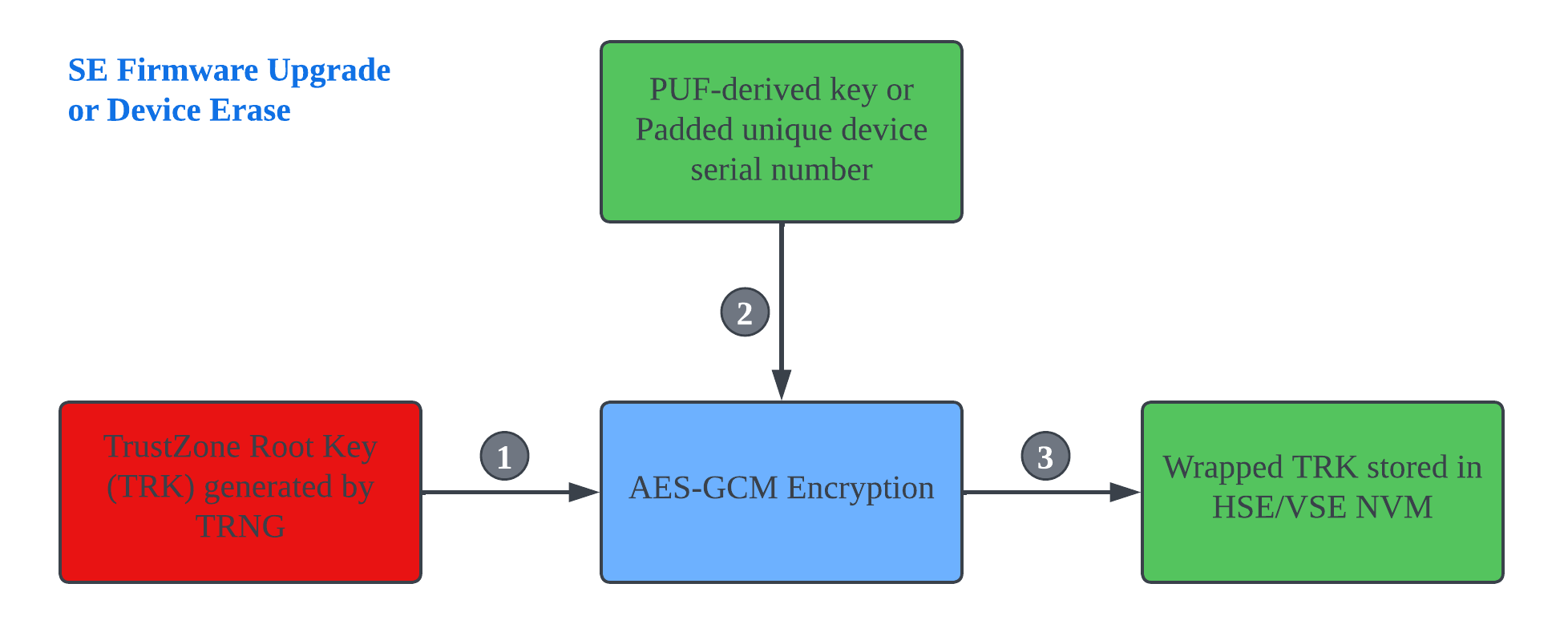
The device generates the TrustZone Root Key (TRK) using the True Random Number Generator (TRNG).
The device wraps the TRK with AES-GCM using one of the following:
A PUF-derived key (HSE and xG27 VSE devices)
A padded unique device serial number (xG22 VSE devices)
The wrapped TRK is stored in Secure Engine (SE) non-volatile memory (NVM), and the plaintext TRK is erased from RAM.
The wrapped TRK is:
Already present on devices shipped with an SE firmware version that supports the feature.
Generated automatically when upgrading from an earlier SE firmware version that does not support the feature.
Regenerated after a device erase.
Note: The Physically Unclonable Function (PUF) is regenerated after each power cycle. Because the PUF-derived key is never stored, the wrapped TRK is protected against storage-extraction attacks.
TrustZone Root Key Usage (HSE)#
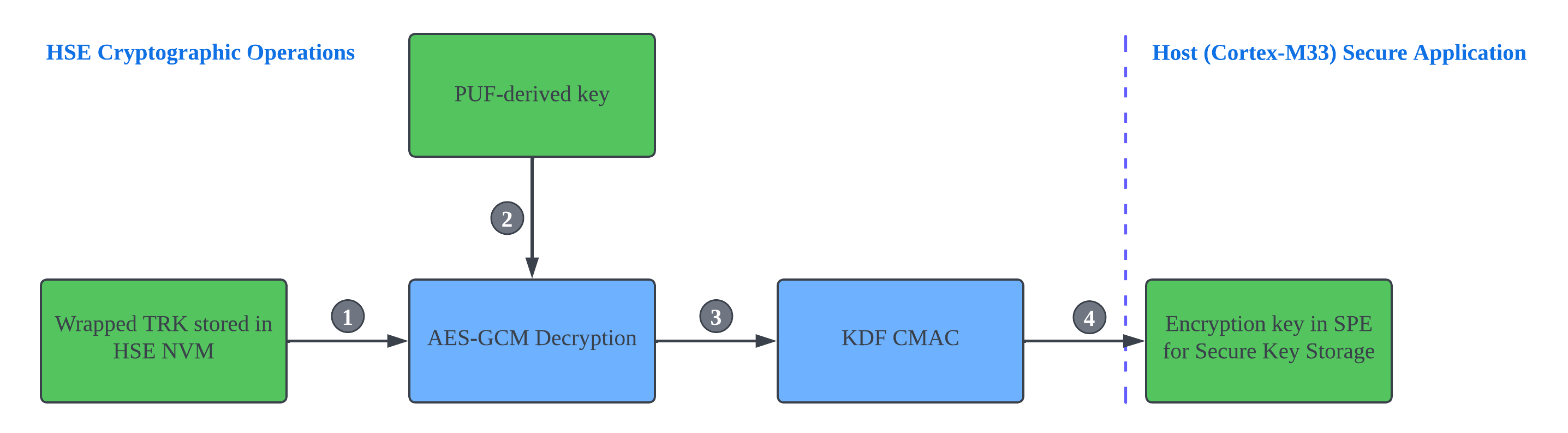
The Secure application accesses the wrapped TRK stored in HSE NVM by using a non-exportable built-in key.
The HSE decrypts the wrapped TRK with the PUF-derived key by using AES-GCM.
The unwrapped TRK becomes the master key for the Key Derivation Function (KDF).
The Secure Key Storage encryption key is derived from the KDF CMAC.
Notes:
The HSE (security co-processor) performs all cryptographic operations.
Only the HSE can access the unwrapped TRK for key derivation, preventing exposure to the host Secure application.
TrustZone Root Key Usage (VSE)#
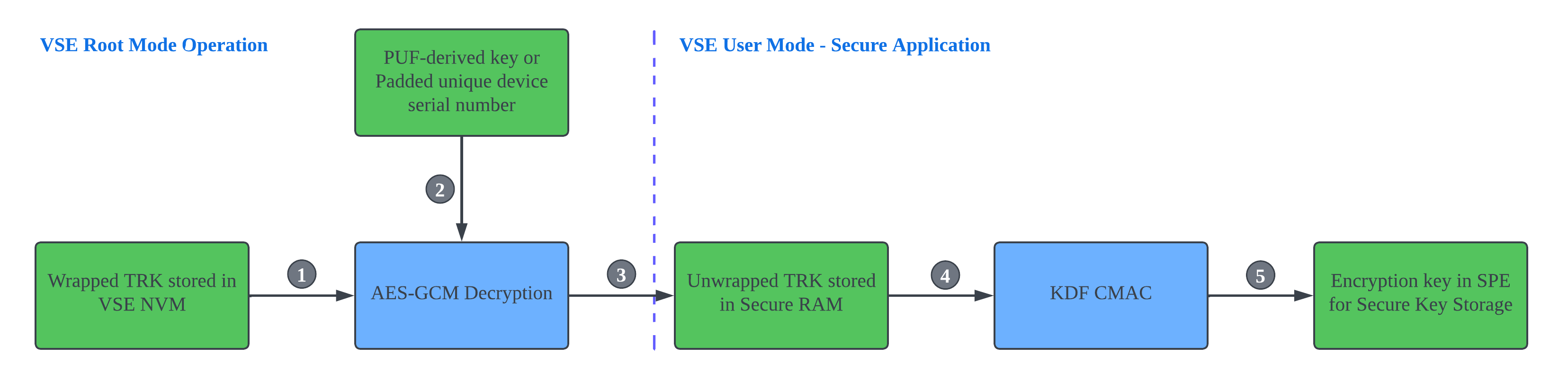
The VSE Root mode firmware accesses the wrapped TRK stored in VSE NVM.
The wrapped TRK is decrypted with AES-GCM by using:
A PUF-derived key (xG27 devices)
A padded unique device serial number (xG22 devices)
When the device switches from VSE Root mode to User mode, the unwrapped TRK is copied to shared RAM. The Secure application running in VSE User mode moves the TRK to Secure RAM in the SPE and erases it from shared RAM.
The unwrapped TRK stored in Secure RAM becomes the master key for the Key Derivation Function (KDF).
The Secure Key Storage encryption key is derived from the KDF CMAC.
Note: On VSE devices, the CRYPTOACC peripheral performs all cryptographic operations.
For more information about HSE and VSE, see Secure Engine Subsystem in Series 2 Secure Debug.
TrustZone Secure Key Storage (HSE and VSE)#
The TRK enables secure storage of cryptographic keys in non-secure flash memory. The number of stored keys is limited only by the available non-secure storage.
The following figure shows how the TRK encrypts a plaintext key before storing it in non-secure NVM.
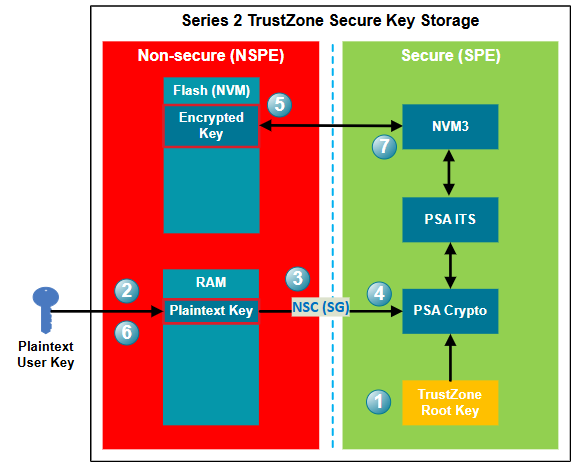
After power-on, the TRK becomes available to the SPE.
On HSE devices, the TRK is unwrapped in the HSE.
On VSE devices, the TRK is stored in Secure RAM.
A user key is generated or imported into non-secure memory. In this example, the key is stored in non-secure RAM so that it can be easily deleted. The key is lost when device power is removed.
The application calls the PSA Crypto API (
psa_import_key()orpsa_generate_key()) through the Secure Gateway (SG) in Non-secure Callable (NSC) memory.The PSA Crypto API passes the plaintext key to the SPE, where it is encrypted with AES-GCM by using an encryption key derived from the TRK through the KDF CMAC.
The encrypted key is stored in the NSPE NVM by using the PSA Internal Trusted Storage (ITS) service and the NVM3 driver.
The plaintext key can then be deleted from non-secure RAM.
Only the PSA Crypto API running in the SPE can retrieve the encrypted key from NSPE NVM and decrypt it for cryptographic operations.
Note: Skip steps 2 and 6 if the PSA Crypto API generates the plaintext key randomly.