


Matter Intermittently Connected Devices (ICD)#
Matter introduces the concept of Intermittently Connected Devices (ICD) in the SDK and in the specification. An Intermittently Connected Device is the Matter representation of a device that is not always reachable. This covers battery-powered devices that disable their underlying hardware when in a low-power mode or devices that can be disconnected from the network, like a phone app.
This page focuses on features designed to improve the performance and reliability of battery-powered devices. Matter ICD functionality can be enabled with the matter_icd_management component. The Matter light-switch and lock examples are ICDs by default.
Creating an ICD Example via Simplicity Studio#
Enabling/Building#
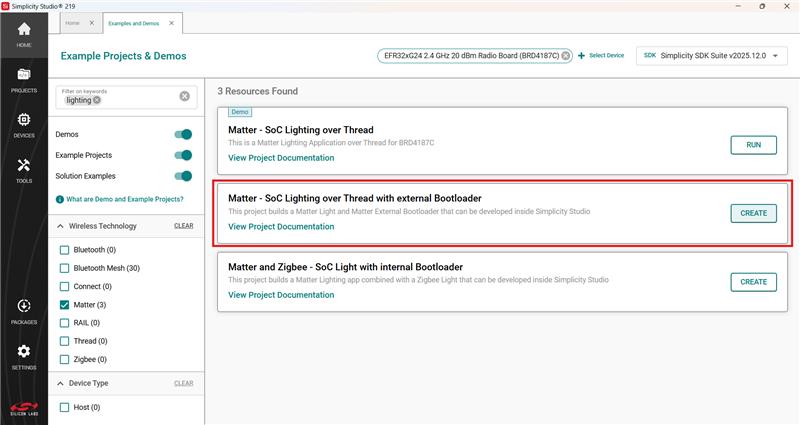
To begin creating an OpenThread ICD example, create a generic Matter over Thread solution example via the New Project Wizard. Lighting solution example will be used for demonstration purposes.
Lock and Light-Switch applications come out-of-box with ICD enabled. The low power component can be added by user.
Create project.
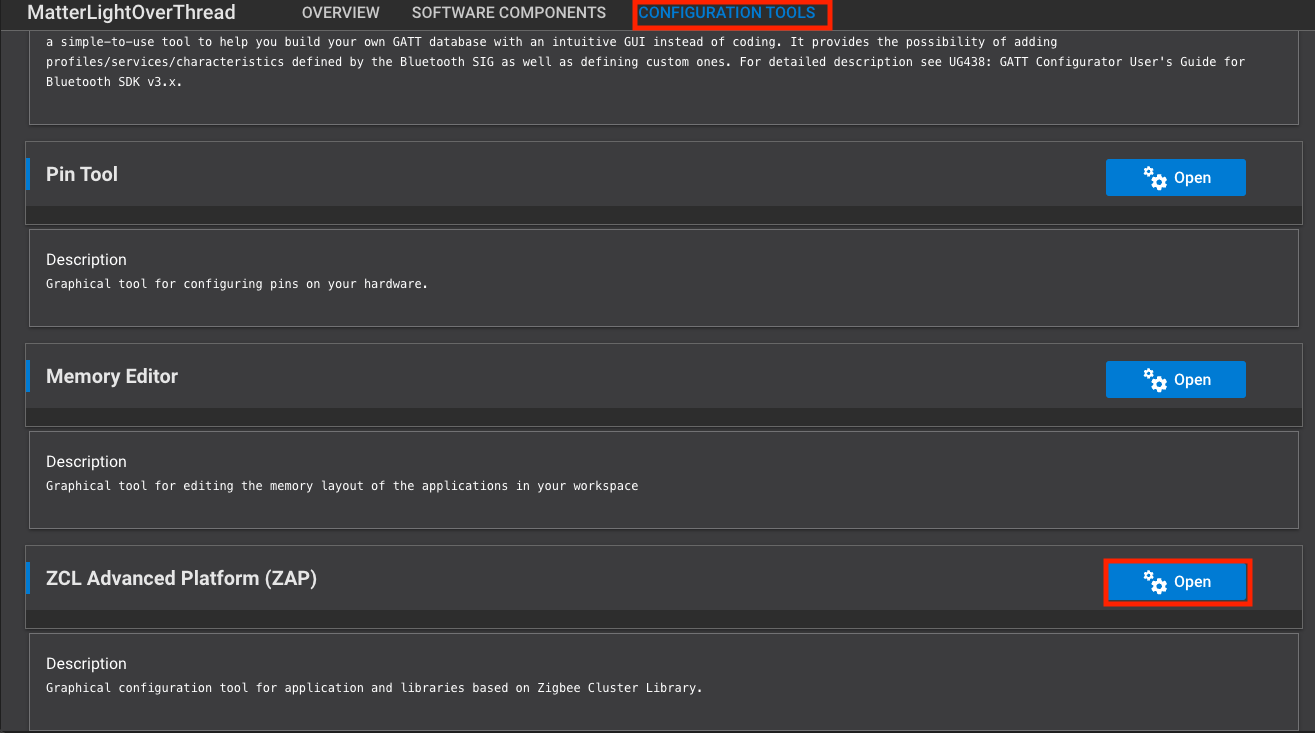
Navigate to the Configuration Tools section and open the ZCL Advanced Platform (ZAP).
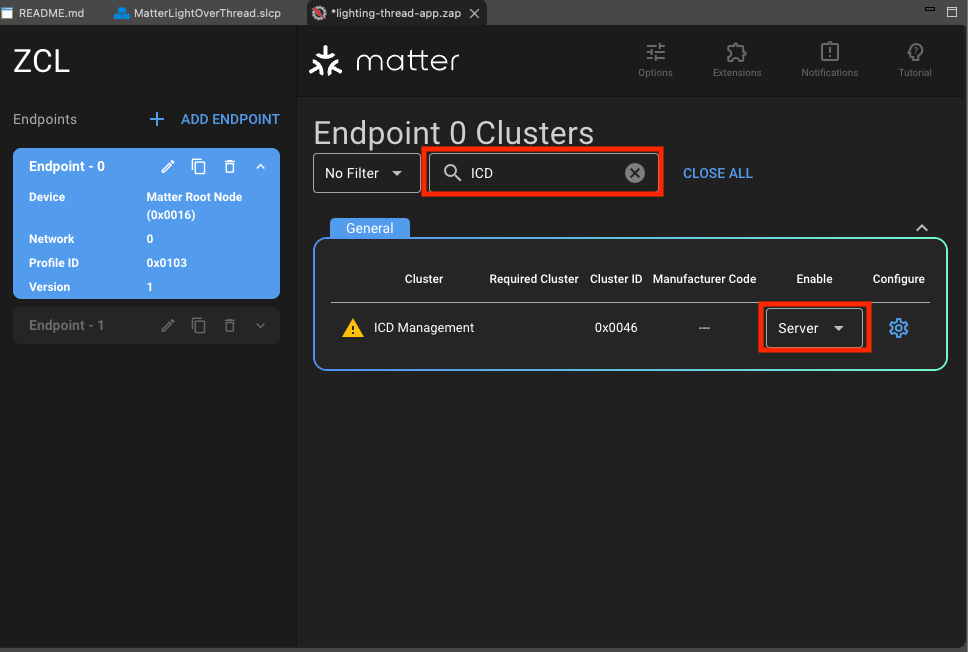
Search for the ICD Management cluster and enable for Server. You will receive a warning that the corresponding component was unable to be installed. This is due to component conflicts within Simplicity Studio.
Navigate to the Software Components tab and confirm that the ICD Management Server Cluster component is installed (enabling the ICD Management cluster should automatically trigger its installation).
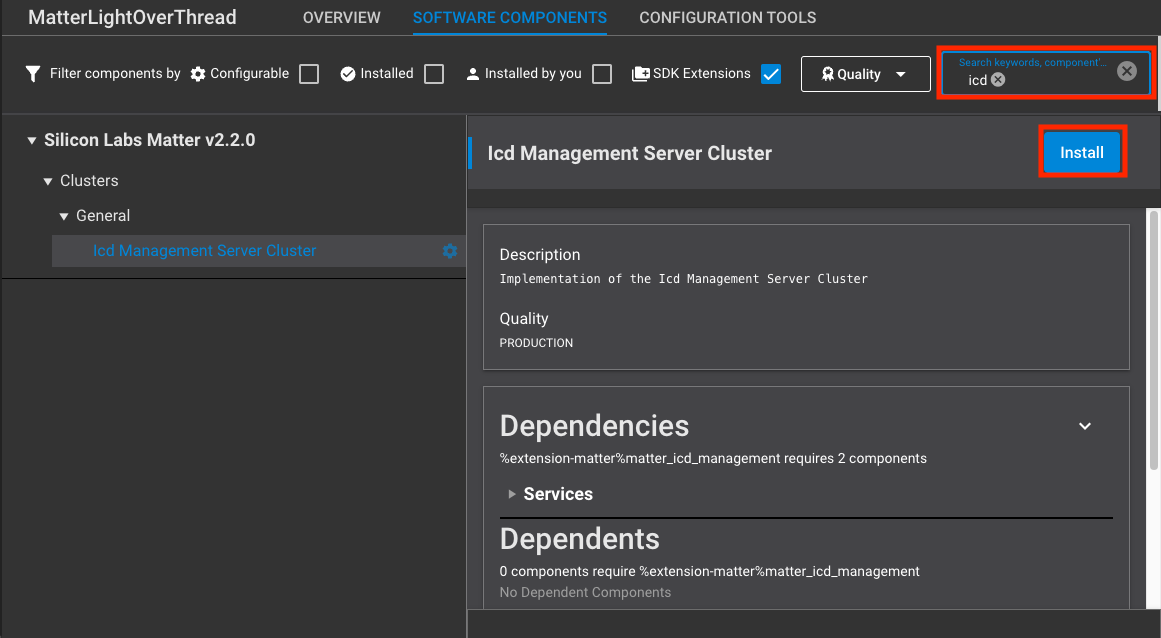
Replace all subsequent conflicting components via the ensuing pop-up options (See below). This will install the necessary Thread Network Layer (MTD) component and ICD source code. This will also remove the conflicting Thread Network Layer (FTD) component.
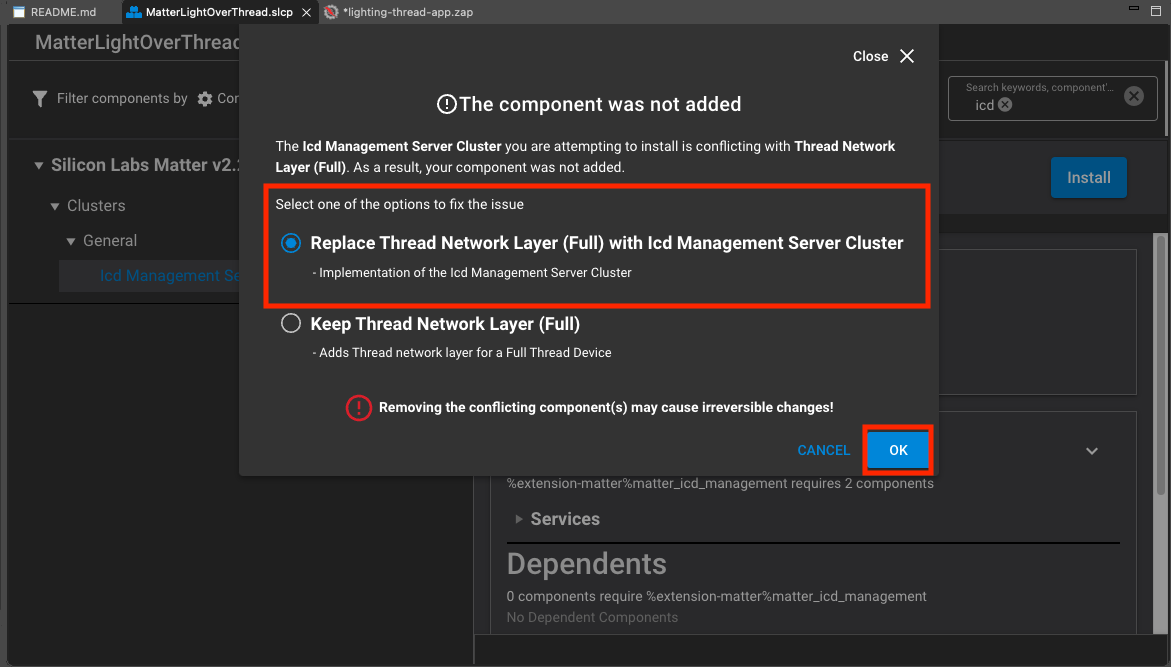
Recommended: Install the matter_platform_low_power component to achieve further energy savings. See details below.
ICD functionality should be installed and ready to build. Build the project as you would a normal example and flash the resulting binary to your specified end device. You should be able to commission the device the same way as non-ICD examples using the QR code URL (generated within the RTT logs at startup or BTN0 press).
Power Saving Components#
Minimal Power Consumption#
The CLI/Display/Logging/Peripheral components are useful development tools but can be removed to save power when they are no longer needed.
The Lower Power Mode is an optional component, installing it will disable:
Silicon Labs Matter → Matter-Thread → OpenThread CLI
Silicon Labs Matter → Platform → Display → Matter Default LCD/Display Configuration
Silicon Labs Matter → Platform → Display → Matter Display
Silicon Labs Matter → Platform → Display → Matter QR Code Display
Silicon Labs Matter → Platform → UART → Matter UART
Silicon Labs Matter → Platform → Utils → Logging to UART
Silicon Labs Matter → Stack → Shell → Matter Shell
Additionally, Matter Support for peripherals (such as LEDs or Buttons) can be removed if necessary. This will remove the appropriate Platform components.
Silicon Labs Matter → Platform → WSTK Button Support
Silicon Labs Matter → Platform → matter LED Support
This will make debugging issues significantly more difficult so these components should only be removed at the end of development/testing when trying to optimize for power savings.
ICD Configurations#
The ICD feature-set offers two types of configurations: cluster configurations and subscription configurations. The cluster configurations are exposed through the ICD Manager Cluster interface. The subscription configurations are exposed through various Matter components configurations and public APIs of the Matter SDK.
ICD Management Cluster#
The ICD Management Cluster enables configuration of the ICD’s behavior. It is required for an ICD to have this cluster enabled on endpoint 0.
The ICDM Cluster exposes three configuration attributes that enable to configure an ICD.
Attribute | Type | Constraints | Description |
|---|---|---|---|
IdleModeInterval | uint32 | 1 to 64800 | Maximum interval in seconds or milliseconds the server can stay in idle mode |
ActiveModeInterval | uint32 | min 300 | Minimum interval in milliseconds the server will stay in active mode |
ActiveModeThreshold | uint32 | min 300 | Minimum amount of time in milliseconds the server typically will stay active after network activity when in active mode |
Configuration Attributes#
The ICD Management Cluster exposes three configuration attributes.
These configurations are independent from the underlying transport configurations.
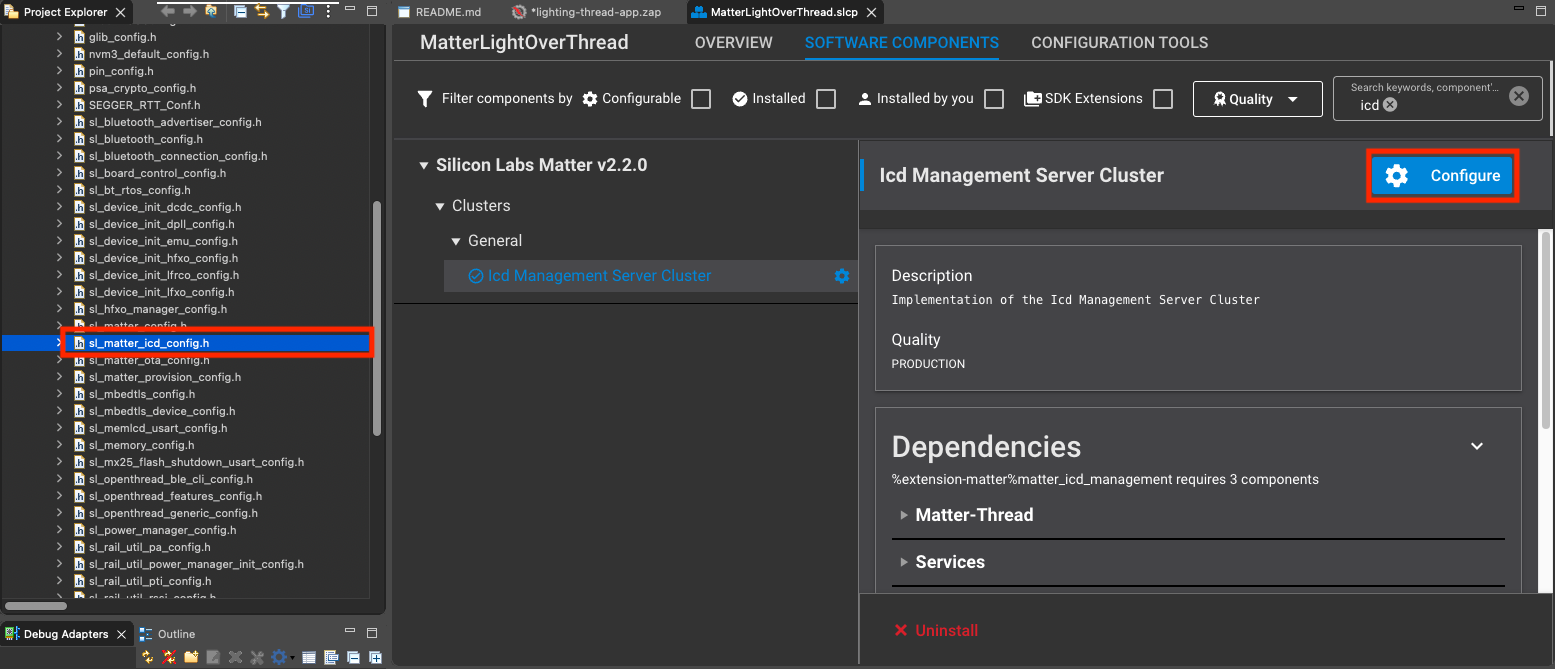
These configurations can be changed by modifying the configuration of the ICD Server Configuration component or directly by setting values in sl_matter_icd_config.h.
#define SL_IDLE_MODE_DURATION_S 600 // 10min Idle Mode Interval
#define SL_ACTIVE_MODE_INTERVAL 1000 // 1s Active Mode Interval
#define SL_ACTIVE_MODE_THRESHOLD 500 // 500ms Active Mode ThresholdPower is inversely proportional to idle time: longer idle durations and shorter active periods yield lower average current draw and better battery life. However, excessive idle time increases latency and risks timeouts with the device's parent or Matter controller. A well-optimized configuration minimizes energy use while ensuring network reliability remains acceptable.
ICD Check-In Protocol Use-Case#
The ICD Check-In Protocol use case is used by ICDs to maintain a known relationship in case subscriptions with clients are lost. This includes how a client shares a Check-In token (symmetric key) with the ICD, when Check-In messages are sent and how the Check-In Protocol requirements are respected.
The Check-In Protocol is a fail-safe mechanism which allows an ICD to notify a registered client that it is available for communication when all subscriptions between the client and ICD are lost. A subscription can be lost for several reasons, such as:
The ICD might not have full RAM retention when it is in an idle state.
When the ICD is powered off to change the battery.
Power or network outage causing the connection between the client and the ICD to be interrupted.
The client is unavailable for any reason (e.g. during a software update or hosted on a mobile device that is sometimes out-of-home).
The Check-In message is sessionless and relies on a shared secret that has been given to the ICD during the registration of the client using the ICD Management cluster. For more information on the ICD Check-In Protocol use-case, see the associated specification section.
User Active Mode Trigger#
Since ICDs are not immediately responsive, they require a means to render them available for communication within user initiated use cases. Some of the user initiated use cases are:
Opening a new commissioning window to add another administrator.
Reconfiguration of an existing fabric (e.g. IPKs, NOC rotation, ACL changes).
Reconfiguration of cluster functionality (e.g. ICD Management, Bindings, Groups, Scenes).
Removal of a device from a fabric.
Changes to the device's settings.
To enable these user initiated use cases, ICDs need to provide a way for a user to put them in active mode and render them responsive. The User Active Mode Trigger feature in the ICD Management cluster indicates whether a particular device implements an active mode trigger.
Configuration#
To change default values corresponding to Matter ICD examples, modify them in either:
config/sl_matter_icd_config.hin VS CodeICD component configurator
Subscription Configurations#
Subscription Maximum Interval Negotiation#
The subscription mechanism is used by ecosystems and controllers to receive attribute change updates and liveness checks. The maximum interval of a subscription request is what defines the frequency at which a device will send a liveness check if there are no attribute changes.
Within the subscription request / response model, a device has the opportunity to decide the maximum interval at which it will send its liveness check (Empty Report Update). The device can set a maximum interval within this range if and only if it is an ICD:
MinIntervalRequested ≤ MaxInterval ≤ MAX(IdleModeInterval, MaxIntervalRequested)The following table shows the subscribe response fields.
Action Field | Type | Description |
|---|---|---|
SubscriptionId | uint32 | identifies the subscription |
MaxInterval | uint16 | the final maximum interval for the subscription in seconds |
The Matter SDK provides a default implementation that allows an ICD to negotiate its MaxInterval. The goal of the algorithm is to set the MaxInterval to the IdleModeInterval.
#if CHIP_CONFIG_ENABLE_ICD_SERVER
// Default behavior for ICDs where the wanted MaxInterval for a subscription is the IdleModeInterval
// defined in the ICD Management Cluster.
// Behavior can be changed with the OnSubscriptionRequested function defined in the application callbacks
// Default Behavior Steps :
// If MinInterval > IdleModeInterval, try to set the MaxInterval to the first interval of IdleModeIntervals above the
// MinInterval.
// If the next interval is greater than the MaxIntervalCeiling, use the MaxIntervalCeiling.
// Otherwise, use IdleModeInterval as MaxInterval
// GetPublisherSelectedIntervalLimit() returns the IdleModeInterval if the device is an ICD
uint32_t decidedMaxInterval = GetPublisherSelectedIntervalLimit();
// Check if the PublisherSelectedIntervalLimit is 0. If so, set decidedMaxInterval to MaxIntervalCeiling
if (decidedMaxInterval == 0)
{
decidedMaxInterval = mMaxInterval;
}
// If requestedMinInterval is greater than the IdleTimeInterval, select next active up time as max interval
if (mMinIntervalFloorSeconds > decidedMaxInterval)
{
uint16_t ratio = mMinIntervalFloorSeconds / static_cast<uint16_t>(decidedMaxInterval);
if (mMinIntervalFloorSeconds % decidedMaxInterval)
{
ratio++;
}
decidedMaxInterval *= ratio;
}
// Verify that decidedMaxInterval is an acceptable value (overflow)
if (decidedMaxInterval > System::Clock::Seconds16::max().count())
{
decidedMaxInterval = System::Clock::Seconds16::max().count();
}
// Verify that the decidedMaxInterval respects MAX(GetPublisherSelectedIntervalLimit(), MaxIntervalCeiling)
uint16_t maximumMaxInterval = std::max(GetPublisherSelectedIntervalLimit(), mMaxInterval);
if (decidedMaxInterval > maximumMaxInterval)
{
decidedMaxInterval = maximumMaxInterval;
}
// Set max interval of the subscription
mMaxInterval = static_cast<uint16_t>(decidedMaxInterval);
#endif // CHIP_CONFIG_ENABLE_ICD_SERVERIf the default implementation does not fit within the use-case,
an implementation can override the default implementation.
The first step is to implement the ApplicationCallback class from the ReadHandler.h header.
/*
* A callback used to interact with the application.
*/
class ApplicationCallback
{
public:
virtual ~ApplicationCallback() = default;
/*
* Called right after a SubscribeRequest has been parsed and processed. This notifies an interested application
* of a subscription that is about to be established. It also provides an avenue for altering the parameters of the
* subscription (specifically, the min/max negotiated intervals) or even outright rejecting the subscription for
* application-specific reasons.
*
* TODO: Need a new IM status code to convey application-rejected subscribes. Currently, a Failure IM status code is sent
* back to the subscriber, which isn't sufficient.
*
* To reject the subscription, a CHIP_ERROR code that is not equivalent to CHIP_NO_ERROR should be returned.
*
* More information about the set of paths associated with this subscription can be retrieved by calling the appropriate
* Get* methods below.
*
* aReadHandler: Reference to the ReadHandler associated with the subscription.
* aSecureSession: A reference to the underlying secure session associated with the subscription.
*
*/
virtual CHIP_ERROR OnSubscriptionRequested(ReadHandler & aReadHandler, Transport::SecureSession & aSecureSession)
{
return CHIP_NO_ERROR;
}
/*
* Called after a subscription has been fully established.
*/
virtual void OnSubscriptionEstablished(ReadHandler & aReadHandler){};
/*
* Called right before a subscription is about to get terminated. This is only called on subscriptions that were terminated
* after they had been fully established (and therefore had called OnSubscriptionEstablished).
* OnSubscriptionEstablishment().
*/
virtual void OnSubscriptionTerminated(ReadHandler & aReadHandler){};
};The second step is registering the callback object to the Interaction Model Engine.
// Register ICD subscription callback to match subscription max intervals to its idle time interval
chip::app::InteractionModelEngine::GetInstance()->RegisterReadHandlerAppCallback(&mICDSubscriptionHandler);Persistent Subscriptions#
Persistent subscriptions were added to Matter as a means to ensure that an ICD can re-establish its subscription and by extension its secure session to a subscriber in the event of a power cycle. When a device accepts a subscription request, it will persist the subscription. When the device reboots, it will try to re-establish its subscription with the subscriber. If the subscription is torn down during normal operations or if the re-establishment fails, the subscription will be deleted.
Persistent subscriptions are enabled by default on all Silicon Labs sample applications.
Subscription Timeout Resumption#
Matter also provides a retry mechanism for devices to try to re-establish a lost subscription with a client. This feature should not be used on an ICD since it can significantly reduce battery life. This functionality is disabled by default in all Matter sample apps, if necessary it can be enabled by directly editing the project's .slcp file and setting to the CHIP_CONFIG_SUBSCRIPTION_TIMEOUT_RESUMPTION configuration value to 1.
Subscription Synchronization#
To avoid forcing an ICD to become active multiple times, the Matter SDK allows an ICD to synchronize its subscription reporting and send all the reports at the same time. The mecansim syncrhonizes the maximum interval of the all subscription to only require the ICD to become active one. This functionality can be enabled by enabling the Synchronous Reports in the Matter Core Components configuration (CHIP_CONFIG_SYNCHRONOUS_REPORTS_ENABLED in sl_matter_config.h).
ICD Device Types#
Matter introduces two types of ICDs.
Short Idle Time ICDs
Long Idle Time ICDs
Short Idle Time ICDs#
Short Idle Time ICDs are battery powered devices that can always be reached by clients. This means that their polling intervals are small enough to guarantee that a message sent from a client will be able to reach the ICD without any synchronization. A door lock, for example, is typicaly a short idle time ICD because it needs to be able to receive commands from clients at any given time. These devices are usually not the initiators in the communication flow.
Requirements#
This section lists the requirements that Short Idle Time ICDs must respect to be certifiable.
The ICD Management Cluster must be present on the Root Endpoint (0) with mandatory attributes.
The transport slow poll configuration must be smaller or equal to 15s. This requirement is not enforced in Matter 1.3 since LIT ICD are not certifiable. Once LIT ICD officially launch, this will be a mandatory requirement.
Support of the ICD Check-In Protocol use-case and the user active mode trigger is optional for SIT ICDs.
Configurations#
These are recommended configurations based on the state of the current implementation of SIT ICDs. The recommended configurations are likely to change with the Matter 1.4 release.
ICD Default configurations
Enable ICD Server: TRUE
Subscription Timeout Resumption: FALSE
Subscription Synchronization: TRUE
ICD Matter Configuration flags
Configuration parameters of the ICD Server Configuration component (sl_matter_icd_config.h):
#define SL_IDLE_MODE_DURATION_S 600 // 10min Idle Mode Interval
#define SL_ACTIVE_MODE_INTERVAL 10000 // 10s Active Mode Interval
#define SL_ACTIVE_MODE_THRESHOLD 1000 // 1s Active Mode ThresholdOpenthread Configuration flags
Configuration parameters of the ICD Server Configuration component (sl_matter_icd_config.h):
#define SL_TRANSPORT_IDLE_INTERVAL 5000 // 5s Idle Intervals
#define SL_TRANSPORT_ACTIVE_INTERVAL 500 // 500ms Active IntervalsNote: Wi-Fi polling configuration are dictated by the Access Point and cannot be changed at the Matter level.
Long Idle ICDs#
Long Idle Time ICDs are battery powered devices that require synchronization between the client and the ICD for communication to succeed. A sensor device is an example of a device that are typically a long idle time ICD.
Long Idle Time ICDs are ready for integration in the Matter 1.3 release. The core feature-set for ICDs has been implemented through the ICDManager.
LIT ICDs should be certifiable with the Matter 1.4 release.
Splitting the two milestones in different releases is to allow more in depth interoperability testing to validate the proposed feature-set achieves it's power consumption and usability goals.
Requirements#
This section lists the requirements that Long Idle Time ICDs must respect to be certifiable.
The ICD Management Cluster must be present on the Root Endpoint (0) with mandatory attributes.
The
LITS(Long Idle Time Support) feature map must be set to 1.All required features, attributes and commands required by this feature map must also be present.
The
CIP(Check-In Protocol support) feature map must be set to 1.All required attributes and commands required by this feature map must also be present.
The
UAT(User Active Mode Trigger support) feature map must be set to 1.All required attributes and commands required by this feature map must also be present.
The
ActiveModeThresholdcannot be lower than 5 seconds.
Configurations#
These are recommended configurations based on the state of the current implementation of LIT ICDs. The recommended configurations are likely to change with the Matter 1.4 release.
ICD Default configurations
Enable ICD Server: TRUE
Subscription Timeout Resumption: FALSE
Subscription Synchronization: TRUE
ICD Slow Polling Limit Enforcement: TRUE
Matter Report on Entering Active: TRUE
Matter LIT Configuration: TRUE
The last three parameters are configuration parameters in the Matter Core Components (ICDServerBuildConfig.h)
ICD Matter Configuration flags
Configuration parameters of the ICD Server Configuration component (sl_matter_icd_config.h):
#define SL_IDLE_MODE_DURATION_S 3600 // 60min Idle Mode Interval
#define SL_ACTIVE_MODE_INTERVAL 0 // 0s Active Mode Interval
#define SL_ACTIVE_MODE_THRESHOLD 5000 // 5s Active Mode ThresholdOpenthread Configuration flags
Configuration parameters of the ICD Server Configuration component (sl_matter_icd_config.h):
#define SL_TRANSPORT_IDLE_INTERVAL 3600000 // 60mins Idle Polling Interval
#define SL_TRANSPORT_ACTIVE_INTERVAL 1000 // 1s Active Polling IntervalICD Features#
Dynamic SIT / LIT Support (DSLS)#
This feature is used when a Matter Accessory device needs to be able to decide when to change mode between SIT and LIT. LIT devices are, by design, capable of behaving like SITs and will default to SIT behavior if they cannot be LITs (e.g. controllers don't support LITs). For this feature to be supported, the device must be able to switch between the SIT and LIT operating modes even if it has a valid registered client.
Given that the intention when configuring a LIT is to optimize battery life, they are configured to behave as LIT whenever possible, hence the need for a feature that enables device vendors to dynamically decide when to change mode if defaulting into LIT is not preferred. For example a Smoke CO sensor might want to behave like a LIT only if its power source changes from line-powered to battery powered.
More details of this feature can be found in the ICD Management Cluster description of the Matter Core Specification Specifications Download Request - IOT.
Note: This feature is only available in Matter 1.4 and later.
To Enable DSLS#
Configure the device as a LIT ICD
Enable the DynamicSitLitSupport feature in the ICD Management Cluster (ICDM) via ZAP
Runtime Operation Mode Switching#
If the device supports switching between the SIT and LIT operation modes while it has at least one registered client, it must set the DynamicSitLitSupport feature in the ICD Management cluster in ZAP.
Each time a LIT ICD switches between operating modes, both the mDNS ICD key and OperatingMode attribute of the ICDM cluster are updated by the Matter stack:
ICDManager::OnSITModeRequest(): Sets ICD=0 and OperatingMode=SIT if "Long Idle Time ICD is operating as a Short Idle Time ICD"
ICDManager::OnSITModeRequestWithdrawal(): Sets ICD=1 and OperatingMode=LIT if "Long Idle Time ICD is operating as a Long Idle Time ICD"
In each case ICDManager::UpdateICDMode() is leveraged to update the ICD operating mode and mDNS ICD key.
Configuration#
DSLS does not introduce new mandatory polling rates or timing requirements. LIT devices are already required to behave like SIT devices when LIT operation is not possible (e.g. controller limitations); DSLS simply overrides the default preference for LIT operation so the ICD will default to SIT unless directed to become LIT by the application.
The LIT slow poll is defined via the SL_TRANSPORT_IDLE_INTERVAL configuration parameter. The SIT slow poll will automatically default to the maximum SIT slow poll (15 seconds) or to whatever is defined via the CHIP_DEVICE_CONFIG_ICD_SIT_POLLING_INTERVAL configuration parameter. It can be further changed via the SetSITPollingInterval API. The SL_TRANSPORT_ACTIVE_INTERVAL defines the fast poll behavior regardless of LIT or SIT mode.
The specific SIT and LIT parameters (poll intervals, idle times, etc.) are vendor-defined and should be chosen based on the use-case. The Matter sample applications provide examples of configurations depending on the use-case. For instance, the Light Switch sample app defaults to an idle time of 15s while the door lock app has and idle time of 5s so that it can be more responsive.