RAIL Overview#
The RAIL library itself is delivered through the Simplicity SDK Suite (SiSDK), but the supporting tools and example applications are also part of this SDK. In the SiSDK, developers can develop protocols that work directly with RAIL, or configure applications based on the Silicon Labs Connect stack. The Silicon Lab Connect stack provides a fully-featured, easily-customizable wireless networking solution optimized for devices that require low power consumption and are used in a simple network topology. For more information, see Silicon Labs Connect Fundamentals.
RAIL components in the Simplicity SDK are:
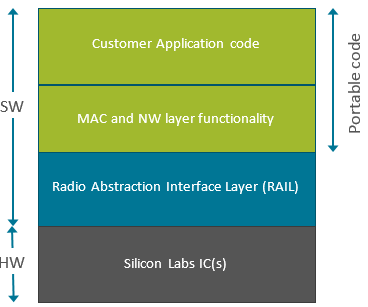
The RAIL library: Provides a programming interface to radio functionality, as shown in the following figure.
The Radio Configurator: Part of Simplicity Studio, a calculator and interface that allows developers to configure static parameters of the radio physical layer. For details, see Proprietary Radio Configurator Guide.
RAILtest, a sample application that includes a serial command for each RAIL library feature, to allow scripted testing and ad hoc experimentation. RAILtest can be built with any PHY, including 802.15.4 and Bluetooth Smart. Many of the RAILtest serial commands can be used for lab evaluation. RAILTest is also a good starting point for testing various RAIL features and can be used as a reference implementation of many APIs.
Other example applications: Can be used as is for evaluation and also serve as a starting point for application development.
Documentation, delivered through Simplicity Studio.
Components built on top of RAIL, that provide basic functionality, like initialization, transmit or receive.
For more information about using the example applications in the Simplicity SDK to begin development with RAIL, see Simplicity SDK Quick-Start Guide.
Although the RAIL library supports the complete EFR32 portfolio, the radio configurator and the Simplicity SDK examples are only available on EFR32FG2 devices and other EFR devices with Proprietary support. Check the device's data sheet under Ordering Information > Protocol Stack to see if Proprietary is supported.