


Simplicity Studio and Visual Studio Code Interoperability#
Simplicity Studio® 6 and Visual Studio Code (VS Code) provide complementary environments for Silicon Labs development. Use Simplicity Studio to create and configure projects, select target hardware, and work with graphical configuration tools. Use VS Code to edit source code and perform other IDE-based development tasks.
You control which projects and workspaces are open in each application. Opening or importing a project, or switching workspaces in Simplicity Studio, does not close projects that are already open in VS Code.
Open a Simplicity Studio Project in VS Code#
In Simplicity Studio, use one of the following options to open a project in VS Code:
In the Project Configurator, select Open in VS Code in the upper-right corner. The project opens in a new VS Code window.

On the Projects page, select the three-dot icon next to the project name, and then select Open in IDE. The project opens in a new VS Code window.
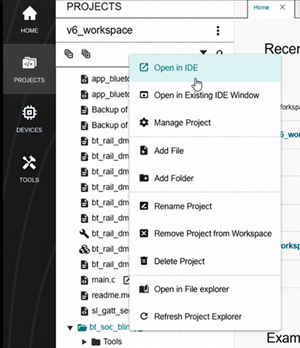
From the same context menu, select Open in Existing IDE Window to add the project to the open VS Code window.
VS Code opens the project and displays the folder structure and files in the Explorer view.
Adding a project to an existing VS Code window creates a multi-root workspace. A multi-root workspace lets you work with multiple Silicon Labs projects in the same VS Code window, including projects from different Simplicity Studio workspaces.
After the project opens in VS Code, you can work with the project in the Silicon Labs extension or open a Simplicity Studio configuration tool for configuration files that need a graphical editor.
For more information about opening projects and the Projects page menu in Simplicity Studio, see Open a Project and The Context Menu.
Open a Simplicity Studio Project from VS Code#
To open a project in Simplicity Studio, right-click the project name in the VS Code extension, and then select Open in Studio.
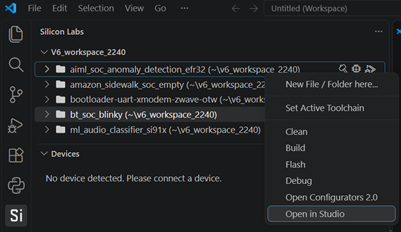
If the project is in the active Simplicity Studio workspace, Simplicity Studio opens the project directly.
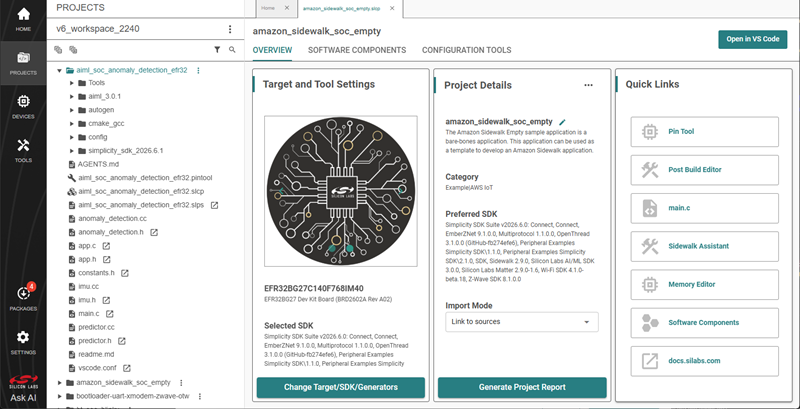
If the project is in a different workspace, Simplicity Studio prompts you to choose one of the following options:
Import into current workspace: Adds the project to the active workspace and opens it.
Switch workspace: Switches to the workspace that contains the project and opens it.
Simplicity Studio does not import a project or switch workspaces without your confirmation.
Open Simplicity Studio Configuration Tools from VS Code#
Some project files require a graphical Simplicity Studio tool for editing. In the VS Code project view, these files display an Open in Studio icon.
To open the tool from the configuration file, select the Open in Studio icon for the file: 
For example, selecting the icon for gatt_configuration.btconf opens the project's configuration in the Bluetooth GATT Configurator.
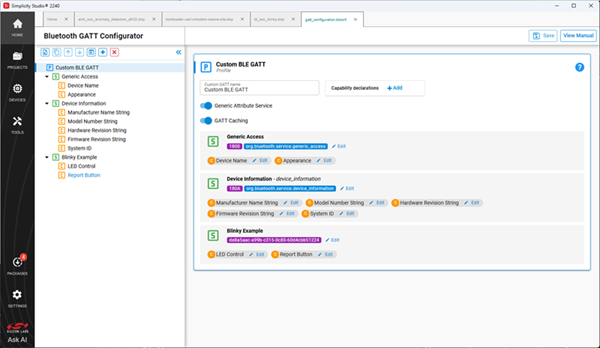
Note: If the project is in a different Simplicity Studio workspace, Simplicity Studio prompts you to import the project into the active workspace or switch to the workspace that contains the project.
Work with Projects in VS Code#
The Silicon Labs extension displays the project folders in the current VS Code workspace. Expand a project to access its source files, configuration files, and supported Silicon Labs tools.
The extension also detects new projects created in a folder that's already open in VS Code. For example, when you create a project from Example Projects & Demos in Simplicity Studio, the new project automatically appears in VS Code. You don't need to import the Simplicity Studio workspace again.
If the current VS Code window does not contain a Simplicity Studio project, the extension provides the following options:
Open Simplicity Studio: Opens Simplicity Studio so you can create or select a project.
Import Workspace: Imports projects from an existing Simplicity Studio workspace into VS Code.
Simplicity Studio Workspaces and VS Code Workspaces#
Simplicity Studio and VS Code use workspaces differently:
A Simplicity Studio workspace organizes the projects managed by Simplicity Studio. For more information, see Workspaces.
A VS Code workspace contains the project folders that are open in a VS Code window.
A VS Code workspace can contain projects from multiple Simplicity Studio workspaces. If you switch the active workspace in Simplicity Studio, project folders that are already open in VS Code remain open.
Use the open, import, and switch workspace actions described in this topic to control which projects are available in each application.