


Flash Initialization and Configuration#
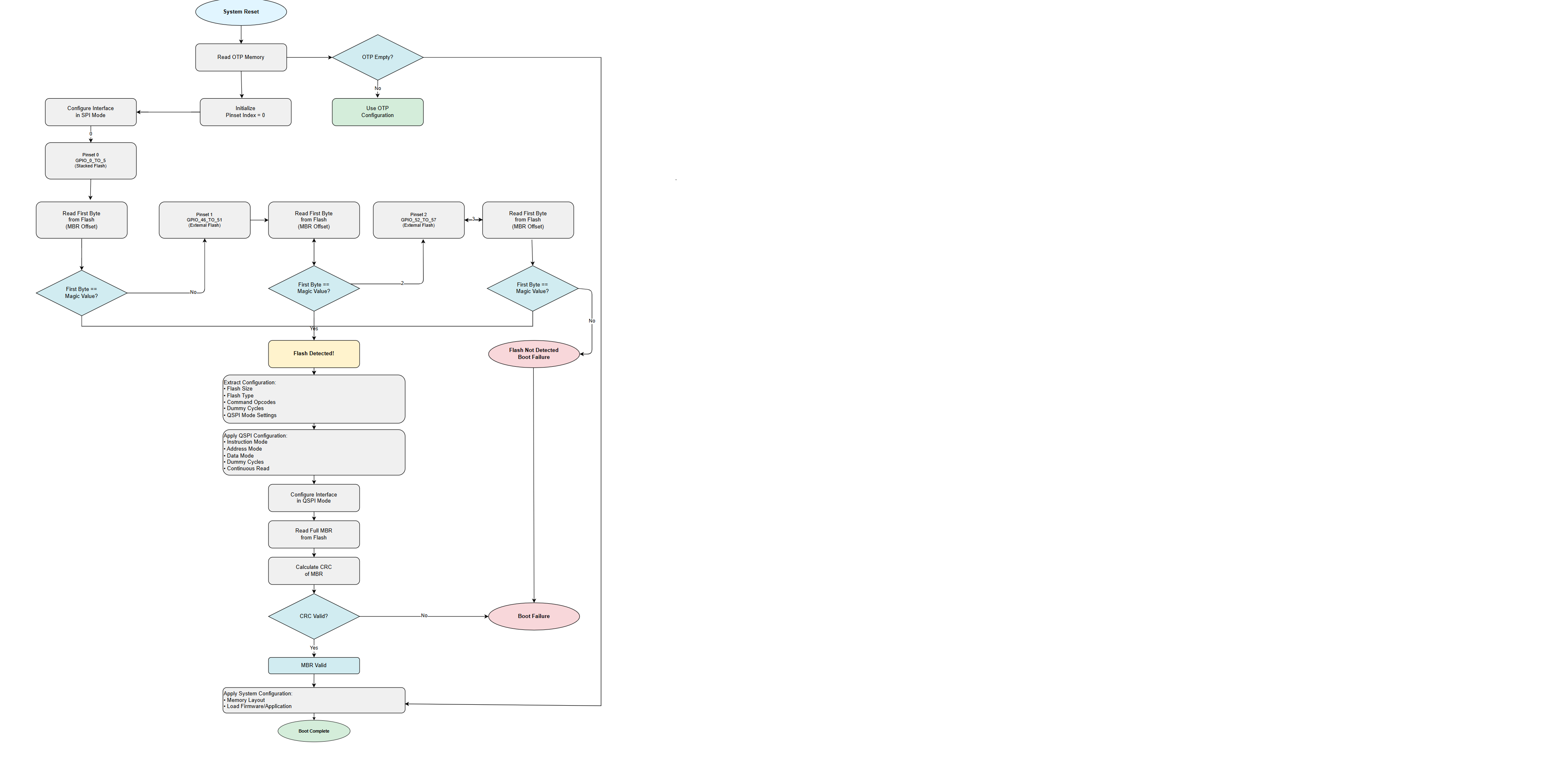
Flash initialization on the SiWx917 platform is performed entirely by the Network Wireless Processor (NWP) Bootloader. Unlike peripherals such as Inter-Integrated Circuit (I²C), flash cannot be configured dynamically at runtime through application programming interfaces (APIs). Instead, the Bootloader reads configuration data from one-time programmable (OTP) memory or from a Master Boot Record (MBR) stored in external flash memory.
This guide describes the initialization sequence, MBR configuration, flash selection, and validation requirements.
Startup Sequence#
Step 1: OTP Memory Check#
The Bootloader reads OTP fields.
If OTP is empty, the Bootloader attempts to detect external flash by reading the MBR in serial peripheral interface (SPI) mode.
Step 2: Flash Detection#
The Bootloader:
Attempts to read the first byte in SPI mode by iterating through each Quad Serial Peripheral Interface (QSPI) pinset.
Reads the first byte from the flash device.
Confirms flash presence if the magic value matches.
Step 3: Primary MBR#
The Bootloader reads the primary MBR in SPI mode. This part of the MBR provides the following information:
Flash size
Flash type
Read, write, and erase command opcodes, as defined in the flash vendor data sheet
Dummy cycles
QSPI mode configuration
Step 4: Configure the QSPI Interface#
The Bootloader applies the following QSPI settings using the values from the MBR:
Instruction mode
Address mode
Data mode
Dummy cycles
Continuous read
Step 5: Apply System Configuration#
The Bootloader:
Applies QSPI settings
Sets up the memory layout
Loads the firmware updater or application image
Flash Configuration via MBR#
There is no runtime API to configure flash memory.
Flash configuration must be defined in the MBR binary before boot. Silicon Labs provides MBRs for supported devices (Macronix, GigaDevice, XMC). For unsupported devices, you must extend the MBR.
Flash Selection#
When you select a flash device, ensure that:
Data sheet commands match MBR fields
The pinset used on hardware matches the MBR
The flash size value is correct
Memory protection features are compatible
Parameters to Validate#
Basic Commands#
Field | Description | Example |
|---|---|---|
| QSPI read |
|
| Page program |
|
| 64 KB erase |
|
| Full erase |
|
| 4 KB erase |
|
| Status register write |
|
| Status register read |
|
QSPI Configuration Fields#
Key fields include:
inst_modeaddr_modedata_modedummy_modeprefetch_encontinuousno_of_dummy_bytesflash_type
Control Flags and Memory Protection#
Required protection support includes:
4 KB
64 KB
1 MB
Additional MBR Parameters#
Flash Type#
Vendor | Value |
|---|---|
XMC |
|
GigaDevice |
|
Macronix |
|
Flash Pinset#
Value | Mapping | Supported |
|---|---|---|
0 | GPIO_0_TO_5 | Yes (Stacked flash) |
1 | GPIO_46_TO_51 | Yes (External flash) |
2 | GPIO_52_TO_57 | Yes (External flash) |
Flash Size#
Size | Value |
|---|---|
4 MB |
|
8 MB |
|
Flash Detection Flow Diagram#
User Checklist#
Verify opcode compatibility.
Confirm the flash vendor ID.
Validate pinset mapping.
Confirm flash size support.
Validate QSPI mode and dummy cycle configuration.
Confirm memory protection compatibility.
Program the updated MBR.
Power-cycle the hardware to load the updated MBR.