


Overview#
Silicon Labs provides a certified Wi-SUN FAN 1.1 solution, delivered as a precompiled stack library (available for GCC and IAR).
Profile (Library) | Linux Border Router | Soc Border Router | FFN | LFN |
|---|---|---|---|---|
Border Router ( | ✔️ | |||
FFN ( | ✔️ | |||
Full ( | ✔️ | ✔️ | ||
LFN ( | ✔️ | |||
MAC Co-Processor ( | ✔️ | |||
RCP Co-Processor ( | ✔️ |
Note: The MAC and RCP libraries target the EFR32 Radio Co-Processor (RCP). When combined with a Linux host running the Wi-SUN stack, they form a Linux Border Router.
This developer guide offers step-by-step instructions to set up and configure different Wi-SUN node types using the provided examples.
It also demonstrates communication over the network using various transport and application layer protocols (UDP/TCP and COAP).
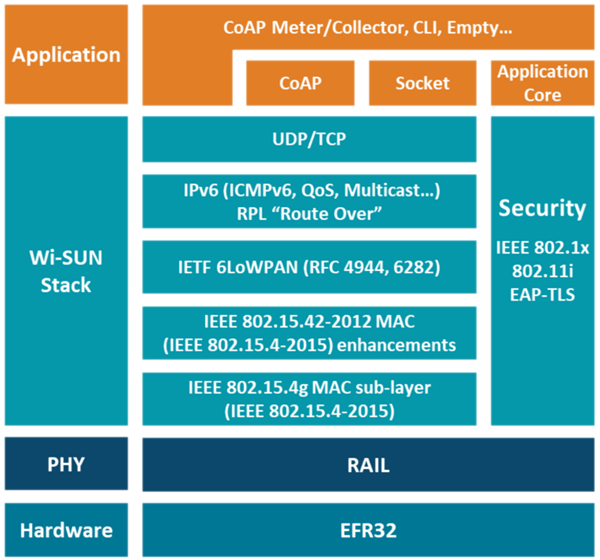
Note: The Wi-SUN stack depends on the RAIL library, which is responsible in interfacing the Hardware Radio and upper layer. It also depends on Mbed TLS third party enabling security with PSA and hardware acceleration.
Summary#
The Border Router section explains how to set up and configure both Linux-based and SoC-based Border Routers.
This section covers how to set up and configure a Router (FFN) to extend coverage and manage traffic.
For low-power device use cases, this section provides a guide to set up and configure a Limited Function Node (LFN).
This section focuses on hardware resources and system utilities used by the Wi-SUN stack and applications.
To help developers optimize deployments, this section describes tools and methodologies for measuring PAN performance and testing with the Wi-SUN Network Measurement Application.
A dedicated section highlighting tools that accelerate development and debugging workflows.
A practical step-by-step workflow that bridges the gap between architecture and hands-on implementation.
Guide to help certify Silicon Labs devices for Wi-SUN FAN 1.1.