


About Example Applications and Demos#
Because starting application development from scratch is difficult, the Silicon Labs Z-Wave SDK comes with several built-in example applications and demos covering the most frequent use cases designed to illustrate common application functions. Silicon Labs strong-ly recommends starting development from one of the example applications. Like everything in SSv5, the examples and the demos shown on the EXAMPLE PROJECTS & DEMOS tab are filtered based on the part you have connected or selected.
This guide will demonstrate how to use two Z-Wave 800 Thunderboards together to connect them in a Z-Wave network, one as a Z-Wave controller and one as a Z-Wave end-device
Demos#
Demos are prebuilt firmware images that are ready to download to a compatible device. The quickest way to find if a demo is available for your part is by adding the part or board information in the My Products view and then navigating to the EXAMPLE PROJECTS & DEMOS tab in the Launcher Perspective. Disable the Example Projects filter.
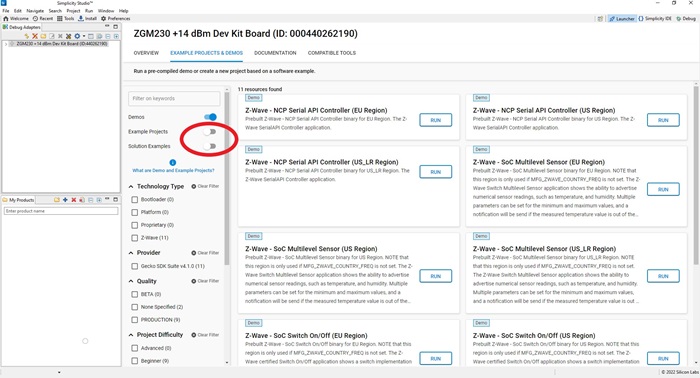
Available demos provided by the Z-Wave SDK for Z-Wave 800 Thunderboard are:
Z-Wave - NCP Serial API Controller: The Serial Applications Programming Interface (Serial API) allows a host to communicate with a Z-Wave chip.
Z-Wave - SoC Switch On/Off: Shows a switch implementation to turn on any device that is connected to power.
Z-Wave - SoC Multilevel Sensor: Shows the ability to advertise numerical sensor readings, such as temperature, and humidity.
To learn more about the sample applications, refer to How to Use Z-Wave Certified Apps or about the Serial API in Serial API Host Application Programming Guide.