


Application Design#
This section discusses several advanced design issues that affect the use of EmberZNet PRO when developing an application without using Simplicity Studio AppBuilder and the application framework. After a review of the basics of application design and application design requirements, this section discusses the basic application tasks requirements, and goes into detail on Zigbee network rejoin strategies, and how to implement Zigbee messaging.
The ABCs of Application Design#
Before you begin to code your application you must complete some vital preliminary tasks. These include network design and system design. However, you cannot design your system or network until you understand the scope of requirements and capabilities in a basic node application. This section describes the task-based features that your application must include.
Design is an iterative process. Each iteration has a ripple effect throughout the system and network designs. In this iterative process, the network design is the first step. Different network topologies have their own strengths and weaknesses. Some topologies may be totally unsuitable for your product, while some may be marginally acceptable for one reason or another. Only by understanding the best network topology for your product can you proceed to the next step: system design.
Your system design must include all the functional requirements needed by your final product. These must include hardware-based requirements, network functionality, security, and other issues. The question of whether or not you will seek Zigbee Certification for your product is another important factor in your system design because it will impose specific functional and design requirements on your application code. Only once you have a fully defined set of requirements and a system design that implements these requirements can you proceed to the next step in the process: application coding.
Golden Rules
Your network will probably be either a sensor-type or a control-type network, or maybe have elements of both.
The potential network bandwidth and latency are topology-dependent.
The best solutions to certain challenges encountered by everyone are likely to be application-specific.
Your application software implements your system design. It will also use the EmberZNet PRO stack software to provide the basic functionality needed to create your Zigbee Wireless Personal Area Network (WPAN) product. Testing follows completion of your application software to confirm that it functions as intended. And, as in most design environments, you will repeat the design/test cycle many times before completing your product design.
Basic Application Design Requirements#
The typical EmberZNet PRO embedded networking application must accomplish certain generic tasks. The following figure summarizes these tasks in relation to other responsibilities managed by the stack itself.
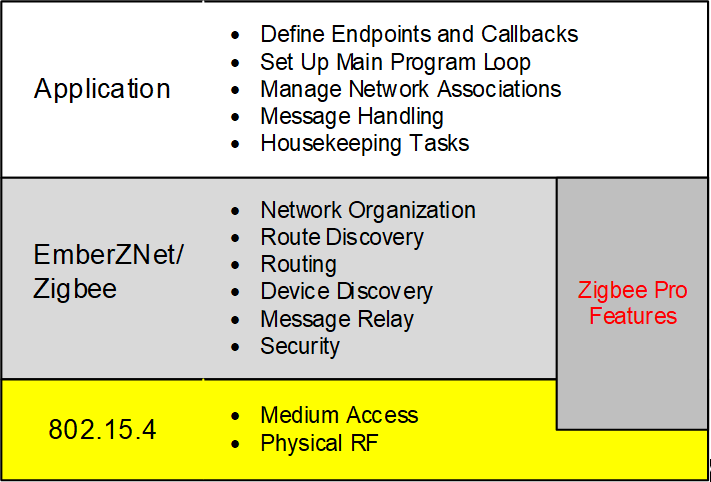
Note: While the EmberZNet PRO stack fulfills the duties noted in the “EmberZNet/Zigbee” layer above, your application may still need to provide configuration or other guidance about how some of those tasks should be handled.
Basic Application Task Requirements (Scratch-Built)#
If you choose to develop your own application from scratch, the following sections provide general design guidelines for you to follow. The figure above describes five major tasks that the generic networking application must perform in a Zigbee environment. In this section, we examine each of these tasks in more detail.
Define Endpoints, Callbacks, and Global Variables#
The main source file for your application must begin with defining some important parameters. These parameters involve endpoints, callbacks, and some specific global variables.
Endpoints are required to send and receive messages, so any device (except a basic network relay device) will need at least one of these. How many and what kind is up to you. The following table lists endpoint-related global variables that must be defined in your application. UG103.2: Zigbee Fundamentals contains information on endpoints, endpoint descriptors, cluster IDs, profiles, and related concepts.
Endpoint | Description |
|---|---|
int8u emberEndpointCount | Variable that defines how many user endpoints we have on this node. |
EmberEndpointDescription PGM endpointDescription | Typical endpoint descriptor; can be named anything. Note that the PGM keyword is just used to inform the compiler that these descriptions live in flash because they don’t change over the life of the device and aren’t accessed much. |
EmberEndpoint emberEndpoints[ ] | A global array accessed by the EmberZNet PRO stack that defines how these endpoints are enumerated; each entry in the array is made up of the “identifier” field of each EmberEndpoint struct. |
Note: The above global variables do not apply in EZSP-based host architectures. Instead the endpoint configuration should be set up by the host during the Configuration phase of the network coprocessor (NCP) using the “AddEndpoint” EZSP command (ezspAddEnd-point() in the provided EZSP driver code).
Required callback handlers are listed in the following table. Full descriptions of each function can be found in the API documentation for your Silicon Labs product at silabs.com.
In this table and throughout this document any stack symbols or API with “X/Y” notation refer to the SoC and NCP variants, respectively, where variants exist.
Callback Handler (SoC function / EZSP host function if different) | Description |
|---|---|
emberMessageSentHandler( ) / ezspMessageSentHandler() | Called when a message has completed transmission. A status argument indicates whether the transmission was successful (acknowledged within the expected timeout) or not. |
emberIncomingMessageHandler( ) / ezspIncomingMessageHandler() | Called whenever an incoming Zigbee message arrives for the application. (Not called for incoming Ember Standalone Bootloader frames or Zigbee frames that are dropped or relayed.) |
emberStackStatusHandler( ) / ezspStackStatusHandler() | Called whenever the stack status changes. A switch structure is usually used to initiate the appropriate response to the new stack status. The application can also utilize the emberStackIsUp() and emberNetworkState() functions to inquire about the current stack state at will. |
emberScanCompleteHandler( ) / ezspScanCompleteHandler() | Not required if linking in the Form & Join utilities library (from app/util/common/form-and-join.c) for use in network search and setup. Called when a network scan has been completed. |
emberNetworkFoundHandler( ) / ezspNetworkFoundHandler() | Not required if linking in the Form & Join utilities library (from app/util/common/form-and-join.c) for use in network search and setup. Called when a network is found during an active networks scan (initiated by emberStartScan() with scanType of EMBER_ACTIVE_SCAN / EZSP_ACTIVE_SCAN). |
Optional but recommended callback handlers are listed in the following table.
Callback Handler | Description |
|---|---|
emberUnusedPanIdFoundHandler( ) | Only required if linking in the Form & Join utilities library (from app/util/common/form-and-join.c) for use in network search and setup. Use with emberScanForUnusedPanId( ). Notifies the application of the PAN ID and channel returned from the scan. |
emberJoinableNetworkFoundHandler( ) | Only required if linking in the Form & Join utilities library (from app/util/common/form-and-join.c) for use in network search and setup. Used with emberScanForJoinableNetwork. Once a network matching the arguments is found, this function notifies the application about the network identified. |
emberScanErrorHandler( ) | Used with emberScanXXX functions. If an error occurs while scanning, the function returns information about the error in a status parameter. |
emberFragmentMessageSentHandler( ) / ezspFragmentMessageSentHandler() | Only required if linking in the Fragmentation utilities library (from app/util/zigbee-framework/fragment.c or fragment-host.c) for use in network search and setup. Used when sending a long message that must be broken up in fragments. A status parameter indicates either that the message has been sent, or that a network problem has been detected. |
Set Up Main Program Loop#
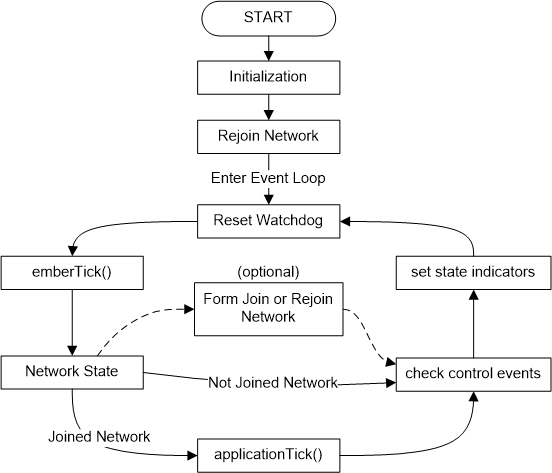
The main program loop is central to the execution of your application. The following figure describes a typical EmberZNet PRO application main loop.
Initialization#
Among the initialization tasks, any serial ports (SPI, UART, debug or virtual) must be initialized. It is also important to call emberInit()/ezspInit() before any other stack functions (except initializing the serial port so that any errors have a way to be reported). Additional tasks include the following.
Prior to calling emberInit()/ezspInit():
Initialize the HAL.
Turn on interrupts.
After calling emberInit()/ezspInit():
Initialize serial ports as needed to print diagnostic information about reset info and
emberInit()/ezspInit()results.Initialize state machines pertaining to any utility libraries, such as
securityAddressCacheInit()andemberCommandReaderInit.Try to re-associate to a network if previously connected.
Initialize the application state (in this case a sensor interface).
Set any status or state indicators to initial state.
Event Loop#
The example in Setup Main Program Loop is based on the sensor.c sample application. In that application, joining the network requires a button press to initiate the process; your application may use a scheduled event instead. The network state is checked once during each circuit of the event loop. If the state indicates "joined," then the applicationTick() function is executed. Otherwise, the execution flow skips over to checking for control events.
This application uses buttons for data input that are handled as a control event. State indicators are simply LEDs in this application, but could be an alphanumeric display or some other state indicator.
The applicationTick() function provides services in this application to check for timeouts, check for control inputs, and change any indicators (like a heartbeat LED). Note that applicationTick() is only executed here if the network is joined.
The function emberTick()/ezspTick() is a part of EmberZNet PRO. It is a periodic tick routine that should be called:
In the application's main event loop
After
emberInit()/ezspInit()
Single chip (SoC) platforms have a watchdog timer that should be reset once during each circuit through the event loop. If it times out, a reset will be triggered. By default, the watchdog timer is set for 2 seconds.
Manage Network Associations#
The application is responsible for managing network associations. The tasks involved include:
Detecting a network
Joining a network
Forming a new network
Extended PAN IDs#
EmberNetworkParameters struct contains an 8 byte extended PAN ID in addition to the 2-byte PAN ID.
CAUTION: Your application must set this value, if only to zero it out. Otherwise, it is likely to be initialized with random garbage, which will lead to unexpected behavior.
emberFormNetwork() stores the extended PAN ID to the node data token. If a value of all zeroes is passed, a random value is used. In production applications Silicon Labs recommends that the random extended PAN ID is used. Using a fixed value (such as the EUI64 of the coordinator) can easily lead to extended PAN ID conflicts if another network running the same application is nearby or if the coordinator is used to commission two different neighboring networks.
emberJoinNetwork() joins to a network based on the supplied Extended PAN ID. if an Extended PAN ID of all zeroes is supplied it joins based on the short PAN ID, and the Extended PAN ID of the network is retrieved from the beacon and stored to the node data token.
The API call for emberJoinNetwork() is as follows:
EmberStatus emberJoinNetwork(EmberNodeType nodeType, EmberNetworkParameters *parameters)The new API function to retrieve the Extended PAN ID is:
void emberGetExtendedPanId(int8u *resultLocation);Detecting a Network#
Detecting a network is handled by the stack software using a process called Active Scan, but only if requested by the application. To do so, the application must use the function emberStartScan() with a scantype parameter of EMBER_ACTIVE_SCAN. This function starts a scan and returns EMBER_SUCCESS to signal that the scan has successfully started. It may return one of several error values that are listed in the online API documentation.
Active Scanning walks through the available channels and detects the presence of any networks. The function emberScanCompleteHandler()/ ezspScanCompleteHandler() is called to indicate success or failure of the scan results. Successful results are accessed through the emberNetworkFoundHandler() / ezspNetworkFoundHandler() function that reports the information shown in the following table.
Function Parameter | Description |
|---|---|
channel | The 802.15.4 channel on which the network was found. |
panId | The PAN ID of the network. |
extendedPanId | The Extended PAN ID of the network. |
expectingJoin | Whether the node that generated this beacon is allowing additional children to join to its network. |
stackProfile | The Zigbee stack profile number of the network. 0=private. 1=Zigbee. 2=ZigbeePro. |
To obtain a subset of these results filtered down to just the networks that allow for joining, the application can use the emberScanForJoinableNetwork() function provided in app/util/common/form-and-join.h. This triggers callbacks to the emberJoinableNetworkFoundHandler() / ezspJoinableNetworkFoundHandler() as each joinable network result is found.
Joining a Network#
To join a network, a node must generally follow a process like the one illustrated in the following figure.
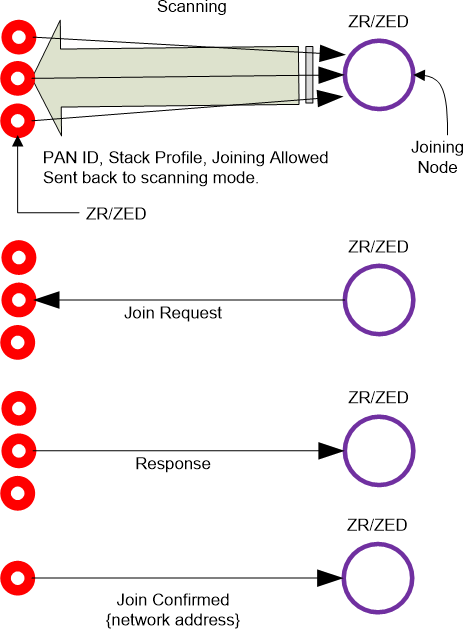
New ZR or ZED scans channels to discover all local (1-hop) ZR or ZC nodes that are join candidates.
Scanning device chooses a responding device and submits a join request.
If accepted, the new device receives a confirmation that includes the network address.
Once joined, the node must be authenticated by the network’s trust center and must await delivery of the network key from the trust center before the stack is considered “up”.
Joining a network involves calling the emberJoinNetwork() function. It causes the stack to associate with the network using the specified network parameters. It can take ~200 ms for the stack to associate with the local network, although security authentication can extend this.
CAUTION: Do not send messages until a call to the emberStackStatusHandler() / ezspStackStatusHandler callback informs you that the stack is up.
Rejoining a network is done using a different function: emberFindAndRejoinNetwork(). The application may call this function when contact with the network has been lost (due to a weak/missing connection between parent and child, changed PAN ID, changed network key, or changed channel). The most common usage case is when an end device can no longer communicate with its parent and wishes to find a new one.
The stack calls emberStackStatusHandler() / ezspStackStatusHandler() to indicate that the network is down, then try to re-establish contact with the network by performing an active scan, choosing a parent, and sending a Zigbee network rejoin request. A second call to the emberStackStatusHandler() / ezspStackStatusHandler callback indicates either the success or the failure of the attempt. The process takes approximately 150 ms to complete.
This function is also useful if the device may have missed a network key update and thus no longer has the current network key.
Creating a Network#
To create a network, a node must act as a coordinator (ZC) while gathering other devices into the network. The process generally follows a pattern shown in the following figure.
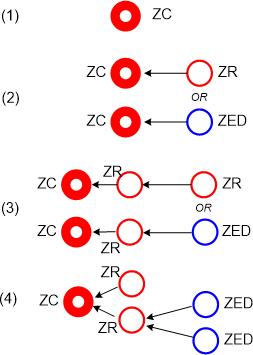
ZC starts the network by choosing a channel and unique two-byte PAN-ID and extended PAN-ID (see the above figure, step 1). This is done by first scanning for a quiet channel by calling
emberStartScan()with an argument ofEMBER_ENERGY_SCAN. This identifies which channels are noisiest so that ZC can avoid them. ThenemberStartScan()is called again with an argument ofEMBER_ACTIVE_SCAN. This provides information about PAN IDs already in use and any other coordinators running a conflicting network. (If another coordinator is found, the application could have the two coordinators negotiate the conflict, usually by allowing the second coordinator to join the network as a router.) The ZC application should do whatever it can to avoid PAN ID conflicts. So, the ZC selects a quiet channel and an unused PAN ID and starts the network by callingemberFormNetwork(). The argument for this function is the parameters that define the network. (Refer to the online API documentation for additional information.) The application’s selection of an unused PAN ID on a given channel can be simplified by using theemberScanForUnusedPanId()call from the Form & Join utilities API from app/util/common/form-and-join.h.Note: The ZC’s application software must, at compile time, specify the required stack profile and application profile for the end- points implemented. The stack is selected through the EMBER_STACK_PROFILE global definition. This may have an impact on interoperability. The EmberZNet PRO libraries support stack profiles 2 (Zigbee PRO feature set) and 0 (proprietary, non-standard stack variant).
ZR or ZED joins the ZC (see the above figure, step 2).
ZR or ZED joins the ZR (see the above figure, step 3).
This results in a network with established parent/child relationships between end device nodes and the router/coordinator devices through which they joined. (Note that routers don’t establish any parent/child relationship with other routers or the coordinator, though neighboring routers may be placed in the local device’s neighbor table for use in future route creations.)
Once the new network has been formed, it is necessary to direct the stack to allow others to join the network. This is defined by the function emberPermitJoining(). The same function can be used to close the network to joining.
Message Handling#
Many details and decisions are involved in message handling, but they all resolve into two major tasks:
Create a message
Process incoming messages
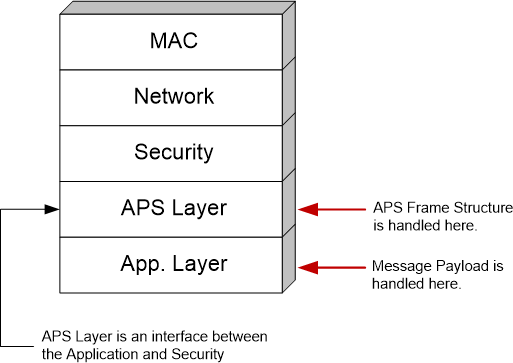
The EmberZNet PRO stack software takes care of most of the low level work required in message handling. The following figure illustrates where the application interacts with the system in message handling. However, while the APS Layer handles the APS frame structure, it is still the responsibility of the application to set up the APS Header on outbound messages, and to parse the APS header on inbound messages.
Sending a Message#
Three basic types of messages can be sent:
Unicast: sent to a specific node ID based on an address table entry (the node ID can also be supplied manually by the application if necessary).
Broadcast: sent to all devices, all non-sleepy devices or all non-ZEDs.
Multicast: sent to all devices sharing the same Group ID.
Before sending a message you must construct a message. The message frame varies according to message type and security levels. Since much of the message frame is generated outside of the application, the key factor that must be considered is the maximum size of the message payload originating in your application.
Take a few moments and study the structure of the API functions shown in the following table.
| Function | Description |
|---|---|
|
emberSendUnicast ( EmberOutgoingMessageType type, int16u indexOrDestination, EmberApsFrame * apsFrame, EmberMessageBuffer message ) |
Sends a unicast message as per the Zigbee specification. Parameters: type Specifies the outgoing message type. Must be one of EMBER_OUTGOING_DIRECT, EMBER_OUTGOING_VIA_ADDRESS_TABLE, or EMBER_OUTGOING_VIA_BINDING. indexOrDestination Depending on the type of addressing used, this is either the EmberNodeId of the destination, an index into the address table, or an index into the binding table. apsFrame The APS frame which is to be added to the message. message Contents of the message. |
|
ezspSendUnicast ( EmberOutgoingMessageType type, int16u indexOrDestination, EmberApsFrame *apsFrame, int8u messageTag, int8u messageLength, int8u *messageContents, int8u *sequence ) |
Sends a unicast message as per the Zigbee specification. Parameters: type Specifies the outgoing message type. Must be one of EMBER_OUTGOING_DIRECT, EMBER_OUTGOING_VIA_ADDRESS_TABLE, or EMBER_OUTGOING_VIA_BINDING. indexOrDestination Depending on the type of addressing used, this is either the EmberNodeId of the destination, an index into the address table, or an index into the binding table. messageTag A host-specified value used to refer to the message. messageLength The length of the messageContents parameter in bytes. *messageContents Content of the message. *sequence Sequence number to be used when the message is transmitted. |
|
emberSendBroadcast ( EmberNodeId destination, EmberApsFrame * apsFrame, int8u radius, EmberMessageBuffer message ) |
Sends a broadcast message as per the Zigbee specification. The message will be delivered to all nodes within radius hops of the sender. A radius of zero is converted to EMBER_MAX_HOPS. Parameters: destination The destination to which to send the broadcast. This must be one of three Zigbee broadcast addresses. apsFrame The APS frame data to be included in the message. radius The maximum number of hops the message will be relayed. message The actual message to be sent. |
|
ezspSendBroadcast ( EmberNodeId destination, EmberApsFrame * apsFrame, int8u radius, int8u messageTag, int8u messageLength, int8u *messageContents, in8u *sequence ) |
Sends a broadcast message as per the Zigbee specification. The message will be delivered to all nodes within radius hops of the sender. A radius of zero is converted to EMBER_MAX_HOPS. Parameters: destination The destination to which to send the broadcast. This must be one of three Zigbee broadcast addresses. apsFrame The APS frame data to be included in the message. radius The maximum number of hops the message will be relayed. messageTag A host-specified value used to refer to the message. messageLength The length of the messageContents parameter in bytes. messageContents The message to be sent. *sequence Sequence number to be used when the message is transmitted. |
|
emberSendMulticast ( EmberApsFrame * apsFrame, int8u radius, int8u nonmemberRadius, EmberMessageBuffer message ) |
Sends a multicast message to all endpoints that share a specific multicast ID and are within a specified number of hops of the sender. Parameters: apsFrame The APS frame for the message. The multicast will be sent to the groupId in this frame. radius The message will be delivered to all nodes within this number of hops of the sender. A value of zero is converted to EMBER_MAX_HOPS. nonmemberRadius The number of hops that the message will be forwarded by devices that are not members of the group. A value of 7 or greater is treated as infinite. message A message. |
|
ezspSendMulticast ( EmberApsFrame * apsFrame, int8u hops, int8u nonmemberRadius, int8u messageTag, int8u messageLength, int8u *messageContents, in8u *sequence ) |
Sends a multicast message to all endpoints that share a specific multicast ID and are within a specified number of hops of the sender. Parameters: apsFrame The APS frame for the message. The multicast will be sent to the groupId in this frame. radius The message will be delivered to all nodes within this number of hops of the sender. A value of zero is converted to EMBER_MAX_HOPS. nonmemberRadius The number of hops that the message will be forwarded by devices that are not members of the group. A value of 7 or greater is treated as infinite. messageTag A host-specified value used to refer to the message. messageLength The length of the messageContents parameter in bytes. messageContents The message to be sent. *sequence Sequence number to be used when the message is transmitted. |
Note: Please keep in mind that the online API documentation is more extensive than that shown here. Always refer to the online API documentation for definitive information.
In every case illustrated above, message buffer contains the message. Normally, the application allocates memory for this buffer (as some multiple of 32 bytes). But how big can this buffer be? Or: How big a message can be sent? The answer is: you don’t necessarily know, but you can find out dynamically. The function emberMaximumApsPayloadLength(void) returns the maximum size of the payload that the Application Support sub-layer will accept, depending on the security level in use. This means that:
Constructing your message involves supplying the arguments for the appropriate message type’s emberSend/ezspSend... function.
You can use emberMaximumApsPayloadLength(void)to determine how big your message can be.
Executing the emberSend/ezspSend... function causes your message to be sent.
Normally, the emberSend/ezspSend... function returns a value. Check the online API documentation for further information.
It should become clear that the task of sending a message is a bit complex, but it is also very consistent. The challenge in designing your application is keeping track of the argument values and the messages to be sent. Some messages may have to be sent in partial segments and some may have to be resent if an error occurs. Your application must deal with the consequences of these possibilities.
Receiving Messages#
Unlike sending messages, receiving messages is a more open-ended process. The application is notified when a message has been received, but the application must decide what to do with it and how to respond to it.
Note: The stack doesn’t detect or filter duplicate packets in the APS layer. Nor does it guarantee in-order message delivery. These mechanisms need to be implemented by the application.
In the case of the SoC platform, the stack deals with the mechanics of receiving and storing a message. But in the case of the EZSP host platform, the message is passed directly to the host. The host must deal with receiving and storing the message in addition to reacting to the message contents.
In all cases, the application must parse the message into its constituent parts and decide what to do with the information. Because this varies based on the system design, we can only discuss it in general terms.
Messages generally can be divided into two broad categories: command or data messages. Command messages involve the operation of the target as a functional member of the network (including housekeeping commands). Data messages are informational to the application, although they may deal with the functionality of a device with which the node is interfaced, such as a temperature sensor.
When a message is received, the function emberIncomingMessageHandler()/ezspIncomingMessageHandler() is a callback invoked by the EmberZNet PRO stack. This function contains the following arguments:
| Function | Description |
|---|---|
|
emberIncomingMessageHandler ( EmberIncomingMessageType type, EmberApsFrame * apsFrame, EmberMessageBuffer message ) |
type The type of the incoming message. One of the following: EMBER_INCOMING_UNICAST EMBER_INCOMING_UNICAST_REPLY EMBER_INCOMING_MULTICAST EMBER_INCOMING_MULTICAST_LOOPBACK EMBER_INCOMING_BROADCAST EMBER_INCOMING_BROADCAST_LOOPBACK EMBER_INCOMING_MANY_TO_ONE_ROUTE_REQUEST apsFrame The APS frame from the incoming message. message The message that was sent. |
|
ezspIncomingMessageHandler( EmberIncomingMessageType type, EmberApsFrame *apsFrame, int8u lastHopLqi, int8s lastHopRssi, EmberNodeId sender, int8u bindingIndex, int8u addressIndex, int8u messageLength, int8u *messageContents ) |
Type EMBER_INCOMING_UNICAST EMBER_INCOMING_UNICAST_REPLY EMBER_INCOMING_MULTICAST EMBER_INCOMING_MULTICAST_LOOPBACK, EMBER_INCOMING_BROADCAST EMBER_INCOMING_BROADCAST_LOOPBACK apsFrame The APS frame from the incoming message. lastHopLqi The link quality from the node that last relayed the message. lastHopRssi The energy level (in units of dBm) observed during the reception. sender The sender of the message bindingIndex The index of a binding that matches the message or 0xFF if there is no matching binding. addressIndex The index of the entry in the address table that matches the sender of the message or 0xFF if there is no matching entry. messageLength The length of the messageContents parameter in bytes. messageContents The incoming message. |
While more than the three message types previously discussed may be returned, the others are simply specialized variations of the three basic types.
The application message handling code must deal with all three arguments of emberIncomingMessageHandler()/ ezspIncomingMessageHandler(). Certain message types may have special handling options. The message itself must be parsed into its constituent parts and each part reacted to accordingly. This usually involves a switch statement and varies in detail with every application. The sample applications (in <install-dir>/app) are a good place to look for detailed examples of incoming message handlers.
For incoming broadcasts, the destination broadcast ID will be in the groupId field of the APS struct.
One additional function can only be called from within emberIncomingMessageHandler(). This extracts the source EUI64 from the network frame of the message, but only if EMBER_APS_OPTION_SOURCE_EUI64 is set.
EmberStatus emberGetSenderEui64(EmberEUI64 senderEui64 );
ezspIncomingSenderEui64Handler()Note: For EZSP host applications, all relevant information about the incoming message is passed to the host by the NCP at the time that the
ezspIncomingMessageHandler()callback is triggered. In cases where the incoming message provides source EUI64 data, and additional callback ofezspIncomingSenderEui64Handler(senderEui64)is provided just prior toezspIncomingMessageHandler().
Message Acknowledgement#
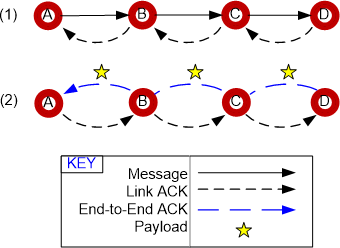
When a message is received, it is good network protocol to acknowledge receipt of the message. This is done automatically in the stack software at the MAC layer with a Link ACK, requiring no action by the application. This is illustrated in the following figure (1) where node A sends a message to node D. However, if the sender requests an end-to-end acknowledgement, the application may want to add something as payload to the end-to-end ACK message (see the following figure (2)). While adding a payload is possible, it is not compliant with the Zigbee specification. If this is of interest, please contact Silicon Labs support. support for further information.
Note: Additional information on message handling can be found in Zigbee Messaging.
Housekeeping Tasks#
A variety of housekeeping tasks must be included in the application. Some of these tasks are application-dependent, but some are re- quired by every application. These universally required tasks are the subject of this section.
Processor Maintenance#
In the case of the SoC platform, one unique task is required of all applications running on that platform. You must call emberTick() on a regular basis. emberTick() acts as a link between the stack state machine and the application state machine. When executed, emberTick() allows the stack to deal with several tasks that have collected since the last time emberTick() was called. A variety of callbacks can result from each call to emberTick(), generally to get input from the application for resolving a stack task. As mentioned in Section A.3.2, Set Up Main Program Loop, emberTick() is called in the application's main event loop and after calling emberInit().
The application’s main loop must perform the following tasks:
Manage I/O functions.
Reset the watchdog timer.
Maintain buffer and memory (including calling
emberSerialBufferTick()if using buffered serial mode).Process errors.
Include debugging features/strategies.
Host I/O Maintenance#
In the case of EZSP network coprocessor [NCP] designs, the host must perform the following additional tasks:
Check for callbacks regularly in the main event loop.
Process errors.
Perform bootloading (if implemented).
Include debugging features/strategies.
Network Maintenance#
A key group of housekeeping tasks involve network maintenance. All applications must generally deal with the following tasks (based on the complexity of the system/application design):
Joining a network.
Rejoining a network.
Dealing with interference (that is, being able to adapt to degrading network conditions) (optional).
Tasks for an End Device (ZED) include:
Dealing with loss of connectivity (that is, polling for a lost parent).
Checking in with parent after emerging from a sleep or hibernation state.
For Mobile ZEDs, keeping their connection to their parent alive by regularly polling that link. Otherwise they need to call
emberRejoinNetwork()whenever they wish to communicate with the network.
Tasks for a Coordinator (ZC) or Router (ZR) include:
Forming a network.
Commissioning a network or accepting a new device on the network.
Dealing with new or replaced nodes.
And, if sleepy ZEDs are included in the network, tasks include:
ZED power consumption (managing sleeping or waiting end devices).
Acting as a parent, dealing with ZED alarms, and reacting to child join/leaves.
Zigbee Network Rejoin Strategies#
End devices (ZED) that have lost contact with their parent or any node that does not have the current network key should call the API function shown below.
EmberStatus emberFindAndRejoinNetwork(boolean haveCurrentNetworkKey,int32u channelMask);The haveCurrentNetworkKey variable determines if the stack performs a secure network rejoin (haveCurrentNetworkKey = TRUE) or an insecure network rejoin (haveCurrentNetworkKey = FALSE). The insecure network rejoin only works if using the Commercial Security Library. In that case the current network key is sent to the rejoining node encrypted at the APS Layer with that device's link key.
Zigbee Messaging#
Address Table
EUI64 values to network ID mappings are kept in an address table. The stack updates the node IDs as new information arrives. It will not change the EUI64s.
EmberStatus emberSetAddressTableRemoteEui64(int8u addressTableIndex, EmberEui64 eui64);
void emberSetAddressTableRemoteNodeId(int8u addressTableIndex, EmberNodeId id);
void emberGetAddressTableRemoteEui64(int8u addressTableIndex, EmberEui64 eui64);
EmberNodeId emberGetAddressTableRemoteNodeId(int8u addressTableIndex);The size of the table can be set by defining EMBER_ADDRESS_TABLE_SIZE before including ember-configuration.c.
The binding table has its own remote ID table. Four reserved node ID values are used with the address and binding tables, described in the following table.
Function | Description |
|---|---|
EMBER_TABLE_ENTRY_UNUSED_NODE_ID (0xFFFF) | Used when setting or getting the remote node ID in the address table or getting the remote node ID from the binding table. It indicates that address or binding table entry is not in use. |
EMBER_MULTICAST_NODE_ID (0xFFFE) | Returned when getting the remote node ID from the binding table and the given binding table index refers to a multicast binding entry. |
EMBER_UNKNOWN_NODE_ID (0xFFFD) | Used when getting the remote node ID from the address or binding tables. It indicates that the address or binding table entry is currently in use but the node ID corresponding to the EUI64 in the table is currently unknown. |
EMBER_DISCOVERY_ACTIVE_NODE_ID (0xFFFC) | Used when getting the remote node ID from the address or binding tables. It indicates that the address or binding table entry is currently in use and network address discovery is underway. |
The following function function validates that a given node ID is valid and not one of the reserved values.
boolean emberIsNodeIdValid(EmberNodeId id);Two additional functions can be used to search through all the relevant stack tables (address, binding, neighbor, child) to map a long address to a short address, or vice versa.
EmberNodeId emberLookupNodeIdByEui64(EmberEUI64 eui64);
EmberStatus emberLookupEui64ByNodeId(EmberNodeId nodeId, EmberEUI64 eui64Return);Since end device children cannot be identified by their short ID, two functions allow the application to set and read the flag that increa- ses the interval between APS retry attempts.
boolean emberGetExtendedTimeout(EmberEUI64 remoteEui64);
void emberSetExtendedTimeout(EmberEUI64 remoteEui64, boolean extendedTimeout);Sending Messages#
The destination address for a unicast can be obtained from the address or binding tables, or passed as an argument. An enumeration is used to indicate which is to be used for a particular message. The same enumeration is used with emberMessageSent() / ezspMessageSentHandler(); EMBER_OUTGOING_BROADCAST and EMBER_OUTGOING_MULTICAST cannot be passed to emberSendUnicast()/ezspSendUnicast().
Use of the address or binding table allows the stack to perform address discovery by setting the EMBER_APS_OPTION_ENABLE_ADDRESS_DISCOVERY option.
enum {
EMBER_OUTGOING_DIRECT,
EMBER_OUTGOING_VIA_ADDRESS_TABLE,
EMBER_OUTGOING_VIA_BINDING,
EMBER_OUTGOING_BROADCAST, // only for emberMessageSent()
EMBER_OUTGOING_MULTICAST // only for emberMessageSent()
};
typedef int8u EmberOutgoingMessageType;
EmberStatus emberSendUnicast(EmberOutgoingMessageType type,
int16u indexOrDestination,
EmberApsFrame *apsFrame,
EmberMessageBuffer message);EMBER_OUTGOING_VIA_BINDING uses only the binding's address information. The rest of the binding's information (cluster ID, endpoints, profile ID) can be retrieved using emberGetBinding() and emberGetEndpointDescription(). This allows the application to re-use an existing binding for additional clusters or endpoints besides the one provided during the binding’s creation.
The next snippet of example code shows how a message might be sent using a binding. The options in the example are the ones Silicon Labs recommends using for unicast transmissions to a non-many-to-one binding, where the destination is not a concentrator. When sending to a network concentrator, route and address discovery should not be enabled as the concentrator will handle this itself by Many-to-one Route Requests. For more information about concentrators see document UG103.3: Software Design Fundamentals.
EmberApsFrame apsFrame = {
profileId,
clusterId,
sourceEndpoint,
destinationEndpoint,
EMBER_APS_OPTION_RETRY
| EMBER_APS_OPTION_ENABLE_ROUTE_DISCOVERY
| EMBER_APS_OPTION_ENABLE_ADDRESS_DISCOVERY
| EMBER_APS_OPTION_DESTINATION_EUI64
};
emberSendUnicast(EMBER_OUTGOING_VIA_BINDING,
bindingIndex,
&apsFrame,
message);emberSendReply()/ezspSendReply() can be used to send a reply (as payload accompanying the APS ACK) to any retried APS messages. Replies are a nonstandard extension to Zigbee and may not be accepted by non-Silicon Labs devices. Note that the use of ezspSendReply() by EZSP host applications is only permissible when the EZSP_UNICAST_REPLIES_POLICY has been configured as EZSP_HOST_WILL_SUPPLY_REPLY; otherwise, the NCP will generate the APS ACK (without any accompanying payload) automatically upon receiving the retried APS unicast.
EmberStatus emberSendReply(int16u clusterId, EmberMessageBuffer reply);Multicasts get an APS frame plus radii. The groupId is specified in the APS frame. The nonMemberRadius specifies how many hops the message should be forwarded by devices that are not members of the group. A value of 7 or greater is treated as infinite.
EmberStatus emberSendMulticast(EmberApsFrame *apsFrame,
int8u radius,
int8u nonMemberRadius,
EmberMessageBuffer message);A multicast table is provided to track group multicast membership for the local device. The size is EMBER_MULTICAST_TABLE_SIZE and defaults to 8. Multicast table entries should be created and modified manually by the application; just index into the array.
Note: The multicast table entries are stored in RAM on the device and are therefore not preserved across resets of the processor. For non-volatile storage of multicast group membership data, use binding table entries with “type” set to EMBER_MULTICAST_BINDING.
EmberMulticastTableEntry *emberMulticastTable;
/** @brief Defines an entry in the multicast table.
* @description A multicast table entry indicates that a particular
* endpoint is a member of a particular multicast group. Only devices
* with an endpoint in a multicast group will receive messages sent to
* that multicast group.
*/
typedef struct {
/** The multicast group ID. */
EmberMulticastId multicastId;
/** The endpoint that is a member, or 0 if this entry is not in use
* (the ZDO is not a member of any multicast groups).
*/
int8u endpoint;
} EmberMulticastTableEntry;Since Zigbee has three different broadcast addresses (everyone, rx-on-when-idle only, routers only), broadcasting requires specifying a destination address. On the receiver, this can be read out of the groupId field in the apsFrame.
#define EMBER_BROADCAST_ADDRESS 0xFFFC
#define EMBER_RX_ON_WHEN_IDLE_BROADCAST_ADDRESS 0xFFFD
#define EMBER_SLEEPY_BROADCAST_ADDRESS 0xFFFF
EmberStatus emberSendBroadcast(EmberNodeId destination,
EmberApsFrame *apsFrame,
int8u radius,
EmberMessageBuffer message);Message Status#
emberMessageSent() /ezspMessageSent() should be called for all outgoing messages. The type of message is given by the enumeration of outgoing message types. Call emberMessageSent()/ezspMessageSent():
For retried unicasts, when an ACK arrives or the message times out.
For non-retried unicasts, when the MAC receives an ACK from the next hop or the MAC retries are exhausted.
For broadcasts and multicasts, when the message is removed from the retry queue (not the broadcast table).
The indexOrAddress argument is the destination address for direct unicasts, broadcasts, and multicasts. For unicasts sent through the address or binding tables, it is the index into the relevant table. The following table summarizes the status arguments for broadcasts and multicasts.
Status Argument | Description |
|---|---|
EMBER_DELIVERY_FAILED | if the message was never transmitted. |
EMBER_DELIVERY_FAILED | if radius is greater than 1 and we don't hear at least one neighbor relay the message. |
EMBER_SUCCESS | otherwise. |
Example code:
void emberMessageSent(EmberOutgoingMessageType type,
int16u indexOrDestination,
EmberApsFrame *apsFrame,
EmberMessageBuffer message,
EmberStatus status);Disable Relay#
If EMBER_DISABLE_RELAY is defined in the app configuration header (or if EZSP_CONFIG_DISABLE_RELAY is set to 0x01 in EZSP), the node will not relay unicasts, route requests, or route replies. It can still generate route requests and replies, so that it can be the source or destination of network messages. This is intended for use in a gateway.
Binding#
The binding table is now used only in support of provisioning. The idea is that a provisioning tool will use the ZDO to discover the services available on a device and to add entries to the device's binding table. Other than the ZDO, no use is made of the binding table within Zigbee. It is up to the application to make use of the information in the table how it sees fit.
Messages use an address table to establish the message destination (unless a binding already exists to reference the destination). Since the binding table exists as a separate library, applications can conserve flash by omitting this library in cases where only the address table is used to preserve destination information, such as when the application has its own method for non-volatile destination data storage.