


Design Considerations#
There are several factors to consider when designing a node that can operate concurrently on multiple networks as illustrated in the following figure. This section discusses them in detail as well as the associated tradeoffs.
Note: As of this revision of this application note, the number of concurrent networks is limited to two.
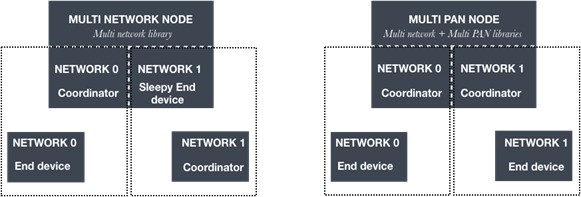
Based on the roles that the node is expected to serve on the networks, there are three general use cases:
Single-network: This use case is the standard version of the EmberZNet PRO stack where a node may only be part of one network at a time. This configuration links in stub versions of the multi-network and multi-pan libraries. This is often the only configuration that is available on parts that are severely code-space restricted.
Multi-network: This use case is applicable when the Zigbee radio on a device is timeshared between two networks wherein the device serves the role of an always-on device on no more than one network. An always-on device may be a Zigbee PRO coordinator, router, or (non-sleepy) end device.
To function as an always-on device on one network, the device must limit its role as a sleepy end-device on the other network. The node may also choose to function as a sleepy end-device on both networks. In this case, it can sleep when it is not active on any network. This allows the two networks to be on different radio channels, run at different radio power levels, and have dissimilar network security requirements. This configuration links in the multi-network library and a stub version of the multi-pan library.
The network scheduling algorithm seamlessly takes care of switching between networks so that the node is on the always-on network unless it explicitly polls or sends some data to the parent on the sleepy end device or sleepy network(s). As soon as the polling or data sending transaction on the sleepy network is completed, the node immediately switches back to the always-on network until a new polling or data sending transaction is initiated. A node that is a coordinator/router on one network and a sleepy end device on the other will not be able to save energy by temporarily shutting down the radio (sleep mode). On the other hand, a node that is a sleepy end device on all networks can enter sleep mode, thus providing energy savings.
Due to the additional overhead required to maintain information on both networks, there is a nominal increase in code space and RAM usage when compared to the single-network use case. Therefore, this feature is limited to parts with flash size of at least 512kB.
Multi-PAN: This use case is an extension of the multi-network use case where a device with a single Zigbee radio operates two Zigbee networks and takes the role of an always-on node on both networks. This configuration is only supported in Host-NCP mode. Host applications that support two coordinator nodes require an NCP that is similarly configured to support Zigbee stack functionality for the two networks.
To function as an always-on device on both networks, there is an additional restriction that both networks need to be on the same radio channel so they can receive messages meant for either network at all times. The onus is upon the application to ensure that both networks are on the same radio channel. Starting with EmberZNet PRO 6.8.0, the stack supports a dual-coordinator configuration only. The first network index supports Zigbee 3.0 security and the second network index only supports the no-security Zigbee PRO network configuration profile. The stack does not currently restrict application-initiated channel changes. This is acceptable when only one of the networks is up. However, when both networks are functional, care must be taken to avoid disruptive network or user-initiated channel changes as these are not supported.
In this configuration, it is also important to note that there is a limitation regarding sleepy broadcast messages. There is a maximum of one broadcast that is queued for all sleepy end devices across both networks.
This configuration links in both the multi-pan and multi-network libraries. There is more overhead involved in serving as a coordinator compared to a router or an end-device. As a result, this configuration with two coordinators results in the most flash and RAM usage and is limited to parts with a flash size of at least 512 kB.
Note: Some components are not multi-network-aware and would require additional implementation to enable expected functionality. These include the Device Table component, Update TC Link Key component, and Network Steering component.
Network 0 | Network 1 | Required Libraries |
|---|---|---|
Zigbee PRO (Coordinator, Router, End device or Sleepy end device) | N/A | Multi-network stub; Multi-PAN stub |
ZigBee PRO Coordinator (always-on) | ZigBee PRO Sleepy end device | Multi-network library; Multi-PAN stub |
ZigBee PRO Router (always-on) | ZigBee PRO Sleepy end device | Multi-network library; Multi-PAN stub |
ZigBee PRO End device (always-on) | ZigBee PRO Sleepy end device | Multi-network library; Multi-PAN stub |
ZigBee PRO Sleepy end device | ZigBee PRO Sleepy end device | Multi-network library; Multi-PAN stub |
Zigbee PRO Coordinator with Zigbee 3.0 security (always-on) | Zigbee PRO Coordinator with no-security (always-on) | Multi-network library; Multi-PAN library |