


Creating an OTA File#
To create an OTA file you need to first decide the parameters of the firmware image that will be embedded in the OTA file.
The basic build parameters are Manufacturer ID, Image Type Id, and Version. Together these form a unique identifier to denote the image for all OTA servers that serve up the file to clients.
Manufacturer ID#
The manufacturer ID is the Connectivity Standards Alliance (CSA)-assigned value that is unique to the manufacturer. For example, the Silicon Labs manufacturer ID is 0x1049. Manufacturers must contact the CSA to obtain their own manufacturer ID.
Image Type ID#
The image type ID is an identifier to indicate the specific product group to which the update applies. For example, if your company manufactures light switches and thermostats, which required different flavors of software, you would use different image type IDs to indicate whether the upgrade is for a light switch or a thermostat.
Zigbee has specified a few values, but the rest (0x0000-0xFFBF) are open to each manufacturer’s interpretation. The manufacturer-specific values for the image type are unique to each manufacturer ID. Therefore different vendors may use the same image type ID within the manufacturer-specific range without a conflict. The image type ID values are shown in the following table.
Image Type ID | Description |
|---|---|
0x0000 – 0xffbf | Manufacturer Specific |
0xffc0 | Security credential |
0xffc1 | Configuration |
0xffc2 | Log |
0xffc3 – 0xfffe | Reserved (unassigned) |
0xffff | Reserved: wild card |
Version#
The Version is the software version that is associated with the file or files that are wrapped in the OTA package. This version is used by the OTA cluster to query when a new software update is ready. In general it is recommended that this be an increasing number for each new software version. However, you are free to use whatever scheme you would like. For example, our version number is encoded as hexadecimal digits, so version 4.2.0 build 1 would be 0x00004201.
Tags
Tags are blobs of data inside the OTA file that are interpreted by the device receiving and processing the update. A few tags are defined and global to all devices, such as the ECDSA Signature Tag and the ECDSA Signer Certificate tag. However, tags can be manufacturer-specific and contain information only pertinent to certain devices that know how to handle them. Each tag is labeled with an identification number. The list of identification numbers is specified by the OTA cluster, as shown in the following table.
Identification Number | Description |
|---|---|
0x0000 | Upgrade Image |
0x0001 | ECDSA Signature |
0x0002 | ECDSA Signing Certificate |
0x0003 | Image Integrity Code |
0x0004 | Picture Data |
0x0005 | ECDSA 283K1 Signature |
0x0006 | ECDSA 283K1 Signing Certificate |
0x0007 – 0xefff | Reserved by Zigbee |
0xf000 – 0xffff | Manufacturer Specific Use |
An OTA file should have at least one tag containing data that is of use to the client receiving the file. There is no limit to the maximum number of tags in the file. The main upgrade file (such as the GBL file) is normally specified as tag 0x0000 (upgrade file), but this is not required by the specification. The OTA cluster code looks for this tag when passing this data to the bootloader of the device.
A NULL upgrade file is used for many of the Zigbee over-the-air bootload cluster certification tests. This is a small file that contains no upgrade code and will not be passed to the bootloader. However the OTA cluster code will download and process it. These files should be specified with a tag OTHER than 0x0000 (upgrade image) inside of them. They may in fact contain no tags and the OTA client code will not process them. Instructions for creating a NULL upgrade file are provided in the section Special OTA Files.
String#
The OTA header string is a human readable string that indicates what the upgrade file is and who it is for. This string is not used by the OTA cluster code and it is only for display purposes.
Signing#
The Zigbee Smart Energy Profile requires that OTA files be signed by the manufacturer. Downloaded files must be validated by the OTA client prior to installation. When images are signed the signer’s certificate is included automatically as a tag in the file, and a signature tag is added as the last tag in the file. Files can be signed in two ways: using a built-in test certificate and using a user-supplied certificate.
Built-in Test Certificate#
Image-builder contains a built-in test certificate that can be used to sign images with the --test-sign option. This certificate is not intended for production use. It is provided as a sample to allow signing and verification to be done in development environments. This built-in certificate used by the tool is automatically accepted by the default Simplicity Studio configuration for the OTA Client component.
Note: Silicon Labs strongly recommends that manufacturers do NOT use the built-in test certificate to generate production images to be shipped to deployed, production device. See User-Supplied Certificates below.
Production signer certificates must be handled differently than test certificates. For more information on this topic please see the Over-the-Air Upgrade Plugins section in Chapter 15 of document in UG491: Zigbee Application Framework Developer's Guide for SDK 7.0 and Higher, provided with the EmberZNet PRO stack release.
Example Using the Built-in Test Certificate#
The following is an example of creating an OTA file and signing using the built-in test certificate.
bash$ ./image-builder-ecc --create test.ota --manuf-id 0x1002 --image-type 0x5678 --version 0x00000005 --string "EFR32 uart fifo ecc tokens" --tag-id 0x0000 --tag-file uart-fifo-ecc-tokens.gbl --test-sign
image-builder (C) 2013 by Silicon Labs
Version: 1.5.2
ECC signature support present.
WARNING: Using internal test key and certificate.
WARNING: Using weak random number generator. Use '--sign' for more secure generator.
File: test.ota
Magic Number: 0x0BEEF11E
Header Version: 0x0100
Header Length: 56 bytes
Field Control: 0x0000
Manufacturer ID: 0x1002
Image Type: 0x5678
Firmware Version: 0x00000005
Stack Version: 0x0002
Header String: EFR32 uart fifo ecc tokens
Total Image Size: 112044 bytes
Total Tags: 3
ID: 0x0000 (Upgrade Image)
Length: 111872 bytes
ID: 0x0002 (ECDSA Signing Certificate)
Length: 48 bytes
Subject: (>)000D6F0000198B36
Issuer: (>)5445535453454341 (Certicom TEST CA)
ID: 0x0001 (ECDSA Signature)
Length: 50 bytes
Signer: (>)000D6F0000198B36
Data: 03ECE34CF26E86E3 7EE3A313A7D9D2ED
3C01FA1230029AF9 8523BD2759CB1E7F
41D045109AAABDDB A338
Using Certicom TEST CA issued certificate.
Message Digest: 77CA8B210A9AAE225CCA7736AFABE0A8
Signature is validUser-Supplied Certificates#
Image-builder also allows users to supply their own certificates to sign their OTA files with the --sign <filename> option. The certificate can be either 163k1 or 283k1. The certificates may either be test certificates issued from the Certicom Test CA, or production certificates issued from the Certicom Production CA. For details about obtaining and modifying a test certificate from Certicom, see Smart Energy ECC-Enabled Device Setup Process.
Note: Silicon Labs strongly recommends that manufactures use their own certificates issued from the Certicom Production CA to sign production images to be shipped to deployed, production devices.
The user-supplied certificates may either be supplied from a text file on disk, or through the command-line STDIN. To provide the data using STDIN, use the --sign option with the special filename stdin. The program reads data from STDIN, expecting the same format as a file on disk. The format for both the file on disk and STDIN is as follows:
# Comment lines begin with a ‘#’ and are ignored
Certificate: <48-byte hexadecimal array>
Private Key: <21-byte hexadecimal array>Alternatively, the certificate files supported by Simplicity Commander are also accepted, as follows:
Device Implicit Cert: <48-byte hex array>
Device Private Key: <21-byte hex array>
# These two parameters are ignored, as they are not used by the image-builder tool.
CA Public Key: <22-byte hex array>
Device Public key: <22-byte hex array>Note: Array data must be specified on the same continuous line, with a carriage return only at the end.
Image-builder reads the data from the text file (or stdin), parses the values to make sure they are formatted correctly, and then uses the data to sign the image. Below is an example of a text file with a user-supplied certificate.
Certificate:0307834a5cfa185ee9c9550a6561212af7082ef6d319000d6f000092e04e544553545345434100000000000000000000
Private Key:02032ed11b3ceeddae99ce00e23bc54564d16b18eaExample Using User-Supplied Certificates#
The following is an example of creating an OTA file and signing using a user-supplied certificate.
$ ./image-builder-ecc --create test.ota --manuf-id 0x1002 --image-type 0x5678 --version 0x00000005 --string "EFR32 uart fifo ecc tokens" --tag-id 0x0000 --tag-file uart-fifo-ecc-tokens.gbl --sign user-supplied-cert.txt
image-builder (C) 2013 by Silicon Labs
Version: 1.5.2
ECC signature support present.
Using user supplied key and certificate.
Using Certicom TEST CA issued certificate.
Using /dev/random for random number generation
Gathing sufficient entropy... (may take up to a minute)...
File: test.ota
Magic Number: 0x0BEEF11E
Header Version: 0x0100
Header Length: 56 bytes
Field Control: 0x0000
Manufacturer ID: 0x1002
Image Type: 0x5678
Firmware Version: 0x00000005
Stack Version: 0x0002
Header String: EFR32 uart fifo ecc tokens
Total Image Size: 112044 bytes
Total Tags: 3
ID: 0x0000 (Upgrade Image)
Length: 111872 bytes
ID: 0x0002 (ECDSA Signing Certificate)
Length: 48 bytes
Subject: (>)000D6F000092E04E
Issuer: (>)5445535453454341 (Certicom TEST CA)
ID: 0x0001 (ECDSA Signature)
Length: 50 bytes
Signer: (>)000D6F000092E04E
Data: 03E9F2CE826C4CB9 B734BBA2933F1F27
3485DDE831030C78 F214589E1C46EB9D
7C50C3FFA300D4C1 8C40
Using Certicom TEST CA issued certificate.
Message Digest: 040797A3C2BC13BC04D1B5C661E4D877
Signature is validProject Configurator Integration#
In order for the device to accept an image signed using a user-supplied certificate, the EUI64 of that signer must be specified to the OTA client component. On the Software Components tab of the Project Configurator, select the OTA Bootload Cluster Client component. If the component is not enabled, on the Zigbee Cluster Configurator under the Configuration Tools tab, find the Over-the-Air Bootloading cluster and select Client. You can also directly install the component.
In the OTA Bootload Cluster Client component, change the Image Signer OTA_CLIENT_SIGNER_EUI0 value to the EUI64 of the primary signer, as shown in the following figure. If other EUI64s are used for signing, then change Image Signer EUI64 1 and Image Signer EUI64 2 to reflect the values of the other two signers’ EUI64s.
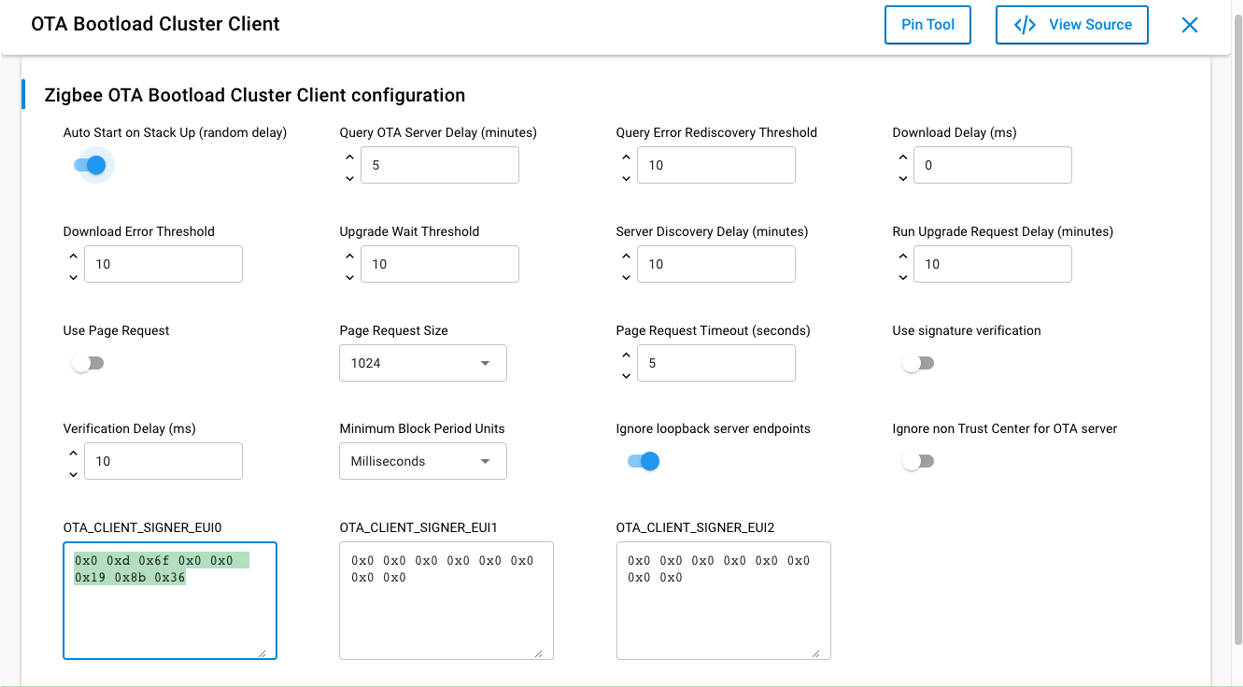
By default, the OTA Bootloader Cluster Client component uses the EUI64 of the built-in test certificate for Image Signer EUI64 0.
Special OTA Files#
This section details certain configurations that apply to various special OTA files.
Null OTA Files#
The certification process for the Zigbee Over-the-Air Bootload cluster client requires that the manufacturer provides a NULL upgrade file to the test house for testing. A NULL OTA upgrade file does not contain an actual upgrade image inside it (such as a GBL). It is much smaller than a full upgrade image, but otherwise the same as a normal Zigbee OTA file. Some of the certification tests performed by the test house use the NULL file as a way of speeding up the testing process.
NULL upgrade files can be created using Image-builder with the --tag-length option instead of the --tag-file option. The value passed to --tag-length is usually something small, such as 10. This option generates a sequence of bytes incrementing from 0 based on the length passed in. When creating the files, you should provide a tag ID other than 0x0000, which Zigbee has defined as "Upgrade Image". This step prevents confusion between a real upgrade file and a NULL upgrade file. If both files have the same tag ID it is difficult to tell them apart. However, the Gecko Bootloader will never try to bootload a NULL upgrade file. It always verifies that the data is a valid GBL file before bootloading it.
NULL files can optionally be signed in the same way as regular OTA files. If the signature is present the OTA Client Policy plugin software will verify it before examining the contents to see if the file contains a NULL image.
Here is an example of how to create a NULL OTA file:
$ ./image-builder --create null-file.ota --version 0x00000005 --manuf-id 0x1002 --image-type 0x5678 --string "NULL upgrade file" --tag-id 0xfffff --tag-length 10
image-builder (C) 2013 by Silicon Labs
Version: 1.5.2
ECC signature support NOT present.
File: null-file.ota
Magic Number: 0x0BEEF11E
Header Version: 0x0100
Header Length: 56 bytes
Field Control: 0x0000
Manufacturer ID: 0x1002
Image Type: 0x5678
Firmware Version: 0x00000005
Stack Version: 0x0002
Header String: NULL upgrade file
Total Image Size: 72 bytes
Total Tags: 1
ID: 0xFFFF (Manufacturer Specific)
Length: 10 bytes