


Remote Authentication Process#
Remote authentication is used to manage attestation by requesting that the device sign a challenge or PSA EAT. The remote device requests a challenge (random nonce) that is either signed directly, if using the MCU identity, or packaged into one of the EAT Tokens, if using the SE identity for authentication. The MCU Device Certificate Private Key is used to sign a challenge for authentication, the SE Device Certificate Private Key is used to sign a EAT (either the PSA IAT or security config token)
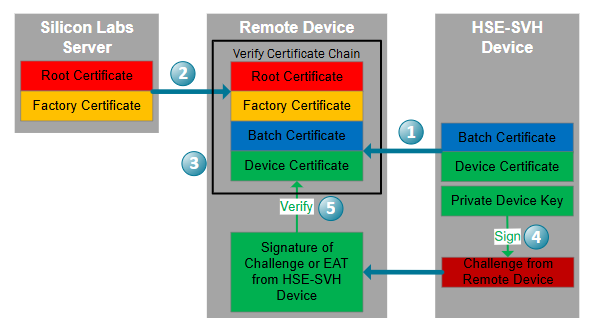
The remote device requests the SE or MCU device certificate and batch certificate from the Silicon Labs device.
The remote device looks up the factory certificate and root certificate from the Silicon Labs Server.
The remote device validates each certificate in the chain using the public key of each Issuer (Verification for Certificates).
The remote device then sends an attestation request to the device. The device uses the MCU Device Certificate Private Key on the chip to sign the challenge or the SE Device Certificate Private key to sign the EAT and sends the signature of challenge or EAT to the remote device.
The remote device requires a small library to validate the signature of challenge or EAT using the Device Certificate Public Key in the device certificate.