


Examples#
Overview#
The secure device authentication examples in this section are demonstrated using the following device and SE FW versions.
| Example | Device (Radio Board) | HSE Firmware | Tool |
|---|---|---|---|
Certificate chain verification using MCU Device Identity | EFR32MG21B010F1024IM32 (BRD4195A) | Version 1.2.16 | Simplicity Commander and OpenSSL |
Certificate chain verification using MCU Device Identity | EFR32MG21B010F1024IM32 (BRD4195A) | Version 1.2.16 | Simplicity Commander |
Certificate chain verification using MCU Device Identity | EFR32MG21B010F1024IM32 (BRD4195A) | Version 1.2.16 | Simplicity Studio 5 |
Certificate chain verification & Remote authentication | EFR32MG21B010F1024IM32 (BRD4195A) | Version 1.2.16 | SE Manager and MBedTLS |
Entity Attestation Token (EAT) | EFR32MG21B010F1024IM32 (BRD4195A) | Version 1.2.16 | SE Manager |
Entity Attestation Token (EAT) | EFR32MG21B010F1024IM32 (BRD4195A) | Version 1.2.16 | Simplicity Commander |
Note: Unless specified in the example, these examples can apply to other HSE-SVH devices.
Root and Factory Certificates for Verification#
Users can download the device root certificate (Device-Root-CA-chain.pem) and factory certificate (Factory-chain.pem) from https://www.silabs.com/certificate-authority.
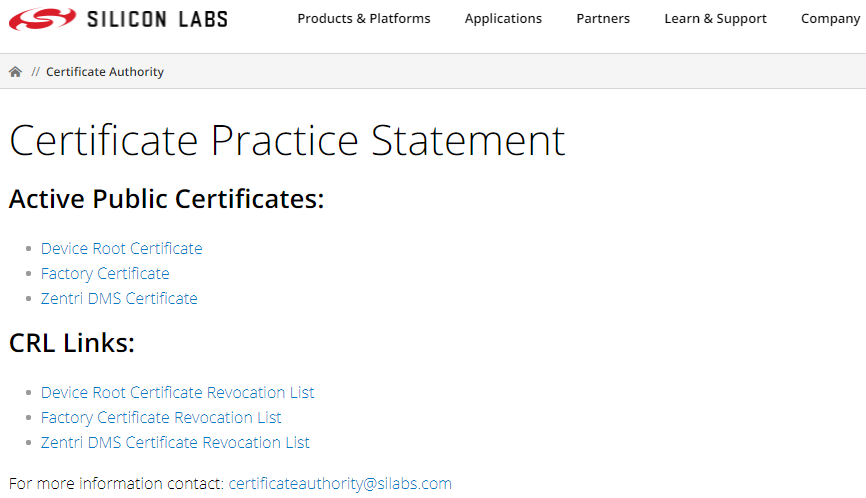
For Simplicity Studio v5.3.0.0 and higher, the device root certificate (device-root-prod.pem) and factory certificate (factory-prod.pem) can be found in the Windows folder below.
C:\SiliconLabs\SimplicityStudio\v5\offline\common\certificates
Using Simplicity Commander#
This application note uses Simplicity Commander v1.23.0. The procedures and console output may be different on the other versions of Simplicity Commander. The latest version of Simplicity Commander can be downloaded from https://www.silabs.com/developers/mcu-programming-options.
commander --versionSimplicity Commander 1v23p0b1960 JLink DLL version: 8.94 Qt 5.15.2 Copyright (C) 2017 The Qt Company Ltd. EMDLL Version: 0v20p6b826 mbed TLS version: 2.16.6 DONEThe Simplicity Commander's Command Line Interface (CLI) is invoked by
commander.exein the Simplicity Commander folder. The location for Simplicity Studio 5 in Windows isC:\SiliconLabs\SimplicityStudio\v5\developer\adapter_packs\commander. For ease of use, it is highly recommended to add the path ofcommander.exeto the systemPATHin Windows.If more than one Wireless Starter Kit (WSTK) is connected via USB, the target WSTK must be specified using the
--serialno \<J-Link serial number>option.If the WSTK is in debug mode OUT, the target device must be specified using the
--device \<device name>option.
For more information about Simplicity Commander, see Simplicity Commander Reference Guide.
Using an External Tool#
The certificate chain verification with MCU device identity example below uses OpenSSL to validate the certificate chain. The Windows version of OpenSSL can be downloaded from https://slproweb.com/products/Win32OpenSSL.html. This application note uses OpenSSL Version 1.1.1h (Win64).
openssl versionOpenSSL 1.1.1h 22 Sep 2020The OpenSSL's Command Line Interface (CLI) is invoked by openssl.exe in the OpenSSL folder. The location in Windows (Win64) is C:\Program Files\OpenSSL-Win64\bin. For ease of use, it is highly recommended to add the path of openssl.exe to the system PATH in Windows.
Using Platform Examples#
Simplicity Studio 5 includes the SE Manager platform examples for secure identity and attestation. This application note uses platform example of GSDK v3.2.3. The console output may be different on the other versions of GSDK.
Refer to the corresponding readme.html file for details about each SE Manager platform example. This file also includes the procedures to create the project and run the example.
Certificate Chain Verification with MCU Device Identity#
Certificate chain verification is the process of making sure a given certificate chain is well-formed, valid, properly signed, and trustworthy. The certificate signature is verified using the public key in the issuer certificate (Verification for Certificates).
Note: The commands below will only verify the MCU Device Identity Certificate on devices with the MCU Device Certificate stored in SE OTP (Series 2 SVH).
Using Simplicity Commander and OpenSSL to verify the MCU Device Certificate#
Run the
security readcertcommand to save the batch certificate in PEM format.commander security readcert batch -o batch.pem --serialno 440030580Writing certificate to batch.pem... DONERun the
security readcertcommand to save the device certificate in PEM format.commander security readcert mcu -o device.pem --serialno 440030580Writing certificate to device.pem... DONEGet the root certificate (
device-root-prod.pem) and factory certificate (factory-prod.pem) from the certificate folder in Simplicity Studio.Use OpenSSL to display the certificate information (e.g.,
device.pem).openssl x509 -in device.pem -text -nooutCertificate: Data: Version: 3 (0x2) Serial Number: 66:f8:5a:e6:b4:ef:6e:49:d3:36:95:63:c9:c3:99:13:e4:71:93:f6 Signature Algorithm: ecdsa-with-SHA256 Issuer: CN = Batch 1001317, O = Silicon Labs Inc., C = US Validity Not Before: Nov 19 15:10:33 2019 GMT Not After : Nov 19 15:10:33 2119 GMT Subject: C = US, O = Silicon Labs Inc., CN = EUI:14B457FFFE0F77CE DMS:086AEC3C645836BFB04D312F S:SE0 ID:MCU Subject Public Key Info: Public Key Algorithm: id-ecPublicKey Public-Key: (256 bit) pub: 04:5c:4b:c9:b0:b3:ff:fa:99:81:c5:99:be:ff:ae: 77:74:1a:f4:30:f1:1e:0e:2d:df:96:4b:ff:d2:46: fa:fa:e7:23:4b:79:cb:0a:c7:71:13:fa:7c:39:5f: e2:18:9e:4e:06:43:88:a7:9c:65:53:f3:a3:a1:06: 81:e6:06:f2:11 ASN1 OID: prime256v1 NIST CURVE: P-256 X509v3 extensions: X509v3 Basic Constraints: critical CA:FALSE X509v3 Key Usage: critical Digital Signature, Non Repudiation, Key Encipherment X509v3 Extended Key Usage: critical TLS Web Client Authentication Signature Algorithm: ecdsa-with-SHA256 30:44:02:20:57:12:a4:84:d8:37:b8:c0:44:8f:16:ac:c1:a3: be:a9:f1:16:38:9f:b9:a2:57:e6:12:49:bf:96:a9:a9:d2:b8: 02:20:5f:ae:22:f5:00:05:49:b1:da:ee:4a:84:48:70:27:97: 1c:40:2d:85:5f:f2:12:b3:8b:4a:d7:9a:ee:60:81:7cUse OpenSSL to verify the certificate chain from steps 1 to 3.
openssl verify -show_chain -CAfile device-root-prod.pem -untrusted factory-prod.pem -untrusted batch.pem device.pemdevice.pem: OKChain:
depth=0: C = US, O = Silicon Labs Inc., CN = EUI:14B457FFFE0F7777 DMS:086AEC3CE650543EE73568DA S:SE0 ID:MCU (untrusted)
depth=1: CN = Batch 1001317, O = Silicon Labs Inc., C = US (untrusted)
depth=2: CN = Factory, O = Silicon Labs Inc., C = US (untrusted)
depth=3: CN = Device Root CA, O = Silicon Labs Inc., C = USUsing Simplicity Commander to Verify the MCU Device Certificate and Batch Certificate#
Run the security readcert command to display the key information about the on-chip certificates (e.g., mcu, batch).
commander security readcert mcu --serialno 440030580cert. version : 3
serial number : 87:30:83:3C:C9:60:E2:E4:1A:05:0D:17:1F:F0:38:47:7F:29:C4:46
issuer name : CN=Batch 1172331, O=Silicon Labs Inc., C=US
subject name : C=US, O=Silicon Labs Inc., CN=EUI:B43522FFFE950215 DMS:086AEC3CBCC884B8D38D896A S:SE0 ID:MCU
issued on : 2022-09-15 23:00:53
expires on : 2122-09-15 23:00:53
signed using : ECDSA with SHA256
EC key size : 256 bits
basic constraints : CA=false
key usage : Digital Signature, Non Repudiation, Key Encipherment
ext key usage : TLS Web Client Authentication
DONEcommander security readcert batch --serialno 440030580cert. version : 3
serial number : 26:88:29:A3:A7:3D:34:59
issuer name : CN=Factory, O=Silicon Labs Inc., C=US
subject name : CN=Batch 1172331, O=Silicon Labs Inc., C=US
issued on : 2022-08-23 15:57:18
expires on : 2118-09-16 17:32:00
signed using : ECDSA with SHA256
EC key size : 256 bits
basic constraints : CA=true, max_pathlen=0
key usage : Digital Signature, Key Cert Sign
DONEUsing Simplicity Studio v5 to Verify the MCU Device Certificate#
This application note uses Simplicity Studio v5.2.1.1. The procedures and pictures may be different on the other versions of Simplicity Studio 5.
Right-click the selected debug adapter RB (ID:J-Link serial number) to display the context menu.
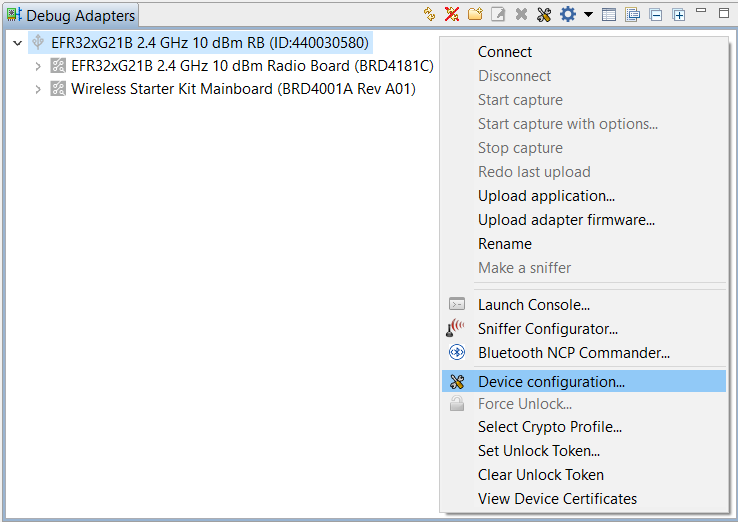
Click Device configuration... to open the Configuration of device: J-Link Silicon Labs (serial number) dialog box. Click the Security Settings tab to get the selected device configuration.
The MCU Certificate: will display Validated Successfully if it passed the certificate chain verification process.
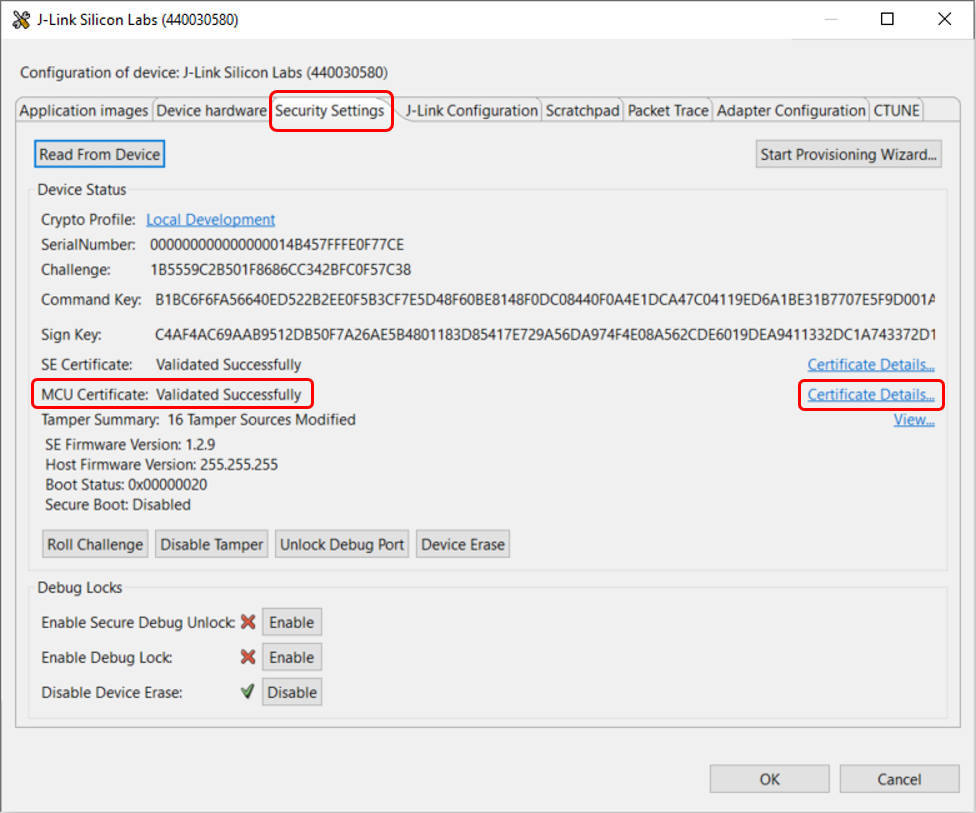
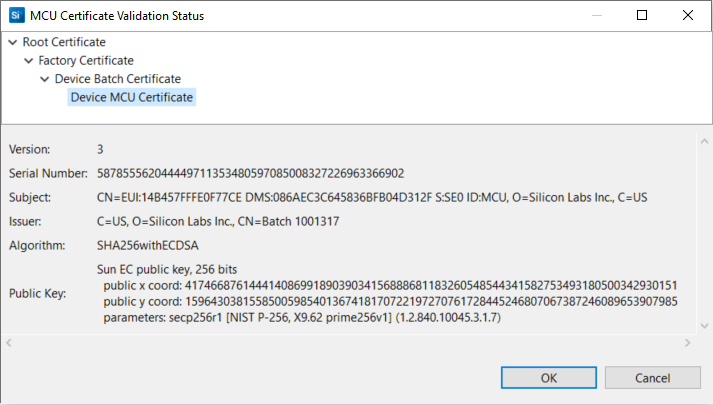
Click Certificate Details... to browse the details of different certificates (e.g., Device MCU Certificate in the figure below).
Using SE Manager Examples for Certificate Chain Verification and Remote Authentication#
The SE Manager Secure Identity platform example uses APIs in SE Manager and MBedTLS to emulate the processes in Remote Authentication Process.
Click the View Project Documentation link to open the readme.html file.

The device simulates the operations in the remote device to eliminate the communications between different parties in this example. The factory certificate and root certificate are hard-coded in the app_mbedtls_x509.c file.
The MCU Device Certificate Private Key in the Secure Key Storage on the chip is used to sign the challenge from the remote device. Therefore this example can only run as-is on a chip with the Standard MCU Device Certificate. It must be modified to be used on devices with an injected MCU Device Certificate, such as Series 2 SVM and Series 3 Secure Vault devices.
Step 1 in the Remote Authentication Process#
SE Manager Secure Identity Example - Core running at 38000 kHz.
. SE manager initialization... SL_STATUS_OK (cycles: 6 time: 0 us)
. Secure Vault High device:
+ Read size of on-chip certificates... SL_STATUS_OK (cycles: 5296 time: 139 us)
+ Read on-chip device certificate... SL_STATUS_OK (cycles: 5138 time: 135 us)
+ Parse the device certificate (DER format)... SL_STATUS_OK (cycles: 167043 time: 4395 us)
+ Get the public device key in device certificate... OK
+ Read on-chip batch certificate... SL_STATUS_OK (cycles: 5080 time: 133 us)
+ Parse the batch certificate (DER format)... SL_STATUS_OK (cycles: 173151 time: 4556 us)Steps 2 and 3 in the Remote Authentication Process (certificate chain printout is disabled)#
. Remote device:
+ Parse the factory certificate (PEM format)... SL_STATUS_OK (cycles: 5373122 time: 141 ms)
+ Parse the root certificate (PEM format)... SL_STATUS_OK (cycles: 5448802 time: 143 ms)
+ Verify the certificate chain with root certificate... SL_STATUS_OK (cycles: 958730 time: 25229 us)Steps 2 and 3 in the Remote Authentication Process (certificate chain printout is enabled)#
. Remote device:
+ Parse the factory certificate (PEM format)... SL_STATUS_OK (cycles: 5373935 time: 141 ms)
+ Parse the root certificate (PEM format)... SL_STATUS_OK (cycles: 5449622 time: 143 ms)
+ Verify requested for (Depth 3) ... OK
cert. version : 3
serial number : 12:E6:A2:A5:9C:AA:27:F9
issuer name : CN=Device Root CA, O=Silicon Labs Inc., C=USsubject name : CN=Device Root CA, O=Silicon Labs Inc., C=US
issued on : 2018-10-10 17:32:00
expires on : 2118-09-16 17:32:00
signed using : ECDSA with SHA256
EC key size : 256 bits
basic constraints : CA=true, max_pathlen=2
key usage : Digital Signature, Key Cert Sign, CRL Sign
+ Verify requested for (Depth 2) ... OK
cert. version : 3
serial number : 24:DC:7B:40:0C:32:9C:0A
issuer name : CN=Device Root CA, O=Silicon Labs Inc., C=USsubject name : CN=Factory, O=Silicon Labs Inc., C=US
issued on : 2018-10-10 17:33:00
expires on : 2118-09-16 17:32:00
signed using : ECDSA with SHA256
EC key size : 256 bits
basic constraints : CA=true, max_pathlen=1
key usage : Digital Signature, Key Cert Sign, CRL Sign
+ Verify requested for (Depth 1) ... OK
cert. version : 3
serial number : 23:09:DA:39:B4:78:05:AA
issuer name : CN=Factory, O=Silicon Labs Inc., C=USsubject name : CN=Batch 1001317, O=Silicon Labs Inc., C=US
issued on : 2019-10-17 21:20:20
expires on : 2118-09-16 17:32:00
signed using : ECDSA with SHA256
EC key size : 256 bits
basic constraints : CA=true, max_pathlen=0
key usage : Digital Signature, Key Cert Sign
+ Verify requested for (Depth 0) ... OK
cert. version : 3
serial number : 66:F8:5A:E6:B4:EF:6E:49:D3:36:95:63:C9:C3:99:13:E4:71:93:F6
issuer name : CN=Batch 1001317, O=Silicon Labs Inc., C=USsubject name : C=US, O=Silicon Labs Inc., CN=EUI:14B457FFFE0F77CE DMS:086AEC3C645836BFB04D312F S:SE0 ID:MCU
issued on : 2019-11-19 15:10:33
expires on : 2119-11-19 15:10:33
signed using : ECDSA with SHA256
EC key size : 256 bits
basic constraints : CA=false
key usage : Digital Signature, Non Repudiation, Key Encipherment
ext key usage : TLS Web Client Authentication
+ Verify the certificate chain with root certificate... SL_STATUS_OK (cycles: 9703861 time: 255 ms)Note: The longer processing time (255 ms) is due to the certificate chain printout.
Steps 4 and 5 (signature of a challenge) in the Remote Authentication Process#
. Remote authentication:
+ Create a 16 bytes challenge (random number) in remote device for signing... SL_STATUS_OK (cycles: 3700 time: 97 us)
+ Sign challenge with private device key in Secure Vault High device... SL_STATUS_OK (cycles: 221983 time: 5841 us)
+ Get public device key in Secure Vault High device... SL_STATUS_OK (cycles: 199788 time: 5257 us)
+ Verify signature with public device key in Secure Vault High device... SL_STATUS_OK (cycles: 229054 time: 6027 us)
+ Verify signature with public device key in remote device... SL_STATUS_OK (cycles: 230442 time: 6064 us)
. SE manager deinitialization... SL_STATUS_OK (cycles: 6 time: 0 us)Using SE Manager Examples to Generate Entity Attestation Tokens (EAT)#
These examples demonstrate how to retrieve the EAT tokens from the Series 2 SVH or Series 3 Secure Vault device.
SE Manager - Attestation Platform Example#
The SE Manager Attestation platform example uses APIs in SE Manager to retrieve the PSA initial attestation token and security configuration token from the SE. This example is only available on devices with an SE Device Certificate programmed, which includes Series 2 SVH and Series 3 Secure Vault (SixG301) devices.
Click the View Project Documentation link to open the readme.html file.

Press SPACE to cycle the challenge size for the PSA attestation token. Press ENTER to make a selection and run the program.
SE Manager Attestation Example - Core running at 38000 kHz.
Initializing SE Manager...
SL_STATUS_OK (cycles: 10 time: 0 us)
Select nonce size for the IAT token (32, 48 or 64 bytes).
Press SPACE to cycle through the options.
Press ENTER to make a selection.
Current nonce size: 32
Selected nonce size: 32
Calling sl_se_attestation_get_psa_iat_token...
SL_STATUS_OK (cycles: 661072 time: 17396 us)PSA Initial Attestation Token (Refer to Entity Attestation Token (EAT) for additional details)
PSA IAT token
=============
-------------------------------------------------------------------
Raw token:
d28443a10126a058e4a83a000124ff58204ca14d0bc8601cad2e511de1964e93
9338b6fc20f8231aa178ca79519b0ffae73a000124f7715053415f494f545f50
524f46494c455f313a00012500490614b457fffe0f77ce3a000124f8013a0001
24f91920003a000124fa5820011c00010600000001000000f2030f0000000000
0000000000000000000000003a000124fb58204922b7bbd31c0c81c9b0485ccf
b5396ec24ffa877ece441e11c947b791218cf83a000124fd81a3016450526f54
046830303031303230390258206d39caedba129297062b820ba6d85b3e432c44
3c8a8a31d3c6232be6906d38dc584030f9d61523204793965fc9eb2be788db9d
2b02692d877673c86ebffbfb6769984515d2f1a287a92d2c134c1024f20f018d
be952a2ccae7ed2980a9f242d02c9c
COSE_Sign1 structure:
d2 ; tag(18)
84 ; array(4)
43 ; byte_str(3)
a10126
a0 ; map(0)
58 ; byte_str(228)
a83a000124ff58204ca14d0bc8601cad2e511de1964e939338b6fc20f8231aa1
78ca79519b0ffae73a000124f7715053415f494f545f50524f46494c455f313a
00012500490614b457fffe0f77ce3a000124f8013a000124f91920003a000124
fa5820011c00010600000001000000f2030f0000000000000000000000000000
0000003a000124fb58204922b7bbd31c0c81c9b0485ccfb5396ec24ffa877ece
441e11c947b791218cf83a000124fd81a3016450526f54046830303031303230
390258206d39caedba129297062b820ba6d85b3e432c443c8a8a31d3c6232be6
906d38dc
58 ; byte_str(64)
30f9d61523204793965fc9eb2be788db9d2b02692d877673c86ebffbfb676998
4515d2f1a287a92d2c134c1024f20f018dbe952a2ccae7ed2980a9f242d02c9c
-------------------------------------------------------------------
Token claims:
a8 ; map(8)
3a ; int(-75008)
58 ; byte_str(32)
4ca14d0bc8601cad2e511de1964e939338b6fc20f8231aa178ca79519b0ffae7
3a ; int(-75000)
71 ; text_str(17)
"PSA_IOT_PROFILE_1"
3a ; int(-75009)
49 ; byte_str(9)
0614b457fffe0f77ce
3a ; int(-75001)
01 ; int(1)
3a ; int(-75002)
19 ; int(8192)
3a ; int(-75003)
58 ; byte_str(32)
011c00010600000001000000f2030f0000000000000000000000000000000000
3a ; int(-75004)
58 ; byte_str(32)
4922b7bbd31c0c81c9b0485ccfb5396ec24ffa877ece441e11c947b791218cf8
3a ; int(-75006)
81 ; array(1)
a3 ; map(3)
01 ; int(1)
64 ; text_str(4)
"PRoT"
04 ; int(4)
68 ; text_str(8)
"00010209"
02 ; int(2)
58 ; byte_str(32)
6d39caedba129297062b820ba6d85b3e432c443c8a8a31d3c6232be6906d38dc
List of claims printed with human-friendly names:
ARM PSA Nonce, Claim ID: -75008
58 ; byte_str(32)
4ca14d0bc8601cad2e511de1964e939338b6fc20f8231aa178ca79519b0ffae7
ARM PSA Profile ID, Claim ID: -75000
71 ; text_str(17)
"PSA_IOT_PROFILE_1"
ARM PSA / IETF EAT UEID, Claim ID: -75009
49 ; byte_str(9)
0614b457fffe0f77ce
ARM PSA Partition ID, Claim ID: -75001
01 ; int(1)
ARM PSA Lifecycle, Claim ID: -75002
19 ; int(8192)
ARM PSA Implementation ID, Claim ID: -75003
58 ; byte_str(32)
011c00010600000001000000f2030f0000000000000000000000000000000000
ARM PSA Boot seed, Claim ID: -75004
58 ; byte_str(32)
4922b7bbd31c0c81c9b0485ccfb5396ec24ffa877ece441e11c947b791218cf8
ARM PSA Software components, Claim ID: -75006
81 ; array(1)
a3 ; map(3)
01 ; int(1)
64 ; text_str(4)
"PRoT"
04 ; int(4)
68 ; text_str(8)
"00010209"
02 ; int(2)
58 ; byte_str(32)
6d39caedba129297062b820ba6d85b3e432c443c8a8a31d3c6232be6906d38dcSecurity Configuration Token (Refer to Entity Attestation Token (EAT) for additional details)
-------------------------------------------------------------------
Calling sl_se_attestation_get_config_token...
SL_STATUS_OK (cycles: 541281 time: 14244 us)
Config token
============
-------------------------------------------------------------------
Raw token:
d28443a10126a0590133a83a000124ff5820c3e3664dcc47711bf81734bc95f0
87d81dd841d73fc805fc9237c7b3dfa25c503a000124f76853494c4142535f31
3a00012500490614b457fffe0f77ce3a000128df582400000001000000000000
0000000000000000002000010209ffffffff00000025000000003a000128e058
1800000000100444400401041411224477242204420a0600053a000128e15840
c4af4ac69aab9512db50f7a26ae5b4801183d85417e729a56da974f4e08a562c
de6019dea9411332dc1a743372d170b436238a34597c410ea177024de20fc819
3a000128e25840b1bc6f6fa56640ed522b2ee0f5b3cf7e5d48f60be8148f0dc0
8440f0a4e1dca47c04119ed6a1be31b7707e5f9d001a659a051003e95e1b936f
05c37ea793ad633a000128e350150444400401041411224477142204425840b7
47d98be9cef8a91af0292a479a3fa499527018b97ac1188ddefb0fa6fcb9b3d1
d4159240a8663c8803a2ef7cebdf7644fa3394cf1057d612e1b3977d9de92d
COSE_Sign1 structure:
d2 ; tag(18)
84 ; array(4)
43 ; byte_str(3)
a10126
a0 ; map(0)
59 ; byte_str(307)
a83a000124ff5820c3e3664dcc47711bf81734bc95f087d81dd841d73fc805fc
9237c7b3dfa25c503a000124f76853494c4142535f313a00012500490614b457
fffe0f77ce3a000128df58240000000100000000000000000000000000000020
00010209ffffffff00000025000000003a000128e05818000000001004444004
01041411224477242204420a0600053a000128e15840c4af4ac69aab9512db50
f7a26ae5b4801183d85417e729a56da974f4e08a562cde6019dea9411332dc1a
743372d170b436238a34597c410ea177024de20fc8193a000128e25840b1bc6f
6fa56640ed522b2ee0f5b3cf7e5d48f60be8148f0dc08440f0a4e1dca47c0411
9ed6a1be31b7707e5f9d001a659a051003e95e1b936f05c37ea793ad633a0001
28e35015044440040104141122447714220442
58 ; byte_str(64)
b747d98be9cef8a91af0292a479a3fa499527018b97ac1188ddefb0fa6fcb9b3
d1d4159240a8663c8803a2ef7cebdf7644fa3394cf1057d612e1b3977d9de92d
-------------------------------------------------------------------
Token claims:
a8 ; map(8)
3a ; int(-75008)
58 ; byte_str(32)
c3e3664dcc47711bf81734bc95f087d81dd841d73fc805fc9237c7b3dfa25c50
3a ; int(-75000)
68 ; text_str(8)
"SILABS_1"
3a ; int(-75009)
49 ; byte_str(9)
0614b457fffe0f77ce
3a ; int(-76000)
58 ; byte_str(36)
000000010000000000000000000000000000002000010209ffffffff0000002500000000
3a ; int(-76001)
58 ; byte_str(24)
00000000100444400401041411224477242204420a060005
3a ; int(-76002)
58 ; byte_str(64)
c4af4ac69aab9512db50f7a26ae5b4801183d85417e729a56da974f4e08a562c
de6019dea9411332dc1a743372d170b436238a34597c410ea177024de20fc819
3a ; int(-76003)
58 ; byte_str(64)
b1bc6f6fa56640ed522b2ee0f5b3cf7e5d48f60be8148f0dc08440f0a4e1dca4
7c04119ed6a1be31b7707e5f9d001a659a051003e95e1b936f05c37ea793ad63
3a ; int(-76004)
50 ; byte_str(16)
15044440040104141122447714220442
List of claims printed with human-friendly names:
ARM PSA Nonce, Claim ID: -75008
58 ; byte_str(32)
c3e3664dcc47711bf81734bc95f087d81dd841d73fc805fc9237c7b3dfa25c50
ARM PSA Profile ID, Claim ID: -75000
68 ; text_str(8)
"SILABS_1"
ARM PSA / IETF EAT UEID, Claim ID: -75009
49 ; byte_str(9)
0614b457fffe0f77ce
SE Status, Claim ID: -76000
58 ; byte_str(36)
000000010000000000000000000000000000002000010209ffffffff0000002500000000
OTP Configuration, Claim ID: -76001
58 ; byte_str(24)
00000000100444400401041411224477242204420a060005
OTP MCU Boot key, Claim ID: -76002
58 ; byte_str(64)
c4af4ac69aab9512db50f7a26ae5b4801183d85417e729a56da974f4e08a562c
de6019dea9411332dc1a743372d170b436238a34597c410ea177024de20fc819
OTP MCU Auth key, Claim ID: -76003
58 ; byte_str(64)
b1bc6f6fa56640ed522b2ee0f5b3cf7e5d48f60be8148f0dc08440f0a4e1dca4
7c04119ed6a1be31b7707e5f9d001a659a051003e95e1b936f05c37ea793ad63
Current applied tamper settings, Claim ID: -76004
50 ; byte_str(16)
15044440040104141122447714220442
-------------------------------------------------------------------
Exiting...
SL_STATUS_OK (cycles: 8 time: 0 us)Note: The reserved tamper source in ID 76004 returns a value of 0 or 5.
Using Simplicity Commander to Verify the SE Device Certificate#
The SE Device certificate can be read from the device using the readcert command.
commander security readcert se --serialno 440030580cert. version : 3
serial number : B0:38:8C:E3:41:FB:B8:CD:DB:0D:A8:6A:BA:2A:81:88:AA:01:47:81
issuer name : CN=Batch 1172331, O=Silicon Labs Inc., C=US
subject name : C=US, O=Silicon Labs Inc., CN=EUI:B43522FFFE950215 DMS:086AEC3C122247BA83B66768 S:SE0 ID:SE
issued on : 2022-09-15 23:00:53
expires on : 2122-09-15 23:00:53
signed using : ECDSA with SHA256
EC key size : 256 bits
basic constraints : CA=false
key usage : Digital Signature, Non Repudiation, Key Encipherment
ext key usage : TLS Web Client Authentication
DONERun the security attestation command to retrieve and validate the security configuration token from the SE. This command is currently supported only on Series 2 Secure Vault High devices.
commander security attestation --serialno 440030580Certificate chain successfully validated up to Silicon Labs device root certificate.
-75008 ARM PSA nonce : e2d87794046ad3e752164dd8ecea63f27f0ee82af1112e13bc3ac2537ff366a2
-75000 ARM PSA Profile ID : SILABS_1
-75009 ARM PSA/IETF EAT UEID : 06b43522fffe950215
-76000 SE status : 000000000000000000000000000000020000002000010210000000000000000200000000
-76001 OTP configuration : 00000000100444400401041411224477242204420a060005
-76003 MCU command key : b1bc6f6fa56640ed522b2ee0f5b3cf7e5d48f60be8148f0dc08440f0a4e1dca47c04119ed6a1be31b7707e5f9d001a659a051003e95e1b936f05c37ea793ad63
-76004 Current applied tamper settings : 15044440040104141122447714220442
Successfully validated signature of attestation token.
DONENote: The reserved tamper source in ID 76004 returns a value of 0 or 5.