


Clock Manager Debugging and Error Handling#
Common Issues and Troubleshooting#
Invalid Configuration Detection#
SLC Validation Warnings: The SLC validation system detects invalid clock configurations and displays warnings in Simplicity Studio's Universal Configurator. Monitor the Problems view for configuration issues before you build.
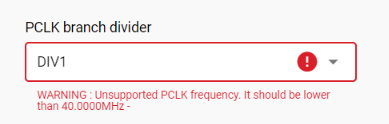
Common Configuration Issues:
Oscillator frequency mismatch with crystal specifications
DPLL configuration parameters outside valid ranges
Clock branch source conflicts or missing oscillators
Bus clock dependencies not satisfied
Clock Manager Initialization Failures#
Symptom: sl_clock_manager_init() returns SL_STATUS_FAIL
Common Causes:
Conflicting components: Both Clock Manager and legacy
device_init_clocksare includedInvalid configuration files: Oscillator configuration conflicts with hardware
Hardware issues: Crystal not present when configuration expects it
Clock Frequency Query Issues#
Symptom: API returns SL_STATUS_INVALID_PARAMETER for frequency queries
Common Causes:
Invalid oscillator enum used
Device doesn't support requested oscillator
Oscillator not enabled in configuration
Bus Clock Enable Failures#
Symptom: Peripheral register access fails or returns incorrect values
Common Causes:
Bus clock not enabled before peripheral access
Invalid bus clock enum
Peripheral not available on device
PLL Lock Failures and Startup Hangs#
Symptom: System hangs during initialization or PLL fails to lock
Common Causes:
DPLL configuration parameters outside valid operating ranges
Reference oscillator frequency doesn't match configuration
Invalid multiplication/division factors
DPLL Configuration Requirements:
The DPLL output frequency must satisfy the equation:
f_out = f_ref × (N + 1) / (M + 1)Where:
f_ref: Reference oscillator frequency (HFXO, HFRCO, LFXO, or LFRCO)N: Feedback divider (300-4095)M: Input divider (0-4095)f_out: Target output frequency (must be within DPLL operating range)
Valid Configuration Example:
// Target: 78 MHz from 39 MHz HFXO
// f_out = 39 MHz × (N + 1) / (M + 1) = 78 MHz
// Solving: N = 3839, M = 1919
#define SL_CLOCK_MANAGER_DPLL_N 3839
#define SL_CLOCK_MANAGER_DPLL_M 1919
#define SL_CLOCK_MANAGER_DPLL_EDGE SL_CLOCK_MANAGER_DPLL_EDGE_FALLDebugging PLL Issues:
Verify reference oscillator is stable and at expected frequency.
Check DPLL parameter calculations against data sheet limits.
Monitor SLC validation warnings for configuration conflicts.
HFXO Calibration Problems#
Symptom: HFXO startup time longer than expected
Common Causes:
Calibration value lost after EM4 wake
Incorrect calibration value applied
Crystal tuning issues
Solution:
// EM4 wake calibration restoration
static uint32_t saved_hfxo_calibration = 0;
void save_hfxo_calibration_before_em4(void) {
sl_status_t status;
status = sl_clock_manager_get_hfxo_calibration(&saved_hfxo_calibration);
if (status == SL_STATUS_OK) {
printf("HFXO calibration saved: 0x%08lX\n", saved_hfxo_calibration);
// Store in EM4 retained memory or external storage
} else {
printf("Failed to save HFXO calibration: %lu\n", (uint32_t)status);
}
}
void restore_hfxo_calibration_after_em4(void) {
sl_status_t status;
if (saved_hfxo_calibration != 0) {
// Restore calibration early in initialization
status = sl_clock_manager_set_hfxo_calibration(saved_hfxo_calibration);
if (status == SL_STATUS_OK) {
printf("HFXO calibration restored: 0x%08lX\n", saved_hfxo_calibration);
} else {
printf("Failed to restore HFXO calibration: %lu\n", (uint32_t)status);
}
}
}Error Code Reference#
Error Code | Value | Description | Common Causes | Recovery Strategy |
|---|---|---|---|---|
| 0x0000 | Success | N/A | Continue operation |
| 0x0001 | General failure | Hardware issues, configuration conflicts | Check hardware and configuration |
| 0x0022 | NULL parameter | NULL pointer passed to API | Verify all pointer parameters |
| 0x0021 | Invalid parameter | Invalid enum, out-of-range value | Check parameter documentation |
| 0x000F | Feature not supported | Device doesn't support feature | Check device capabilities |
| 0x0025 | Information not available | Precision info not available | Use alternative approach |
| 0x001A | Service not ready | Clock Manager not initialized | Call initialization functions |
| 0x0012 | Operation timeout | PLL lock timeout, calibration timeout | Check hardware, retry operation |
Performance and Timing Considerations#
API Performance Characteristics#
Clock Manager APIs have different performance characteristics depending on their implementation:
Fast Operations (< 1 µs):
sl_clock_manager_get_oscillator_frequency(): Uses cached valuessl_clock_manager_get_clock_branch_frequency(): Performs a mathematical calculationsl_clock_manager_enable_bus_clock(): Performs a single register writesl_clock_manager_disable_bus_clock(): Performs a single register writesl_clock_manager_get_oscillator_precision(): Returns a cached configuration valuesl_clock_manager_set_hfxo_calibration(): Updates a register with validationsl_clock_manager_set_rc_oscillator_calibration(): Updates a calibration register
Slow Operations (>100 µs):
RCO calibration functions: Take milliseconds depending on cycle count
HFXO startup without calibration: Takes hundreds of milliseconds for optimization
slx_clock_manager_hfxo_calibrate_ctune(): Includes HFXO startup delay
Thread Safety Considerations#
Important: Clock Manager APIs are NOT thread-safe and require external synchronization when accessed from multiple threads.
Thread Safety Requirements:
All Clock Manager APIs must be protected with mutex or similar synchronization.
RCO calibration operations are explicitly documented as not thread-safe.
HFXO calibration save/restore sequences need atomic execution.
Clock export configuration changes should be protected.
Recommended Approaches:
Initialization Strategy: Initialize Clock Manager in the main thread before starting RTOS tasks.
Runtime Access: Use mutex protection for clock queries from multiple threads.
Configuration Strategy: Avoid clock configuration changes after system initialization.
Calibration Strategy: Perform calibration operations from a single, dedicated thread.
Critical Sections Needed For:
RCO calibration operations (
sl_clock_manager_configure_rco_calibration(), etc.)HFXO calibration save/restore sequences
Clock export configuration changes
Any sequence of related Clock Manager API calls that must appear atomic
Power Manager Integration Issues#
Clock Manager integration issues with Power Manager typically stem from initialization order dependencies. The Clock Manager must be initialized before the Power Manager to ensure proper HFXO coordination for wireless applications. If integration issues occur, verify that both services are included in the project and initialized in the correct sequence through the SL Main framework.
Note: On Series 3 devices, the Power Manager can automatically switch to SOCPLL for performance-mode operation when the Execution Modes feature is enabled. This behavior provides maximum system performance when needed while maintaining power efficiency during normal operation.
Device Manager Integration Issues#
Device Manager integration issues usually manifest as incorrect peripheral clock frequencies or bus clock enable failures. The Device Manager provides the mapping between peripherals and their corresponding clock branches. If peripherals exhibit unexpected behavior, verify that the correct Device Manager component for the target device is included and that bus clocks are enabled before accessing peripheral registers.