


Multiple-Model Support#
This guide describes how to run more than one machine learning model in a single Silicon Labs project. For single-model inference steps, see Machine Learning on Silicon Labs Devices from Scratch.
Setting up multiple models in Simplicity Studio#
When you need more than one model, add one ML Model (ml_model) component instance per model. Each instance gets its own .mlconf file under config/tflite/ and its own generated headers under autogen/ml/.
IMPORTANT: Follow the steps below in order. Finish Model A completely — instance,
.mlconf, and generated sources — before you create Model B.
Step 1: Model A instance creation and .mlconf configuration#
For Model A instance creation and .mlconf configuration, follow Add Machine Learning to a New or Existing Project. Name the first instance (for example, blink_model), set the model: path in its .mlconf file, and confirm Model A sources appear under autogen/ml/ — for example, blink_generated.hpp and sl_ml_model_blink.h. Do not add a second instance until these files are present.
Step 2: Model B instance creation#
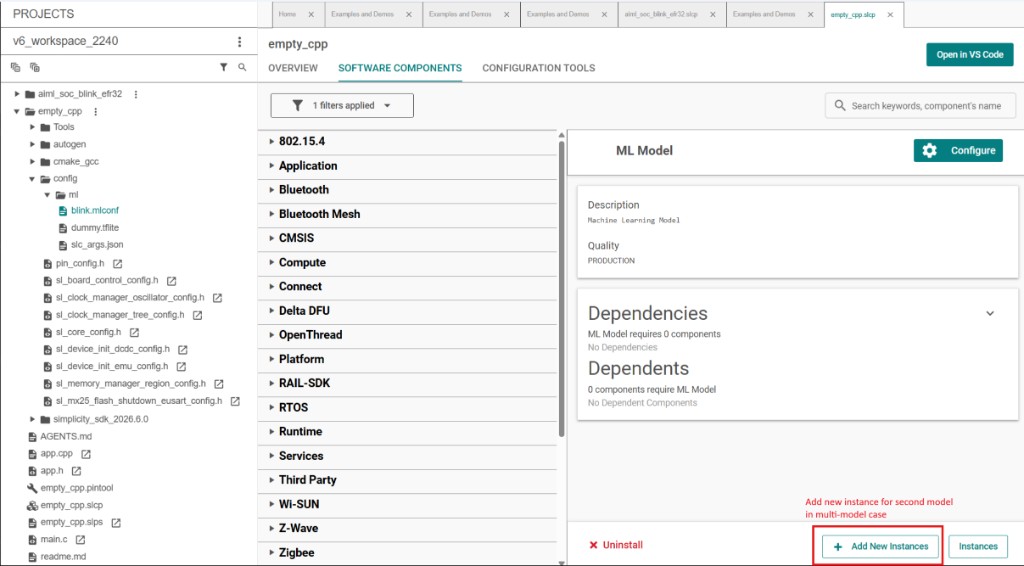
Open your project
.slcpfile and go to the SOFTWARE COMPONENTS tab.Select ML Model under Silicon Labs AI/ML → Machine Learning.
Click + Add New Instances, enter a name for Model B (for example,
keyword_spotting_model), and confirm.
Step 3: Model B .mlconf configuration#
Open the new
.mlconffile inconfig/tflite/(for example,keyword_spotting_model.mlconf).Set
model:to the absolute path of Model B's.tflitefile and save.Wait for generation to finish. Confirm Model B sources appear under
autogen/ml/, for example:keyword_spotting_on_off_v2_generated.hppsl_ml_model_keyword_spotting_on_off_v2.h
Step 4: Verify both models#
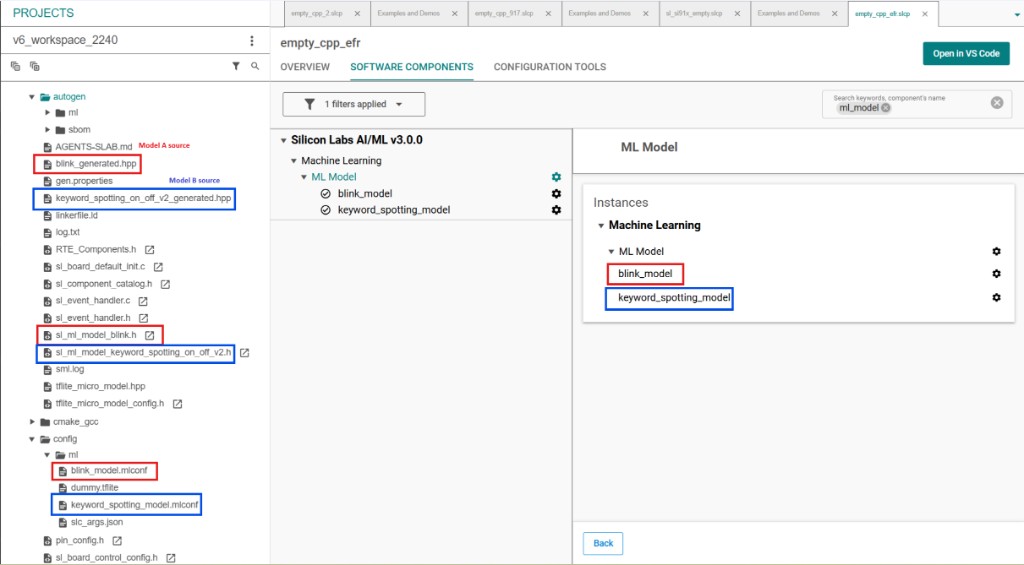
When both models are configured, Project Explorer and the SOFTWARE COMPONENTS tab should show:
Two ML Model instances (for example,
blink_modelandkeyword_spotting_model)One
.mlconffile per instance underconfig/tflite/Generated source and header files for each model under
autogen/ml/
Using multiple models in an application#
Each model instance produces its own handle in autogen/sl_ml_model_<instance>.h. The handle variable name follows the instance name — for example, an instance named kws produces sl_ml_kws_model_handle, and an instance named blink produces sl_ml_blink_model_handle.
Call sl_ml_model_init() during application startup in
app_init(), and call sl_ml_model_run() fromapp_process_action().
Do not call sl_ml_model_init() on every iteration of app_process_action() — as models stay initialized until sl_ml_model_deinit() is called. Refer to the ML TFLite Micro Model API reference, for more information.
Choose how models share memory:
Concurrent Loading for Faster Model Switching#
Initialize every required model once in app_init() and leave them loaded. Call sl_ml_model_run() on each handle from app_process_action() as needed.
NOTE:
Use this when a second model must run without unloading the first (for example, keyword detection always active while a second model drives an LED animation).
Ensure that all the models can be loaded into the available RAM.
If sl_ml_model_init() returns
SL_STATUS_FAIL, try sequential loading instead.
void app_init(void)
{
sl_ml_model_init(&sl_ml_kws_model_handle);
sl_ml_model_init(&sl_ml_blink_model_handle);
}
void app_process_action(void)
{
sl_ml_model_run(&sl_ml_kws_model_handle);
sl_ml_model_run(&sl_ml_blink_model_handle);
}Sequential Loading for Lower RAM Usage#
Load one model at a time. Call sl_ml_model_init() before use and sl_ml_model_deinit() before switching to another model. Use this pattern only when total RAM cannot hold every model's tensor arena at once.
void app_process_action(void)
{
sl_ml_model_init(&sl_ml_kws_model_handle);
sl_ml_model_run(&sl_ml_kws_model_handle);
sl_ml_model_deinit(&sl_ml_kws_model_handle);
sl_ml_model_init(&sl_ml_blink_model_handle);
sl_ml_model_run(&sl_ml_blink_model_handle);
sl_ml_model_deinit(&sl_ml_blink_model_handle);
}Reference#
For example projects with concurrent and sequential keyword spotting plus blink inference, refer to Voice Control Light with Blink (multiple-model)