


Gecko Bootloader and Delta DFU Upgrades#
With GSDK v2024.6.1, Gecko Bootloader support comes with support for delta DFU upgrades. This section provides an introduction to Delta DFU upgrades and describes the major points that should be considered while using the Delta DFU component.
Introduction to Delta DFU#
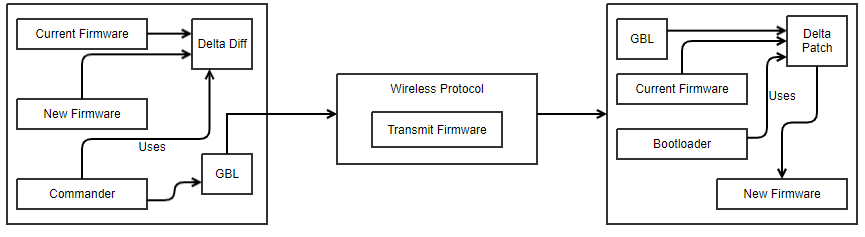
The main function of the image delta DFU is to calculate the difference between the current firmware stored on the device and the new firmware to be updated. This difference is used to create a patch file that can be applied to the current firmware, resulting in the new firmware. The patch file is created using the Simplicity Commander tool, transferred to the device with any wireless protocol as a GBL, and applied on top of the current firmware by the Gecko Bootloader. The patch file creation and application are both implemented in a library that is shared between these tools.
The following diagram illustrates the complete process.
Gecko Bootloader Operation#
The Delta DFU upgrades can be enabled by including the Delta DFU component in the Gecko Bootloader. Simplicity Commander supports the creation of a Delta DFU GBL file.
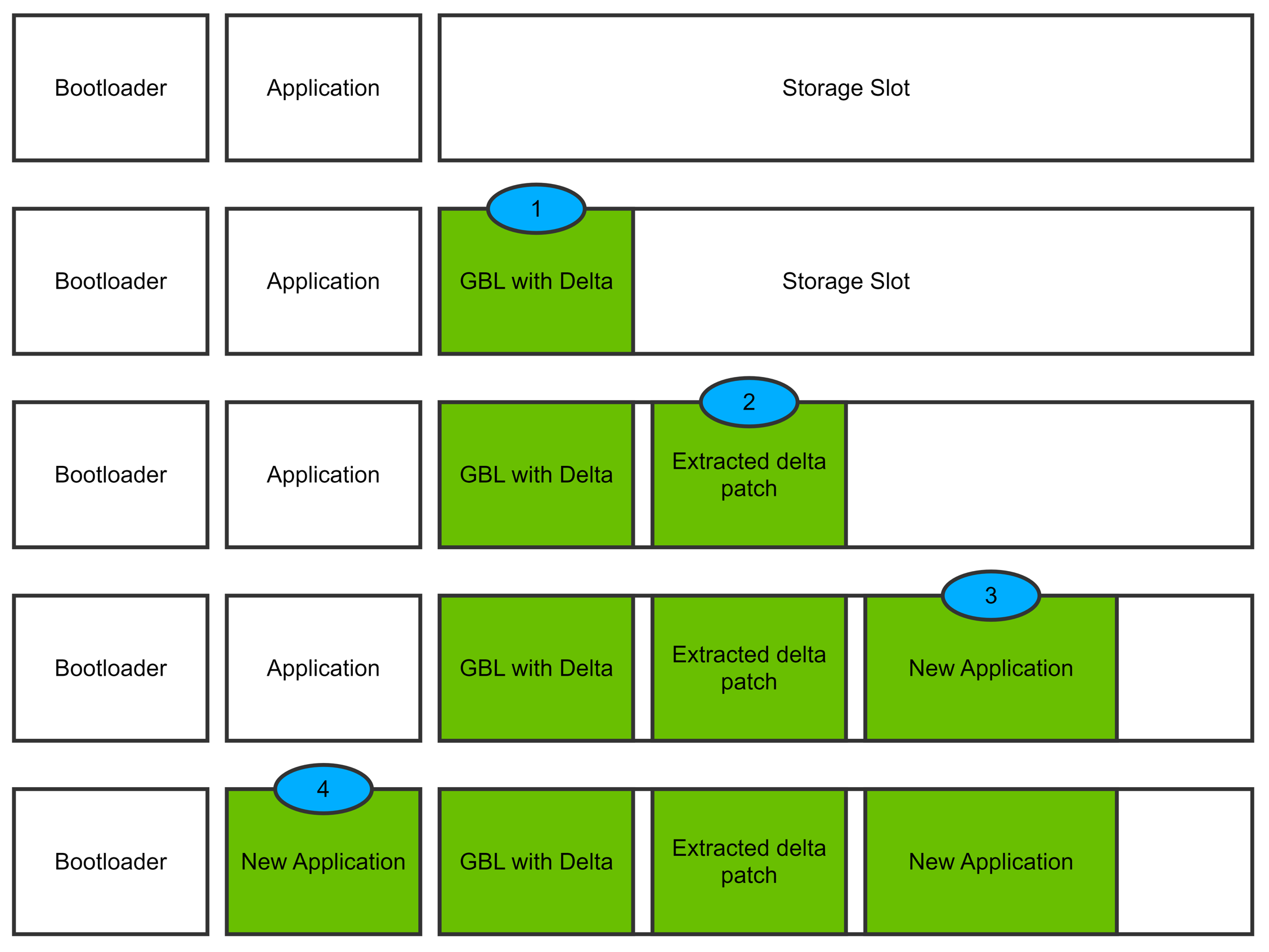
With Delta DFU enabled, the application bootloaders are equipped to accept Delta DFU GBL files. These GBL files contain a patch file that is extracted into the slot. The Gecko Bootloader creates the new firmware using this patch file and the currently running firmware within the slot. The slot size should have enough number of pages to hold the GBL file, patch file, and the new firmware binary in the slot. Each file starts on a new page.
The Delta DFU upgrades are triggered in the same way as in an application bootloader. Once the bootloader finds a GBL that contains Delta Patch, it extracts the patch file and then re-constructs the new firmware file within the slot. If the new firmware is created correctly, then the bootloader copies this new firmware to the application area, completing the upgrade.
To create the GBL file, Commander needs two input files, one of the firmware that is current and one that is the upgrade. For Delta DFU upgrades to work, it is essential that the firmware on the device and the firmware used to create the GBL are the same. Also, the version dependency tag is included in Delta DFU and should be correctly set by the user.
Delta DFU operation is illustrated in the following figure:
Delta Patch Extraction (Flash vs. RAM)#
In Delta DFU, the Silicon Labs Gecko Bootloader must extract the patch file inside the GBL before it can reconstruct the new firmware image. The bootloader supports two extraction modes:
Flash-based extraction (default).
RAM-based extraction (optional).
Flash-Based Extraction (Default)#
By default, the bootloader stores the extracted delta patch in the upgrade slot in flash. The storage slot must therefore be large enough to hold all three of the following, each written to flash and aligned to page boundaries:
The GBL file.
The extracted delta patch.
The reconstructed firmware image.
This approach adds no RAM requirements, but it increases the total flash space the upgrade process needs.
RAM-Based Extraction#
On devices with sufficient RAM, you can configure the bootloader to extract the delta patch into RAM by enabling the BTL_DELTA_DFU_EXTRACT_TO_RAM configuration option. In this mode:
The GBL file remains in the upgrade slot.
The bootloader extracts and decompresses the delta patch into RAM.
The bootloader reconstructs the firmware image and writes it to flash.
Because the extracted patch is no longer stored in flash, the storage slot only needs to accommodate the GBL file and the reconstructed image. This reduces flash (NVM) usage and allows larger firmware images to be updated in the same slot.
RAM Buffer Sizing#
When RAM-based extraction is enabled, the bootloader allocates a RAM buffer large enough to hold the entire extracted patch. The bootloader determines the buffer size as follows:
Uncompressed delta tags and LZMA-compressed patches: The buffer matches the uncompressed patch size, which the bootloader reads directly.
LZ4-compressed patches: The compressed data does not expose the uncompressed size, so the bootloader assumes a compression ratio of at least 20% and allocates approximately 1.25× the compressed size.
If RAM is insufficient, the bootloader rejects the update before reconstruction begins. Partial or streaming extraction is not supported — the entire patch must be fully present in RAM.
Behavior During Power Loss#
Because RAM is volatile, any reset or power interruption during extraction forces the bootloader to repeat the extraction step on resume. The GBL file itself stays intact in flash, so the bootloader can reprocess it when the upgrade continues.
Flash-based extraction avoids this rework: the extracted patch persists in non-volatile memory, so a reset doesn't cost the extraction work already done.
When to Use Each Mode#
Choose this mode | When |
|---|---|
RAM-based | The device has ample RAM, and you need to reduce flash usage or fit a larger upgrade. |
Flash-based (default) | RAM is constrained, or your application can't afford to redo extraction after a reset. |
For more details on how to set up and configure Delta DFU in the Bootloader as well as creating the Patch File, see OTA Delta DFU.