


HSE Secure Key Storage#
The following sections demonstrate three key storage methods:
ARM TrustZone
Plaintext key storage
Secure Key Storage
Note: The following examples demonstrate AES keys. However, the same concepts apply to any key type supported by the device.
Key generation and usage#
On HSE-SVH devices, the HSE performs all cryptographic operations. To perform these operations, the HSE must have access to the required user keys. User keys can be generated and used in the following ways.
External storage with in-place usage#
Generate a plaintext key and store it in device memory.
Pass a key descriptor that points to the key to the HSE for a cryptographic operation.
The HSE performs the operation using the key but does not store it in a volatile key storage slot.
External storage with HSE import#
Generate a plaintext key and store it in device memory.
Pass a key descriptor that points to the key and specifies a volatile key storage slot.
The HSE imports the key into the specified volatile storage slot. Optionally, the HSE can export the key in wrapped form for storage in device memory.
Request a cryptographic operation by providing either the volatile slot index or a pointer to the wrapped key stored in device memory.
Internal HSE key generation#
Request that the HSE generate a new key directly in one of its volatile key storage slots. Optionally, the HSE can export the key in wrapped form for storage in device memory.
Request a cryptographic operation by providing either the volatile slot index or a pointer to the wrapped key stored in device memory.
Notes:
To retain a key across device resets, store it in nonvolatile memory.
For more information, see Plaintext key storage and Secure Key Storage.
Plaintext key storage#
Plaintext key import#
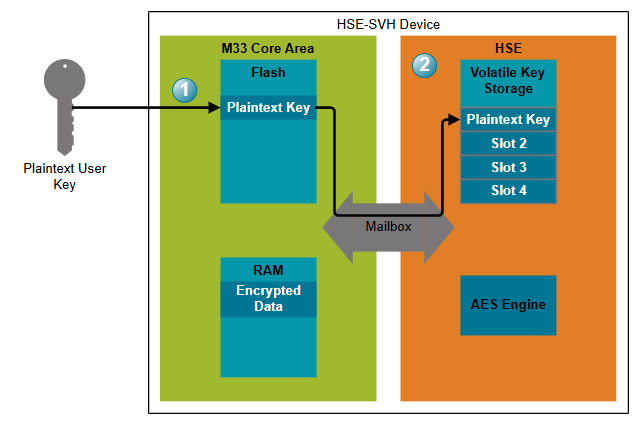
The simplest way to store a key is in plaintext. To store and use a key stored in plaintext form :
Generate a user key and store it in device memory. For persistent storage, use nonvolatile memory such as device flash.
After a device reset, the HSE volatile key storage is empty. Import the plaintext key into a volatile storage slot (method 2), or use the key directly from nonvolatile memory for each cryptographic operation (method 1).
Plaintext key usage#
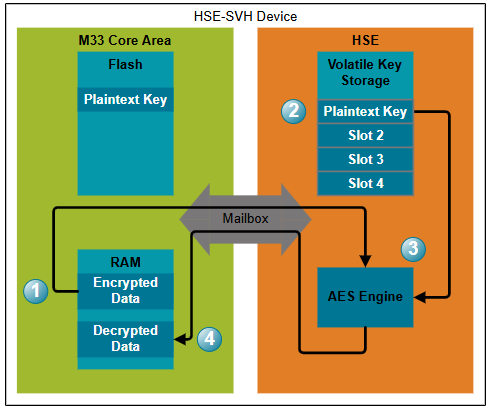
To use a plaintext key for a cryptographic operation:
Pass the input data (AES-encrypted data in this example) to the HSE.
Request a cryptographic operation using either:
The HSE performs the requested cryptographic operation.
The HSE returns the processed data to the application.
Plaintext key storage has two significant security limitations:
Anyone with access to device storage can obtain the plaintext key.
Because the application can access the plaintext key, an attacker who compromises the application or gains elevated privileges can also access the key.
Secure Key Storage#
With Secure Key Storage, the application accesses user keys only in encrypted (wrapped) form. The HSE encrypts and decrypts wrapped keys by using a device-unique root key that is accessible only to the HSE. The root key is reconstructed after each reset and is never stored while the device is powered down.
Key wrapping lets you securely store user keys in nonvolatile memory. The number of wrapped keys is limited only by the available storage.
Note: The reconstructed root key is unique to each HSE-SVH device and is recreated identically after every reset.
Wrap an external key#
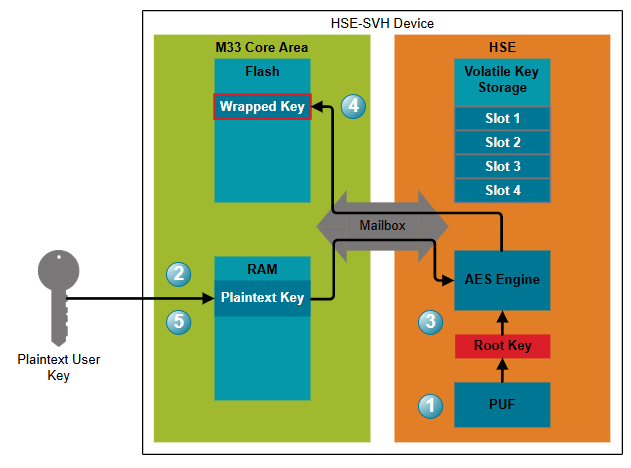
To wrap an externally generated key:
After power-up, the device reconstructs its unique root key by using the Physically Unclonable Function (PUF).
Generate a user key and store it in RAM. Storing the key in RAM makes it easy to delete and ensures that the key is lost if power is removed.
Pass the key to the HSE.
The HSE encrypts the key by using its root key and returns the wrapped key.
Store the wrapped key in nonvolatile memory, such as device flash.
Delete the plaintext key. From this point onward, only the HSE can access the plaintext key.
Generate an internal wrapped key#
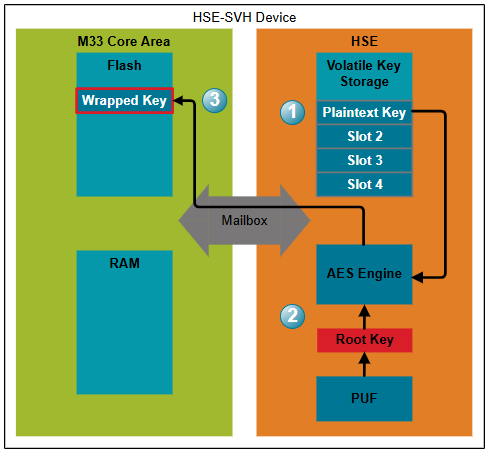
Instead of importing a key, you can have the HSE generate one directly.
Request that the HSE generate a new key in a volatile key storage slot by using the True Random Number Generator (TRNG).
The HSE encrypts the key with its root key.
Store the returned wrapped key in nonvolatile memory.
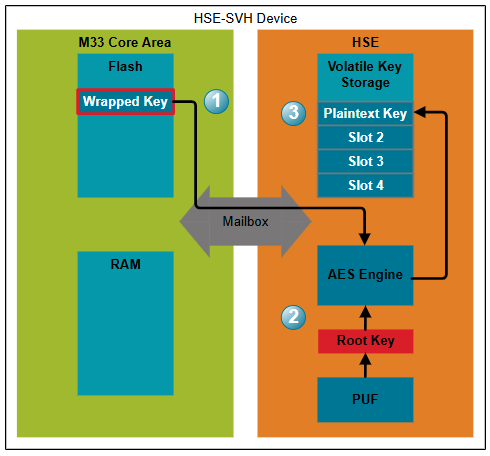
Import a wrapped key#
To import a wrapped key:
Pass the wrapped key to the HSE.
The HSE decrypts (unwraps) the key by using its root key.
The HSE stores the plaintext key in a volatile key storage slot.
Use a wrapped key#
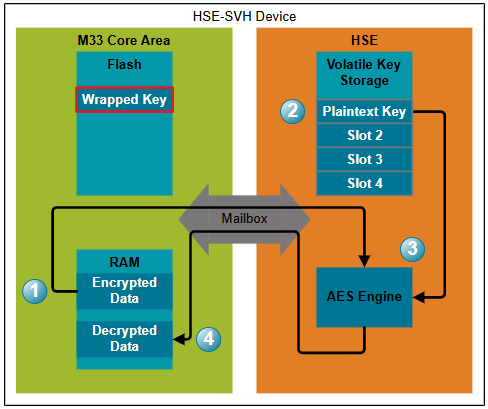
Using a wrapped key follows the same process as using a plaintext key that has already been imported into the HSE.
Pass the input data to the HSE or the SYMCRYPTO hardware accelerator.
Request a cryptographic operation by using either:
A key stored in an HSE volatile key storage slot, or
A wrapped key stored in memory. In this case, the HSE unwraps the key before use but does not store it for future operations.
The HSE or SYMCRYPTO performs the requested cryptographic operation.
The processed data is returned to the application.
Secure Key Storage advantages#
Compared to plaintext key storage, Secure Key Storage provides the following advantages:
Access to device memory does not expose plaintext user keys.
Compromising the application does not expose plaintext user keys because the application never accesses them directly.
The number of securely stored keys is limited only by the available storage, including external storage.
Operation details#
Root key generation#
Secure Key Storage encrypts and decrypts (wraps and unwraps) user keys by using an HSE root key. Because this key protects all wrapped keys, it must remain highly secure.
During power-up, the HSE key management system uses a Physically Unclonable Function (PUF) to reconstruct a persistent, device-unique root key. The root key is accessible only to the AES encryption engine and is not retained when power is removed.
Access a wrapped key#
By default, keys stored in an HSE storage slot can be exported in plaintext. To prevent this, set the key descriptor to mark the key as non-exportable.
A non-exportable key can be accessed only in wrapped form. The HSE also adds metadata that identifies the wrapped key. Because only the HSE has access to the root key, the application cannot access the plaintext key.
Note: Wrapped keys are larger than plaintext keys because they include metadata required by the HSE.
Wrapped key storage and usage#
After a key is wrapped, you can safely store it in device flash, RAM, or external storage. The number of wrapped keys is limited only by the available storage space.
After storing the wrapped key, delete the plaintext key from the application. From then on, only the HSE can unwrap and use the key.
You can use a wrapped key in either of the following ways:
Pass the wrapped key directly to the HSE for a cryptographic operation. The HSE imports, unwraps, and uses the key but does not retain it.
Import the wrapped key into a volatile HSE storage slot. The HSE unwraps the key and stores it in plaintext in the slot. Subsequent operations reference the slot index, improving performance because the key does not need to be imported and unwrapped for every operation.
Size of a wrapped key#
Wrapped keys use GCM encryption. The total size of a wrapped key is:
Key material
12-byte initialization vector (nonce)
16-byte authentication tag
Password protection#
When creating or importing a key, you can require a password before the key can be used.
The password field in the key descriptor is 8 bytes long. If no password is specified, the HSE uses a default password consisting of eight zero bytes.
If an incorrect password is provided during a cryptographic operation, the HSE returns an invalid credentials error and does not perform the operation.