


Clock API Initialization and Configuration (Silicon Labs SiWG917 SoC)#
This section describes how to initialize and configure the Clock Manager application programming interface (API) on the Silicon Labs SiWG917 system-on-chip (SoC).
It explains the startup sequence, configuration options, and available initialization methods to ensure that the clock system is correctly set up before application code execution.
Startup Sequence#
At system startup, the Clock Manager service initializes automatically by calling the following API:
sl_status_t sl_si91x_clock_manager_init(void);This function configures the system to use the SoC phase-locked loop (PLL) as the primary clock source and sets the core frequency to 180 MHz by default. The actual frequency configuration can vary based on project requirements.
During initialization, the function enables required clock sources, establishes reference clocks, and synchronizes the M4 and ultra-low-power (ULP) subsystems.
System Startup Behavior#
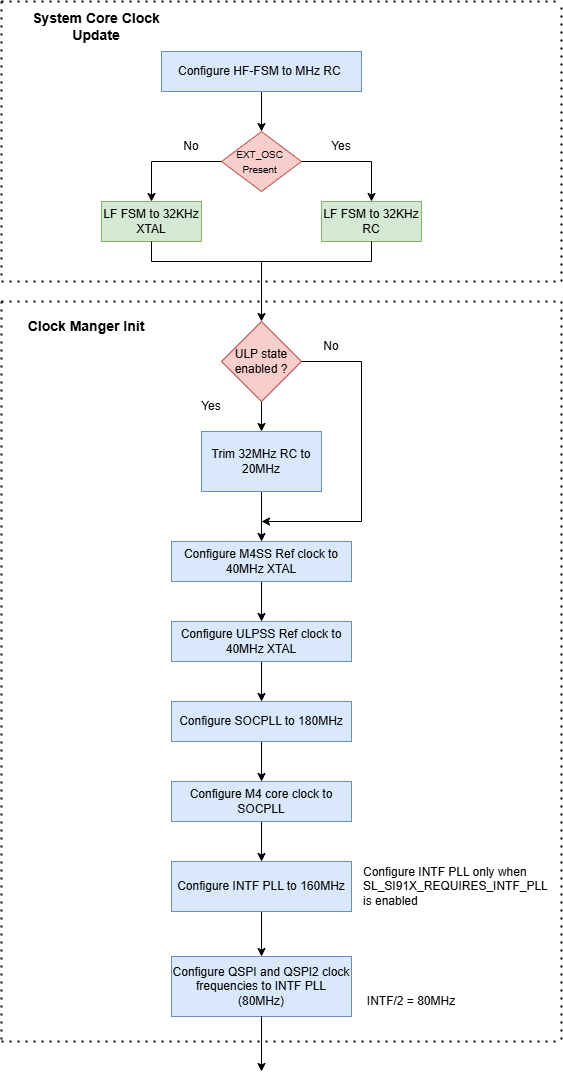
The high-frequency finite state machine (HF-FSM) defaults to the 32 MHz RC clock during system boot.
The low-frequency FSM (LF-FSM) uses the 32 kHz crystal oscillator (XTAL) as its primary source.
If the external XTAL is unavailable, the system automatically switches to the 32 kHz RC clock as a fallback.
Clock Manager Initialization Details#
During initialization:
If ULP mode is active, the 32 MHz RC clock is trimmed to 20 MHz to reduce power consumption.
Both the M4 subsystem (M4SS) and ULP subsystem (ULPSS) reference clocks are configured to use the 40 MHz XTAL.
The SoC PLL is configured to 180 MHz (maximum supported frequency), providing the main input to the system core.
The interface PLL (INTFPLL) is configured to 160 MHz when
SL_SI91X_REQUIRES_INTF_PLLis defined.The QSPI clock is set to 80 MHz (INTFPLL ÷ 2) for high-speed flash access.
Important: When you use the Power Manager service, clock configurations can change dynamically based on power state transitions. The Power Manager can adjust core clock frequencies to optimize power consumption during different operating modes.
Additional resources: For detailed information about the Power Manager, see the Power Manager Developer Guide.
Note: Ensure that all dependent modules, such as the Power Manager, are initialized before calling the Clock Manager functions.
UC Configuration#
The Universal Configurator (UC) provides a graphical interface for integrating and managing the Clock Manager component within your WiSeConnect project.
Clock Manager Component#
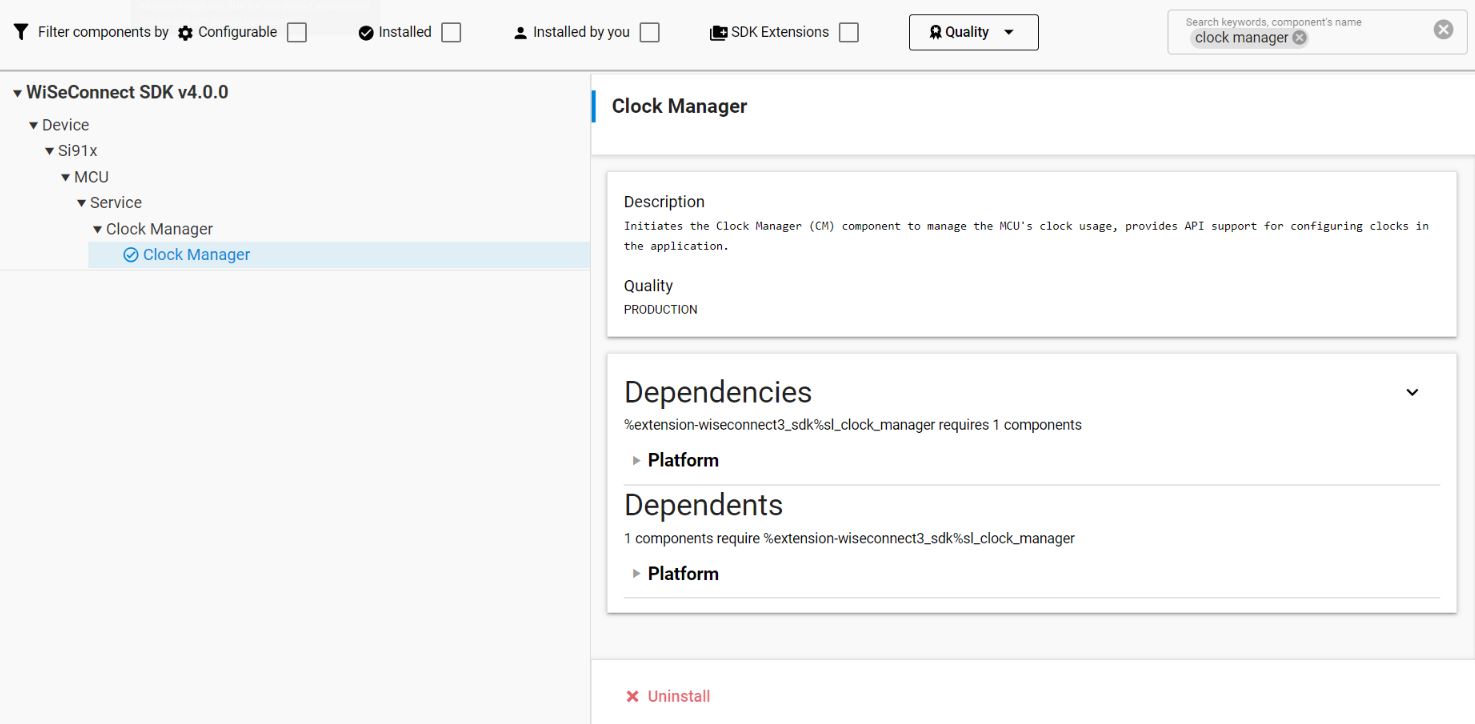
The Clock Manager component is installed by default in new SiWG917 projects.
Currently, manual configuration options are limited for Clock APIs. Initialization and setup are managed automatically.
The UC interface displays component dependencies and startup order for verification.
Tip: Use UC to review initialization order and confirm that the Clock Manager is included in the project configuration.
Clock API Initialization#
You can initialize the Clock Manager either automatically through UC or manually in code, depending on your project setup.
Automatic Initialization#
When the Clock Manager component is added through the UC:
No manual function calls are required.
The Clock Manager service starts automatically during system initialization.
The core clock and PLL configurations are applied before the application
main()function runs.
Manual Initialization#
For projects requiring explicit control, initialize the Clock Manager manually by calling:
sl_status_t sl_si91x_clock_manager_init(void);Function Description#
This API performs the following functions:
Initializes all system clock sources and reference clocks.
Sets the core clock to 180 MHz using the SoC PLL.
Configures interface PLL and QSPI clock frequencies as required.
Returns a status code (
sl_status_t) that indicates success or failure.
Example: Basic Initialization#
#include "sl_si91x_clock_manager.h"
sl_status_t status;
status = sl_si91x_clock_manager_init();
if (status != SL_STATUS_OK) {
// Handle initialization error
return status;
}
// Continue with application setup after successful clock configurationNote: Always check return values after initialization and call
sl_si91x_clock_manager_init()early in the startup sequence, before initializing peripheral drivers or dependent services.