


SDK and Framework Introduction#
SDK 8.1.x Overview#
Z-Wave SDK 8.1.x supports Z-Wave and Z-Wave Long Range applications on Z-Wave Series 800 devices. It provides the Z-Wave Plus Application Framework (ZAF), sample applications, protocol services, and power-management support for certified end-device development.
Series 800 devices are based on Silicon Labs' 32-bit ARM® Cortex®-M platform and support both traditional Z-Wave mesh networks and Z-Wave Long Range networks. The appropriate network type and power profile depend on the product's regional, range, and battery-life requirements.
The ZAF implements an event-driven application design and provides framework-managed transport, Command Class, and power-management services. It lets an application concentrate on product behavior while using interoperable Z-Wave services supplied by the SDK.
SDK 8.1 migration note: In Series 2 applications,
SL_SLEEPTIMER_PERIPHERALmust beSL_SLEEPTIMER_PERIPHERAL_DEFAULT(typically SYSRTC), not BURTC. Existing projects are updated automatically during SDK migration. BURTC remains reserved forzw_shutdown_managerEM4 wake-up handling.
Z-Wave Plus v2 specifications define requirements for interoperability between Z-Wave products and vendors, while maintaining compatibility with existing products. Series 800 devices can participate in the interoperable Z-Wave ecosystem when their application meets the applicable certification requirements.
Z-Wave Plus v2 Specification#
Each product must follow the applicable Z-Wave Plus v2 specifications to pass the certification program and ensure interoperability in the ecosystem of existing products. The primary focus is ease of use for consumers, which can be summarized as follows:
Shopping does not require intensive knowledge about which products work with which other products.
Installation is as simple as possible and intuitive.
Operating the products does not require any technical knowledge.
No tricky maintenance procedures, such as exclude/include, are needed.
To accomplish this vision, several new requirements are added to the original Z-Wave Plus specification. These additions include:
Both Security-2 (S2) and SmartStart are now mandatory to increase security while keeping the inclusion process simple.
Each product must support Identify functionality, i.e., must feature a visible LED for identification purposes, making it easy to identify a product.
All actuators must support the Basic Command Class, guaranteeing that any controller can control any actuator.
Any state change must now be reported, making sure the controller always knows the true status of a device.
OTA firmware update is mandatory for all nodes, and dynamic capabilities are allowed because a controller must be able to re-interview a node to detect new or changed capabilities.
For more information about the specifications, refer to [7] and [8].
Z-Wave Plus Application Framework#
The purpose of the Z-Wave Plus Application Framework (ZAF) is to facilitate the implementation of robust Z-Wave Plus v2-compliant products. ZAF version 11.x is distributed with Z-Wave SDK 8.x.
The framework is described in full detail in [9]. Read this documentation before developing a Z-Wave application. The following outline provides an overview.
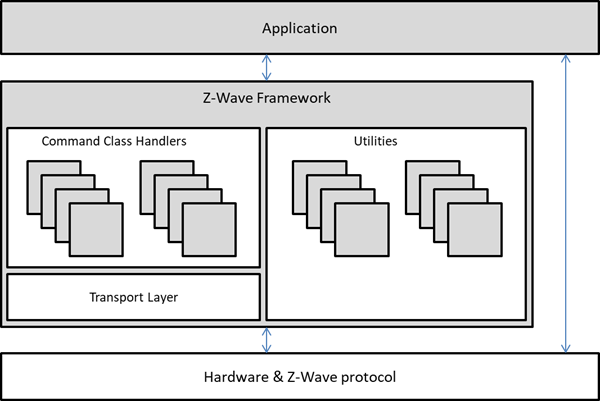
The ZAF consists of three blocks:
Transport Layer: This layer handles all communication with the protocol, which includes single cast, multicast, Multi-Channel encapsulation, delivery of bundled commands, etc.
Command Classes: These modules parse and compose Command Class frames.
Utilities: These modules include I/O handling for the hardware bundled with the SDK, battery monitoring, firmware updating, and other application services.
The figure below outlines the Z-Wave Plus Application Framework modules.
End-Device Roles#
This section introduces the end-device roles supported by Z-Wave SDK 8.1.x. See [6] and [9] for more information. This document focuses on certified end-device applications; controller and Z/IP Gateway development are outside its scope.
An end-device application can be configured for an always-listening, sleeping, or frequently listening power profile.
Always Listening End Device: Mains-powered devices that are always listening and can act as repeaters in a Z-Wave mesh network. Examples include on/off switches.
Reporting Sleeping End Device (RSS): Battery-operated devices that remain in sleep mode until triggered. Examples include door/window sensors and motion sensors.
Listening Sleeping End Device (LSS), also known as a Frequently Listening Routing End Device (FLiRS): A battery-operated device that wakes within approximately one second when it receives a wake-up beam. A FLiRS device alternates between sleep and a brief listening period, providing communication latency of approximately one second with battery consumption close to that of a fully sleeping device. Door locks are a typical example.
Association Groups and Endpoints#
An association is a logical connection between nodes. It enables an end device to directly control other end devices upon activation. A device must support at least one association group (group 1), designated for “Lifeline Reporting” as defined by the Z-Wave Plus v2 Device Type specification; see [8]. Each group is responsible for controlling or reporting specific commands, for example, a temperature measurement. One group can hold multiple commands if needed.
Association Group Information (AGI) enables machine-to-machine interfacing as well as human-user interpretation of available association groups, thus eliminating the need for paper-based documentation.
All device-centric events are mapped to the Lifeline group; this includes events such as Battery Low, Tamper Alarm, and Device Reset Locally. The Lifeline concept allows a gateway to set up one association from a device to receive the reports it needs.
In the example of a motion sensor, the sensor reading is mapped to the Lifeline group. In contrast, another association group targets local application functionality, such as turning on a lamp based on movement.
Endpoints allow a device to support multiple controllable endpoints. Each endpoint specifies the supported device and Command Classes and can be controlled individually.
Z-Wave Long Range does not support mesh routing, which simplifies association configuration. A Z-Wave Long Range node must support the Lifeline group and is allowed one Lifeline destination, typically the gateway. Product application logic can reside on either the node or the gateway, according to the product design.
Security#
Security 0 was the first version of security. This Command Class provides a framework for establishing encrypted communications within a Z-Wave network. However, the key exchange at inclusion is vulnerable to interception.
Security 2 is the latest Security Command Class and is required for all Z-Wave devices. S2 defines three types of security layers:
S2 Access Control
S2 Authenticated
S2 Unauthenticated
S2 security operates with the concept of a network key. All nodes may use this key to communicate with each other. S2 divides the logical Z-Wave network into three dedicated security classes, with each one having a unique network key. A given S2 security class not only identifies the network key to use but also dictates the rules applying to authentication of a new node during inclusion. The “S2 Access Control” class is the most trusted class, intended for access-control devices such as door locks and garage doors. The “S2 Authenticated” class is used for normal household devices such as sensors and light dimmers. The “S2 Unauthenticated” class is the least trusted class. It is intended for constrained controllers that, due to a limited user interface, cannot authenticate a node joining the network.
In a wireless environment, there is a real risk that a foreign node is included accidentally or due to malicious intent. The S2 authentication process allows an including controller to verify that a joining node is indeed the physical device that it claims to be. Depending on the UI, an including controller may allow the user to enter a Device-Specific Key (DSK) string of decimal digits that can be read visually or scanned as a QR code.
Given that SmartStart is mandatory for Z-Wave devices, all Z-Wave-based devices must request either S2 Access Control or S2 Authenticated. If requesting S2 Authenticated, a node must also request S2 Unauthenticated for backward compatibility. All Z-Wave Long Range devices support SmartStart as their inclusion method, and S2 Authenticated is the lowest allowed security class.