Architecture#
SDK scope: This chapter describes the Z-Wave Plus v2 Application Framework (ZAF) included with Z-Wave SDK 8.1.x in the Simplicity SDK. The generated API documentation and installed SDK source code are the authoritative references for API signatures and implementation details.
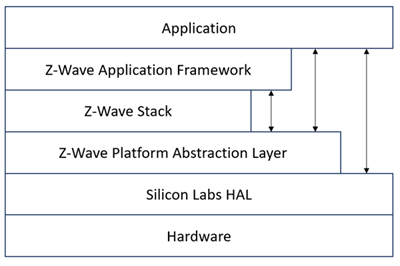
The figure below shows how the application and ZAF interfaces with other elements in Z-Wave.
The figure below shows the architecture of the ZAF.
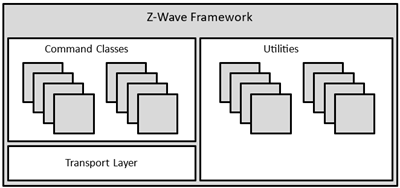
The ZAF consists of three blocks:
Transport Layer: This layer handles all communication with the protocol, which includes single cast, multicast, Multi-Channel encapsulation, delivery of bundled commands, etc.
Command Classes: These modules parse and compose Command Class frames.
Utilities: These modules provide reusable application services, such as board and I/O integration, battery monitoring, association handling, firmware update support, and power-management integration.
The framework implements an event-driven application design. Applications use the ZAF and Command Class interfaces instead of calling the protocol directly. The SDK controls transport serialization and the lifecycle of transmit requests. Applications must wait for the relevant completion callback or event before reusing application-owned transmit data.
The installed SDK is component-based. Use Project Configurator to select the Z-Wave, Command Class, board-support, logging, and platform components required by the application. Do not rely on framework source-directory names or private synchronization modules, because those are implementation details that can change between SDK releases.
SDK 8.1 Platform Considerations#
On Series 2 devices, configure
SL_SLEEPTIMER_PERIPHERALasSL_SLEEPTIMER_PERIPHERAL_DEFAULT(normally SYSRTC).BURTCis reserved for Z-Wave shutdown and wake-up handling byzw_shutdown_manager.Configure hardware behavior through the Z-Wave Core component or
zw_hardware_config.h. In SDK 8.1,ZW_DCDC_CONFIGis applied at startup. Select the setting appropriate for the product's power source and board design.SDK 8.1 improves SmartStart pre-inclusion power consumption for never-listening battery end devices by allowing deep sleep during idle periods. Applications must still configure wake sources, peripherals, and power requirements for their own hardware.
Application Memory and Build Output#
Memory limits are target- and configuration-specific. Do not use fixed Flash, RAM, or bootloader-size limits for Z-Wave 800 Series applications. Instead, review the linker output and the memory summary produced for the selected device, bootloader, protocol configuration, and enabled components.
Build applications using Simplicity Studio or the SDK build workflow. Use the generated map file and size report to track flash, RAM, NVM, and bootloader allocations. Treat the device memory map and generated project configuration as the authoritative sources.
Smart Start#
The Smart Start feature is part of the protocol and automatically handles the inclusion process without having a user physically interact with a device. When powered on for the first time, the device tells the world that it is ready for inclusion and most likely a controller nearby will hear this and include the device. If inclusion process times out, it retries again after a given time.
Starting Smart Start Inclusion#
The Smart Start inclusion process starts when the application invokes ZAF_setNetworkLearnMode() with the parameter “E_NETWORK_LEARN_MODE_INCLUSION_SMARTSTART”.
The Z-Wave protocol informs the application about the status of inclusion using the command status handler with the following events:
EZWAVECOMMANDSTATUS_NETWORK_LEARN_MODE_START
EZWAVECOMMANDSTATUS_LEARN_MODE_STATUS
The EZWAVECOMMANDSTATUS_NETWORK_LEARN_MODE_START event contains a status telling whether the inclusion was started successfully.
The EZWAVECOMMANDSTATUS_LEARN_MODE_STATUS event can contain several different statuses:
ELEARNSTATUS_SMART_START_IN_PROGRESS
ELEARNSTATUS_LEARN_IN_PROGRESS
ELEARNSTATUS_LEARN_MODE_COMPLETED_FAILED
ELEARNSTATUS_LEARN_MODE_COMPLETED_TIMEOUT
ELEARNSTATUS_ASSIGN_COMPLETE
The status ELEARNSTATUS_SMART_START_IN_PROGRESS indicates that the process of smart start inclusion to a controller has commenced.
The status ELEARNSTATUS_LEARN_IN_PROGRESS indicates that the process of classic inclusion to a controller has started.
If the status is ELEARNSTATUS_LEARN_MODE_COMPLETED_FAILED, the application must reset its NVM and reboot.
If the status is ELEARNSTATUS_LEARN_MODE_COMPLETED_TIMEOUT, the application must re-enter the Smart Start inclusion process.
Configuring Smart Start Inclusion#
When an end device is in SmartStart, it sends inclusion requests with increasing delay between requests. By default, the maximum inclusion request interval is 512 seconds. SDK 8.1 can enter deep sleep during SmartStart idle periods on never-listening battery end devices.
The maximum inclusion interval can be changed from the application. A higher value might be used in battery powered products to save battery power if it is expected that the product will be in smart start inclusion for a long time. A lower value might be used to ensure a faster smart start inclusion when power consumption is not an issue.
The command for changing the maximum inclusion interval is:
Function:
void ZAF_SetMaxInclusionRequestIntervals(uint32_t intervals) Function for setting the maximum inclusion request delay.
Parameter:
uint32_t intervals Maximum inclusion request delay in 128 seconds steps. Valid range is 5-99
The inclusion requests will be sent out on interval shown in the table below:
Request number | Delay since last inclusion request |
|---|---|
0 (Power up) | 0 sec |
1 | Random(0..16 sec) |
2 | Random(16..32 sec) |
3 | Random(32..64 sec) |
4 | Random(64..128 sec) |
5 | Random(128..256 sec) |
6 | Random(256..512 sec) |
.. | .. |
X | Random(Interval*64..interval*128 sec) |
Power Management#
Power management is coordinated by the Z-Wave protocol, the platform power manager, and the application. The energy modes available to a device depend on its role type, its wake-up requirements, and the enabled hardware peripherals. Always test current consumption and wake-up behavior on the production hardware.
The legacy ZAF PowerManagement module and its power-lock APIs are not the SDK 8.1 mechanism. Select the API according to the resource that must remain available:
Requirement | SDK 8.1 mechanism |
|---|---|
Keep the ARM core in a permitted energy mode for an application peripheral | Use the Silicon Labs |
Keep the Z-Wave radio able to receive while no transmit is in progress | Use |
Prevent a never-listening device from entering EM4 shutdown | Use |
For SDK 8.1, zw_shutdown_manager owns BURTC use for EM4 shutdown and wake-up. The platform sleeptimer must therefore use the default peripheral rather than BURTC. See SDK 8.1 Platform Considerations.
True Status Module#
The True Status module implements the requirements for Lifeline Reports as specified in document “Z-Wave Plus v2 Device Type Specification” [15].
The main components of the True Status module are described in the following sub-sections.
True Status Engine (TSE)#
The True Status Engine is supplied by the ZAF. Its component name, source layout, and public declarations are SDK implementation details; consult the generated SDK 8.1 API documentation when integrating it.
TSE implements the functionality for registering and handling the state change events that a node wants to report to its lifeline association group members.
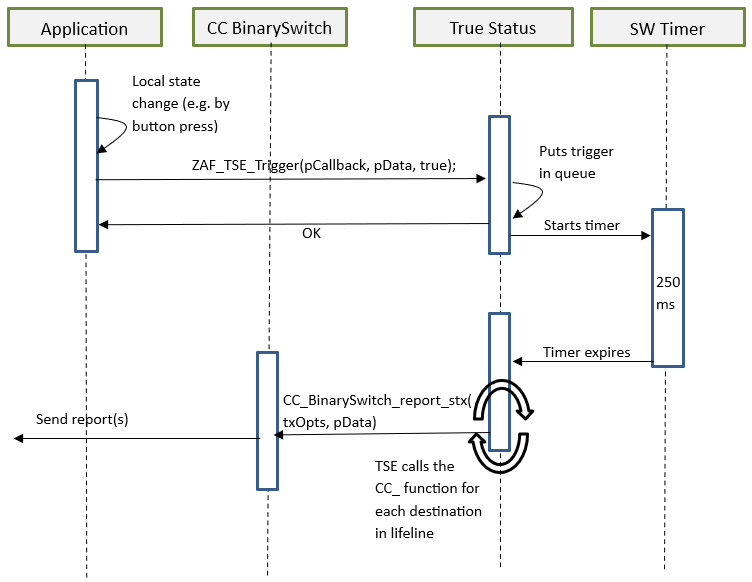
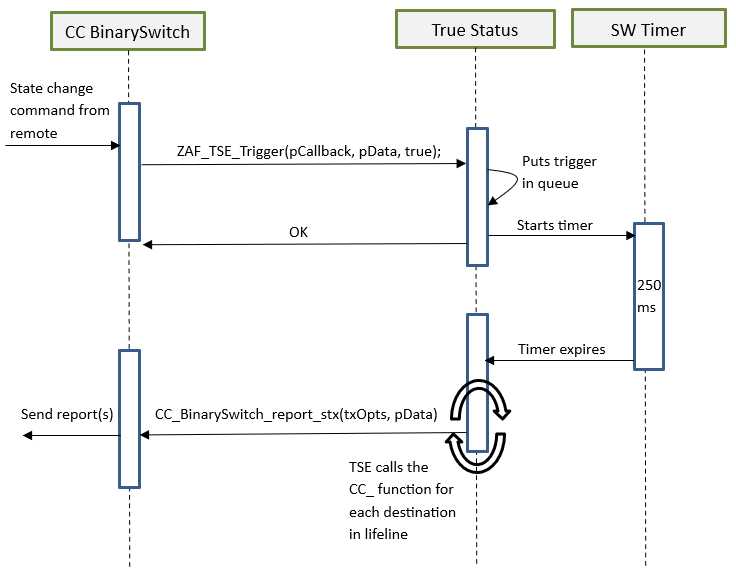
A state change can be triggered by a command from a remote note, or by a local change (e.g., a button press).
Public functions:
bool ZAF_TSE_Init();
Function for initializing the True Status Engine. Called by the ZAF during initialization.
bool ZAF_TSE_Trigger(void* pCallback, void* pData, bool overwrite_previous_trigger);
Function for registering state change events and triggering the report to be sent to lifeline group members after a predefined delay. The delay is currently defined to 250 ms. The delay is a means to prevent network collisions and to avoid generation of redundant reports from rapid state changes.
The function also takes care of sending the report to the relevant lifeline group members only; i.e., it will not send the report to a lifeline destination that issued the command causing the state change. The current implementation can hold up to 3 different state change requests in a queue awaiting the predefined delay to expire. Additional requests during this period will be discarded.
Arguments:
pCallback: Pointer to a callback function for sending the state change report to the lifeline group members. (Described in more details in the next section).
pData: Pointer to a data struct that will be passed in argument to the pCallback function. The pData pointed struct MUST first contain a RECEIVE_OPTIONS_TYPE_EX variable indicating properties about the received frame that triggered the change. Local changes must also include a RECEIVE_OPTIONS_TYPE_EX in the pData struct.
overwrite_previous_trigger: Boolean parameter indicating if a previous trigger with the same pCallback and the same source endpoint in the pData struct should be discarded or not. Set it to true to overwrite previous triggers and false to stack up all the trigger messages.
Returns true if success. False if the request could not be handled (queue is full).
True Status Callback Functions#
The True Status Callback Functions consist of several functions that implement the functionality for sending the actual state change reports to the lifeline association group members. These functions are implemented in each of the relevant command class modules.
The True Status Callback Function is one of the arguments passed to the ZAF_TSE_Trigger() function (described in the previous section), and it will be executed by the True Status Engine for sending the state change reports to each of the relevant members of the lifeline group, one at a time.
An example of a True Status Callback Function implementation can be found in the Command Class BinarySwitch:
void CC_BinarySwitch_report_stx(TRANSMIT_OPTIONS_TYPE_SINGLE_EX txOptions, s_CC_binarySwitch_data_t* pData);
Arguments:
txOptions: Tx Options passed from the True Status Engine with the required destination parameters for sending the state change report to a given lifeline member.
pData: Pointer to the data struct previously registered at the call to ZAF_TSE_Trigger(). Contains the command data for the report to be sent.
It is important to note that a True Status Callback Function must only send the state change reports by single-cast addressing, not by multicast. Therefore, be sure to use only the Transport_SendRequestEP() transmit function for this purpose as it is also done in the CC_BinarySwitch_report_stx() implementation.
True Status Sequence Flows#
The following diagrams show the function call flows for a BinarySwitch example for the two use cases: (1) state change triggered by a command from a remote note, and (2) state change triggered by a local change (e.g., a button press).
Use Case 1 – State Change Triggered by a Command from a Remote Note#
Use Case 2 – State Change Triggered by a Local Change#