


Poll Control Cluster#
Need of the Poll Control Cluster#
Problem#
The primary issue is a combination of two mechanisms which cause problems for sleepy end devices receiving messages.
First is the duration of time that the parent device stores messages for their children. This is only 7.68 seconds before a message is lost. This means that a message going from a router to an end device through another router (for example A -> B -> C, where A and B are routers and C is a sleepy end device), the message is held in the parent of the end device (B in this case). And the end device must poll within 7.68 seconds of receiving the message or the message times out of the queue. Messages can be resent, but this small window means a SED must poll frequently to receive messages.
But as we know, many customers sleepy end devices are powered by batteries and want the longest life possible, years in many cases. In order to save battery life, SED manufacturers prefer to have their devices sleep as long as possible. This usually results in polling intervals much longer than 7.68 seconds. This means that unless a SED is very lucky in polling at the right time, it will many times miss messages.
As a result sleepy end devices may miss the messages sent from other devices due to lack of polling frequency and this means that any sort of management by the controller is extremely difficult.
Solution#
In order to overcome this problem, the Poll Control cluster is used to provide a mechanism for the management of a sleepy end device’s data poll rate. It can be used by a configuration device to make an end device more responsive for a short period of time, polling at a very high rate, also known as fast polling, so that the device can more reliably receive message and be managed by the controller.
Poll Control Cluster#
The Poll Control cluster is a cluster that is defined in the Zigbee Cluster Library Specification. It is similar as other ZCL clusters in that it operates as in a server-client model. There is a Poll Control client and Poll Control server.
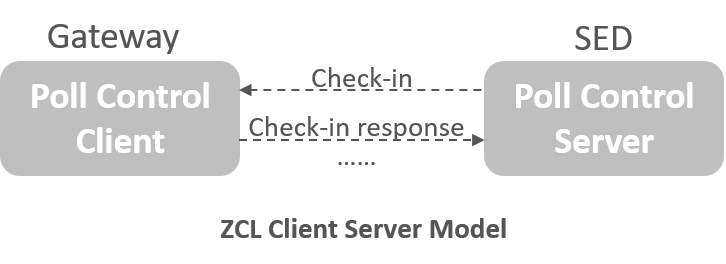
Now the confusing parts are which roles are played by each device. We normally think of a server as the always on device and a client the one that checks in. However in the Poll Control cluster, usually the Gateway acts as client and the sleepy end device works as the server. This is the case because the generally the server checks in with the client, which then sends commands to operate the server.
In the Poll Control cluster, once the SED server checks in with the client (usually a router), the client manages the data polling rate of the sleepy end device using four different commands:
0x00 - Check-in Response (Mandatory): When a server checks in, the client uses this to respond if it wants to enter fast polling mode or not.
0x01 - Fast Poll Stop (Mandatory): This tells a server that the client is finished sending messages and it can return to it’s regular polling interval.
0x02 - Set Long Poll Interval (Optional): set the long interval by which the end device polls
0x03 - Set Short Poll Interval (Optional): set the short interval by which the end device polls
The poll control cluster server defines one Check-in command and several polling interval attributes. Some of the attributes are mandatory, the others are optional.
Command
0x00 - Check-in (M)
Attributes
0x0000 - Check-inInterval (M)
0x0001 – LongPollInterval (M)
0x0002 – ShortPollInterval (M)
0x0003 – FastPollTimeout (M)
0x0004 - Check-inIntervalMin (O)
0x0005 - LongPollIntervalMin (O)
0x0006 - FastPollTimeOutMax (O)
You can refer to the ZCL specification for a more detailed explanation about these commands and attributes.
Attribute Settings and Battery Life Considerations#
The sleepy end device works as Poll Control server and can be managed by Poll Control client. In order to help conserve battery life sleepy end devices have two attributes which set bounds on the time they are allowed to be kept awake and more importantly, turn on their radios to check in.
Check-inIntervalMin - Provide minimum value for the Check-inInterval to protect against the Check-inInterval being set too low and draining the battery on the device
FastPollTimeOutMax - Provide maximum value for the FastPollTimeout to avoid it being set to too high a value resulting in an inadvertent power drain on the device
The default values chosen for this cluster are:
Check-in Interval = 1 hour = 0x3840 quarter seconds
Long Poll Interval = 5 seconds = 0x14 quarter seconds
Short Poll Interval = 0.5 second = 0x02 quarter seconds
Fast Poll Timeout = 10 seconds = 0x28 quarter seconds
It also requires that the Check-in interval >= Long Poll interval >= Short Poll interval
It should also be noted that Fast polling mode will operate so long as the client is sending data to the server/end device. So these values only come into play once fast polling data transfers are complete.
How does the Poll Control cluster work#
In some practical user cases we need to use the Poll Control cluster for sleepy end device. For example: the sleepy end device receives an OTA update from the OTA server or the billing information being downloaded from the meter.
So here we have a sleepy end device/Poll Control server and router on the network/Poll Control client. This client/router will want to send data to the SED at certain intervals.
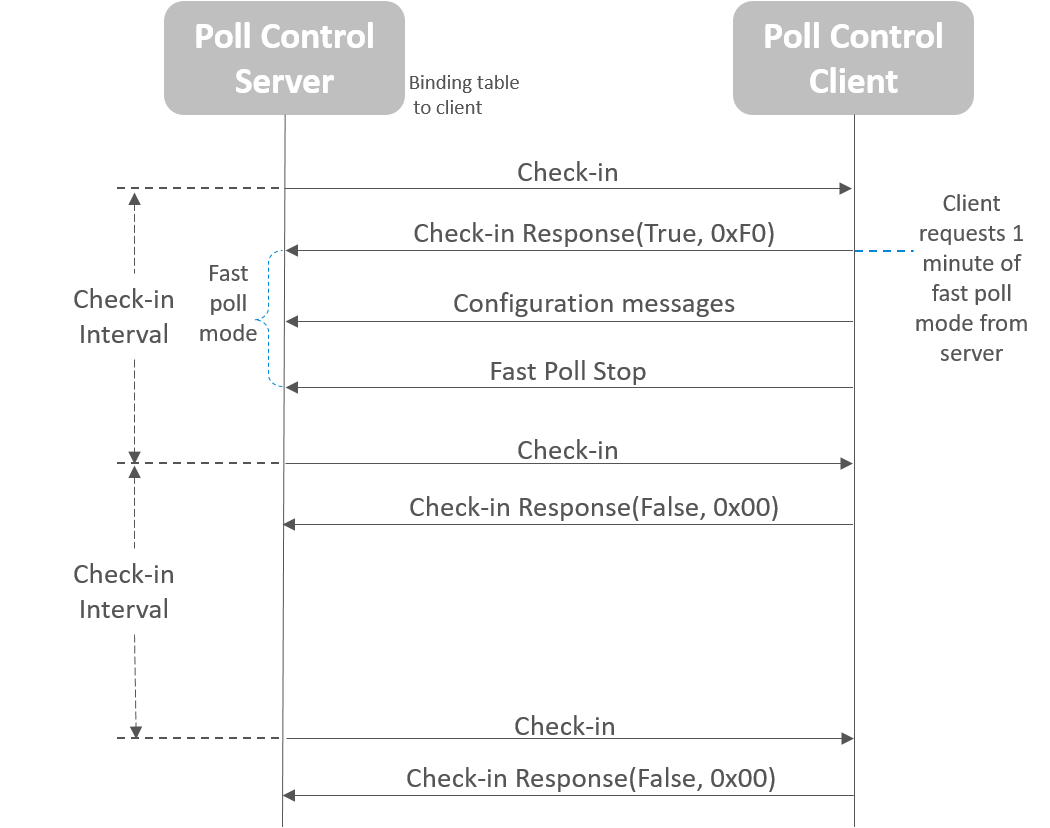
Normally when a SED wakes up, it polls its parent for data and then go back to sleep. But this is where the Poll Control cluster operations step in.
When the devices first come up, usually during device discovery, the Poll Control client configure bindings on the device implementing the Poll Control server. This will initiate the server sending Check-in commands to client.
Server sends Check-in to client periodically and the Check-in interval is guaranteed.
Note: On a normal check in, the client will return FALSE and the SED returns to sleep.
Client responds Check-in Response with True if the client wants to configure server, responds with False if nothing need to configure.
Server enters fast poll mode if the Check-in Response is True.
Client can configure the server when the server is in the fast poll mode.
Client can send Fast Poll Stop after the configuration.
From all above we can see that the Poll Control cluster allows you to configure end devices in a way that maximizes their sleep time while allowing them to have intervals where they receive data from other nodes on the network easily and efficiently.