


Network Activities (Form, Join, Rejoin, Leave)#
Creating a Network#
When a Zigbee network starts, it all begins with the Zigbee coordinator (ZC). This is shown in our diagram here.
The Zigbee coordinator (ZC) is represented by a thick red circle
The Zigbee Router (ZR) is represented by thin red circles
The Zigbee End Device (ZED) is represented by thin blue circles
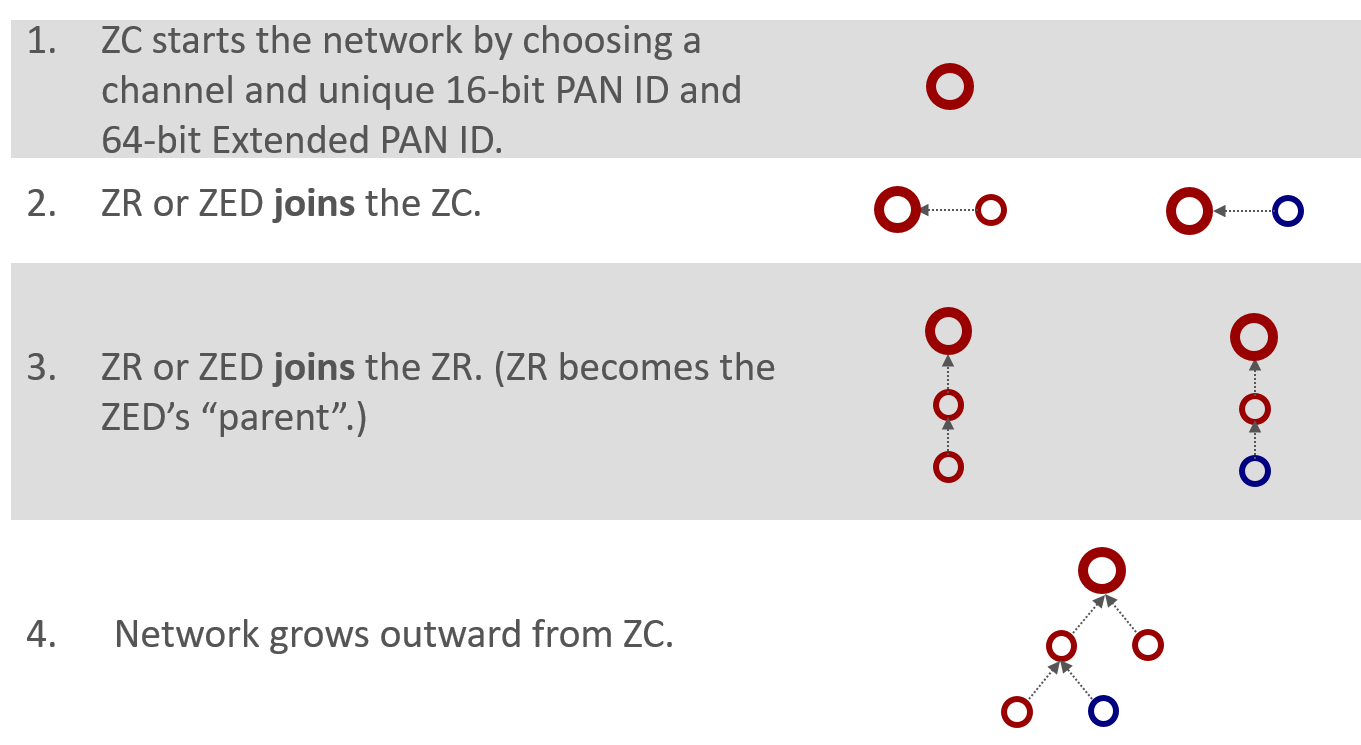
The coordinator begins by choosing a channel that would be one of the 2.4 GHz allocations designated 11 through 26. These represent channels with a center frequency from 2.405 GHz to 2.480 GHz. The coordinator is responsible for choosing a unique 2-byte PAN ID and a unique 64-bit extended PAN ID. If you recall from our last presentation regarding PAN IDs, the short PAN ID used to identify the network, but in case a conflict arises the extended PAN ID is the backup scheme.
Once the coordinator has chosen the channel, PAN ID, and extended PAN ID, the network expands by allowing more nodes, such as a router or an end device, to join through the existing coordinator. A device can only join the network through a node already on the network. The exception is the coordinator which is the device that forms the network.
After the first router joins the coordinator after network formation, future nodes can join the network through the coordinator or the new router. Nodes cannot join through an end device because an end device doesn’t have routing functionalities. As the network grows, a tree-like structure forms from the coordinator, with the end devices generally being on the fringes of the network.
Joining a Network#
From the perspective of joining a network - a device that wants to join the network is depicted by the purple circle. It is neither red nor blue because it hasn’t joined the network and therefore doesn’t have a node type.
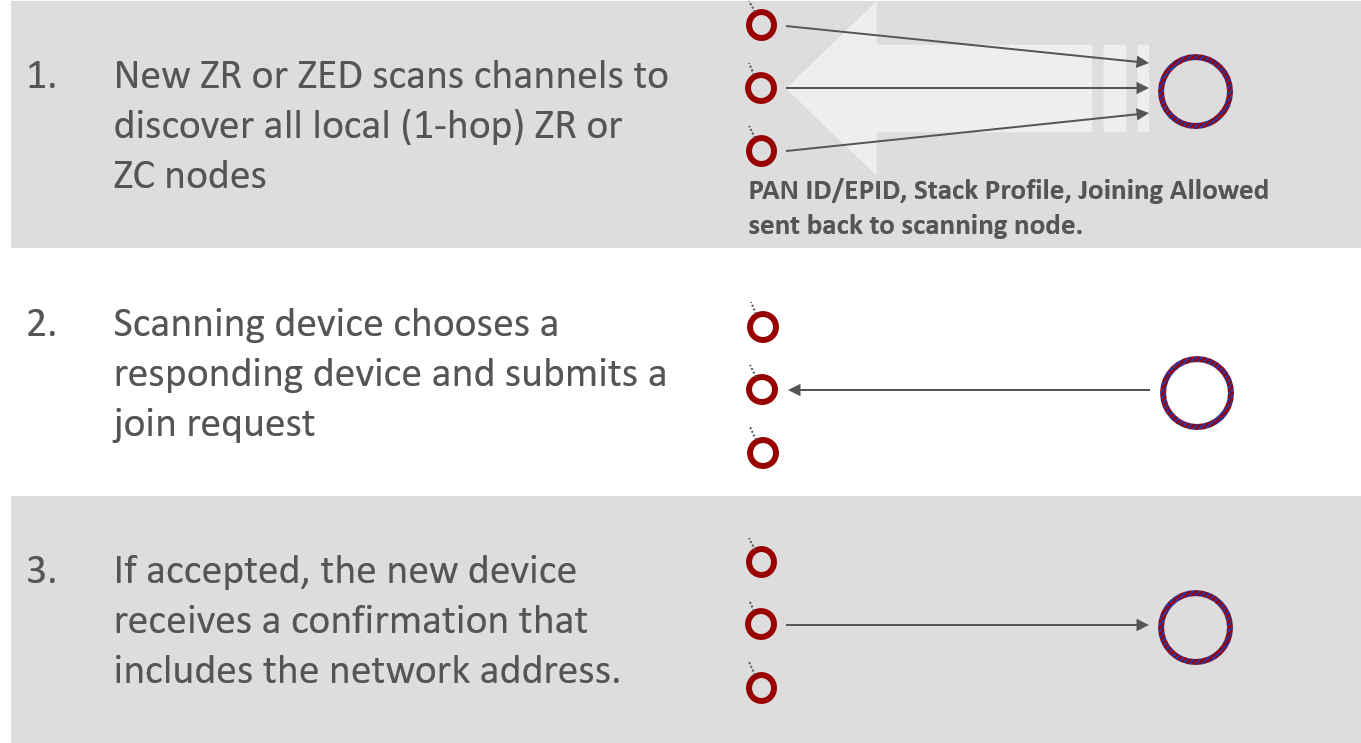
First of all the device has to scan across the channels, to identify what networks are available. Then it has to solicit router and coordinator nodes to determine which are available devices through which it can join. This process is called an Active Scan, an IEEE 802.15.4 MAC concept where we send the beacon request which is a single hop broadcast that transcends all the PAN ID boundaries. Every device in every 15.4 network within range can hear this beacon request, and they are supposed to respond with some indication of their network such as PAN ID, extended PAN ID and stack feature set, and a Boolean parameter that says whether or not there’s any joining allowed. This “joining-allowed” property is done on a case-by-case basis for each node. So it may be that there are two nodes in the available network but only one of those nodes is allowing new devices to enter. It’s something like having multiple access points into the network where they can be enabled or disabled for accessibility to new devices at will. The other information that’s not displayed in the diagram here is that there is also information from the router or coordinator about its ability to sustain additional end devices. So if you are an end device wanting to join the network, a potential parent might say it could let you into the network if you were a router, but because it can’t support any more end devices, it can’t let you in. This allows the end device to rule out that node as a potential parent.
In this diagram, in action number 1 we see the large arrow soliciting the devices with its beacon request, and the individual network indications are beacons coming back. Whichever beaconing device is heard best becomes the parent node of the joining device. Once this is chosen, the joining device submits an association request to the chosen node from the chosen network. This is action number 2 – the arrow going across to the chosen device. At this point there is no security authentication; it’s simply that if someone submits a join request to a node and it is permitting joining, and it can accept a new device, then it should create and send a random address to the joining device, and now the new device is successfully associated into the network. This is shown in action number 3. The process of association is a very simple one-to-one device process and doesn’t involve contact with other nodes. After the association takes place there is a security authentication step with the trust center device to complete the story, however, we will not provide details of this authentication as it is out of the scope of this introduction.
Network Analyzer Capture of Joining a Network#
Below is a log of the Network Analyzer to help illustrate the joining process. If you are not already familiar with this tool, we recommend that you take the time to learn about Network Analyzer.
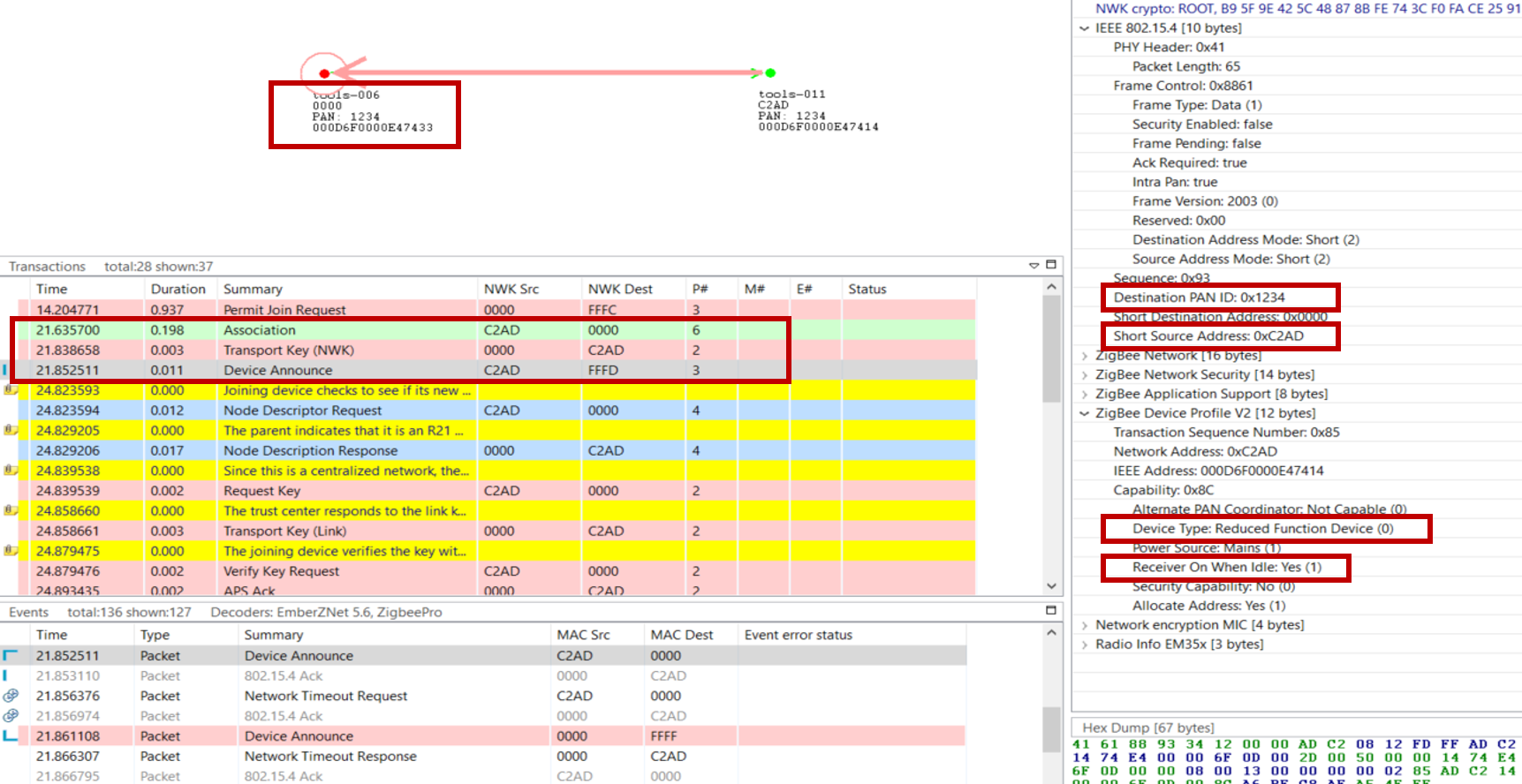
On the top, you see a visual representation of the network, and the arrows show the transaction between the nodes. The “Transactions View” shows all the transactions between nodes, and the “Event View” shows all the messages separately. This may be a bit overwhelming because the message of a transaction can be scattered over time. The “Events detail” view is showing the different fields inside the selected message in the “Events View”. More information about the Network Analyzer will be handled in the “Studio: Key Concepts Network Analyzer” presentation.
The joining device sends an association message to the coordinator of the network, this is the green message in the log. After this the coordinator will share the network key, so the device can encrypt and decrypt the messages. After this is done the joining device is announcing itself in the network, this way the whole network knows what kind of device the just joined device is. The details of the device announcement can be seen in the “Event Detail pane” on the right. Here we see in the top red box the PAN id of the network, also here is the short Id of the joined device visible. The following 2 red boxes are more device describing, from these boxed you can determine the device type, coordinator, router, end device, or a sleepy end device. Routers and Coordinators are full-function devices, while an end device or a sleepy end device are reduced-function devices. For a sleepy end device, the receiver will sleep when the device is in an idle state, while the other devices will always listen to the channel.
After Device Announce, the device requests a link key update. For further information and more details on link key update, see Zigbee 3.0 Security.
Rejoin a Network#
Rejoining is a way for a node to reconnect to a network of which it was previously part. Rejoining is necessary in three different circumstances:
Sleepy devices that may no longer be able to communicate with their parent.
Devices that have missed the network key update and need an updated copy of the network key.
Devices that have missed a PAN ID update and need to discover the network’s new PAN ID.
When a device tries to rejoin, it may or may not have the current network key. Without the correct network key, the device's request to rejoin is silently ignored by nearby routers. Therefore, a device has two choices when rejoining: a secured rejoin or a trust center rejoin. If the rejoining device has the correct network key it will do a secure rejoin to a neighboring router. A router/coordinator device will always provisionally accept a NWK layer Rejoin command with the active network key. If the network key is invalid the rejoining device will request a new network key from the trust center, this is called a Trust center rejoin. Note that neither of these rejoin cases requires the MAC Permit Association otherwise the procedure is the same as the Association procedure.

Let’s look at the above picture, this is part of a log from the Network Analyzer, where a device is sending a rejoin request to the coordinator. The coordinator is granting the device access to the network with a network response command. The message after this is a device announcement, this is used to notify that the device is on the network.
For a more detailed explanation, see Zigbee 3.0 Security.
Leaving a Network#
There are multiple ways to request a device to leave the network.
The ZDO leave command which can be indirect or direct. With the indirect way we request the parent of the end device to handle the leave of the end device. This can be useful with end devices. The direct way of a leave request will address the leave request to the device directly. This can be used for routers and end devices. (Note that messages for a sleepy end device may time out before they are delivered.)
APS Remove Device is another way to request a device to leave on the APS layer, this gives you the opportunity to encrypt the message.
If a device is receiving a leave request and then leaves, it sends a leave announcement to notify the rest of the network. This gives the opportunity to the rest of the network to take adequate actions, such as updating their routing tables.
The leave announcement can also be sent to the network as a result of device voluntarily leaving the network; here you can think of it as a graceful power down.
There are some example use cases of leaving a network and you can see below figure.
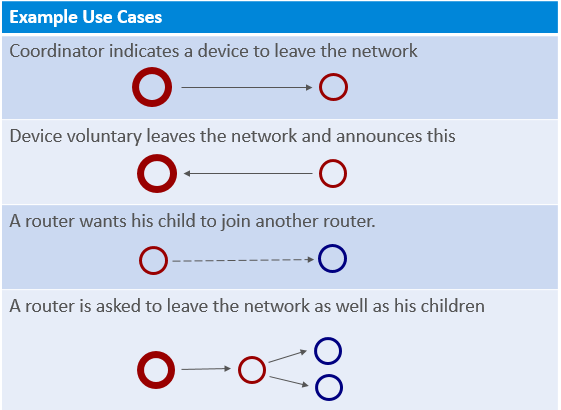
A coordinator that requests a device to leave the network, this is used for example when the joining process is not successfully completed.
A device that is voluntarily leaving the network. There the device is only sending the leave announcement.
A router that is requesting an end device to join another router; this can be a result of a router leaving the network and allowing its end device children to remain in the network.
A coordinator that is asking a router to leave the network, as well as its end device children. The router will first request the children to leave the network, and after that leave the network itself.
Example of ZDO Leave#
Let’s see how a network leave looks like in the Network Analyzer.

In the above figure you can see the transactions where a device is asked to leave and then rejoin the network. First, device 0x0001 is requesting device 0x0002 to leave the network.
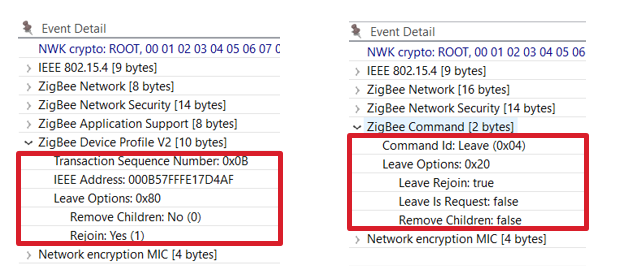
In the leave request, the Rejoin bit is set to True while the Remove Children bit isn’t set. This message is processed by device 0x0002 which sends a network leave announcement, the event details of which is shown on the right side. In this message we see that the Leave Rejoin bit is set, and other rejoin options are cleared. The “Leave is Request” is set when the device is leaving the network by a request; when it’s cleared the leave is initiated by the device itself. The Remove Children option bit is set when the children of the device are also removed, and cleared when this is not the case.