


Frame Formats#
This section describes each type of ASH frame, including its format and purpose, the notation used in documentation, and some examples.
RST Frame Format#
The following figure illustrates the format of the RST frame.
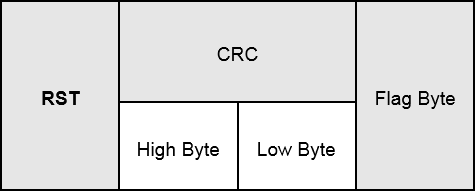
Purpose: Requests the NCP to perform a software reset (valid even if the NCP is in the FAILED state).
Notation used in documentation: RST()
Example:
C0 38 BC 7E
RSTACK Frame Format#
The following figure illustrates the format of the RSTACK frame.
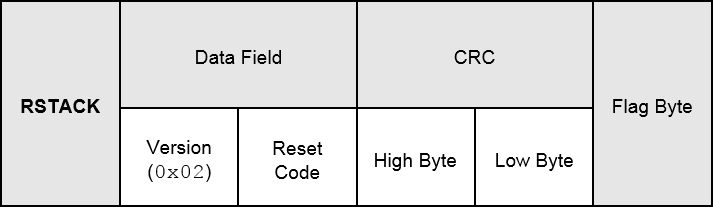
Purpose: Informs the Host that the NCP has reset and the reason for the reset.
Data field:
Version: Fixed at 0x02 in this version of ASH
Reset Code: See the table of Reset and Error Codes
Notation used in documentation: RSTACK(V, C)
V: version
C: reset code
Example:
C1 02 02 9B 7B 7E
ERROR Frame Format#
The following figure illustrates the format of the ERROR frame.
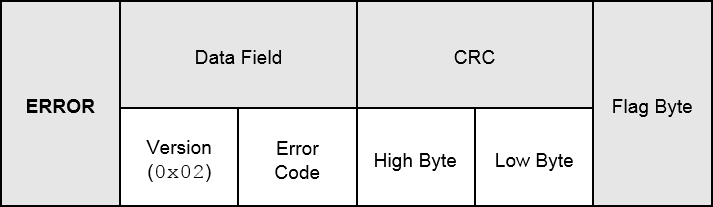
Purpose: Informs the Host that the NCP detected a fatal error and is in the FAILED state.
Data field:
Version: Fixed at 0x02 in this version of ASH
Error Code: See the table of Reset and Error Codes
Notation used in documentation: ERROR(V, C )
V: version
C: reset code
Example:
C2 01 52 FA BD 7E
DATA Frame Format#
The following figure illustrates the format of the DATA frame.
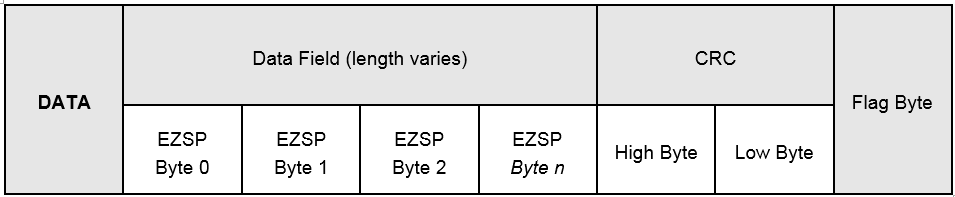
Purpose: Carries all EZSP frames.
Data Field:
EZSP frame: exclusive-OR’ed with a pseudo-random sequence
Notation used in documentation: DATA(F, A, R)
F: frame number (frmNum)
A: acknowledge number (ackNum)
R: retransmit flag (reTx)
Examples — without pseudo-random sequence applied to Data Field:
EZSP “version” command: 00 00 00 02
DATA(2, 5, 0) = 25 00 00 00 02 1A AD 7E
EZSP “version” response: 00 80 00 02 02 11 30
DATA(5, 3, 0) = 53 00 80 00 02 02 11 30 63 16 7E
Examples — with pseudo-random sequence applied to Data Field:
EZSP “version” command: 00 00 00 02
DATA(2, 5, 0) = 25 42 21 A8 56 A6 09 7E
EZSP “version” response: 00 80 00 02 02 11 30
DATA(5, 3, 0) = 53 42 A1 A8 56 28 04 82 96 23 7E
ACK Frame Format#
The following figure illustrates the format of the ACK frame.
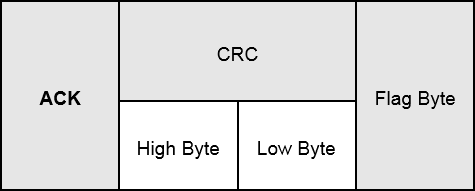
Purpose: Acknowledges receipt of a valid DATA frame.
Notation used in documentation: ACK(A)+/-
A: acknowledge number (ackNum)
+/-: not ready flag (nRdy); “+” = “0” = “ready”; “-” = “1” = “not ready”
Examples:
ACK(1)+ :81 60 59 7E
ACK(6)– : 8E 91 B6 7E
NAK Frame Format#
The following figure illustrates the format of the NAK frame.
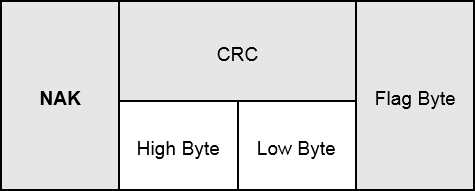
Purpose: Indicates receipt of a DATA frame with an error or that was discarded due to lack of memory.
Notation used in documentation: NAK(A)+/-
A: acknowledge number (ackNum)
+/-: not ready flag (nRdy); “+” = “0” = “ready”; “-” = “1” = “not ready”
Examples:
ACK(6)+ : A6 34 DC 7E
ACK(5)- : AD 85 B7 7E