


Troubleshooting#
J-Link could not connect to the device (EFR32)#
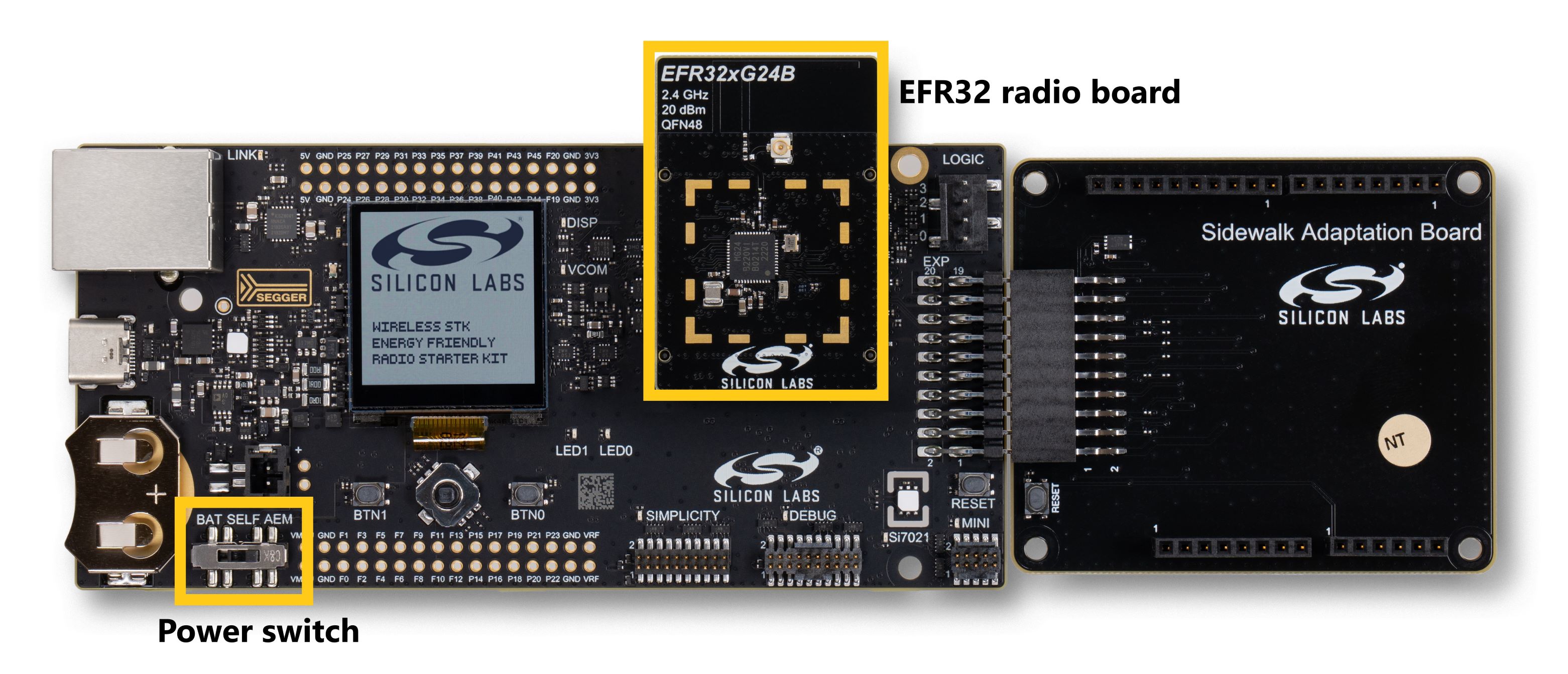
When using the Wireless Starter Kit main board (WSTK) along with a radio board, you should be able to connect with J-Link RTT Viewer using the parameters in Testing and Debugging. Your EFR32 should also be detected by Simplicity Studio 6.
If your EFR32 is not detected or you have difficulties connecting with J-Link RTT Viewer, you can check two points:
Your WSTK power switch is on AEM mode.
Your radio board is plugged in correctly (see the following)
CloudFormation Errors#
Permission Denied#
While executing the CloudFormation command to deploy your stack, you have an error showing missing authorization as follows:
<your user> is not authorized to perform: cloudformation:<some action> on resource aws:cloudformation:us-east-1:<some resource> because no identity-based policy allows the cloudformation:<some action> actionIt is probably because your IAM user associated to your CLI does not have sufficient permissions. You should ask the person managing your AWS account to help you on this task.
Failed to Create Stack#
CloudFormation stack creates objects and every user inside the same IAM policy has access to those objects. The stack only needs to be created once, and can be used for all your devices. If you deploy the CloudFormation stack and objects with the same names already exist, the deployment fails and the Sidewalk Assistant rolls back the changes automatically.
To get more details on this error, execute this command: aws cloudformation describe-stack-events --stack-name NameOfYourStack
This command displays all the actions attempted to deploy the CloudFormation stack. You need to find the first error message that appeared and understand why it failed. If you see an error log about an object that already exists then you should check what objects are already created inside your AWS account.
As an example you can see in the following log that the creation of CFSRepublishLambdaRole failed (value of ResourceStatus field) because it already exists (value of ResourceStatusReason field):
{
"StackId": "arn:aws:cloudformation:us-east-1:78468574544:stack/NameOfYourStack/4a54e4-4583-5435-f548-ad546584dd58",
"EventId": "CFSRepublishLambdaRole-CREATE_FAILED-2022-09-21T14:18:19.899Z",
"StackName": "NameOfYourStack",
"LogicalResourceId": "CFSRepublishLambdaRole",
"PhysicalResourceId": "",
"ResourceType": "AWS::IAM::Role",
"Timestamp": "2022-09-21T14:18:19.899000+00:00",
"ResourceStatus": "CREATE_FAILED",
"ResourceStatusReason": "CFSRepublishLambdaRole already exists in stack arn:aws:cloudformation:us-east-1:560019425582:stack/SidewalkStack/a58745f-5458-5742-125e-65a8b45a25",
"ResourceProperties": "{\"MaxSessionDuration\":\"3600\",\"RoleName\":\"CFSRepublishLambdaRole\",\"Description\":\"Allows IoT to call AWS services on your behalf.\",\"Policies\":[{\"PolicyName\":\"CFSRepublishPolicy\",\"PolicyDocument\":{\"Statement\":[{\"Action\":[\"iot:*\",\"sqs:*\",\"iotwireless:*\",\"logs:*\"],\"Resource\":[\"*\"],\"Effect\":\"Allow\"}]}}],\"AssumeRolePolicyDocument\":{\"Version\":\"2012-10-17\",\"Statement\":[{\"Action\":[\"sts:AssumeRole\"],\"Effect\":\"Allow\",\"Principal\":{\"Service\":[\"lambda.amazonaws.com\"]},\"Sid\":\"\"}]}}"
}You should delete the duplicated resources or rename them. If the duplicated object is the Destination, you will need to delete that Destination. If there are devices present in the account that are associated with the Destination defined by that stack, the attempt to delete that Destination will fail to avoid orphaning those existing associated devices.
A solution is to delete those devices (if no longer needed), or re-associate those devices to a different Destination - both of which frees up the original Destination to be deleted as part of the process to clean up and rollback duplicated stack elements.
Here are a few useful commands to get back to a clean slate:
aws iotwireless deregister-wireless-device --identifier "9d2c6b31-25af-4b3e-b6d3-377ea783c5b2" --wireless-device-type Sidewalk
aws iotwireless delete-wireless-device --id "9d2c6b31-25af-4b3e-b6d3-377ea783c5b2"
aws iotwireless delete-destination --name "CFSDestination""Registration Errors#
Failing During Device Registration#
Once your device is on, it will try to find a gateway to register. During this message exchange, if you see the following errors on your endpoint logs, then your Secure Element Firmware is probably outdated.
<error> GET_DEVICE_ECDH_SIG: 3
<error> MASK NOT FOUND
<info> data_send send -8
<error> Dispatcher: Message handler returned unexpected result - -8
<error> MASK NOT FOUNDThe Amazon Sidewalk examples require that the EFR32 uses a minimal version of Secure Element firmware depending on the radio board MCUs. See the table below to check your version:
MCUs | SE minimal version |
|---|---|
xG21 | 1.2.9 |
KG100S | 1.2.9 |
Series 2 | 2.1.7 |
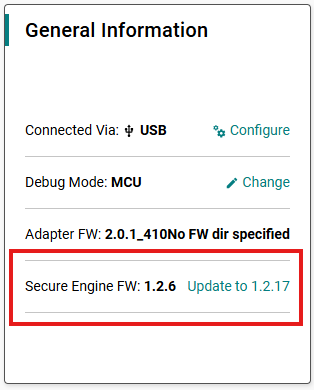
You can verify this version in Simplicity Device Manager tool, select your device and click Configure. From the left panel, go to Secure Engine Firmware then read the Secure Element firmware. If the EFR32 is using an older firmware version, update it.
You can also verify it from Simplicity Studio 6 in Device panel, select your device and look for Secure Engine FW in Overview under General Information.
Time Synchronization#
Once your device is registered, time synchronization between the gateway and the endpoint should take place within a few minutes. If the device does not attempt to synchronize with the gateway, check that your Amazon gateway device is connected to the Internet and localized in the US, then try rebooting your gateway and your endpoint.
Amazon Sidewalk - SoC Hello Neighbor Errors#
When trying out the Hello Neighbor application with FSK radio layer, you may see logs about failing Disco module that resemble the following logs (the device is fully registered and attempts to discover the gateway):
<info> [00132619] App - sidewalk status changed: 1
<info> [00132619] App - registration status: 0, time sync status: 1, link status: 0[00132631] <info> RTC compensation is not supported.
[00132632] <info> swi thread created
[00132632] <info> Set region 1, country: US, num cfg: 2
[00132673] <info> P2P chnl loaded: 7
[00132673] <info> PAN ID loaded:
[00132673] <info> B9 80 96 21 00
[00132675] <info> Def mcast retries: 1
[00132675] <info> Pairing state loaded: 0
[00132675] <info> Config version 4
[00132675] <info> init_chnl_seed, chsid:9, seed:FFFFFA610000
[00132676] <info> rnet_mac_disco_init state = 0, req_auth = 0,cur_ev = 00000000
[00132676] <info> min ch symbols ms 151 bcn time ms 167
[00132677] <info> Starting GWD Process in: PASSIVE_SYNC/FFS_MODE
[00132677] <info> rnet_mac_disco_start_sampling state = 1, req_auth = 0, cur_ev = 00000000 f = 00052AC1 r = 0
[00132678] <info> Disco sampling start SUCCESS! state = 2, req_auth = 0, cur_ev = 00000000
[00132679] <info> 900MHz MAC Init: PRB:1 BCN:1 HDR:1, HDR_LORA:0 LDR:0
[00132680] <info> rnet_sec: Loading Setting (key=0xa) not on flash!
[00132682] <error> rnet_sec: File content for 2 mode cannot be trusted!
[00132683] <info> rnet_sec: Loading Setting (key=0x9) not on flash!
[00132685] <error> rnet_sec: File content for 1 mode cannot be trusted!
[00132686] <info> Ring-Net initialized
[00132686] <info> Disco stop sampling success. Time elapsed = 7 ms
[00132686] <info> [MET] B:0 N:0
[00132687] <info> rnet_mac_disco_init state = 1, req_auth = 0,cur_ev = 00000000
[00132687] <info> Starting GWD Process in: PASSIVE_SYNC/FFS_MODE
[00132688] <info> rnet_mac_disco_start_sampling state = 1, req_auth = 0, cur_ev = 00000000 f = 00052AC1 r = 0
[00132688] <info> Disco sampling start SUCCESS! state = 2, req_auth = 0, cur_ev = 00000000
[00132689] <info> Disco active. LSC=0, symb=7490, rx_to_ms=151
[00132690] <info> [MET] B:0 N:0
[00132857] <warning> Disco submodule ended prematurely! ch = 0
[00133025] <warning> Disco submodule ended prematurely! ch = 1
[00133193] <warning> Disco submodule ended prematurely! ch = 2
[00133362] <warning> Disco submodule ended prematurely! ch = 3
[00133530] <warning> Disco submodule ended prematurely! ch = 4This error is generally linked to a missing or incorrectly plugged-in Semtech board.
For more troubleshooting advice, check out the FAQ on Silicon Labs community forum.