


Bluetooth Qualification#
All products using Bluetooth technology must go through the Bluetooth SIG's Qualification Process, even if the product does not have the Bluetooth logo or Bluetooth is not mentioned in the packaging and the documentation. In practice this means that, before you can sell a Bluetooth-enabled product to the market, the product must be qualified also known as Qualified Product that has successfully completed the Bluetooth Qualification Process through the Bluetooth SIG. The qualification listing has an administrative fee paid by a member to Bluetooth SIG, fee value is depending on your membership type you have with Bluetooth SIG. There are online resources to learn more about the Bluetooth Qualification Process as well as tutorials on the Qualification Workspace, which is the online tool used to complete the Bluetooth Qualification Process. If you need assistance to qualify your product consider reaching out to your nearest Bluetooth Qualification Consultant.
Scenario A: Product Listing Using Existing Core Layer Designs#
When qualifying your product based on the Silicon Labs Bluetooth stack, you will integrate the pre-qualified designs (known as Design Number - DN) listed in the diagram below, depending on which SDK version was used to build your application. In addition to these software designs, you must also have to integrate a qualified RFPHY design (hardware - SoCs/Modules/Boards) in your product listing. If you are designing with an SoC then you may need to obtain your own RFPHY qualification with the Bluetooth SIG, depending on your hardware design and Bluetooth core spec version. In the latter case, consult your nearest Bluetooth Qualification Consultant, or Silicon Labs through the support portal, to understand if an existing Silicon Labs RFPHY pre-qualification could be used/inherited. If there are no designs changes in Hardware RFPHY which is following the reference design as shown in datasheets then existing RFPHY design number can be inherited.
The above software-based pre-qualified designs are two/one out of the three/two designs to integrate when proceeding with the Option 2b step as mentioned in QPRD v4.0 or above. Customers do not need to do any additional testing for each unmodified layer inherited from an included pre-qualified designs. Unmodified layers are not shown in test plan, given that the test reports are embedded in the pre-qualified designs /components for the SIG to review.
Note: Silicon Labs recommends using the latest SDK or SDK's which are less than 3 years old. Using of old SDK (older than 3 year period) is not recommended unless Subsystem/Core-Controller configurations design exists or it is not affected when inheriting Silicon Laboratories' designs. It is difficult to renew the old expired component/designs in order to be compliant to latest Test Case Reference List (Errata introduced in interim to fix specifications, test specifications and any other bugfix) in core layers i.e. Link Layer, Host stack. It is customers responsibility to qualify SDK/Hardware design if planning to use old SDK. For exceptions (or any pre existing agreements), contact Silicon Labs technical support through the support portal in case there is a need to use an older SDK version.
A.1: Combining pre-qualified core layer designs with same Bluetooth specification versions#
In scenarios, where the hardware (i.e. RFPHY) is following the reference design as shown in the datasheets, and when software/firmware is used as it is, Silicon Labs recommends using appropriate hardware and software versions using the same specification version. For example: Design numbers Q332743 (RFPHY design # for xG24 range of products) and Q317849 (Other controller layers and Host design #, using BLE SDK 9.0.0 and above, SiSDK 2024.12 and above) will help to qualify your product for Bluetooth Core specification 6.0 without any additional testing. Q332743 and Q317849 are listed for Bluetooth Core specification 6.0.
Silicon Labs has created and listed a number of original designs for the software releases as shown below; however, it is recommended to use its subset design numbers in combination with an existing qualified RFPHY design # to make an end product. Refer to Existing Silicon Labs Design Numbers (DNs) for Creating a New Product Design for further details.
Bluetooth SDK Version | Component | DN /QDID |
|---|---|---|
V11.0.0 and above | Channel Sounding, Link Layer (Bluetooth 6.1) and Host stack (Bluetooth 6.1) | |
V9.0.0.0 and above | Channel Sounding, Link Layer (Bluetooth 6.0) and Host stack (Bluetooth 6.0) | |
V6.0.0.0 and above | Link Layer (Bluetooth 5.4) and Host stack (Bluetooth 5.4) | |
V3.2.x and above | Link Layer (Bluetooth 5.3) | |
V2.13.12 and above only | Link Layer (Bluetooth 5.3) | |
V3.2.x and above | Host stack (Bluetooth 5.3) | |
V2.13.12 and above only | Host stack (Bluetooth 5.3) |
A.2: Combining pre-qualified core layer designs with different Bluetooth specification versions#
Scenarios combining RFPHY design with a Bluetooth core specification version different than design, with other controller layers and Host, requires testing for RFPHY to upgrade to the latest version or vice versa.
Caution: Select a specification version that will affect only RFPHY unless changes are required in other controller layers like Link Layer, Host Controller interface, or Channel Sounding. Note also that, if there is no change in test cases from one core spec version to another core spec version, then testing is not required and has to be declared in the Test declaration sheet, also known as the Test plan.
Design number for pre-qualified core layer designs that combine to make a product/products are shown below in Existing Silicon Labs Design Numbers (DNs) for Creating a New Product Design.
Scenario B: Product Listing using Existing Core-Controller Configuration Design and Core-Host Configuration Design#
In this scenario, the lowest version of two designs is selected to determine the Bluetooth Specification version. These types of pre-qualified designs were previously known as subsystems, where Inter Layer Dependency (ILD) is not checked between Controller and Host designs. Silicon Labs has also listed the Core-Controller Configuration design by integrating a pre-qualified RFPHY core layer design and software-based core layer design in addition to pre-qualified Core-Host Configuration design as shown below. In this case, proceed with Option 2a step as mentioned in QPRD v4.0 or above. In the Qualification workspace, Specify the Design section, enter the Design Numbers (DNs) / Qualified Design IDs (QDID) for the design on which you are basing your project with no modification. No modification implies that no changes have been made in Hardware by following the Silicon Labs reference design as shown in datasheets and unmodified software (SDK).
Qualified Core-Host Configuration and Core-Controller Configurations designs are listed in the table below.
Bluetooth SDK Version and Hardware Part (if any) | Core-Host Configuration Design or Core-Controller Configuration Design | DN |
|---|---|---|
V11.0.0 and above | Core-Host Configuration Design (Bluetooth 6.1) | |
V9.0.0.0 and above with xG27 / xG29 | Core-Controller Configuration Design (Bluetooth 6.0) | |
V9.0.0.0 and above | Core-Host Configuration Design (Bluetooth 6.0) | |
V6.0.0.0 and above | Core-Host Configuration Design (Bluetooth 5.4) | |
V6.0.0.0 and above with BGM220S Radio | Core-Controller Configuration Design (Bluetooth 5.4) | |
V6.0.0.0 and above with EFR32xG24 series for specific combinations only | Core-Complete Configuration Design (Bluetooth 5.4) |
Existing Silicon Labs Design Numbers (DNs) for Creating a New Product Design#
In the diagram below, RFPHY Design # refers to design numbers allocated for the existing qualified products at RFPHY level (hardware) for the SOCs, Modules, or Development Kit Boards. Each column indicates the series they belong to.
Other controller layers and host Design numbers refer to design numbers allocated for Silicon Labs qualified products at the software/firmware level covering controller layers LL, HCI, CS, and Host layers. It also indicates which RFPHY features are supported.
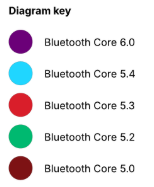
See the diagram key below.
SoCs, Modules, and Development Kit Boards#
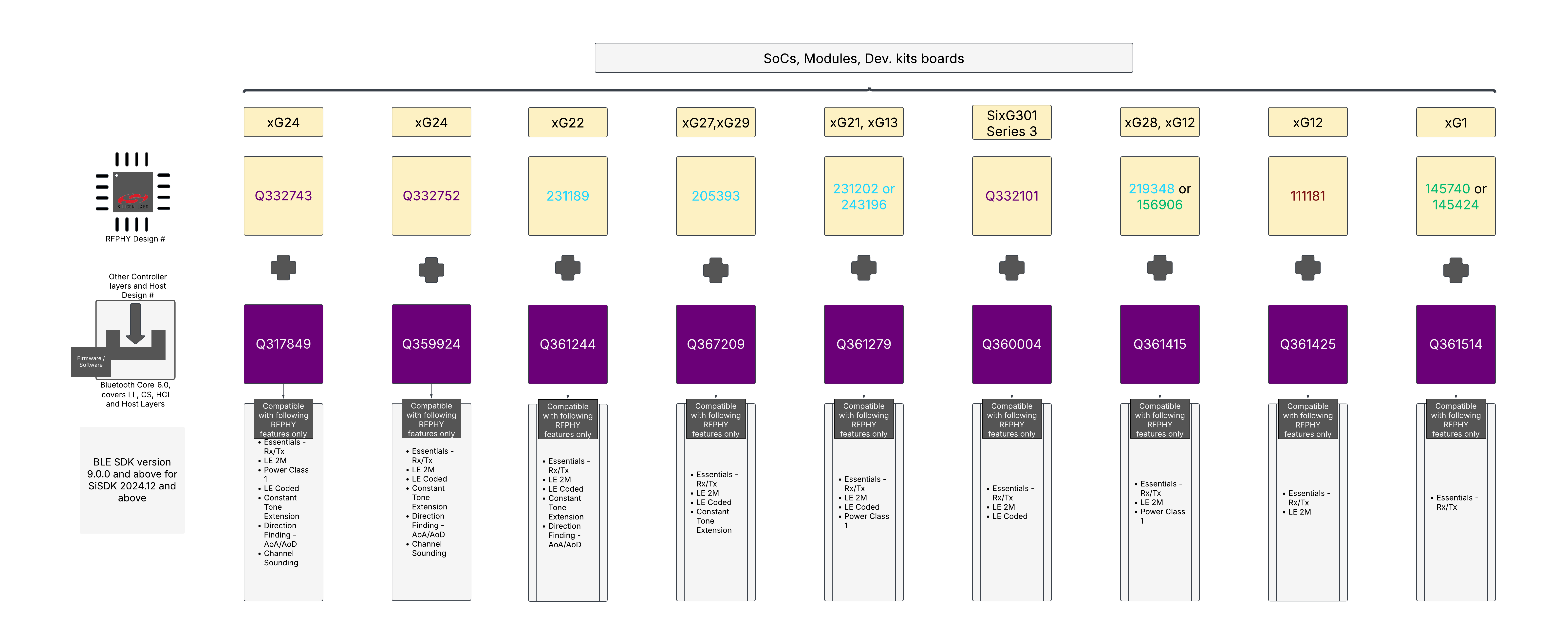
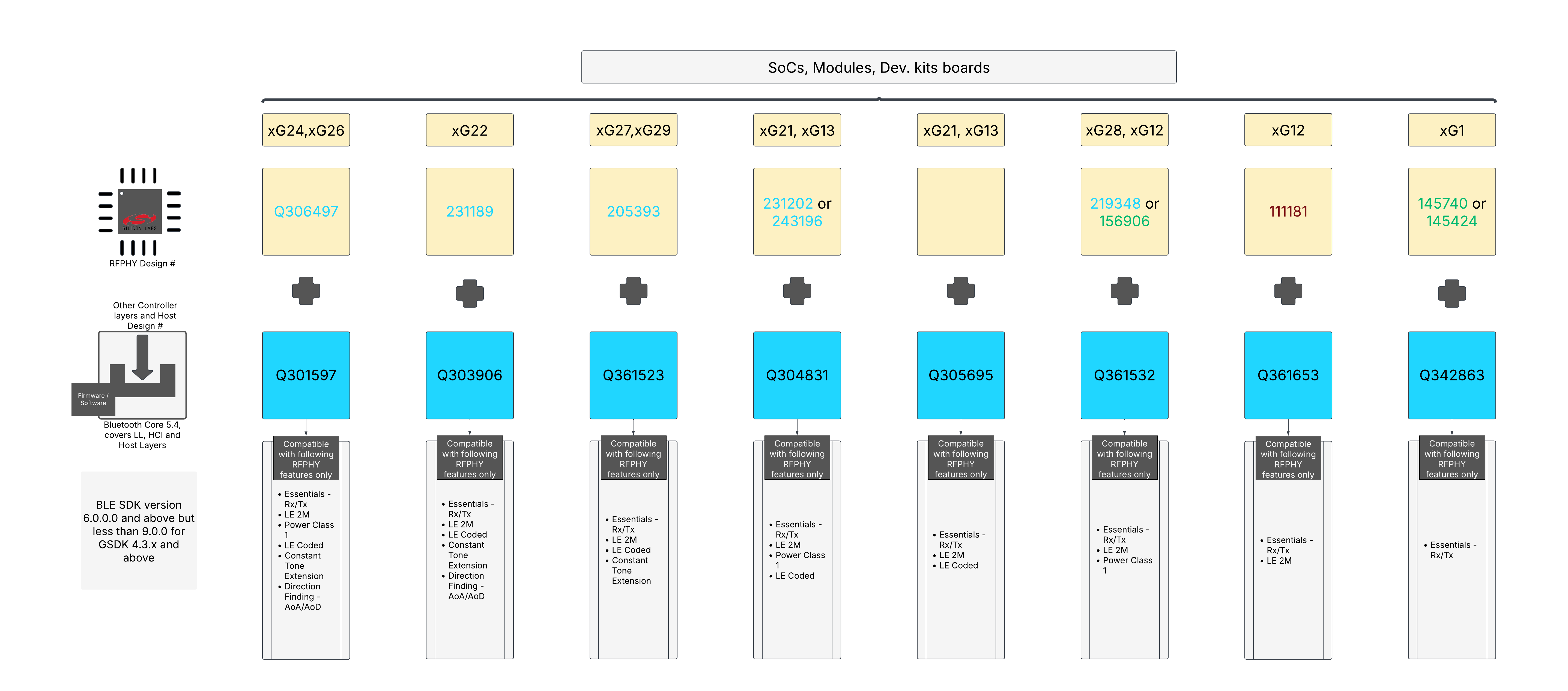
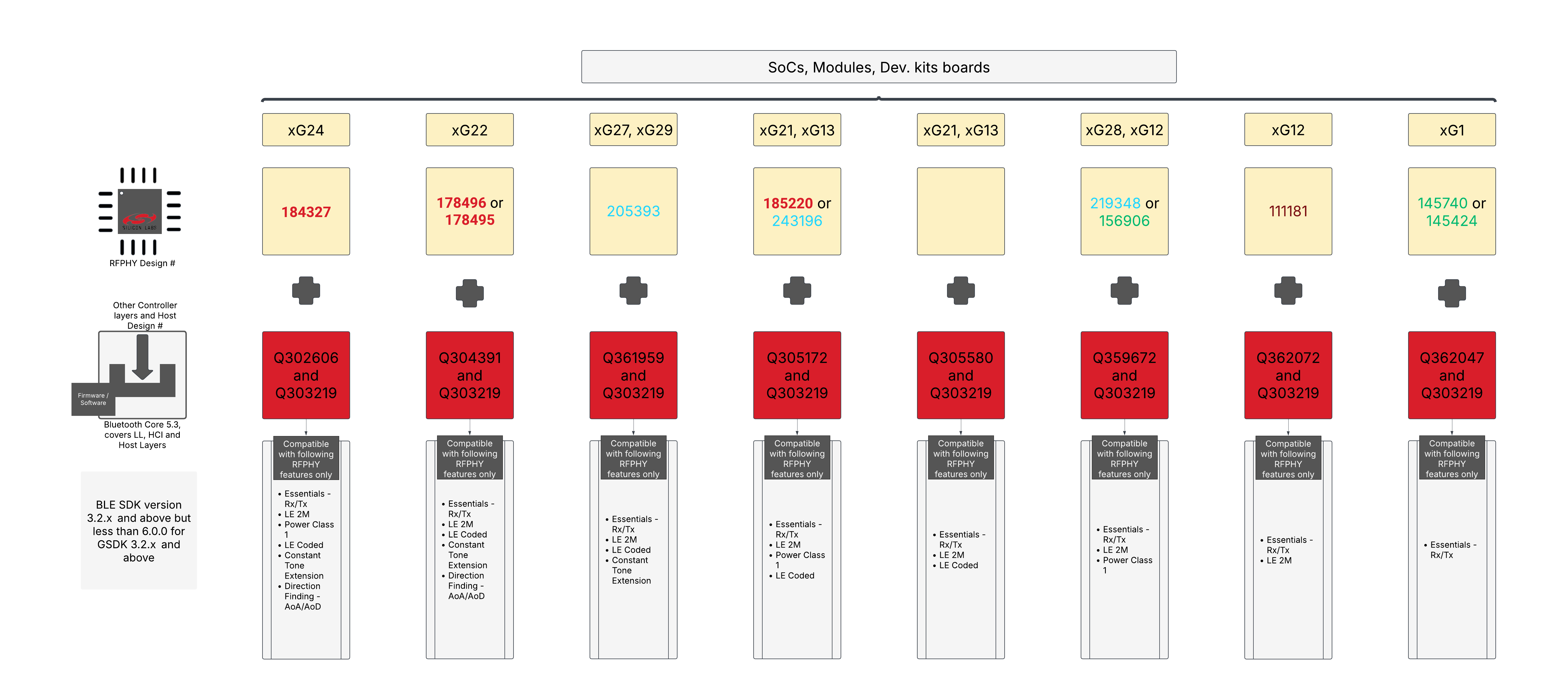
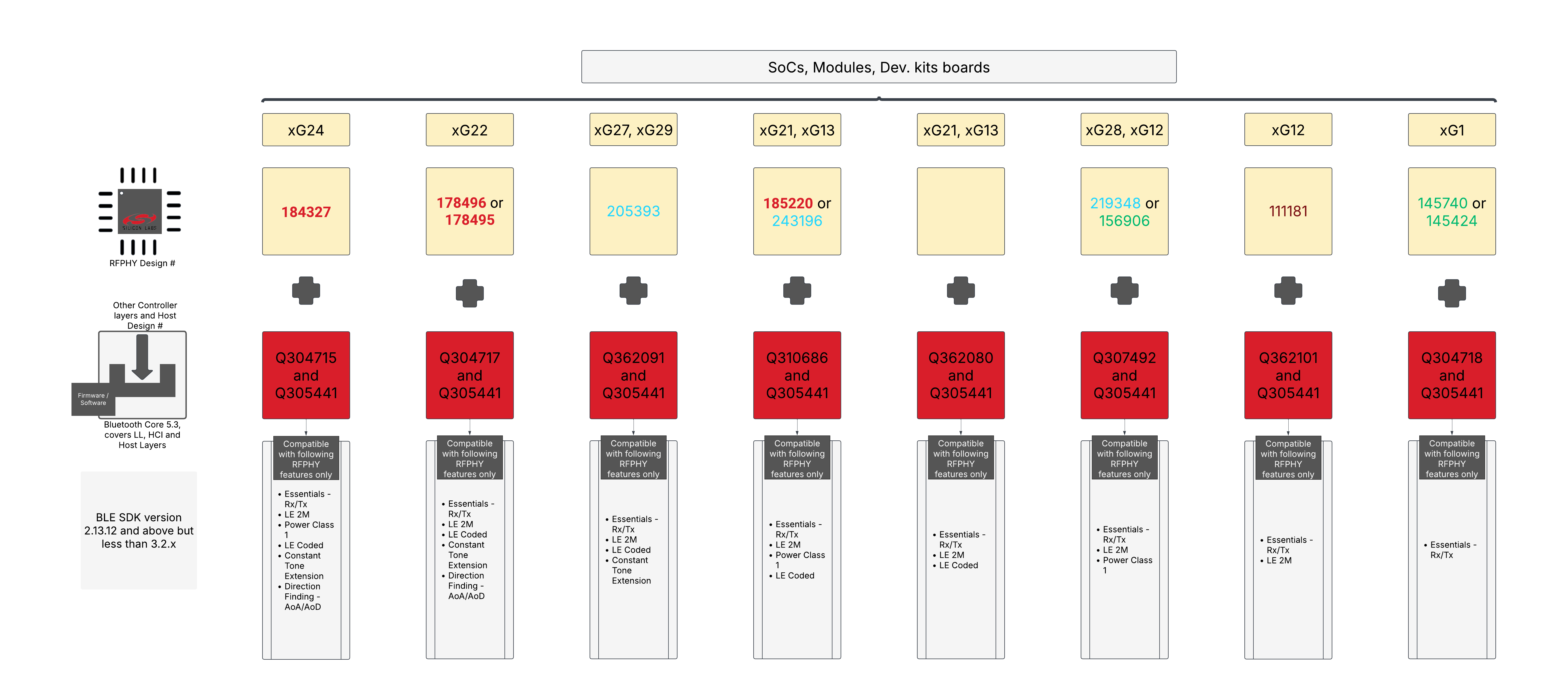
The diagrams above are shown in tabular form below.
| Compatible with following RFPHY features only | ||||||||||
|---|---|---|---|---|---|---|---|---|---|---|
| SoCs, Modules, Dev. Kits boards | RFPHY Design # | Other Controller Layers and Host Design # | BLE SDK version and SiSDK | Essentials - Rx/Tx | LE 2 M | Power Class 1 | LE Coded | Constant Tone Extension | Direction Finding - AoA/AoD | Channel Sounding |
| xG24 | Q332743 | Q317849 | 9.0.0 and above for SiSDK 2024.12 and above | Yes | Yes | Yes | Yes | Yes | Yes | Yes |
| xG24 | Q332752 | Q359924 | 9.0.0 and above for SiSDK 2024.12 and above | Yes | Yes | No | Yes | Yes | Yes | Yes |
| xG22 | 231189 | Q361244 | 9.0.0 and above for SiSDK 2024.12 and above | Yes | Yes | No | Yes | Yes | Yes | No |
| xG27, xG29 | 205393 | Q367209 | 9.0.0 and above for SiSDK 2024.12 and above | Yes | Yes | No | Yes | Yes | No | No |
| xG21, xG13 | 231202, 243196 | Q361279 | 9.0.0 and above for SiSDK 2024.12 and above | Yes | Yes | Yes | Yes | No | No | No |
| SixG301 Series 3 | Q332101 | Q360004 | 9.0.0 and above for SiSDK 2024.12 and above | Yes | Yes | No | Yes | No | No | No |
| xG28, xG12 | 219348, 156906 | Q361415 | 9.0.0 and above for SiSDK 2024.12 and above | Yes | Yes | Yes | No | No | No | No |
| xG12 | 111181 | Q361425 | 9.0.0 and above for SiSDK 2024.12 and above | Yes | Yes | No | No | No | No | No |
| xG1 | 145740, 145424 | Q361514 | 9.0.0 and above for SiSDK 2024.12 and above | Yes | No | No | No | No | No | No |
| Compatible with following RFPHY features only | |||||||||
|---|---|---|---|---|---|---|---|---|---|
| SoCs, Modules, Dev. Kits boards | RFPHY Design # | Other Controller Layers and Host Design # | BLE SDK version and SiSDK/GSDK | Essentials - Rx/Tx | 2M | Class 1 | Coded Phy | Constant Tone Extension | AoA/AoD |
| xG24, xG26 | Q306497 | Q301597 | 6.0.0.0 and above but less than 9.0.0 for GSDK 4.3.x and above | Yes | Yes | Yes | Yes | Yes | Yes |
| xG22 | 231189 | Q303906 | 6.0.0.0 and above but less than 9.0.0 for GSDK 4.3.x and above | Yes | Yes | No | Yes | Yes | Yes |
| xG27, xG29 | 205393 | Q361523 | 6.0.0.0 and above but less than 9.0.0 for GSDK 4.3.x and above | Yes | Yes | No | Yes | Yes | No |
| xG21, xG13 | 231202, 243196 | Q304831 | 6.0.0.0 and above but less than 9.0.0 for GSDK 4.3.x and above | Yes | Yes | Yes | Yes | No | No |
| Q305695 | 6.0.0.0 and above but less than 9.0.0 for GSDK 4.3.x and above | Yes | Yes | No | Yes | No | No | ||
| xG28, xG12 | 219348, 156906 | Q361532 | 6.0.0.0 and above but less than 9.0.0 for GSDK 4.3.x and above | Yes | Yes | Yes | No | No | No |
| xG12 | 111181 | Q361653 | 6.0.0.0 and above but less than 9.0.0 for GSDK 4.3.x and above | Yes | Yes | No | No | No | No |
| xG1 | 145740, 145424 | Q342863 | 6.0.0.0 and above but less than 9.0.0 for GSDK 4.3.x and above | Yes | No | No | No | No | No |
| Compatible with following RFPHY features only | |||||||||
|---|---|---|---|---|---|---|---|---|---|
| SoCs, Modules, Dev. Kits boards | RFPHY Design # | Other Controller Layers and Host Design # | BLE SDK version and SiSDK/GSDK | Essentials - Rx/Tx | 2M | Class 1 | Coded Phy | Constant Tone Extension | AoA/AoD |
| xG24 | 184327 | Q302606 and Q303219 | 3.2.x and above but less than 6.0.0 0 for GSDK 3.2.x and above | Yes | Yes | Yes | Yes | Yes | Yes |
| xG22 | 178496, 178495 | Q304391 and Q303219 | 3.2.x and above but less than 6.0.0 0 for GSDK 3.2.x and above | Yes | Yes | No | Yes | Yes | Yes |
| xG27, xG29 | 205393 | Q361959 and Q303219 | 3.2.x and above but less than 6.0.0 0 for GSDK 3.2.x and above | Yes | Yes | No | Yes | Yes | No |
| xG21, xG13 | 185220, 243196 | Q305172 and Q303219 | 3.2.x and above but less than 6.0.0 0 for GSDK 3.2.x and above | Yes | Yes | Yes | Yes | No | No |
| Q305580 and Q303219 | 3.2.x and above but less than 6.0.0 0 for GSDK 3.2.x and above | Yes | Yes | No | Yes | No | No | ||
| xG28, xG12 | 219348, 156906 | Q359672 and Q303219 | 3.2.x and above but less than 6.0.0 0 for GSDK 3.2.x and above | Yes | Yes | Yes | No | No | No |
| xG12 | 111181 | Q362072 and Q303219 | 3.2.x and above but less than 6.0.0 0 for GSDK 3.2.x and above | Yes | Yes | No | No | No | No |
| xG1 | 145740, 145424 | Q362047 and Q303219 | 3.2.x and above but less than 6.0.0 0 for GSDK 3.2.x and above | Yes | No | No | No | No | No |
| Compatible with following RFPHY features only | |||||||||
|---|---|---|---|---|---|---|---|---|---|
| SoCs, Modules, Dev. Kits boards | RFPHY Design # | Other Controller Layers and Host Design # | BLE SDK version and SiSDK/GSDK | Essentials - Rx/Tx | 2M | Class 1 | Coded Phy | Constant Tone Extension | AoA/AoD |
| xG24 | 184327 | Q304715 and Q305441 | 2.13.12 and above but less than 3.2.x | Yes | Yes | Yes | Yes | Yes | Yes |
| xG22 | 178496, 178495 | Q304717 and Q305441 | 2.13.12 and above but less than 3.2.x | Yes | Yes | No | Yes | Yes | Yes |
| xG27, xG29 | 205393 | Q362091 and Q305441 | 2.13.12 and above but less than 3.2.x | Yes | Yes | No | Yes | Yes | No |
| xG21, xG13 | 185220, 243196 | Q310686 and Q305441 | 2.13.12 and above but less than 3.2.x | Yes | Yes | Yes | Yes | No | No |
| Q362080 and Q305441 | 2.13.12 and above but less than 3.2.x | Yes | Yes | No | Yes | No | No | ||
| xG28, xG12 | 219348, 156906 | Q307492 and Q305441 | 2.13.12 and above but less than 3.2.x | Yes | Yes | Yes | No | No | No |
| xG12 | 111181 | Q362101 and Q305441 | 2.13.12 and above but less than 3.2.x | Yes | Yes | No | No | No | No |
| xG1 | 145740, 145424 | Q304718 and Q305441 | 2.13.12 and above but less than 3.2.x | Yes | No | No | No | No | No |
Silicon Labs has also prepared the Step by Step guide with instructions on how to inherit product design numbers in the Qualification Workspace Tool, and list your product(s) on the Bluetooth SIG website. Seek assistance from a BQTF lab or BQC if the process is unclear or deviates from the recommended steps. Deviations can occur for various reasons; for instance, modifying the matching circuit to meet your product requirements. Note that it is not possible to cover every possible scenario in this article. It is the member’s responsibility to complete the Bluetooth Qualification Process for your product under your member company’s account on the Bluetooth SIG website.
Note: You will be charged a Product Qualification Fee for the first product submission that includes a specific design. Subsequent products that include the same design will not incur an additional fee. Silicon Laboratories cannot pay this fee on your behalf, qualify your product for you, or be held responsible for products listed by member companies.
In general, Silicon Labs does not provide pre-qualifications for adopted profiles. You must obtain these with your own end applications that implement the functionality as per the SIG profile specification.
Silicon Labs has developed several original software designs for the Mesh X2core layers, showcased below.
DN | DN Type | Products | Mesh Spec | BLE SDK Version |
|---|---|---|---|---|
224628 | X2Core Layers | Wireless Gecko Bluetooth Mesh 1.1; contains Mesh Protocol 1.1, Mesh Model 1.1, Mesh BLOB Transfer Model 1.0, and Mesh Device Firmware Update 1.0 specifications | 1.1 | 5.0.3 and above |
155722 | X2Core Layers | Wireless Gecko Mesh Model, Wireless Gecko Mesh Model, Time and Scheduler added with Lighting | 1.0.1 | 1.7.x |
145819 | X2Core Layers | Wireless Gecko Mesh Model, Wireless Gecko Mesh Model, Lightning only | 1.0.1 | 1.6.x |
145768 | X2Core Layers | Wireless Gecko Mesh Profile, Wireless Gecko Mesh Profile | 1.0.1 | 1.6.x |
114852 | X2Core Layers | Wireless Gecko Mesh Model, 1.x | 1.0.0 | 1.x.x |
114904 | X2Core Layers | Wireless Gecko Mesh Profile, 1.x | 1.0.0 | 1.x.x |
101318 | X2Core Layers | Wireless Gecko Mesh Profile, 1.x | 1.0.0 | 1.x.x |
X2Core Layers were also known as Profile Subsystem in the previous QPRD v2.3 or below.
This article is valid as per the current QPRD v4.0 (Qualification Program Reference Document) on the Bluetooth SIG website. If there are any conflicts of opinion in the qualification process, then QPRD v4.0 (Qualification Program Reference Document) or the Bluetooth SIG latest qualification program document have precedence over this article. Alternatively, you can contact a Bluetooth Qualification Consultant or Support Request (requires Bluetooth.com account) with the Bluetooth SIG. Contact technical support if you need more information related to Silicon Labs products.
Note: There can also be newer DNs than the ones listed in the table above if there are newer software releases for Host, Controller, or X2Core layers. You can browse valid Qualified Designs and their Assessment Date by entering Silicon Laboratories in the search bar of Product Search.