


Encrypted eXecute in Place#
Series 3 devices introduce the new EXiP feature which enhances the security of external flash by providing encryption during program- ming and decryption of ciphertext during execution, through the SE and EXTMEM subsystems.
Algorithm Used#
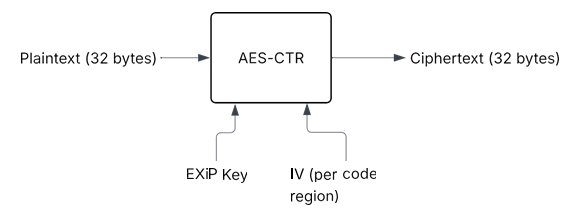
EXiP utilizes the AES-CTR encryption algorithm which provides confidentiality for flash contents. When EXiP is enabled, 16 bytes at a time will be taken to encrypt plaintext or decrypt ciphertext with the EXiP Key stored within the SE using an IV generated by the SE for each EXiP enabled code region.
While EXiP uses less memory than AXiP, it is considered a less secure solution, due to the underlying algorithm differences. Not only could an attacker modify ciphertext without detection, since there is no integrity or authenticity check on the data, AES-CTR is also vulnerable to bit-flipping attacks. This allows an attacker to XOR bits in the ciphertext, which results in the same bits being flipped in the plaintext, once decrypted.
EXiP Key#
The EXiP feature utilizes a single 256-bit AES key that is derived at boot from a device-unique Physical Unclonable Function (PUF) seed. The PUF is only available while the device is powered on, and the EXiP key derived off of this unique seed when needed. This ensures that the EXiP key has enhanced resistance to physical attacks. As this key is derived from the PUF, it is permanent for the lifetime of the device. This EXiP key is shared across all EXiP-configured code regions of the device, and is a separate key from the AXiP key.
IV Generation#
Unique initialization vectors ensure that multiple encryptions of identical plaintexts yield different ciphertexts. In EXiP, IVs are generated using the true random number generator and are stored within the SE's MTP. In order to prevent IV reuse, which could introduce pre- dictable bit patterns, a new IV is generated when flashing a code region with EXiP enabled. For more details, refer to the Considerations for Development Devices section.
EXiP Device Configuration#
On Series 3 devices EXiP is not enabled by default. A user must configure their device for EXiP in order to utilize the feature. Refer to Configuring Code Regions for more details on how to configure code regions for EXiP.