


OpenSSL Certificate Creation#
An SSL certificate is an important way to secure user information and protect against hackers.
OpenSSL Installation#
In Debian/Linux
To install OpenSSL, issue the following command:
sudo apt install openssl
In Windows
To install OpenSSL, either download precompiled OpenSSL binaries for Windows or install via WSL using the command:
sudo apt install openssl
Certificates Creation#
Use the following commands to generate certificates:
Generate the device key:
openssl ecparam -name prime256v1 -genkey -noout -out device.key
Generate the client certificate (e.g.,
device.crtanddevice.key) using a CA certificate:openssl req -new -out device.csr -key device.key
Note: Below is a sample for demonstration to generate "device.csr". Make sure to use the same Common Name provided here for Thing Name.
openssl req -new -out device.csr -key device.key You are about to be asked to enter information that will be incorporated into your certificate request. What you are about to enter is what is called a Distinguished Name or a DN. There are quite a few fields but you can leave some blank For some fields there will be a default value, If you enter '.', the field will be left blank. Country Name (2 letter code) [AU]:IN State or Province Name (full name) [Some-State]:Telangana Locality Name (eg, city) []:Hyderabad Organization Name (eg, company) [Internet Widgits Pty Ltd]:Silicon Labs Pvt Ltd Organizational Unit Name (eg, section) []:MATTER Common Name (e.g. server FQDN or YOUR name) []:AWS_DEMO Email Address []:XXXX@silabs.com Please enter the following 'extra' attributes to be sent with your certificate request A challenge password []: An optional company name []:Upload CSR to AWS: While creating the AWS IoT thing, use the Upload CSR option in the configure device certificate step. Once the CSR generated in step 2 is uploaded, AWS will generate an AWS CA-authenticated
device.crt.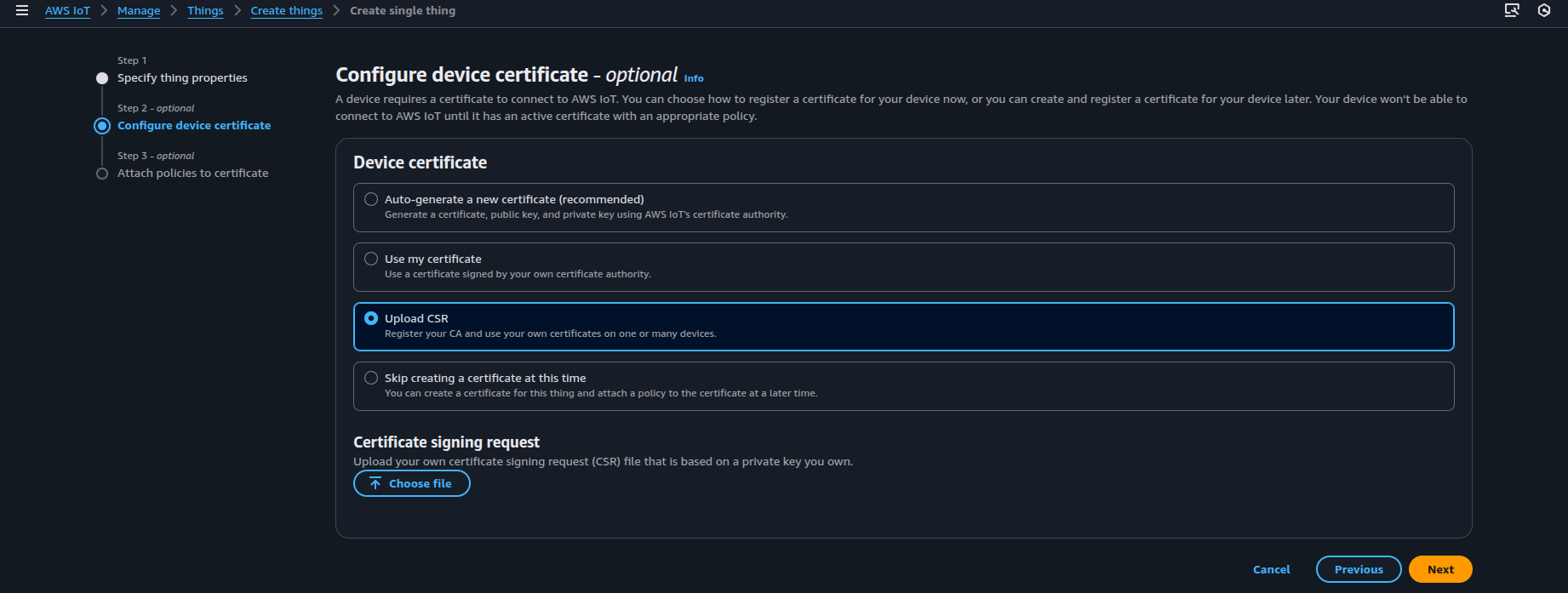
To use MQTT Explorer, repeat steps 1 and 2 to create an additional set of certificates
(e.g., explorer.crt and explorer.key). Use a different name to uniquely identify the certificates.
Note: The supported certificate type to be used in this PoC is ECDSA.