


Bluetooth Stack and SDK Support#
CTE Transmitter and Receiver#
To support Direction Finding, Bluetooth 5.1 introduced the concept of Constant Tone Extension (CTE). CTE, as its name suggests, extends the Bluetooth packets with a constant tone, that is with a continuous phase, constant amplitude and constant frequency signal, sent immediately after the CRC of the Bluetooth packet. The length of this extension varies between 16 μs – 160 μs. This signal can be used on the receiver side to measure the phase of the incoming signal on multiple antennas.

To learn more about CTE, see the Technical Overview of Bluetooth Direction Finding published by the Bluetooth SIG: https://www.bluetooth.com/bluetooth-resources/bluetooth-direction-finding/ and Bluetooth Core Specification v5.1 or later.
CTEs can be sent:
Over Bluetooth connections using the Link Layer Constant Tone Extension Request procedure (connection-oriented mode).
In periodic advertisements, if the CTEInfo field is present (connectionless mode).
Additionally, Silicon Labs provide a proprietary solution to send CTEs in extended advertisements (Silicon Labs enhanced mode), which makes Real Time Locating Systems more scalable. This solution is highly recommended in a use case with hundreds of tags, as it is stateless, in contrast to connections and periodic advertisement synchronizations which need to store sync information for each tag and do not scale well.
To be able to send or receive CTEs, the CTE Transmitter and CTE Receiver software components must be installed in your Bluetooth project, respectively.
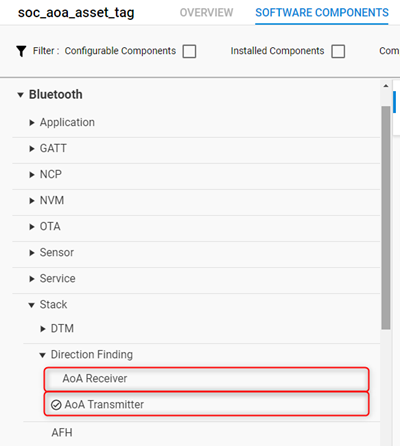
These components initialize the cte_transmitter and cte_receiver BGAPI classes, and make it possible to use the associated APIs:
https://docs.silabs.com/bluetooth/3.1/group-sl-bt-cte-transmitter,
https://docs.silabs.com/bluetooth/3.1/group-sl-bt-cte-receiver.
Note: The CTE Transmitter feature is available on all EFR32xG22 and EFR32xG24 devices, including SoCs and modules. The CTE Receiver feature is available only on part numbers marked with “Direction Finding” protocol stack support in the datasheet.

Typically a device is either in CTE transmitter or in CTE receiver mode, but not both. Install the corresponding software component on each device.
To enable CTE responses on a connection, use the API sl_bt_cte_transmitter_enable_connection_cte() on the CTE transmitter side. To send a CTE request from the receiver to the transmitter, use the API sl_bt_cte_receiver_enable_connection_cte() on the receiver side. If CTE responses are enabled on the transmitter side, the Bluetooth stack will automatically respond to each CTE request with a CTE response.
To transmit CTEs in periodic advertisements, first start a periodic advertiser on the transmitter side (install the Periodic Advertising software component and use the corresponding Bluetooth APIs), and then use the sl_bt_cte_transmitter_enable_connectionless_cte() API to add CTE to the existing advertiser. To start listening to CTEs attached to periodic advertisements, first establish a periodic synchronization on the receiver side (install the Periodic Advertising Synchronization software component and use the corresponding APIs), and then use the sl_bt_cte_receiver_enable_connectionless_cte() API to enable CTE reception on the established synchronization.
To transmit CTEs in Silicon Labs proprietary extended advertisements, first start a (regular) extended advertisement on the transmitter side, and then use the API sl_bt_cte_transmitter_enable_silabs_cte() to add CTE to the advertiser. To start listening to CTEs attached to Silicon Labs proprietary extended advertisements, first start (regular) scanning on the receiver side and then use the API sl_bt_cte_receiver_enable_silabs_cte().
Every time a CTE is received on the receiver side, the signal is automatically sampled by the Bluetooth stack and an IQ report event is generated by the Bluetooth stack. If you choose to use the reference RTLS implementation of Silicon Labs, you do not have to care about these events. The IQ samples are forwarded to the RTL library, which then calculates the Angle of Arrival for you. If you choose to process the IQ samples with your application, find more details about IQ samples in Custom Direction-Finding Solutions using Silicon Labs’ Bluetooth Stack.
GATT Services#
CTEs have parameters such as length, slot duration, and how often they should be sent. To make their configuration easy, the Bluetooth SDK adds support for CTE configuration via the GATT database. This is especially useful in AoA mode on the asset tags (CTE transmitters).
There are three CTE configuration services corresponding to the three CTE transmit mode (connection-oriented, connectionless, Silicon Labs enhanced mode). To add these services to your project, install the corresponding software component:
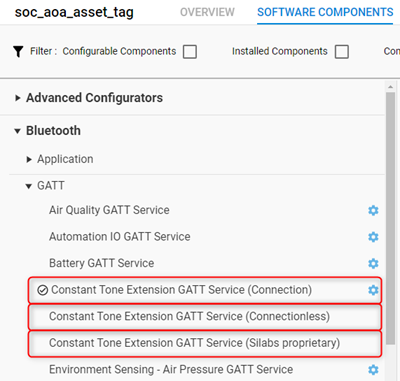
The software components will not only add the service to the GATT database, but they will also take care of enabling, disabling and configuring CTEs when the characteristics of the CTE service are written from a remote device. Note that the Connection oriented service must always be installed when using any of the three software components. Connectionless and Silicon Labs enhanced services cannot be installed at the same time.
Antenna Switching#
Determining the direction of the Bluetooth signal is not possible without one device having an antenna array. As described in Bluetooth® Direction Finding Fundamentals, in Angle of Arrival (AoA) mode the receiver must have an antenna array, while in Angle of Departure (AoD) mode the transmitter must have an antenna array. In AoA mode the antennas must be switched during CTE reception, while in AoD mode the antennas must be switched during AoA transmission. The Bluetooth stack supports both AoA and AoD mode, and it controls antenna switches automatically during CTE transmission or reception. If you use Silicon Labs’ antenna array boards, you do not have to care about switching pin configuration and antenna switching patterns, since they are implemented in the sample apps. If you use a custom antenna array, details about the configuration are in Custom Direction-Finding Solutions using Silicon Labs’ Bluetooth Stack.