


Introduction#
Silicon Labs provides modularized software sample projects for Angle of Arrival (AoA) asset tags and locators that can be easily extended to address different use case scenarios.
In general, the sample applications can be grouped in two main categories:
AoA asset tag sample app: demonstrates a Constant Tone Extension (CTE) transmitter.
AoA locator sample app: demonstrates a CTE receiver.
AoA Asset Tags—CTE Transmitters
Beginning with version 3.1, the Bluetooth SDK provides an AoA asset tag sample project (Bluetooth AoA - SoC Asset Tag) that can easily be extended to address the following three scenarios by simply installing software components using Simplicity Studio 5’s Project Configurator.
Bluetooth 5.1 Connection-based AoA asset-tag
Bluetooth 5.1 Connectionless AoA asset-tag
Silicon Labs enhanced AoA asset-tag
AoA Locators—CTE Receivers#
Beginning with version 3.1, the Bluetooth SDK also provides sample projects for AoA locators. Due to the resource-constrained nature of the EFR32 device, all the locator sample applications supported in Bluetooth SDK v3.x work in NCP (Network Co-Processor) mode. Thus, two sample applications are provided in the SDK to support both the NCP target and the NCP host of the locator:
AoA NCP locator sample app
AoA locator host sample app
The Bluetooth stack runs on the EFR32 (AoA locator target) and the application runs on a host (MCU or PC). While the NCP AoA locator is generic for all variants, the AoA locator host sample app must be configured for the desired type of CTE receiver mode during runtime (that is, connection-based, connectionless, or Silicon Labs enhanced).
AoA can be measured accurately using a single locator. However, a single locator can only provide a rough estimation of the asset tag’s position. To determine the precise position of the asset tag, using multiple locators is recommended. By using multiple antenna arrays, the position of an asset tag can be determined using triangulation.
To demonstrate position estimation, the Bluetooth SDK also provides a sample host project supporting multiple locators—the positioning host application. In addition, the SDK also provides a Python based direction-finding visualization app for a multi-locator setup.
In summary, Bluetooth SDK v3.x offers the following examples that can be adapted for different use case scenarios:
Studio Examples
bt_aoa_soc_asset_tag: Bluetooth AoA – SoC Asset Tag
bt_aoa_ncp_locator: Bluetooth AoA - NCP locator
Host Examples (app/Bluetooth/example_host)
bt_aoa_host_locator: single AoA locator host for angle estimation
bt_host_positioning: host app for position estimation using multiple locators
bt_host_positioning_gui: Python host app for the visualization of a multi-locator setup
Software Architecture#
The following diagram provides an overview of the software architecture for the asset-tag, NCP AoA locator, and host sample applications provided by Silicon Labs.
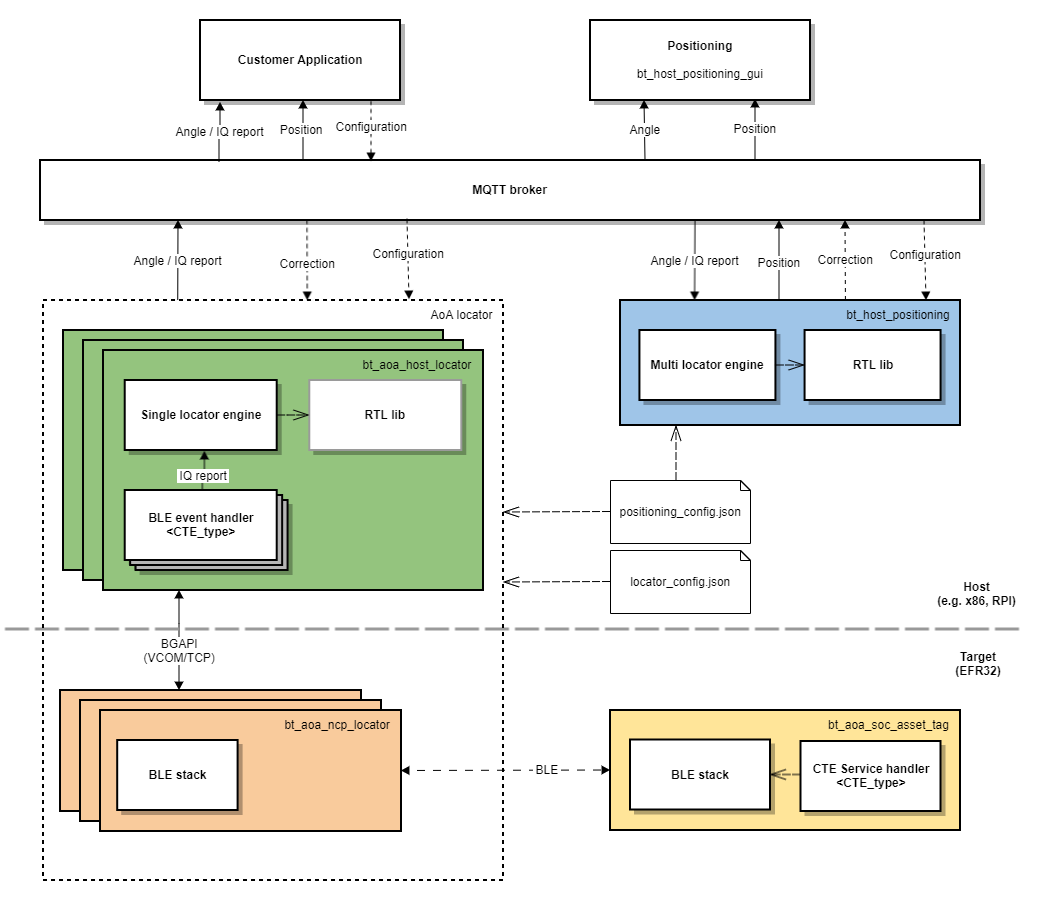
The yellow and orange boxes represent the AoA asset tag and NCP AoA locator sample projects, respectively. These example projects are meant to run on an EFR32xG22 or on an EFR32xG24 device.
The green box represents the AoA locator host sample app. This sample app is meant to run on a host machine (for example, x86, Raspberry Pi). The orange and green boxes logically form a single locator (a CTE receiver).
The AoA locator host (green box) connects to the NCP AoA locator (orange box) via a serial port (VCOM) or TCP/IP. In the latter case, the AoA locator host and NCP AoA locator can be in different locations.
Silicon Labs AoA sample projects utilize the MQTT messaging protocol for sending and receiving the asset tag’s angle and position information, and making changes to the runtime configuration parameters. MQTT is a publish and subscribe messaging exchange protocol where a publisher sends, and the subscriber receives topics of interest via a message broker. The subscribers and publishers in the MQTT protocol do not interact with each other. The connection between them is handled by the broker. The broker filters all incoming messages and distributes them to the subscribers.
The AoA locator host controls the Bluetooth stack running on the NCP AoA locator and receives the CTE IQ samples (In-Phase and Quadrature-Phase pair of readings) using BGAPI protocol. Using the RTL library, the AoA locator host calculates the Angle of Arrival of an asset tag and publishes the result to the MQTT broker (white box in the figure above).
The positioning host (that is, the box in blue) represents the positioning host sample project. This host application subscribes to MQTT topics (related to the angle data) published by single locators to calculate and publish the exact position of an asset tag in an X, Y, Z coordinate.
Prerequisites#
To get started with AoA application development, you will need the following:
EFR32xG22 or EFR32xG24 based device serving as a tag (for example, Thunderboard BG22).
4x4 antenna array board: one for the single locator sample app, more than one for the positioning sample app.
A Wireless Starter Kit (WSTK) for each antenna array board.
Simplicity Studio v5 installed on your PC.
Bluetooth 3.1.0 or higher SDK installed from Gecko SDK Suite v3.1.0 or later.
MinGW64 for building the AoA locator host applications, if you are using a Windows PC as a host.
Mosquitto MQTT Broker—follow the instructions in Building the Single AoA Locator Host Sample Application to install Mosquitto.
MQTT Explorer (optional): http://mqtt-explorer.com/.
Python 3.7 for visualization purposes.
Tools#
As well as the sample applications, Silicon Labs also provides tools inside Simplicity Studio to help development with the RTL library. This set of tools is called the Silicon Labs Direction Finding Tool Suite, and it is documented in Using the Bluetooth® Direction Finding Tool Suite.
The tools can be used for creating configurations files, which are needed by the host application, as discussed later. Furthermore, they are also able to consume the configuration files, and run the RTL library to calculate and display angles and positions without the need of any host application. If you want to test the RTL library without building the host application first, continue with Using the Bluetooth Direction Finding Tool Suite while referring to this document for further details.
Note: The tools were created for demonstration purposes, and not to be used in production. For development purposes, please start with the sample application described in this document.