


Bluetooth AoA- SoC Asset Tag#
Asset tags are relatively simple as their only goal is to send CTEs on a single antenna. However, CTEs can be sent in several different ways depending on the use case. Bluetooth SDK v3.1 provides an asset tag sample project, Bluetooth AoA- SoC Asset Tag, that can easily be extended to address the following three scenarios by installing software components using Simplicity Studio 5’s Project Configurator.
Bluetooth 5.1 Connection-based AoA asset-tag sends CTE responses on a connection when a CTE request is received.
Bluetooth 5.1 Connectionless AoA asset-tag sends CTE in periodic advertisements.
Silicon Labs Enhanced (Silicon Labs proprietary) AoA asset-tag sends CTE in extended advertisements.
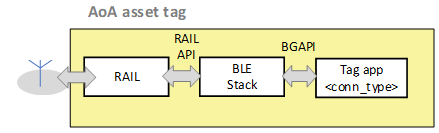
At its core, the Bluetooth AoA - SoC Asset Tag is simply a Bluetooth – SoC Empty sample project extended with a CTE transmitter and an Asset Tracking Profile (ATP) in its GATT database. These properties can be added by installing one or two of the following software components, depending on the use case.
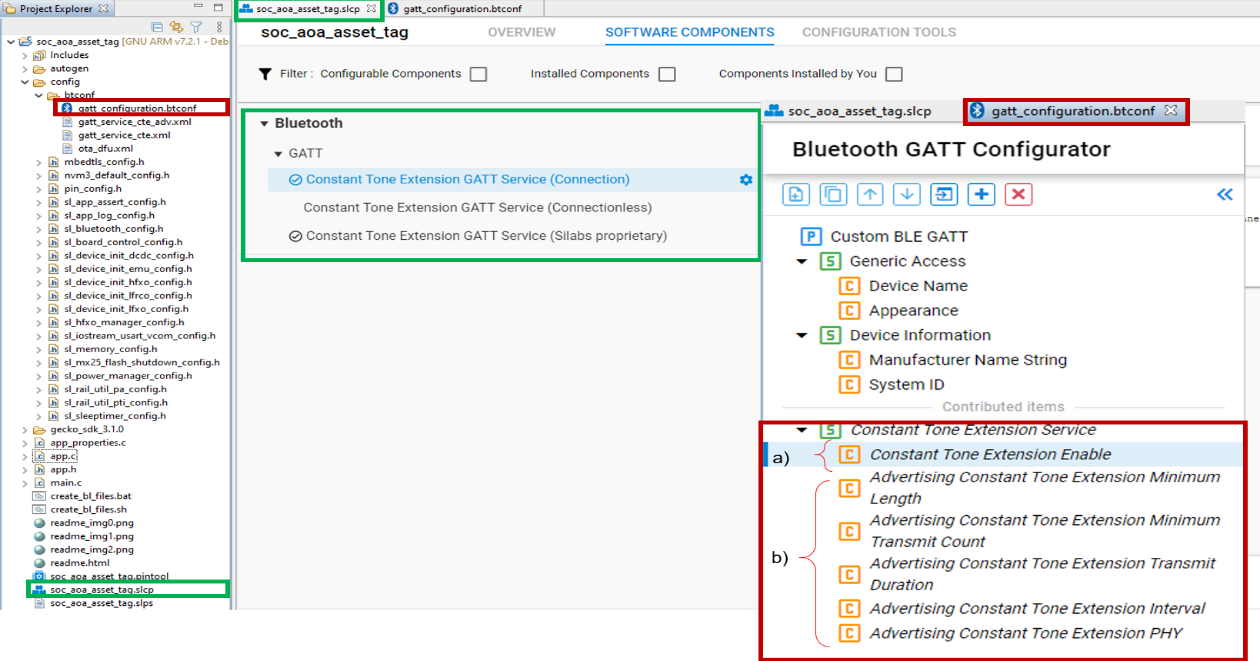
Constant Tone Extension GATT Service (Connection)
Constant Tone Extension GATT Service (Connectionless)
Constant Tone Extension GATT Service (Silabs proprietary)
By default, the Bluetooth AoA - SoC Asset Tag has the Constant Tone Extension GATT Service (Connection) and Constant Tone Extension GATT Service (Silabs proprietary) component preinstalled in the project. The Constant Tone Extension GATT Service (Connection) component has dependency on AoA Transmitter. Therefore, it is installed in the background. The AoA Transmitter component enables initializing the CTE transmitter.
In addition to enabling the AoA transmitter, the Constant Tone Extension GATT Service (Connection) component also contributes to the Bluetooth GATT configuration, which is the Constant Tone Extension Service with a Constant Tone Extension Enable characteristic, as shown by (a) in the following figure. The Constant Tone Extension Enable characteristics is mandatory, and thus must be included in Connection, Connectionless, and Silicon Labs proprietary tag implementations.
On the other hand, the Constant Tone Extension GATT Service (Silabs Proprietary) component allows broadcasting CTEs in extended advertisements. This component contributes the following characteristics to the Constant Tone Extension GATT Service which can be used to alter different CTE parameters:
Advertising Constant Tone Extension Minimum Length
Advertising Constant Tone Extension Minimum Transmit Count
Advertising Constant Tone Extension Transmit Duration
Advertising Constant Tone Extension Interval
Advertising Constant Tone Extension PHY
These characteristics are mandatory when CTE transmission is supported on advertising channels, which is the case for the Connectionless and Silicon Labs proprietary approaches.
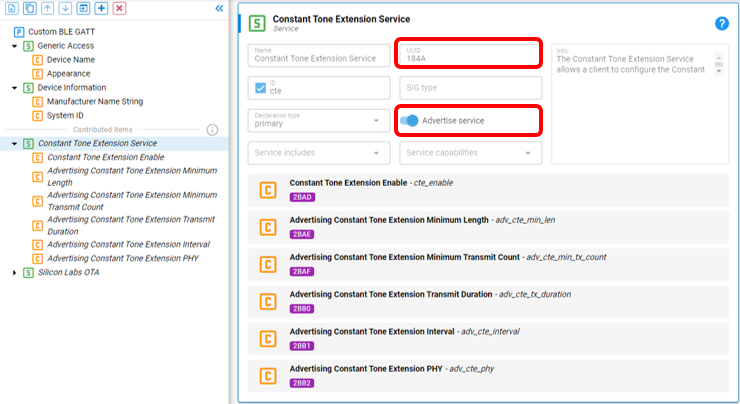
The Bluetooth AoA - SoC Asset Tag sample project enables CTE transmission, and automatically adds the CTE Service specified by the Bluetooth SIG (https://www.bluetooth.com/specifications/specs/) to the GATT database. Since a locator device finds the asset tag by looking for this service in the advertising packets, advertising CTE service is also enabled in the sample project by default (see advertise service checked in the Bluetooth GATT configurator in the figure below).
Note: In Bluetooth SDK v3.1, a temporary UUID was used for the CTE service. In Bluetooth SDK v3.2, the official UUID of the CTE service is supported. This means that tags programmed with v3.1 are not compatible with locators programmed with v3.2 and vice versa.
Connection-Based Asset Tag Sample Application#
A connection-based asset tag needs to implement:
A connectable Bluetooth peripheral that starts advertising itself
CTE transmitter to be able to send CTE responses, and
ATP in its GATT database.
As mentioned above, the Constant Tone Extension GATT Service (Connection) component implements both the CTE transmitter and ATP in the GATT database of your project. As such, for the connection-based tag, the Bluetooth AoA - SoC Asset Tag sample app works out of the box without having to install any additional software components. You can uninstall the Constant Tone Extension GATT Service (Silabs Proprietary) component if your custom project does not need to send CTEs on extended advertising.
The CTE transmitter is initialized by calling the sl_bt_init_classes(). This API is automatically added in the Bluetooth initialization by the AoA Transmitter component. The AoA Transmitter component is added to the project (in the background) when the Constant Tone Extension GATT Service (Connection) is installed, which is the default in the Bluetooth AoA - SoC Asset Tag sample app.
main() -> sl_system_init() -> sl_stack_init() -> sl_bt_init() -> sl_bt_init_classes()CTE transmission is enabled by sl_bt_cte_transmitter_enable_connection_cte() after a locator device connects to the tag and writes 0x01 into the Constant Tone Extension Enable characteristics. This process is handled by sl_gatt_service_cte_on_event() when the sl_bt_evt_gatt_server_user_write_request event is triggered. sl_gatt_service_cte_on_event() is defined in sl_gatt_service_cte.c, which is generated inside the gecko_sdk_3.1.x/app/Bluetooth/common/gatt_service_cte directory by the Constant Tone Extension GATT Service (Connection).
It is important that the “Write” property of the Constant Tone Extension Enable characteristics is enabled in the Bluetooth GATT configurator service (see Write checked under Properties).
To test a connection-based asset tag application:
Create a Bluetooth AoA - SoC Asset Tag project in Simplicity Studio 5.
Build the project.
Flash it to an EFR32xG22 or EFR32xG24 device. Note: If you use a new Thunderboard, push its reset button before programming. On some boards, the factory default firmware puts the device into EM4 after 30 seconds, and in this case the device must be restarted to be accessible by the programmer.
The sample does not contain a bootloader. By default, a new device is factory-programmed with a bootloader. If you have a new device, haven’t cleared the bootloader region for your part or have a supported bootloader image already flashed on your device, you do not need to flash a bootloader. Once you have installed a bootloader image, it remains installed until you erase the device. If you need to load a bootloader, select an example, such as SPI Flash Storage Bootloader (single image), and build it and flash it as described above. For more information about the Gecko Bootloader, see Silicon Labs Gecko Bootloader User’s Guide for GSDK 4.0 and Higher (series 1 and 2 devices) or Silicon Labs Gecko Bootloader User’s Guide for Series 3 and Higher.
Connectionless Asset Tag Sample Application#
A connectionless asset tag needs to implement:
A periodic advertiser.
CTE transmitter: to be able to send CTEs in periodic advertisements.
ATP (Asset Tracking Profile) in its GATT database.
The CTE transmitter is initialized by calling the sl_bt_init_classes(). This API is automatically added in the Bluetooth initialization by the AoA Transmitter component. This component is added to the project (in the background) when the Constant Tone Extension GATT Service (Connection) is installed, which is the default in the Bluetooth AoA- SoC Asset Tag sample app.
main() -> sl_system_init() -> sl_stack_init() -> sl_bt_init() -> sl_bt_init_classes()The connectionless version of the asset tag is rather simple. It starts periodic advertising with CTE enabled, and that is all. To achieve this, remove the Constant Tone Extension GATT Service (Silabs Proprietary) and install the Constant Tone Extension GATT Service (Connectionless) component.
The Constant Tone Extension GATT Service (Connectionless) component also contributes to the Bluetooth GATT configurator. It adds the following characteristics to the Constant Tone Extension GATT Service, which can be used to alter different CTE parameters:
Advertising Constant Tone Extension Minimum Length
Advertising Constant Tone Extension Minimum Transmit Count
Advertising Constant Tone Extension Transmit Duration
Advertising Constant Tone Extension Interval
Advertising Constant Tone Extension PHY
It is important that the Write property of each of these characteristics is enabled in the Bluetooth GATT configurator service (see Write checked under Properties).
When the tag is booted, it initializes the CTE transmitter and periodic advertising feature, and enters an infinite loop of processing Bluetooth stack events.
void sl_bt_process_event(sl_bt_msg_t *evt)
{
sl_bt_ota_dfu_on_event(evt);
sl_gatt_service_cte_on_event(evt);
sl_gatt_service_cte_adv_on_event(evt);
sl_bt_on_event(evt);
}The sl_gatt_service_cte_adv_on_event() handles events related to system boot and user write requests. When a system boot event is triggered, CTE advertising is initialized and started automatically by this handler using adv_cte_init() and adv_cte_start(), respectively. These functions are defined in sl_gatt_service_cte_adv.c and sl_gat_service_cte_connectionless.c, generated inside gecko_sdk_3.1.x/app/Bluetooth/common/gatt_service_cte_adv directory when the Constant Tone Extension GATT Service (Connectionless) component is installed.
adv_cte_init() is called only once during the init phase. It sets the default parameter values for the CTE advertising. In contrast, adv_cte_start() is triggered during the initialization and when the user write request for updating the value of one of the connectionless CTE characteristics (listed above) is completed. The adv_cte_start() normally sets the advertising phy, starts a connectionless advertising, and adds CTEs to the periodic advertisements using sl_bt_cte_transmitter_enable_connectionless_cte().
To test the connectionless asset tag application:
Create Bluetooth AoA - SoC Asset Tag project in Simplicity Studio 5.
Uninstall the Constant Tone Extension GATT Service (Silabs Proprietary) component.
Install the Constant Tone Extension GATT Service (Connectionless) component using the Project Configurator.
Build the project.
Flash it to an EFR32xG22 or EFR32xG24 device.
Note: If you use a new Thunderboard, push its reset button before programming. On some boards, the factory default firmware puts the device into EM4 after 30 seconds, and in this case the device must be restarted to be accessible by the programmer.
The sample does not contain a bootloader. By default, a new device is factory-programmed with a bootloader. If you have a new device, haven’t cleared the bootloader region for your part or have a supported bootloader image already flashed on your device, you do not need to flash a bootloader. Once you have installed a bootloader image, it remains installed until you erase the device. If you need to load a bootloader, select an example, such as SPI Flash Storage Bootloader (single image), and build it and flash it as described above. For more information about the Gecko Bootloader, see Silicon Labs Gecko Bootloader User’s Guide for GSDK 4.0 and Higher (series 1 and 2 devices) or Silicon Labs Gecko Bootloader User’s Guide for Series 3 and Higher.
Note that you cannot uninstall the Constant Tone Extension GATT Service (Connection) in a connectionless asset tag as it is the only component that installs the AoA Transmitter and contributes the Constant Tone Extension Enable characteristic, which is mandatory for the Constant Tone Extension Service.
Silicon Labs Enhanced (Silabs proprietary) Asset Tag Sample Application#
The Silicon Labs asset tag sample app sends CTEs in extended advertisements, which is not a standard solution, and therefore can only be used with Silicon Labs locators. The advantage of this solution is that it uses extended advertisements, in which case no synchronization information needs to be stored on the locator for each tag, in contrast to connections and periodic advertisements. This solution scales much better than the other two and can be used with hundreds of tags.
This sample app implements:
An advertiser broadcasting extended advertisements.
CTE transmitter: to be able to send CTEs in extended advertisements.
ATP (Asset Tracking Profile) in its GATT database.
The difference between the connectionless version and the Silicon Labs proprietary version of the asset tag sample app is that the Silicon Labs solution starts extended advertising with CTE instead of periodic advertising. This offers better scalability since it puts no RAM constraints on the receiver side, like connections and periodic advertisement synchronizations.
The CTE transmitter is initialized by calling the sl_bt_init_classes(). This API is automatically added in the Bluetooth initialization by the AoA Transmitter component. This component is added to the project (in the background) when the Constant Tone Extension GATT Service (Connection) is installed, which is the default in the Bluetooth AoA- SoC Asset Tag sample app.
main() -> sl_system_init() -> sl_stack_init() -> sl_bt_init() -> sl_bt_init_classess_cte()To broadcast CTEs in extended advertisement, the Constant Tone Extension GATT Service (Silabs Proprietary) software component must be installed, which is the default in the Bluetooth AoA - SoC Asset Tag sample app. As such, for the Silicon Labs proprietary tag, the Bluetooth AoA - SoC Asset Tag sample app works out of the box without having to install any additional software components.
Similar to the connectionless version, the Constant Tone Extension GATT Service (Silabs Proprietary) component adds the following characteristics to the Constant Tone Extension GATT Service, which can be used to alter different CTE parameters:
Advertising Constant Tone Extension Minimum Length
Advertising Constant Tone Extension Minimum Transmit Count
Advertising Constant Tone Extension Transmit Duration
Advertising Constant Tone Extension Interval
Advertising Constant Tone Extension PHY
It is important that the Write property of each of these characteristics is enabled in the Bluetooth GATT configurator service (see Write checked under Properties).
When the tag is booted, it initializes the CTE transmitter, and enters an infinite loop of processing Bluetooth stack events.
void sl_bt_process_event(sl_bt_msg_t \*evt)
{
sl_bt_ota_dfu_on_event(evt);
sl_gatt_service_cte_on_event(evt);
sl_gatt_service_cte_adv_on_event(evt);
sl_bt_on_event(evt);
}The sl_gatt_service_cte_adv_on_event() handles events related to system boot and user write requests. When a system boot event is triggered, CTE advertising is initialized and started automatically by this handler using adv_cte_init() and adv_cte_start(), respectively. These functions are defined in sl_gatt_service_cte_adv.c and sl_gat_service_cte_silabs.c, generated inside gecko_sdk_3.1.x/app/Bluetooth/common/gatt_service_cte_adv directory when the Constant Tone Extension GATT Service (Silabs Proprietary) component is installed.
adv_cte_init() is called only once during the init phase. It sets the default parameter values for the CTE advertising. Whereas, adv_cte_start() is triggered during the initialization and when a user write request for updating the value of one of the connectionless CTE characteristics (listed above) is completed. The adv_cte_start() normally sets the advertising phy, starts a connectionless advertising, and adds CTEs to the extended advertisements using sl_bt_cte_transmitter_enable_silabs_cte().
To test the Silicon Labs proprietary asset tag application:
Create a Bluetooth AoA - SoC Asset Tag project in Simplicity Studio 5.
Build the project.
Flash it to an EFR32xG22 or EFR32xG24 device. Note: if you use a new Thunderboard, push its reset button before programming. On some boards, the factory default firmware puts the device into EM4 after 30 seconds, and in this case the device must be restarted to be accessible by the programmer.
The sample does not contain a bootloader. By default, a new device is factory-programmed with a bootloader. If you have a new device, haven’t cleared the bootloader region for your part or have a supported bootloader image already flashed on your device, you do not need to flash a bootloader. Once you have installed a bootloader image, it remains installed until you erase the device. If you need to load a bootloader, select an example, such as SPI Flash Storage Bootloader (single image), and build it and flash it as described above. For more information about the Gecko Bootloader, see Silicon Labs Gecko Bootloader User’s Guide for GSDK 4.0 and Higher (series 1 and 2 devices) or Silicon Labs Gecko Bootloader User’s Guide for Series 3 and Higher.
Note that you cannot uninstall the Constant Tone Extension GATT Service (Connection) in a Silicon Labs proprietary asset tag as it is the only component that installs the AoA Transmitter and contributes the Constant Tone Extension Enable characteristic, which is mandatory for the Constant Tone Extension Service.
The Bluetooth specification allows CTEs to be added to periodic advertisements only. Therefore, this is a proprietary, non-standard solution. It can, however, help you scale your system. In the case of periodic advertisement, the locator must keep track of each periodic advertiser one-by-one. For each, it needs to know when and on which channel to expect the next packet. With hundreds of tags, this can result in huge RAM consumption, making this solution less scalable. In contrast to this, to receive an extended advertisement the locator must scan on the primary advertising channels only, listen for legacy advertisements that point to extended advertisements, and jump to the reported channel at the reported time. No time/channel tracking is needed; therefore, hundreds of tags can be followed.