


Simplicity Machine Learning Converter#
Overview#
The Converter is part of the Simplicity Machine Learning suite of tools. It converts PyTorch and ONNX models into TensorFlow Lite (.tflite) format for deployment on Silicon Labs embedded devices. The Silicon Labs ML toolchain currently consumes .tflite models; this tool bridges common training workflows (PyTorch, ONNX) without requiring a separate runtime.
The converter enables you to:
Convert PyTorch models (
.pt,.pth) to.tfliteusing litert-torchConvert ONNX models (
.onnx) to.tfliteusing onnx2tfOptionally generate conversion metadata (
manifest.json) and a diagnostic log (conversion.logwhen--log-level debug)Use the same conversion engine from the Simplicity Machine Learning GUI and CLI (
sml convert)
The tool is available as:
A graphical interface (GUI) — the Converter is integrated into the Simplicity Machine Learning application GUI.
A command-line interface (CLI) called
sml convert.
NOTE: The Converter (
sml convert) is only available in Simplicity Machine Learning (orsmlon the CLI) version 1.1.0-beta or later. If you installed an older Simplicity Machine Learning (GUI) or (CLI) package before this release, upgrade through Simplicity Installer or SLT so the Converter functionality on the GUI andsml convertcommand on the CLI are available.
Scope of This Tool#
This documentation is written primarily for embedded and ML engineers who have trained or exported a model in PyTorch or ONNX and need a .tflite file for Silicon Labs projects.
To work with trained models, you must have familiarity with ML concepts to run conversion and interpret validation results.
NOTE: The converter focuses on model format conversion to float32
.tflite. It does not train models, apply INT8/FP16 quantization, or measure on-device execution performance.
NOTE: PyTorch conversion requires Linux, WSL2 (on Windows), or MacOS and Python 3.12. See Limitations for platform and environment constraints.
Key Concepts and Terminology#
Term | Description |
|---|---|
LiteRT | Google's edge inference stack (formerly TensorFlow Lite) |
TFLite / | Serialized LiteRT model format used by Silicon Labs tooling |
PyTorch model | A trained model saved as |
ONNX model | Framework-agnostic model in |
Representative dataset | Sample inputs used to calibrate quantization (not used by this converter; output is float32) |
input_shape | Fixed dimensions for the model input tensor (required for PyTorch conversion) |
manifest.json | Optional metadata file describing the conversion run |
Supported Input and Output#
Input Models#
Format | Extension | Note |
|---|---|---|
PyTorch |
| Must contain a full |
ONNX |
| Self-contained file (no external weight files). |
Format detection uses file extensions (.pt, .pth, .onnx). Invalid content is reported when the model is loaded.
Output artifacts#
Artifact | Required | Description |
|---|---|---|
| Yes | Primary output; path defaults from the source filename in the current working directory unless |
| No | Conversion metadata when |
| No | Diagnostic trace when |
Usage#
sml convert --helpUsage: sml convert <input_model> [options]
Convert PyTorch or ONNX model to TFLite format.
Arguments:
input_model Input model file path (.pt, .pth, .onnx)
Options:
-o, --output PATH Output .tflite path (auto-generated if omitted)
--input-shape SHAPE Input shape for PyTorch (e.g. 1,3,224,224); required for .pt/.pth
--save-manifest Generate manifest.json
--log-level <level> Logging verbosity: error|warning|info|debug
(default: error; debug writes conversion.log)
-v, --verbose Verbose output
-h, --help Show helpExamples:
# PyTorch — input shape required
sml convert model.pt --input-shape 1,3,224,224
# ONNX — custom output path
sml convert model.onnx --output output/model.tflite
# With optional artifacts
sml convert model.pt --input-shape 1,3,224,224 --save-manifest --log-level infoNOTE:
Each conversion produces one float32
.tflitefile. INT8/FP16 quantization is not applied by this tool.
Converting a Model from the GUI#
Install Simplicity Machine Learning (GUI) version 1.1.0-beta or later (see Installation).
Launch Simplicity Machine Learning#
Launch from Simplicity Studio v6:
Open Simplicity Studio and navigate to the Tools tab on the left panel.
Hover on Simplicity Machine Learning and click the Play icon that appears on the right side.
Or, launch from the command line:
slt launch smlOpen the Convert tab in the application.
Convert a PyTorch Model (.pt / .pth)#
Click Browse and select your PyTorch model file (
.ptor.pth). A file-selection dialog opens for supported model types.
The tool detects the PyTorch format from the file extension. Enter input shape (for example,
1,3,224,224) — this field is required for PyTorch models.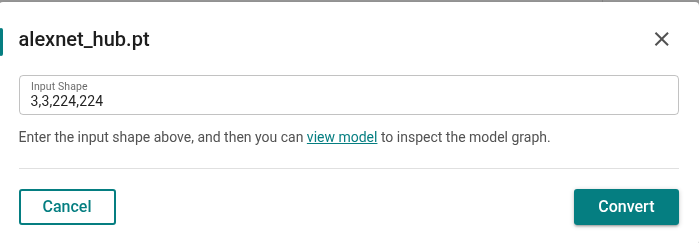
Optionally set the output
.tflitepath and enable manifest.json or debug logging.Click Convert and wait while conversion runs. Progress and status updates appear in the UI.
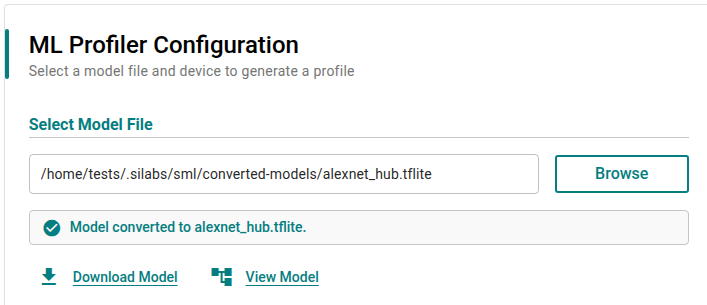
When conversion completes, download or save the generated
.tflitefile.
Convert an ONNX Model (.onnx)#
Click Browse and select your ONNX model file (
.onnx).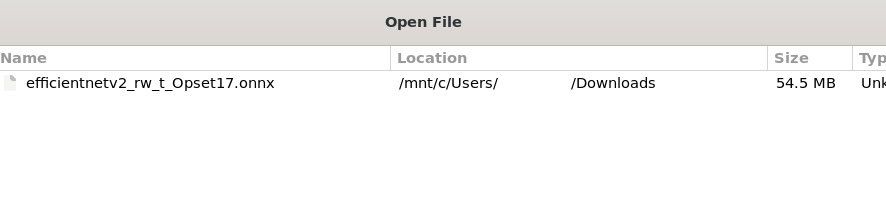
For ONNX models with fixed input shapes, input shape is not required. The Convert control is available once the model file is selected.
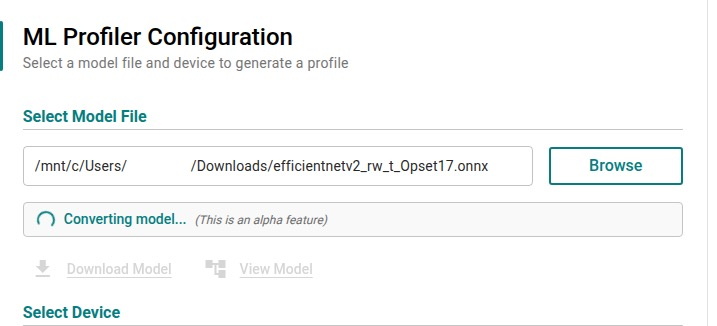
Click Convert and wait for conversion to finish.
Download or save the generated
.tflitefile.
Optional Artifacts#
manifest.json#
When you pass --save-manifest on the CLI , the converter writes a manifest.json file next to the output .tflite. Use this optional file to audit a conversion in development or CI: it records what was converted, how long it took, and whether any warnings or errors occurred.
The file includes:
conversion — source and output paths, detected format, converter version, and duration
model_info — input and output tensor shapes
file_info — source and output file sizes and compression ratio
warnings and errors — messages collected during the run (empty when none)
Example structure:
{
"version": "1.0",
"conversion": {
"source_model": "/path/to/model.onnx",
"source_format": "onnx",
"output_model": "/path/to/model.tflite",
"converter_version": "1.0.0",
"duration_seconds": 12.5
},
"model_info": {
"input_shapes": { "input": [1, 224, 224, 3] },
"output_shapes": { "output": [1, 1000] }
},
"file_info": {
"source_size_bytes": 5242880,
"output_size_bytes": 2621440,
"compression_ratio": 2.0
},
"warnings": [],
"errors": []
}Validating Converted Models#
A conversion is valid when the .tflite model produces functionally equivalent outputs to the source model for representative inputs.
Validation criteria:
Output similarity — converted outputs match source outputs within tolerance (for example, cosine similarity ≥ 0.99, numerical error < 5%)
Structural integrity — the
.tflitefile loads successfully and tensor shapes match expectations
Compare source and converted models using the same test inputs before deploying to hardware. Numerical parity is not bit-exact; small drift (for example, relative tolerance rtol≈1e-3) is normal.
Limitations#
Environment and Platform#
Python 3.12 only (
>=3.12,<3.13); Python 3.11 and 3.13+ are not supported.Linux, WSL2 or MacOS is required for PyTorch conversion (
litert_torch).CPU-only conversion; GPU conversion is not supported.
Native Windows PyTorch conversion is generally not supported for this stack. Prefer Linux ,WSL2 or MacOS. See litert-torch#968.
Input formats and models#
Supported inputs are PyTorch (
.pt,.pth) and ONNX (.onnx) only.PyTorch files must contain a full
nn.Module(torch.save(model)or a dict with a"model"key). State-dict-only files are rejected.input_shapeis required for PyTorch conversion (for example,1,3,224,224).The PyTorch path supports a single input tensor only.
ONNX models must be self-contained (no external weight files).
For ONNX models with dynamic input dimensions, provide
input_shape(multi-input:name1:d1,d2;name2:...).
Conversion Behavior#
Output is float32
.tfliteonly; INT8/FP16 quantization is not applied by this tool.Not all PyTorch or ONNX operators are supported; unsupported ops fail with diagnostic messages.
Ultralytics YOLO and similar detection checkpoints are not reliably convertible on the PyTorch path. Export to ONNX with Ultralytics and use the ONNX path as a workaround.
Models with data-dependent control flow,
.item()/.tolist()in the forward path, or multiple non-tensor inputs may fail duringtorch.export.ONNX output file size may differ from the source ONNX file due to graph layout changes (NCHW → NHWC) and FlatBuffer encoding.
Summary#
The Silicon Labs sml converter produces float32 .tflite models from PyTorch and ONNX sources through a single sml engine, available from the Simplicity Machine Learning GUI and CLI today, with a Python API planned for the future. Provide input_shape for PyTorch models, validate outputs against the source model, and use optional manifest.json to audit conversions in development and CI.
Troubleshooting#
sml convert not found or Convert tab missing
You may have an older Simplicity Machine Learning package installed. The converter requires version 1.1.0-beta or later. Check your version with sml --version, then upgrade Simplicity Machine Learning (GUI) and/or (CLI) through Simplicity Installer or by re-running slt install sml / slt install sml-cli.
Input file not found
Verify the path to .pt, .pth, or .onnx is correct and readable.
Unsupported file extension
Only .pt, .pth, and .onnx are accepted. Rename or re-export the model in a supported format.
PyTorch: missing or invalid input shape
Provide --input-shape on the CLI with batch, channels, height, and width (for example, 1,3,224,224). The tool may infer shape from the saved model in some cases; if inference fails, set it explicitly.
PyTorch: state-dict-only file
Instantiate the model architecture, load the state dict, and save the full nn.Module before converting.
PyTorch conversion fails during tracing
Ensure the model is in evaluation mode, uses float32 weights, and avoids data-dependent control flow. See LiteRT PyTorch conversion. For YOLO and similar models, export to ONNX first.
ONNX conversion fails operator validation
Check operator support and model structure. Ensure the ONNX file is self-contained.
Outputs differ significantly from the source model
Re-run validation with representative inputs. A small numerical drift is expected.
Platform or Python version errors
Use Python 3.12 on Linux, WSL2 or MacOS for PyTorch conversion. Do not rely on native Windows for the PyTorch path.
References#
Profiler — on-device profiling after you have a
.tflitemodel