


Wi-SUN Mode Switch#
Introduction#
Overview#
Mode Switch allows Wi-SUN nodes to temporarily use a higher data rate PHY (FSK or OFDM) for unicast data while keeping the network stable.
The network always operates with a Base PHY (FSK) for control and broadcast
Nodes can switch to a faster PHY only for unicast data
Switching is per neighbor and is only possible if both nodes (or a node and a border router) support the same PHY
In short:
Base PHY equals reliability
Mode Switch PHY equals performance boost (when possible)
How Mode Switch Works#
Nodes advertise supported PHYs using POM-IE
Each node determines compatible PHYs with neighbors
A PHY is selected (PhyModeID) by the application
Mode switch is triggered at PHY level (PHR field)
Data is exchanged using the new PHY
If failures occur → fallback to Base PHY
Key Rules#
Mode Switch only applies to unicast traffic
Broadcast always uses Base PHY
Requires mutual PHY support
Supported PHYs for Mode Switch#
Wi-SUN supports PHY Mode Switch, allowing nodes to dynamically switch from a configured base PHY operating mode to other PHY operating modes supported by both peers.
The base PHY:
is the locally configured PHY on each device used to join the Network
is not included in the set of mode-switch candidate PHYs
The mode switch candidate PHYs:
are the PHYs advertised using the POM-IE
may include both FSK and OFDM PHYs depending on regulatory domain and device capabilities
Mode switching can occur between FSK PHYs, or from an FSK base PHY to OFDM PHYs where supported. In practice, deployments typically select a robust low-rate FSK PHY (e.g. 50 kbps) as the base PHY to maximize coverage, while higher-rate PHYs are used opportunistically via mode switching.
Regulatory Domain NA (North America)#
Example base PHY (informative)#
A commonly used base PHY is:
PhyModeID 0x02 — FSK — 50 kbps
Note: Other FSK PHYs defined for NA may also be used as base PHY depending on configuration.
Mode switch candidate PHYs (NA)#
Nodes may switch to any mutually supported PHY among the following.
FSK PHYs#
PhyModeID 0x03 — mode #2a — 100 kbps
PhyModeID 0x05 — mode #3 — 150 kbps
PhyModeID 0x06 — mode #4a — 200 kbps
PhyModeID 0x08 — mode #5 — 300 kbps
OFDM PHYs#
PhyModeID 0x22 — Option 1, MCS2 — 400 kbps
PhyModeID 0x23 — Option 1, MCS3 — 800 kbps
PhyModeID 0x24 — Option 1, MCS4 — 1200 kbps
PhyModeID 0x25 — Option 1, MCS5 — 1600 kbps
PhyModeID 0x26 — Option 1, MCS6 — 2400 kbps
PhyModeID 0x33 — Option 2, MCS3 — 400 kbps
PhyModeID 0x34 — Option 2, MCS4 — 600 kbps
PhyModeID 0x35 — Option 2, MCS5 — 800 kbps
PhyModeID 0x36 — Option 2, MCS6 — 1200 kbps
PhyModeID 0x44 — Option 3, MCS4 — 300 kbps
PhyModeID 0x45 — Option 3, MCS5 — 400 kbps
PhyModeID 0x46 — Option 3, MCS6 — 600 kbps
PhyModeID 0x54 — Option 4, MCS4 — 150 kbps
PhyModeID 0x55 — Option 4, MCS5 — 200 kbps
PhyModeID 0x56 — Option 4, MCS6 — 300 kbps
Regulatory Domain EU (Europe)#
Example base PHY (informative)#
A commonly used base PHY is PhyModeID 0x01 — FSK — 50 kbps
Note: Any supported FSK PHY for the EU domain may be configured as the base PHY.
Mode switch candidate PHYs (EU)#
FSK PHYs#
PhyModeID 0x03 — mode #2a — 100 kbps
PhyModeID 0x05 — mode #3 — 150 kbps
OFDM PHYs#
PhyModeID 0x54 — Option 4, MCS4 — 150 kbps
PhyModeID 0x55 — Option 4, MCS5 — 200 kbps
PhyModeID 0x56 — Option 4, MCS6 — 300 kbps
Mode Switch PHYs in the Radio Configurator#
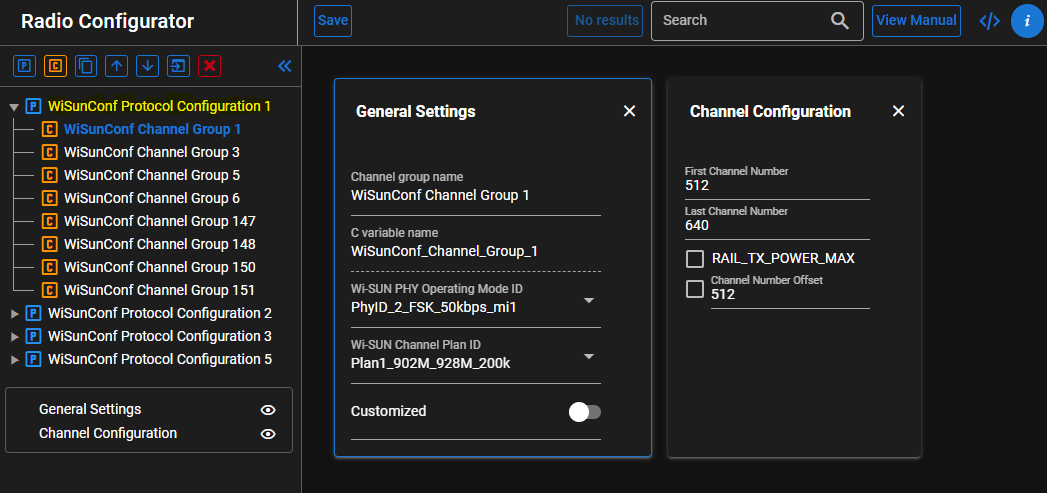
Before configuring mode switch PHYs in the application with the mode switch APIs, add all PHYs that may be used for mode switching to the Radio Configurator.
After adding the PHYs, either directly in the Radio Configurator or through the Wi-SUN Configurator, verify that all PHYs the application may switch between are in the same Protocol Group, as shown in the following screenshot.
This is important because mode switch can only occur between PHYs that belong to the same Protocol Group.
In the following radio configuration example:
It is possible to switch between the PHYs in WiSUNConf Protocol Configuration 1
It is not possible to switch between a PHY in WiSUNConf Protocol Configuration 1 and another in WiSUNConf Protocol Configuration 2
Fallback Mechanism#
Mode Switch is automatically disabled for a neighbor if failures significantly exceed successes (4 times more retries than successes over time).
Result:
Node falls back to Base PHY
The
SL_WISUN_MSG_MODE_SWITCH_FALLBACK_IND_IDindication is raised with the MAC address of the neighbor
Wi-SUN Mode Switch with SoC Sample Apps#
To test Mode Switch for OFDM or FSK modulations with the Wi-SUN stack on SoC:
Use Wi-SUN - SoC Border Router project for the border router
Use Wi-SUN - SoC CLI project for the node devices
Mode switch Command#
The mode switch feature can be used from the wisun_cli and wisun_brcli applications with the following command:
wisun mode_switch [Mode Switch mode] [PhyModeID] [MAC Address]Command Parameters#
Mode Switch Mode#
0 — Mode Switch Disabled
Disables mode switching for the selected neighbor(s)
wisun mode_switch 0 PhyModeID [MAC Address]Parameters:
PhyModeIDis ignored in this caseMAC Addresscan be:A single neighbor
ff:ff:ff:ff:ff:ff:ff:fffor all neighbors
1 — Mode Switch Enabled with Specific PhyModeID
Enables mode switching with a specific
PhyModeIDfor the selected neighbor(s)
wisun mode_switch 1 PhyModeID ff:ff:ff:ff:ff:ff:ff:ff
Required before using Mode
2When
MAC Addressisff:ff:ff:ff:ff:ff:ff:ff, the globalPhyModeIDis set for all neighbors
wisun mode_switch 1 PhyModeID [MAC Address]Parameters:
PhyModeID: PhyModeID to switch toMAC Address: MAC address of the neighbor(s)A single neighbor
Or
ff:ff:ff:ff:ff:ff:ff:fffor all neighbors
2 — Mode Switch Enabled with Global PhyModeID (Single Neighbor)
Enables mode switching using the global PhyModeID for a single neighbor
wisun mode_switch 2 PhyModeID [MAC Address]Parameters:
PhyModeIDis ignored in this caseff:ff:ff:ff:ff:ff:ff:ffcannot be usedThe global
PhyModeIDmust be set beforehand using:wisun mode_switch 1 PhyModeID ff:ff:ff:ff:ff:ff:ff:ffMAC Address: MAC address of the neighbor
Examples#
Assume 3 neighbors:
01:02:03:04:05:06:07:08
11:12:13:14:15:16:17:18
21:22:23:24:25:26:27:28
To use PhyModeId 34 (OFDM option 1, MCS2) globally (for all existing neighbors), the command is:
wisun mode_switch 1 34 ff:ff:ff:ff:ff:ff:ff:ffTo use PhyModeID 52 (OFDM option 2, MCS4) for the first and second neighbors only, two commands are necessary:
wisun mode_switch 1 52 01:02:03:04:05:06:07:08
wisun mode_switch 1 52 11:12:13:14:15:16:17:18To use the global PhyModeID (without the need to specify it) for the second neighbor, the command is:
wisun mode_switch 2 xx 11:12:13:14:15:16:17:18To disable mode switch for the first neighbor, the command is:
wisun mode_switch 0 xx 01:02:03:04:05:06:07:08To disable mode switch for all neighbors using the global PhyModeID, the command is:
wisun mode_switch 0 xx ff:ff:ff:ff:ff:ff:ff:ffMode Switch in wsbrd#
Mode switch in wsbrd is configured through the PHY configuration in wsbrd.conf and dynamically controlled via the D-Bus API.
Refer to the official configuration file wsbrd.conf, the relevant parameter for mode switch is phy_operating_modes.
For dynamic control via D-Bus, refer to SetLinkModeSwitch official documentation and example.
Mode Switch implementation using the APIs#
sl_wisun_set_mode_switch#
sl_wisun_set_mode_switch() is the runtime API used to actually enable and control mode switching. It tells the Wi-SUN stack which PHY to use for high data rate communication and whether the feature is enabled for a given neighbor or for all neighbors. You typically call it after the device has joined the network, because mode switch operates on established neighbor relationships. Using the broadcast MAC applies the configuration globally,and using a specific MAC applies it to one neighbor. This API directly maps to the CLI wisun mode_switch command and is the only API required to make mode switching happen in practice.
sl_status_t sl_wisun_set_mode_switch (uint8_t mode, uint8_t phy_mode_id, const sl_wisun_mac_address_t * neighbor_address)sl_wisun_set_pom_ie#
sl_wisun_set_pom_ie() API controls which PHYs the node advertises to its neighbors through the POM-IE (PHY Operating Mode Information Element). Mode switching can only occur if both peers advertise a common PHY, so this API effectively defines the capability set of the device. By default (if sl_wisun_set_pom_ie() is not called), the advertised list will contain first 15 PhyModeId listed in the radio multi-PHY configuration. You can use this API to reduce or customize the default advertised PHY list. It can be used before or after the connection, if called after the connection the list is applied immediately.
sl_status_t sl_wisun_set_pom_ie (uint8_t phy_mode_id_count, uint8_t phy_mode_ids, uint8_t is_mdr_command_capable)Implementation examples#
Limit advertised PHYs#
By default, the stack may advertise a larger PHY list depending on the PhyModeIds listed in the radio multi-PHY configuration. The following example restricts advertisement to only two PHYs: base PHY (2) and OFDM PHY (34).
#include "sl_wisun_api.h"
void configure_pom_ie(void)
{
uint8_t phy_mode_ids[] = {2, 34};
sl_wisun_set_pom_ie(sizeof(phy_mode_ids), phy_mode_ids,0);
}Enable mode switch after connection#
After the following call, the stack will automatically start using the higher data rate PHY for unicast traffic when conditions allow, while keeping multicast and asynchronous traffic on the base PHY.
#include "sl_wisun_api.h"
static const uint8_t broadcast_mac[8] = {0xff,0xff,0xff,0xff,0xff,0xff,0xff,0xff};
void sl_wisun_on_event(sl_wisun_evt_t *evt)
{
if (evt->header.id == SL_WISUN_MSG_CONNECTED_IND_ID) {
// Enable global mode switch to OFDM PHY (ID 34)
sl_wisun_set_mode_switch(SL_WISUN_MODE_SWITCH_ENABLE,
34,
broadcast_mac);
}
}