


Green Power Operational Model#
A GPD is said to be operational when it sends application control commands such as on/off. Typically, such operational commands are useful after the GPD is commissioned to a Zigbee network after the commissioning process. Like commissioning, a GPD can have two operational modes.
Unidirectional Operation: Sends commands to the Zigbee network and requires a minimum energy budget.
Bidirectional Operation: Sends commands and receives a response back; for example, reading an attribute from the network. Because this mode sends data to the Zigbee network and receives data back from the network, it uses more energy.
Green Power Command Transport#
The following figure illustrates a high-level typical GP operational command transport with four GP devices.
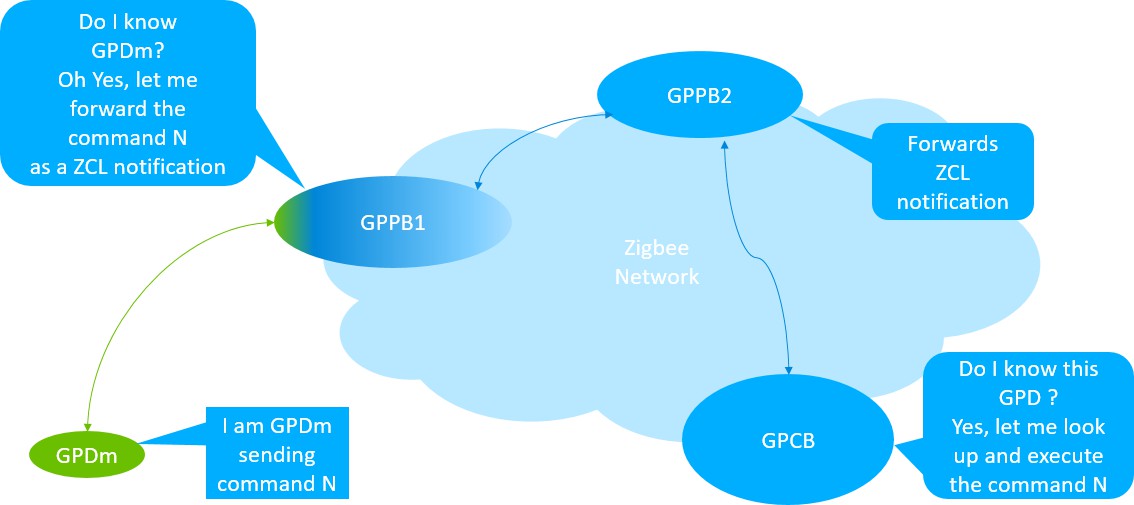
These are the general steps in the Green Power command transport in the above figure.
GPDm (a GPD with Source Id = m) sends a command N (a GPDF frame) to GPPB1.
GPPB1 receives the command N.
GPPB1 looks up GPDm in its proxy table to determine whether GPDm has an entry paired with a Sink. If it does, GPPB1 forwards command N as a Zigbee Cluster Library (ZCL) notification to GPPB2. If it does not recognize GPDm after the proxy table lookup, GPPB1 drops the packet.
Once GPPB2 receives the notification, it forwards the command further as a ZCL command, as it would do for any other ZCL commands in the Zigbee network. (Any router in the Zigbee network would do the same because in Z3, all routers are GPPBs.)
The GPCB receives the ZCL notification and processes it by looking up its Sink table to obtain the required information. If all the information is correct and the GPDm is paired to this GPCB, the GPCB processes the command as follows:
Looks up command N in its translation table to attempt to translate it.
Translates command N to an equivalent Zigbee command (which includes interpreting the command payload) and finds one or more paired application endpoints (which are in the translation table). Refer to the translation table in Default Translation Table No Payload for the Zigbee Commands.
Pushes the Zigbee packet to the identified application endpoint on the node.
Frame Format#
The following figures illustrate the standard format of a Zigbee frame and the format of a generic GP frame. The size difference is be- cause the entire GP frame must fit into the ZCL payload (or addressing).


Most of the information contained in the Zigbee NWK header and all the information in the APS headers is not relevant for GP operation. As a result, the GP frame contains a modified NWK header and no APS header, followed by a dedicated application payload. GP frames are compact and shorter, but they contain all the necessary information required for addressing and security.
Green Power Device Tables#
The table sizes (sink and proxy tables) are configured using the configurations in green-power-translation-table-config.h. The translation table is to support configurable translation for compact attribute reporting and multi-sensor **CJO multi-sensor operation?**. Compact attribute reporting is supported in the EmberZNet stack as part of supporting the translation table.
To support the Green Power feature, the following tables are maintained on the sink and/or proxy nodes:
Proxy Table: This table holds pairing information about the paired GPDs and the corresponding Sink. An entry to the proxy table is automatically activated during the commission process. The application can access the proxy table entries with the following APIs:
emberGpProxyTableLookup(EmberGpAddress \*addr): Look up a specific GPD source id in the Proxy table.emberAfPluginGreenPowerClientClearProxyTable(): Clear the Proxy table of all stored GPD pairings.Sink Table: This table holds information about local bindings between a particular GPD and the target‘s local endpoints in the GPS. An entry to the sink table is automatically activated during the commission process. The application can access sink table entries with the following APIs:
uint16_t emberAfFillCommandGreenPowerClusterGpSinkTableRequestSmart (uint8_t options, uint32_t gpdSrcId, uint8_t \*gpdIeee, uint8_t gpdEndpoint, uint8_t index): This function prepares an application framework ZCL com- mand buffer for the GP sink table request command with supplied arguments and returns the buffer length.bool emberAfPluginGreenPowerServerSinkTableAccessNotificationCallback(void\* data, EmberAfGpServerSinkTableAccessType accessType): This function is called by the green power server plugin to notify the ap- plication about a GPD addition or removal by the GPS to the Sink table.
Translation Table: Holds translations for GPD command into a command from the Zigbee application profile supported on the node:
The commands from the source (GPD) node do not come from a standard Zigbee command set. A sink node for GP commands interprets the commands received from the GPD and performs the required action. The sink node must translate the received command into a command from the Zigbee Application profile supported on the node (for example, Home Automation).
A Translation table entry is derived from the Default or Customized table.
The Default Table: Stores the predefined translations as per GP specification. By default, the GPD Command Translation Table contains the generic translations (mapping the GPD commands to their ZCL equivalents).
Customized Table: Contains specific command translations defined for a given GPD device. Creating a customized table is outside the scope of this guide.
If both default and customized translation are applicable to a particular GPD command, the customized translation supersedes the default translation.
The translation table is created during commissioning and later used to the interpret the command received from GPD.
| GPD Commands | Mapping to Zigbee | |||
|---|---|---|---|---|
| CommandID | Command Name | Corresponding Cluster-ID | CommandID | Command Payload |
| 0x00 | Identify | Identify | Identify | 0x003xc |
| 0x01 - 0x0F | Reserved | |||
| 0x10 - 0x17 | Recall Scene 0-7 | Scenes | Recall Scene | GroupID, SceneID = 0 - 7 |
| 0x18 - 0x1F | Store Scene 0 | Scenes | Store Scene | GroupID, SceneID = 0 |
| 0x20 | Off | On/Off | Off | N/A |
| 0x21 | On | On/Off | On | N/A |
| 0x22 | Toggle | On/Off | Toggle | N/A |
| 0x23 | Release | - | ||
| 0x24 - 0x2F | Reserved | |||
| 0x30 - 0x33 | Defined in Table GPDF Commands with Payload below sent by GPD | |||
| 0x34 | Level Control/Stop | Level Control | Stop | N/A |
| 0x35 - 0x38 | Defined in Table GPDF Commands with Payload below sent by GPD | |||
| 0x39 - 0x3F | Reserved | |||
| 0x40 | Move Hue Stop | Color Control | Move Hue | Stop |
| 0x41 - 0x44 | Defined in Table GPDF Commands with Payload below sent by GPD | |||
| 0x45 | Move Saturation Stop | Color Control | Move Saturation | Stop |
| 0x46 - 0x4B | Defined in Table GPDF Commands with Payload below sent by GPD | |||
| 0x4C - 0x4F | Reserved | |||
| 0x50 | Lock Door | Door Lock | Lock Door | N/A |
| 0x51 | Unlock Door | Door Lock | Unlock Door | N/A |
| 0x52 - 0x5F | Reserved | |||
| 0x60 | Press 1 of 1 | N/A | ||
| 0x61 | Release 1 of 1 | N/A | ||
| 0x62 | Press 1 of 2 | N/A | ||
| 0x63 | Release 1 of 2 | N/A | ||
| 0x64 | Press 2 of 2 | N/A | ||
| 0x65 | Release 2 of 2 | N/A | ||
| 0x66 | Short Press 1 of 1 | N/A | ||
| 0x67 | Short Press 1 of 2 | N/A | ||
| 0x68 | Short Press 2 of 2 | N/A | ||
| 0x69 - 0x6A | Defined in Table GPDF Commands with Payload below sent by GPD | |||
| 0x6B - 0x6F | Reserved | |||
| 0x70 - 0x9F | Reserved | |||
| 0xA0 - 0xE0 | Defined in Table GPDF Commands with Payload below sent by GPD | |||
| 0xE1 | Decommissioning | N/A | ||
| 0xE2 | Success | N/A | ||
| 0xE3 | Defined in Table GPDF Commands with Payload below sent by GPD | |||
| 0xE4 - 0xEF | Defined in Table GPDF Commands with Payload below sent by GPD | |||
| GPD Command | Mapping to Zigbee | ||
|---|---|---|---|
| CommandID | Command Name | ClusterID | Command Name |
| 0x30 | Move Up | Level Control | Move Up |
| 0x31 | Move Down | Level Control | Move Down |
| 0x32 | Step Up | Level Control | Step Up |
| 0x33 | Step Down | Level Control | Step Down |
| 0x35 | Move Up (with On/Off) | Level Control | Move Up (with On/Off) |
| 0x36 | Move Down (with On/Off) | Level Control | Move Down (with On/Off) |
| 0x37 | Step Up (with On/Off) | Level Control | Step Up (with On/Off) |
| 0x38 | Step Down (with On/Off) | Level Control | Step Down (with On/Off) |
| 0x41 | Move Hue Up | Color Control | Move Hue Up |
| 0x42 | Move Hue Down | Color Control | Move Hue Down |
| 0x43 | Step Hue Up | Color Control | Step Hue Up |
| 0x44 | Step Hue Down | Color Control | Step Hue Down |
| 0x46 | Move Saturation Up | Color Control | Move Saturation Up |
| 0x47 | Move Saturation Down | Color Control | Move Saturation Down |
| 0x48 | Step Saturation Up | Color Control | Step Saturation Up |
| 0x49 | Step Saturation Down | Color Control | Step Saturation Down |
| 0x4A | Move Color | Color Control | Move Color |
| 0x4B | Step Color | Color Control | Step Color |
| 0xA0 | Attribute Reporting | Copied from the triggering GPD command | ZCL Report Attributes Command |
| 0xA1 | Manufacturer Specific Attribute Reporting | Copied from the triggering GPD command | ZCL Report Attributes Command |
| 0xA2 | Multi-Cluster Reporting | Copied from the triggering GPD command | ZCL Report Attributes Command |
| 0xA3 | Manufacturer Specific Multi-Cluster Reporting | Copied from the triggering GPD command | ZCL Report Attributes Command |
| 0xA4 | Request Attributes | Copied from the triggering GPD command | ZCL Report Attributes Command |
| 0xA5 | Read Attribute Response | Copied from the triggering GPD command | ZCL Read Attributes Response Command |
| 0xA6 | ZCL Tunneling | Copied from the triggering GPD command | |
| 0xA7 | Reserved | ||
| 0xA87 | Compact Attribute Reporting | Derived from the triggering GPD command, using the information sent during commissioning | ZCL Report Attributes Command |
| 0xA897 - 0xAE | Reserved | ||
| 0xAF | GPD sensor commands (0xA0 – 0xA3) | Copied from the triggering GPD command | ZCL Report Attributes Command |
| 0xB0 - 0xBF | Manufacturer-defined GPD commands (payload is manufacturer-specific) | ||
| 0xC0 - 0xDF | Reserved | ||
| 0xE0 | Commissioning | N/A | |
| 0xE3 | Channel Request | N/A | |
| 0xE4 | Application Description | N/A | |
| 0xE54 - 0xEF | Reserved | ||