Silicon Labs Green Power within Zigbee EmberZNet 8.x and Higher#
Zigbee EmberZNet Software Development Kit (SDK) v8.x contains mainly API name changes compared to SDK v7.x. This chapter de- scribes the Green Power features of the Zigbee EmberZNet 8.x SDK.
Examples - SoC#
The same examples are provided as in SDK 6.10.x or earlier SDK version, however they can now be accessed from the File > New > Silicon Labs Project Wizard menu in Simplicity Studio 6. An easy way to access them is to filter for the "gp" keyword and Zigbee Tech- nology Type.
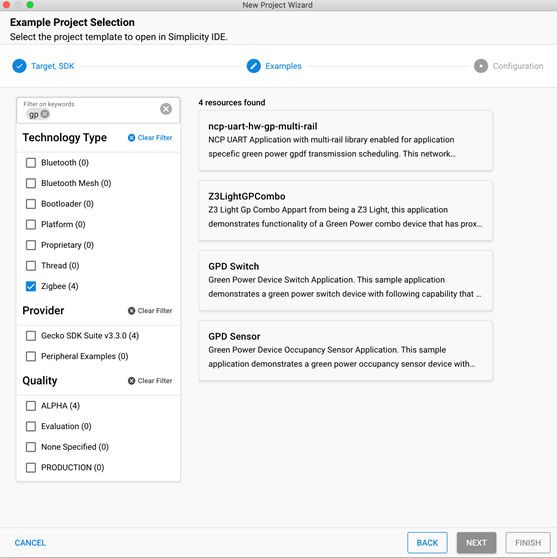
The examples are:
Zigbee - GPD Sensor: Green Power Device Occupancy Sensor application that demonstrates a Green Power occupancy sensor device. The Green Power Device Application Support component is pre-configured accordingly.
Zigbee - GPD Switch: Green Power Device Switch application that demonstrates a Green Power switch device. The Green Power Device Application Support component is pre-configured accordingly.
Zigbee GP - Z3LightCombo: The Z3Light example application extended with Green Power Combo (Proxy + Sink) functionality. Green Power-related components are added and pre-configured to support this functionality.
Zigbee - NCP UartHwGpMultiRail: Zigbee - NCP UartHw example application extended with Green Power Multi-RAIL functionality.
For more information on the examples, refer to the Project Details section of the Project Overview in each example.
Examples - NCP#
In EmberZNet, the basic functionality with Green Power endpoints is now located on NCP. This example shows how to run a Z3Gateway with a Zigbee - NCP UartHwGpMultiRail rail sample application and the necessary steps to pair a GPD Switch using the Green Power Adapter component. This sample application provides the following benefits:
It allows the Zigbee Green Power to function entirely on the NCP with no intervention from the host in a Host-NCP setup and there- fore reduces energy consumption by avoiding the need to wake up the Linux Host for Green Power packets.
The GPPB and GP Sync is integrated into the NCP.
It provides additional EZSP APIs added for the GP Sync functionality.
To start building your application follow these steps:
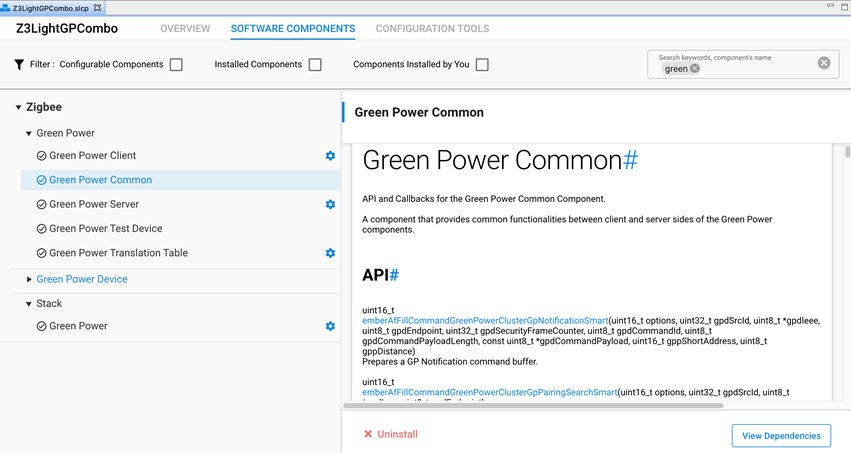
In Simplicity Studio, create a new Z3Gateway Host Project. For information on how to create a Z3Gateway Host Project, refer to EZSP-UART Host Interfacing Guide. Once the Z3Gateway project has been created, open the Project Configurator's Software Components tab:
Under Zigbee > Green Power, uninstall the following components:
Green Power Client
Green Power Common
Under Zigbee > Green Power, install the following components:
Green Power Client CLI: Implements the client-side CLI functionality of the Green Power Cluster.
Green Power Server CLI: Implements the server-side CLI functionality of the Green Power Cluster.
Green Power Translation Table CLI: Implements the Translation Table CLI functionality of the Green Power Cluster.
Application Framework Support Component: This Application Framework implementation is used for NCP applications.
In the Configuration Tools tab, open the Zigbee Cluster Configurator. Delete Endpoint 242 (Device – GP Combo Basic 0x0066).
You can transfer your project to your platform and build it using a standard
makecommand.
Using the Zigbee - NCP UartHwGpMultiRail sample application, create a new project. Open the Software Components in the Project Configurator:
a. Install the following components in Zigbee > Green Power:
- Application Framework Support Component. - Green Power Adapter: This component provides all the in/out interfaces for the green power cluster. - Green Power Client. - Green Power Combo Zap Config: If your NCP configuration is for a GPP you should use the Green Power Proxy Config Component. - Green Power Common. - Green Power Server. - Green Power Translation Table.b. Disable all Custom Options in the Green Power Adapter Component:
c. Build and flash the project into your board.
Once you have built the Z3Gateway in step 1 in your host and flashed the Zigbee - NCP UartHwGpMultiRail application in step 2, you can connect the NCP to your host and run the Z3Gateway:
./Z3GatewayHost -p /dev/tty.usbmodem0004402507811 Reset info: 11 (SOFTWARE) ezsp ver 0x0E stack type 0x02 stack ver. [8.0.1 GA build 270]Ezsp Config: set address table size to 0x0002:Success: setTo pair the (Host + NCP) GPCombo with a GPD, on the GPCombo issue the CLI command:
plugin green-power-server commission 9 0 0 1: This will initiate commissioning in the Sink.
Note: If a sink is setting its commissioning mode for groupcast, then it needs to ensure the binding table is not full and has enough available space for the commissioning endpoint to be added. This guarantees that packets will be properly forwarded.
To send the GPD Command (Commission) from the GPD, issue the CLI command:
node comm 255: This command will start commissioning and will eventually pair with the On-Off Cluster on Endpoint 1 on the Host.
Finally, you can send GPDF command 0x22 (see the Default Translation Table No Payload), which is the switch toggle CLI command for the GPD. This command will be received by the NCP and will be translated in the translation table to the on-off toggle command. The NCP will then ask the host to toggle the attribute of the On-Off Cluster in Endpoint 1.
Components#
Components are made up of a collection of source files and properties. The component-based design enables customization by adding, configuring, and removing components. The application developer can use SSv6’s Project Configurator and Component Editor to easily assemble the desired features by including those components that match the required functionality and by configuring the various properties associated with those components.
The configuration options and source code previously associated with plugins and the callbacks are all found as a component or part of a component.
The components commonly associated with Green Power functionality are the following:
Green Power Device:
Green Power Device AF CLI: Implements the CLI for the Green Power Device application. Depends on the CLI service, GPD Application support, and Debug Print components.
Green Power Device Application Support: Implements application layer support for the Green Power Device. Depends on the GPD Network Support component.
Green Power Device Network Support: Implements network layer support for the Green Power Device.
Green Power Sinks, Proxies, and Combos
Application Framework Support Component
Provides Application Framework implementation used on NCP applications.
Green Power Adapter
Provides the green power cluster user with all the in/out function interfaces. The customer should be able to use their framework.
Green Power Client
Implements the Green Power Client cluster from the Zigbee Cluster Library (ZCL).
Documentation can be found at: https://docs.silabs.com/zigbee/7.0/zigbee-af-api/green-power-client
Green Power Client CLI
Implements the client-side CLI functionality of the Green Power Cluster.
Green Power Server
Implements the Green Power Server cluster from the ZCL.
Documentation can be found at: https://docs.silabs.com/zigbee/7.0/zigbee-af-api/green-power-server
Green Power Server CLI
Implements the server-side CLI functionality of the Green Power Cluster.
Green Power Common
Contains code that is common between the server and client cluster implementations. Required by all Green Power applications within the Zigbee Framework.
Documentation can be found at: http://docs.silabs.com/zigbee/7.0/zigbee-af-api/green-power-common
Green Power Translation Table
Implements the Green Power Translation Table.
Green Power Translation Table CLI
Implements the translation table CLI functionality of the Green Power Cluster.
Documentation can be found at: https://docs.silabs.com/zigbee/latest/zigbee-af-api/green-power-translation-table-cli
Stack - Green Power
Implements the Green Power Stack within the Zigbee framework. Required by the Green Power Common component.