


Migrate from AI/ML SDK 2.2.2 to 3.0.0#
This guide explains how to upgrade an existing Simplicity Studio project from AI/ML SDK 2.2.2 to AI/ML SDK 3.0.0.
AI/ML 3.0.0 introduces breaking changes: EFR32 projects move from the flatbuffer converter to the MVP compiler. The SiWx917 projects already used the MVP compiler (mvp_compiler) in 2.2.2 but without the ml_model component. On both platforms, application code moves to the unified sl_ml_model_* runtime API. Register each model with the instantiable ML Model (ml_model) component and a project *.mlconf.
Scope#
This guide covers projects that already use AI/ML 2.x — EFR32 / Series 2 (tensorflow_lite_micro, flatbuffer autogen, sl_tflite_micro_*) or SiWx917 (mvp_compiler, slx_ml_*, tflite_micro_model.hpp). For new projects on 3.0.0, see Add Machine Learning to a New or Existing Project and the MVP Compiler.
Summary of Breaking Changes#
In AI/ML 2.2.2, EFR32 and SiWx917 used different compilation and runtime APIs. In AI/ML 3.0.0, both platforms compile via the MVP compiler with ml_model and share a common runtime (sl_ml_model_init(), sl_ml_model_run(), and tensor accessors). Replace platform-specific 2.2.2 calls with this unified interface (MODEL_STEM is the .tflite filename without extension).
Area | AI/ML 2.2.2 (EFR32 / Series 2) | AI/ML 2.2.2 (SiWx917) | AI/ML 3.0.0 (unified) | Example |
|---|---|---|---|---|
Model compilation AC | Flatbuffer converter ( | MVP compiler ( | MVP compiler via ML Model ( |
|
Generated headers |
|
|
|
|
Initialization |
|
|
|
|
Inference |
|
|
|
|
Tensor access |
|
|
|
|
Audio Feature Generator API Changes#
If your project uses the audio feature generator, after you reinstall the Audio Feature Generator (fe_audio) component (step 2) update application code as follows.
Area | AI/ML 2.2.2 | AI/ML 3.0.0 | Example ( |
|---|---|---|---|
Header |
|
|
|
Initialization (EFR32) |
| Same function; include |
|
Initialization (SiWx917) |
|
| — |
Load model settings | Not used with flatbuffer autogen |
|
|
Fill input tensor |
|
|
|
On EFR32, sl_ml_audio_feature_generation_update_features(), sl_ml_audio_feature_generation_get_features_*(), and related runtime functions keep the same names.
Upgrade Through Simplicity Studio#
This process uses aiml_soc_voice_control_light_efr32_micriumos as the reference project. The Voice Control Light sample on BRD2601B, upgraded from AI/ML SDK 2.2.2.
Prerequisites#
This guide assumes you already have a working project on AI/ML SDK 2.2.2. Before upgrading, install Simplicity SDK Suite v2026.6.0 (or newer 2026.x) with Silicon Labs AI/ML SDK 3.0.0 or later.
1. Upgrade the SDK in the GUI#
Open the project
.slcpfile in Project Configurator, click the Change SDK version on the OVERVIEW tab. Studio opens the Select SDK dialog.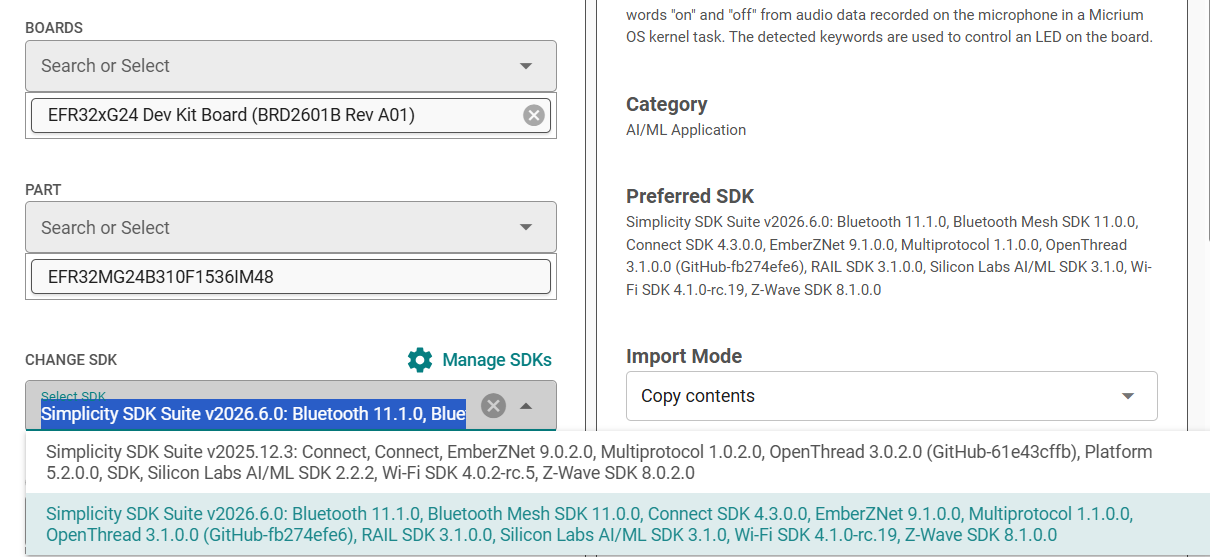
Select Simplicity SDK Suite v2026.6.0 (preferred) or the latest 2026.x entry that includes AI/ML 3.0.0+.
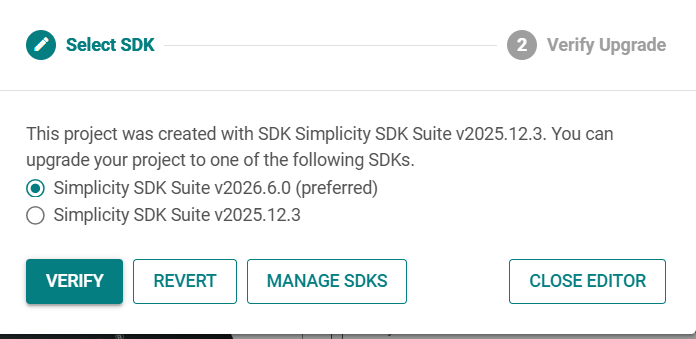
Click VERIFY to open Upgrade:
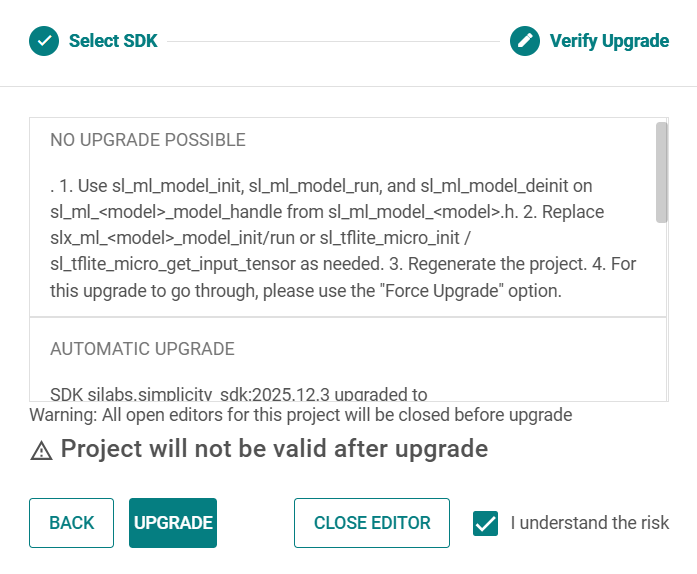
Review AUTOMATIC UPGRADE changes (for example, adding
ml_model, renamingml_audio_feature_generationtofe_audio, movingnn_util/nn_mvptoaiml).Under NO UPGRADE POSSIBLE, Studio lists the manual steps (update to
sl_ml_model_*APIs, regenerate, use Force Upgrade). Select I understand the risk, then click UPGRADE. Studio cannot rewrite your application source automatically — this is expected.After a successful upgrade, the Project Explorer references
simplicity_sdk_2026.6.0andaiml_3.x.xfolders.The first Generate may fail with an MVP compiler error until you fix
*.mlconf(step 3) — this is expected.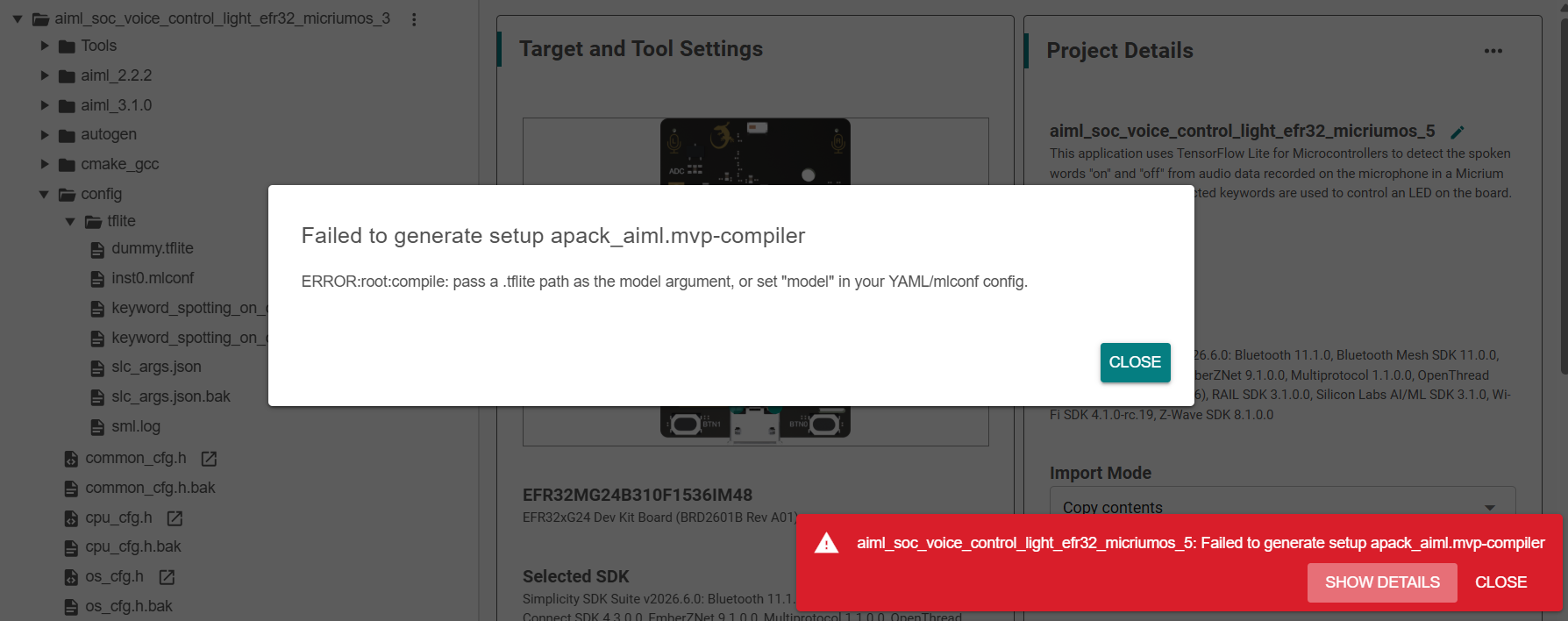
NOTE: The SDK upgrade is partially complete at this point. Generation will fail until you fix the model compiler configuration (.mlconf) and update application source code.
2. Reinstall the Audio Feature Generator (fe_audio) (if applicable)#
Skip this step if your project does not use the audio feature generator.
In AI/ML 2.2.2, ml_audio_feature_generation was a non-instantiable component. In 3.0.0, fe_audio is instantiable — add one fe_audio instance per model that uses the audio feature generator.
In testing with aiml_soc_voice_control_light_efr32_micriumos_5, the SDK upgrade removed the legacy ml_audio_feature_generation component and did not leave a working replacement in place. You must add the AI/ML 3.0 component manually:
Open the project
.slcpfile in Project Configurator.Under Software Components, search for
audio feature.Expand AI/ML → Machine Learning → Feature Generator and install Audio Feature Generator (
fe_audio).Add a
fe_audioinstance in Studio. The instance name must match the corresponding ML Model (ml_model) instance name exactly.Generate the project.
Confirm
sl_fe_audio.h,sl_fe_audio_instances.h(SiWx917), and relatedfe_audioconfig files appear (for exampleconfig/sl_ml_audio_feature_generation_config.h).
Platform-specific setup after adding the instance:
SiWx917#
Enable model_parameters_header in the model's *.mlconf so the compiler generates <instance>_generated_parameters.h for the frontend config:
codegen:
model_parameters_header:
enabled: trueThen in application code:
#include "sl_fe_audio_instances.h"
#include "sl_fe_audio_si91x.h"
sl_ml_audio_feature_generation_init(&sl_fe_audio_keyword_spotting_on_off_v3_cfg);Replace keyword_spotting_on_off_v3 with your shared fe_audio / ml_model instance name.
EFR32#
Add the fe_audio instance in Studio as described above. Initialization stays parameterless — call sl_ml_audio_feature_generation_load_model_settings() with the model flatbuffer, then sl_ml_audio_feature_generation_init():
#include "sl_fe_audio.h"
#include "sl_ml_model_inst0.h"
sl_ml_audio_feature_generation_load_model_settings(sl_ml_inst0_model_handle.flatbuffer);
sl_ml_audio_feature_generation_init();3. Fix the *.mlconf Model Path After Upgrade#
After upgrading the SDK, the first project generation often fails with the following error:
"Set model: to the absolute path to the .tflite file that you want to associate with this .mlconf file, or just the name of the .tflite file that will be copied into the config/tflite directory of your project."
In Project Explorer, open
config/tflite/and identify every*.mlconffile (one per ML Model instance). In the reference project this isconfig/tflite/inst0.mlconf.Find the matching
.tflitemodel file (keyword_spotting_on_off_v2.tflitein the reference project). Edit the*.mlconffile and setmodel:to the absolute path to that file, or to its filename if the flatbuffer is registered underconfig_file:withdirectory: tflite. For example:
model: keyword_spotting_on_off_v2.tfliteGenerate the project again.
Confirm
autogen/ml/andautogen/sl_ml_model_<instance>.happear. If generation still fails, openautogen/sml.logfor details.If your project uses the audio feature generator with Siwx917, enable
model_parameters_headerin that*.mlconf, so the compiler emits<instance>_generated_parameters.hforfe_audio. Remove the legacy Audio Feature Generator (ml_audio_feature_generation) component if it is still listed alongsidefe_audio.
NOTE: If your
.slcpstill containsSL_TFLITE_MICRO_ARENA_SIZEfrom AI/ML 2.2.2, you can leave it. AI/ML 3.0.0 plans tensor memory at compile time through the ML Model component, so this setting is not used on the new inference path.
4. Update Application Source Code#
Update your application .c / .cc / .cpp files (not the files under autogen/), or use the AI-assisted migration prompt after completing the Steps 1 to 3.
If your project uses the audio feature generator, apply Audio feature generator API changes after completion of upgrade in Step 1.
API Replacement Table#
Legacy (2.x) | AI/ML 3.0.0 |
|---|---|
|
|
|
|
|
|
|
|
|
|
|
|
|
|
|
|
|
|
| Not used — call |
| Check |
|
|
Automatic init at startup | Explicit |
|
|
Before (2.2.2)#
#include "sl_tflite_micro_init.h"
void app_process_action(void) {
TfLiteTensor* input = sl_tflite_micro_get_input_tensor();
input->data.int8[0] = sample;
TfLiteStatus status = sl_tflite_micro_get_interpreter()->Invoke();
if (status != kTfLiteOk) {
return;
}
TfLiteTensor* output = sl_tflite_micro_get_output_tensor();
int8_t result = output->data.int8[0];
}After (3.0.0)#
#include "sl_ml_model_keyword_spotting_on_off_v2.h"
void app_process_action(void) {
if (sl_ml_model_init(&sl_ml_keyword_spotting_on_off_v2_model_handle) != SL_STATUS_OK) {
return;
}
TfLiteTensor* input = sl_ml_keyword_spotting_on_off_v2_model_handle.input_tensor(0);
input->data.int8[0] = sample;
if (sl_ml_model_run(&sl_ml_keyword_spotting_on_off_v2_model_handle) != SL_STATUS_OK) {
return;
}
TfLiteTensor* output = sl_ml_keyword_spotting_on_off_v2_model_handle.output_tensor(0);
int8_t result = output->data.int8[0];
}Tip: Call
sl_ml_model_initonce (for example inapp_initor task startup), then callsl_ml_model_runin your inference loop. Usesl_ml_model_deinitonly when unloading the model.
AI-assisted Migration Prompt#
Complete SDK upgrade in Simplicity Studio.
Verify the Studio checklist, the AI-assisted migration prompt repairs common
.slcpissues that Studio often cannot fix (ghost legacy components, missing*.mlconfbindings), and migrates application source.
Note: Close Studio before the AI session. If Project Configurator is open, it can overwrite
.slcpedits when you save. After the AI finishes, reopen Studio → Generate → Build. Do not open Software Components or save from Configurator unless you intend to change components.
Studio Checklist (complete before pasting the prompt)#
Do these in Project Configurator → Software Components :
Action | Component |
|---|---|
Install / keep | ML Model ( |
Install / keep | Audio Feature Generator ( |
Install / keep | TensorFlow Lite Micro ( |
Remove if present |
|
Remove if present | MVPv1 Accelerated Kernels ( |
Remove if present | Debug Logging using IO Stream ( |
Make sure to complete the Step 3 and then perform the AI prompt.
Copy-paste Prompt#
Replace PROJECT_ROOT in the block below, then copy the entire fenced block into your AI coding session.
You are migrating a Silicon Labs Simplicity Studio project from AI/ML SDK 2.2.2 to AI/ML 3.0.0.
Project root: PLACE YOUR PROJECT PATH HERE
The user should have completed the SDK upgrade in Studio and closed Simplicity Studio (so `.slcp` edits are not reverted on Save).
Your job is to repair common `.slcp` issues Studio cannot fix, migrate application source, fix `config/**/*.mlconf`, add the EFR32 FP16 toolchain flag when missing, and apply the VS Code (GCC) CMake fallback when needed. The user will **Generate** and **Build** in Studio after you finish — do not run `slc generate`.
## Hard rules
1. **Never edit** `autogen/`, autogenerated `cmake_gcc/*.cmake` (for example `aiml_soc_voice_control_light_efr32_micriumos_8.cmake`), `simplicity_sdk_*`, `aiml_*`, or `wiseconnect*_sdk_*`. **Exception:** Phase 0.6 may edit only `cmake_gcc/CMakeLists.txt` (user extension point).
2. **Only edit** application source (`.c`, `.cc`, `.cpp`, `.h`, `.hpp`), `config/**/*.mlconf`, limited `*.slcp` keys in Phase 0.5, and `cmake_gcc/CMakeLists.txt` in Phase 0.6 (EFR32 only). Never change SDK version, `sdk_extension`, or unrelated `.slcp` keys.
3. Discover all symbols from the project — do not guess model names or instance names.
4. Apply every replacement consistently across all application files before finishing.
5. Do not change application logic, timing, or recognition thresholds — only migrate APIs and headers.
6. **Hard stop only** for blockers you cannot fix: missing `ml_model`, `fe_audio` (audio projects), or `tensorflow_lite_micro`; missing `config/tflite/MODEL_FILE` on disk; or legacy kernel components (`tensorflow_lite_micro_accelerated_kernels`, `tensorflow_lite_micro_optimized_kernels`, `nn_mvp`, `nn_util`, `tensorflow_debug_log_iostream`) still listed under `component:`. For those, print the blocker list and stop — do not edit source. Ghost `ml_audio_feature_generation`, missing `*.mlconf` in `config_file:`, and missing `-mfp16-format=ieee` (`.slcp` and/or `cmake_gcc/CMakeLists.txt`) are **not** hard stops — fix in Phase 0.5 and 0.6.
7. **Do not** use `slc generate --with` / `--without` or patch autogenerated `cmake_gcc/*.cmake` files.
8. **Do not delete** `sl_ml_audio_feature_generation_config.*` or other SDK `sl_ml_audio_feature_generation_*` files — in 3.x they belong to `fe_audio`.
9. After edits, print the verification checklist (Phase 4) with pass/fail for each item.
10. **Studio v6 / VS Code (GCC):** There is no GNU ARM C++ Compiler GUI. If `.slcp` has `-mfp16-format=ieee` but `cmake_gcc/aiml_soc_voice_control_light_efr32_micriumos_8.cmake` lacks it in `target_compile_options(slc ...)`, apply Phase 0.6. MVP `mvpv1/*.cc` files compile into **`slc`**, not the executable.
## Phase 0 — Discovery (read only)
1. Read the `.slcp` file in PROJECT_ROOT.
2. Determine platform:
- **SiWx917** if `.slcp` lists `wiseconnect3_sdk` or source uses `slx_ml_*`,
`sl_ml_audio_feature_generation_si91x.h`, or `tflite_micro_model.hpp`.
- **EFR32 / Series 2** otherwise (typical: `sl_tflite_micro_*` in app source).
3. Record from `.slcp` and `config/tflite/`:
- `MODEL_STEM` = `.tflite` filename without extension (for example `keyword_spotting_on_off_v2`).
- `MODEL_FILE` = basename (for example `keyword_spotting_on_off_v2.tflite`).
- `ML_INSTANCE` = `ml_model` instance name (for example `inst0`).
If multiple models exist, migrate each; one `ml_model` instance per model.
4. Check prerequisites (read `.slcp`):
- **Hard blockers** (stop if any fail): `ml_model` with instance; `fe_audio` matching `ml_model` (audio); `tensorflow_lite_micro`; no legacy kernels under `component:`; `config/tflite/MODEL_FILE` on disk.
- **Auto-repair in Phase 0.5** (do not stop): ghost `ml_audio_feature_generation` when `fe_audio` is present; missing `config_file:` entry for `config/tflite/ML_INSTANCE.mlconf`; missing `-mfp16-format=ieee` in `.slcp` (EFR32).
- **Auto-repair in Phase 0.6** (do not stop, EFR32 only): if `cmake_gcc/CMakeLists.txt` lacks `-mfp16-format=ieee` on the `slc` target, or generated `cmake_gcc/*_*.cmake` (project name cmake) has no `-mfp16-format=ieee` under `target_compile_options(slc` — add Phase 0.6 block (Studio Save often reverts `.slcp` before Generate propagates flags).
5. Detect project generator: if `.slps` contains `visual-studio-code` or OVERVIEW would show **VS Code (GCC)**, plan Phase 0.6 for EFR32 MVP builds.
6. Read `autogen/sml.log` if present — note if it contains `no mlconf files found` (Phase 0.5 should fix the binding).
7. Grep PROJECT_ROOT application source for legacy APIs:
- `sl_tflite_micro_`, `slx_ml_`
- `sl_tflite_micro_model.h`, `sl_tflite_micro_init.h`
- `tensorflow/lite/c/common.h`, `tensorflow/lite/micro/`
- `sl_ml_audio_feature_generation.h` (include path — replace with `sl_fe_audio.h`)
- `tflite_micro_model.hpp`, `keyword_spotting_*_model.`, `register_tflite_micro_accelerator`
8. Generated symbols use **MODEL_STEM**, not ML_INSTANCE (unless they match):
- Header: `sl_ml_model_MODEL_STEM.h` (under `autogen/` after Generate)
- Handle: `sl_ml_MODEL_STEM_model_handle`
## Phase 0.5 — Safe `.slcp` repairs (editable)
Apply when Phase 0 found auto-repair items. Edit only `component:` (ghost removal) and `config_file:` / `toolchain_settings` in `PROJECT_ROOT/*.slcp`. Do not change SDK version or other keys.
1. **Remove ghost `ml_audio_feature_generation`** when `fe_audio` is already installed: delete only this block from `component:`:
- package: aiml
vendor: silabs
id: ml_audio_feature_generation
Do not remove `fe_audio` or `ml_model`.
2. **Add missing `*.mlconf` binding** when `config/tflite/ML_INSTANCE.mlconf` exists on disk but `config_file:` lacks it. Insert before the `.tflite` entry:
- path: config/tflite/ML_INSTANCE.mlconf
directory: tflite
override:
component: ml_model
file_id: ml_compiler_config
instance: ML_INSTANCE
3. **EFR32 FP16 flag** — if no `toolchain_settings` entry has `option: gcc_compiler_option` and `value:` containing `-mfp16-format=ieee`, append:
- value: -mfp16-format=ieee
option: gcc_compiler_option
Skip on SiWx917. Without this flag, MVP kernels fail with `float16_t has not been declared`.
## Phase 0.6 — EFR32 FP16 in `cmake_gcc/CMakeLists.txt` (VS Code / GCC fallback)
Apply on **EFR32** when `autogen/ml/accelerator/mvpv1/` exists or MVP compilation is enabled, and **either**:
- `cmake_gcc/CMakeLists.txt` does not already pass `-mfp16-format=ieee` to `slc`, or
- the autogenerated project cmake (for example `cmake_gcc/aiml_soc_voice_control_light_efr32_micriumos_8.cmake`) lacks `-mfp16-format=ieee` in `target_compile_options(slc` (common when Studio reverted `.slcp` before Generate).
Edit **only** `PROJECT_ROOT/cmake_gcc/CMakeLists.txt`. Immediately after the line `include(...cmake)` that pulls in the autogenerated `slc` target, ensure this block exists (add if missing; do not duplicate):
# MVP-compiled kernels in autogen/ml/accelerator/mvpv1/ require IEEE FP16 on EFR32.
target_compile_options(slc PUBLIC
$<$<COMPILE_LANGUAGE:C>:-mfp16-format=ieee>
$<$<COMPILE_LANGUAGE:CXX>:-mfp16-format=ieee>
)
Skip on SiWx917. Still apply Phase 0.5 `.slcp` `toolchain_settings` when possible — Phase 0.6 is the reliable build fix for Studio v6 + VS Code (GCC) when Generate does not propagate the flag.
## Phase 1 — `*.mlconf` and model files (editable)
1. Ensure `config/tflite/ML_INSTANCE.mlconf` exists. Create from the project template if missing.
2. Set `model: MODEL_FILE` (not `null`).
3. Ensure `config/tflite/MODEL_FILE` exists on disk. If referenced but missing, tell the user where
to copy it from — do not invent model binaries.
4. Platform-specific `codegen` in mlconf:
- **SiWx917** + audio FE: `model_parameters_header: enabled: true`
- **EFR32** + audio FE: `model_parameters_header` may stay `false`
## Phase 2 — Application source migration
Migrate every application file with legacy ML APIs. Typical files: `audio_classifier.cc`,
`recognize_commands.h`, `recognize_commands.cc`, `*_config.h`, `*_config.cc`, `app.c`.
### 2a. Headers
| Remove / replace | With |
| ---------------- | ---- |
| `#include "sl_tflite_micro_model.h"` | `#include "sl_ml_model_MODEL_STEM.h"` |
| `#include "sl_tflite_micro_init.h"` | (remove) |
| `#include "sl_ml_audio_feature_generation.h"` | `#include "sl_fe_audio.h"` (EFR32) |
| `#include "sl_ml_audio_feature_generation_si91x.h"` | `#include "sl_fe_audio_si91x.h"` |
| `#include "sl_ml_audio_feature_generation_config_si91x.h"` | `#include "sl_fe_audio_instances.h"` (SiWx917) |
| `#include "tensorflow/lite/c/common.h"` | `#include "ml/third_party/tflm/common.h"` |
| `#include "tensorflow/lite/micro/tflite_bridge/micro_error_reporter.h"` | (remove — see 2e) |
| `#include "tensorflow/lite/micro/micro_error_reporter.h"` | (remove — see 2e) |
| `#include "tflite_micro_model.hpp"` | (remove unless still required) |
| `#include "slx_ml_MODEL_STEM_model.h"` | `#include "sl_ml_model_MODEL_STEM.h"` |
| `#if __has_include("sl_tflite_micro_model_parameters.h")` | Optional: `MODEL_STEM_generated_parameters.h` if enabled in mlconf |
Also add `#include "sl_ml_audio_feature_generation_config.h"` where the audio FE config is needed (EFR32).
### 2b. Model init / run / tensors
| Legacy (2.x) | AI/ML 3.0.0 |
| ------------ | ----------- |
| `sl_tflite_micro_init()` | `sl_ml_model_init(&sl_ml_MODEL_STEM_model_handle)` |
| `slx_ml_MODEL_STEM_model_init()` | `sl_ml_model_init(&sl_ml_MODEL_STEM_model_handle)` |
| `sl_tflite_micro_get_interpreter()->Invoke()` | `sl_ml_model_run(&sl_ml_MODEL_STEM_model_handle)` |
| `slx_ml_MODEL_STEM_model_run()` | `sl_ml_model_run(&sl_ml_MODEL_STEM_model_handle)` |
| `sl_tflite_micro_get_input_tensor()` | `sl_ml_MODEL_STEM_model_handle.input_tensor(0)` |
| `sl_tflite_micro_get_output_tensor()` | `sl_ml_MODEL_STEM_model_handle.output_tensor(0)` |
| `keyword_spotting_*_model.input()` | `sl_ml_MODEL_STEM_model_handle.input_tensor(0)` |
| `keyword_spotting_*_model.output()` | `sl_ml_MODEL_STEM_model_handle.output_tensor(0)` |
| `*_model_flatbuffer` | `sl_ml_MODEL_STEM_model_handle.flatbuffer` |
| `register_tflite_micro_accelerator()` | Remove — handled inside `sl_ml_model_init()` |
Call `sl_ml_model_init()` once at startup. Call `sl_ml_model_run()` in the inference loop.
Check `SL_STATUS_OK` for init/run (not `kTfLiteOk` on invoke).
### 2c. Audio feature generator (EFR32)
After `#include "sl_fe_audio.h"` and model init:
if (!sl_ml_audio_feature_generation_load_model_settings(sl_ml_MODEL_STEM_model_handle.flatbuffer)) { ... }
if (sl_ml_audio_feature_generation_init() != SL_STATUS_OK) { ... }
sl_ml_audio_feature_generation_fill_tensor(sl_ml_MODEL_STEM_model_handle.input_tensor(0));
### 2d. Audio feature generator (SiWx917)
sl_ml_model_init(&sl_ml_MODEL_STEM_model_handle);
sl_ml_audio_feature_generation_init(&sl_fe_audio_ML_INSTANCE_cfg);
sl_ml_audio_feature_generation_fill_tensor(sl_ml_MODEL_STEM_model_handle.input_tensor(0));
Omit `load_model_settings()` when `model_parameters_header` is enabled in mlconf.
### 2e. `recognize_commands.h` / `recognize_commands.cc` (AI/ML 3.0 pattern)
- Use `ml/third_party/tflm/common.h` and `ml/third_party/tflm/micro_log.h` (not `tensorflow/lite/*`).
- `PreviousResultsQueue` has a default constructor (no `ErrorReporter` parameter).
- `RecognizeCommands` constructor has **no** `tflite::ErrorReporter*` argument.
- Replace `TF_LITE_REPORT_ERROR(...)` with `MicroPrintf(...)` or `printf(...)` in app code.
- Remove `error_reporter_` member variables.
### 2f. Error handling
if (sl_ml_model_run(&sl_ml_MODEL_STEM_model_handle) != SL_STATUS_OK) { ... }
## Phase 3 — Post-migration grep
Re-grep application source (exclude `autogen/`, SDK copies). **Zero hits** required for:
- `sl_tflite_micro_get_`, `sl_tflite_micro_init`, `slx_ml_`
- `sl_tflite_micro_model.h`, `sl_tflite_micro_init.h`
- `tensorflow/lite/c/common.h`, `tensorflow/lite/micro/`
- `sl_ml_audio_feature_generation.h` (use `sl_fe_audio.h` instead)
- `sl_ml_audio_feature_generation_si91x.h`
- `tflite_micro_model.hpp` (unless required by non-ML code)
- `keyword_spotting_*_model.` (C++ wrapper object API)
- `sl_tflite_micro_get_error_reporter`
## Phase 4 — Verification checklist (print to user)
| Check | Expected |
| ----- | -------- |
| Studio: `ml_model` + instance | Present (user verified in Studio) |
| Studio: `fe_audio` (if audio) | Instance matches `ml_model` |
| Studio: `tensorflow_lite_micro` | Present |
| Studio: legacy components removed | No `ml_audio_feature_generation`, no accelerated/optimized TFLM kernels, no `nn_mvp`/`nn_util`, no `tensorflow_debug_log_iostream` |
| Studio: mlconf in `.slcp` `config_file` | `config/tflite/ML_INSTANCE.mlconf` with matching `instance` |
| `-mfp16-format=ieee` in `.slcp` `toolchain_settings` (EFR32) | Present (AI Phase 0.5 added, or was already set) |
| `-mfp16-format=ieee` on `slc` in `cmake_gcc/CMakeLists.txt` (EFR32, VS Code/GCC) | Present (AI Phase 0.6 added if needed) |
| After Generate: `-mfp16-format=ieee` in compile flags for `mvpv1/*.cc` | Present in `.rsp` or generated cmake (user verifies after Build if needed) |
| `config/tflite/*.mlconf` `model:` | `MODEL_FILE`, not `null` |
| `config/tflite/MODEL_FILE` on disk | Present |
| Legacy API grep (app source) | Zero hits |
| User: **Generate** in Studio | Required (after AI edits) |
| After Generate: `autogen/sl_ml_model_MODEL_STEM.h` | Exists |
| After Generate: `autogen/ml/` | Exists |
| After Generate: `autogen/sml.log` | No `no mlconf files found` |
| User: **Build** in Studio | Succeeds |
| User: flash and test | Hardware OK |
## Output format
1. Discovery summary: platform, MODEL_STEM, ML_INSTANCE, generator (VS Code/GCC or other), hard blockers (if any), and Phase 0.5 / 0.6 repairs applied.
2. If hard blockers exist, **only** print section 1, the Studio fix list, and stop — no file edits.
3. Every file edited and why.
4. Phase 4 checklist with pass/fail.
5. Remind user: reopen Studio (if closed) → **Generate** → **Build** → flash. Do not Save from Project Configurator unless changing components (may revert `.slcp`). On VS Code (GCC) projects, keep the Phase 0.6 `CMakeLists.txt` edit even if `.slcp` was reverted.Note: Generated model symbols use the
.tflitefilename stem (MODEL_STEM), not necessarily theml_modelinstance name. For example, instanceinst0withkeyword_spotting_on_off_v2.tfliteproducessl_ml_model_keyword_spotting_on_off_v2.handsl_ml_keyword_spotting_on_off_v2_model_handle, notsl_ml_inst0_model_handle.
5. Build and Test on Hardware#
Build the project in Studio.
Flash and run on your board.
Verify that inference behavior matches the pre-migration application.
Upgrade Through CLI#
It uses aiml_soc_voice_control_light_efr32_micriumos as the reference project — the Voice Control Light sample on BRD2601B, upgraded from AI/ML SDK 2.2.2. Use SLT and SLC instead of Simplicity Studio.
Prerequisites#
slt install aiml/2.2.2@silabs # pulls simplicity-sdk/2025.12.3@silabs
slt install aiml/3.0.0@silabs # pulls simplicity-sdk/2026.6.0@silabs1. Open the Reference Project#
Open a terminal and change to your existing AI/ML 2.2.2 project directory, or use the bundled example:
cd "$(slt where aiml/2.2.2)/examples/aiml_soc_voice_control_light_efr32_micriumos"If you copied the example from the SDK, generate once with the 2.2.2 stack first:
slc generate -cp -p aiml_soc_voice_control_light_efr32_micriumos.slcp \
-d target/brd2601b --with brd2601b \
--sdk-package-path "$(slt where simplicity-sdk/2025.12.3),$(slt where aiml/2.2.2)"2. Upgrade the .slcp#
slc upgrade updates project metadata only — it does not regenerate upgraded source code in the autogen/ directory.
slc upgrade -p aiml_soc_voice_control_light_efr32_micriumos.slcp \
--sdk-package-path "$(slt where simplicity-sdk/2026.6.0),$(slt where aiml/3.0.0)" \
--source-sdk-version 2025.12.3 --force-upgradeWithout --force-upgrade, SLC cancels when upgrade rules list manual steps (for example migrating to sl_ml_model_* APIs) and the upgrade does not complete. You must pass --force-upgrade to make the upgrade from AI/ML 2.2.2 to 3.0.0+.
Example terminal output:
PS C:\Users\<username>\.silabs\slt\installs\conan\p\aiml220b56d6ae053\p\examples\aiml_soc_voice_control_light_efr32_micriumos> slc upgrade -p aiml_soc_voice_control_light_efr32_micriumos.slcp --sdk-package-path "$(slt where simplicity-sdk/2026.6.0-latest),$(slt where aiml/3.0.0)" --source-sdk-version 2025.12.3
3. Regenerate the project.
4. For this upgrade to go through, please use the "Force Upgrade" option.
Problem detected, no action performed: Some component references are not explicit. Some upgrades may not trigger correctly if the components cannot be found. Implicit components: ml_audio_feature_generation
Automatic upgrade: SDK silabs.simplicity_sdk:2025.12.3 upgraded to silabs.simplicity_sdk:2026.6.0
Automatic upgrade: Extension silabs.aiml:2.2.2 upgraded to silabs.aiml:3.0.0
Automatic upgrade: Adds ml_model component for sml MVP compilation of .tflite models.
Automatic upgrade: Adds aiml nn_util and nn_mvp required by MVP-accelerated kernels.
upgrade was cancelled because of invalid statuses.
PS C:\Users\<username>\.silabs\slt\installs\conan\p\aiml220b56d6ae053\p\examples\aiml_soc_voice_control_light_efr32_micriumos> slc upgrade -p aiml_soc_voice_control_light_efr32_micriumos.slcp --sdk-package-path "$(slt where simplicity-sdk/2026.6.0-latest),$(slt where aiml/3.0.0)" --source-sdk-version 2025.12.3 --force-upgrade
Problem detected, no action performed: .
1. Use sl_ml_model_init, sl_ml_model_run, and sl_ml_model_deinit on sl_ml_<model>_model_handle from sl_ml_model_<model>.h.
2. Replace slx_ml_<model>_model_init/run or sl_tflite_micro_init / sl_tflite_micro_get_input_tensor as needed.
3. Regenerate the project.
4. For this upgrade to go through, please use the "Force Upgrade" option.
Problem detected, no action performed: Some component references are not explicit. Some upgrades may not trigger correctly if the components cannot be found. Implicit components: ml_audio_feature_generation
Automatic upgrade: SDK silabs.simplicity_sdk:2025.12.3 upgraded to silabs.simplicity_sdk:2026.6.0
Automatic upgrade: Extension silabs.aiml:2.2.2 upgraded to silabs.aiml:3.0.0
Automatic upgrade: Adds ml_model component for sml MVP compilation of .tflite models.
Automatic upgrade: Adds aiml nn_util and nn_mvp required by MVP-accelerated kernels.
Despite issues, the project was requested to be upgraded.
A full generation should be run to sync the generated content with the new SDK.3. Fix the .slcp and *.mlconf#
slc upgrade updates SDK metadata but does not add every component or fix compiler config. Edit project files directly using text editor. See steps 2-3 for the same changes that has been done using Project Configurator.
Edit aiml_soc_voice_control_light_efr32_micriumos.slcp
In component::
Add
fe_audiowith the same instance name asml_model(for example,inst0) when the project uses the audio feature generator.Remove legacy entries if still listed after upgrade:
ml_audio_feature_generationtensorflow_lite_micro_accelerated_kernels,tensorflow_lite_micro_optimized_kernels,nn_mvp,nn_util,tensorflow_debug_log_iostream
In config_file:, bind each *.mlconf to its ml_model instance when missing:
# excerpt — aiml_soc_voice_control_light_efr32_micriumos.slcp
component:
- package: aiml
vendor: silabs
id: ml_model
instance:
- name: inst0
- package: aiml
vendor: silabs
id: fe_audio
instance:
- name: inst0
config_file:
- path: config/tflite/inst0.mlconf
directory: tflite
override:
component: ml_model
file_id: ml_compiler_config
instance: inst0On EFR32, append under toolchain_settings if -mfp16-format=ieee is missing:
- value: -mfp16-format=ieee
option: gcc_compiler_optionEdit config/tflite/inst0.mlconf
Set model: to the .tflite filename (for example, keyword_spotting_on_off_v2.tflite). See step 3 for details.
4. Regenerate with the New SDK#
slc generate -cp -p aiml_soc_voice_control_light_efr32_micriumos.slcp \
-d target/brd2601b --with brd2601b \
--sdk-package-path "$(slt where simplicity-sdk/2026.6.0),$(slt where aiml/3.0.0)" Confirm autogen/ml/ and autogen/sl_ml_model_<MODEL_STEM>.h appear. If generation fails, open autogen/sml.log — no mlconf files found usually means the *.mlconf binding or model: path is still wrong.
5. Update Application Source and Build#
Migrate application .c / .cc / .cpp files to sl_ml_model_* APIs (step 5), then build and flash (step 6).