


MVP Compiler#
This guide describes MVP compiler integration in Simplicity Studio that includes components, pipeline stages, and troubleshooting. For setup steps and a Project Configurator information, refer to Add Machine Learning to a New or Existing Project. For *.mlconf keys, see MVP Compiler Configuration.
The ml_model component is required for machine learning applications.
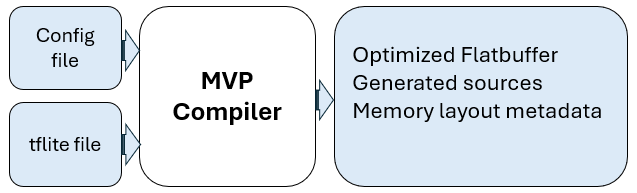
The compiler transforms a quantized TensorFlow Lite (.tflite) model into firmware-ready artifacts:
Optimized flatbuffer (
_generated.h)Generated C/C++ sources, headers
Memory layout metadata in the flatbuffer
To change compiler behavior, edit the project *.mlconf bound to each ml_model instance and regenerate the project.
Overview#
During project generation, Studio invokes the compiler for each ml_model instance. To learn more about how settings combine, what runs by default, and how your board maps to a platform id, refer to MVP Compiler Configuration.
Components#
Add an ml_model instance for each model in your project. For multiple models or board-specific flatbuffers, see Multi-Model Support.
Component | Role |
|---|---|
| Registers the model, also owns |
| Runs the compiler during project generation. |
Each instance reserves config/compiler/<instance>.mlconf, ships a default template with model: null until you set model: in your project *.mlconf, and publishes compiled artifacts under autogen/ named from the .tflite stem.
Compiler Pipeline Stages#
The compiler executes an ordered pipeline. Extension defaults apply where your *.mlconf is silent; project overrides merge for configurable sections such as graph_optimizer, memory_optimizer, memory_specification, and codegen. See MVP Compiler Configuration for key details.

The compiler runs optimization passes in sequence. Each pass transforms the model and prepares it for the next stage.
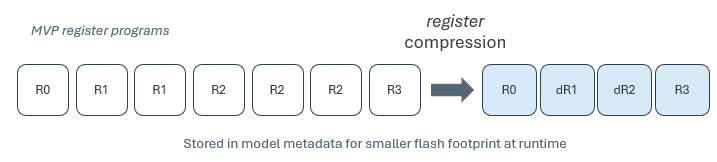
Register compression: Records MVP accelerator register programs during compilation, and then compresses them by removing redundant writes and applying delta encoding. The compressed programs are stored in the compiled model metadata, so runtime kernels load smaller and more efficient programs. This stage always runs, and it is not configurable in *.mlconf.
Memory planning: Builds an offline memory allocation plan for tensors and buffers so the firmware knows where data stored before inference runs. This reduces runtime planning overhead and produces a deterministic memory layout. The planner pass uses extension defaults, so you generally do not need to change memory_planner in a project *.mlconf. To tune region sizes or linker sections without disabling the planner, use the memory_specification section; memory planning reads those definitions when building the plan. That lets you cap SRAM usage, or assign weights to flash.
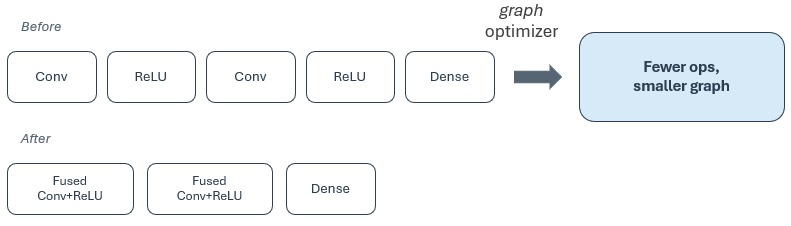
Graph optimizer: Configurable in graph_optimizer. Simplifies the TensorFlow Lite graph before other passes run (for example, by merging or removing layers), and when enabled, precomputes constant subgraphs. This can reduce latency, RAM, and flash use on Silicon Labs targets. Enable it for production builds unless you are isolating a graph-related issue.
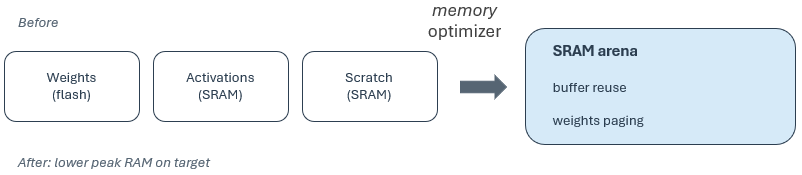
Memory optimizer: Configurable in memory_optimizer. It uses the memory plan to apply weights paging, and when enabled, reuses safe buffer between layers. This helps large models fit within available SRAM, or flash. Enable it when the model is memory-constrained or when you want dual weights paging on platforms that support it.
Code generation: Configurable in codegen. Produces C/C++ headers, sources for embedded integration, model data, operation resolver for the kernels for your graph, and symbol names your application links against. You can adjust symbols, linker sections, and runtime_memory_size. This stage is required for normal Studio builds that publish artifacts under autogen/.
Override memory regions in memory_specification rather than trying to disable automatic memory planning. Set codegen.model_header.runtime_memory_size only when you have a validated size from profiling or documentation—not to replace the memory planner in normal builds.
Output Layout#
During project generation, Simplicity Studio scans the staged tflite/ directory for bound *.mlconf files and runs the compiler once per file. Generated code is published to the project autogen tree. Your application links against the autogen copy; compiler workspace folders are not retained in the project source tree.
Output | Behavior |
|---|---|
Autogen directory | Generated files placed under the configured |
Build log | Project generation console; |
When code generation is enabled, compiled TFLM sources and generated symbols are published to autogen.
Best Practices#
The following recommendations apply to production firmware:
Register compression: Leave enabled (default SLC behavior). It is required for normal compilation and code generation and cannot be controlled from
*.mlconf.Memory planning: Keep
memory_planner.enabled: true. Disabling the planner is appropriate only for controlled experiments. When disabled, setcodegen.model_header.runtime_memory_sizeexplicitly:memory_planner: enabled: false # not recommended for production codegen: model_header: runtime_memory_size: <tensor arena size>Graph and memory optimization:
graph_optimizerandmemory_optimizerare configurable in project*.mlconf. You may disable either stage temporarily for comparison. For release builds, leave both enabled to avoid reduced performance and increased RAM usage.
Troubleshooting#
If compilation or autogen output does not match expectations, check the following issues.
Issue | Possible Cause and Solution |
|---|---|
Model not optimized beyond basics | Confirm an |
| Bind a project |
Wrong model or “model not found” | Check |
Compiled output missing after generation | Regenerate the project, and verify that |
Failure after board or SDK change | Regenerate the project, and verify that OPN or board support (Supported Platforms); review the build log and |
Out of memory or linker errors | Adjust |