


Introduction#
The Channel Sounding Demo showcases Bluetooth Channel Sounding functionality using the Simplicity Connect mobile app and Silicon Labs wireless devices. The demo supports the following operating modes:
Channel Sounding Demo (Phone as Initiator): The mobile app acts as the Channel Sounding (CS) Initiator and measures the distance to a CS Reflector device.
Channel Sounding Demo (Phone as Reflector): The mobile app acts as the Channel Sounding (CS) Reflector and serves as a Digital Key in a proximity-based lock and unlock application.
Channel Sounding Demo (Phone as Initiator)#
The Channel Sounding demo (Phone as Initiator) showcases how to measure the distance between a smartphone and a reflector device using Bluetooth Channel Sounding. This feature enables more accurate distance and direction measurements between Bluetooth devices compared to traditional RSSI-based methods.
The smartphone acts as the Channel Sounding (CS) Initiator, and the EFR32xG24 Development Kit (BRD2606A) acts as the Channel Sounding (CS) Reflector. The initiator estimates the distance to the reflector, and the estimated values are also available on the reflector side.
Users interact with the Simplicity Connect mobile app on the smartphone to discover, connect to, and range with the reflector device. Once the devices are connected and the Channel Sounding session is established, distance measurements are displayed in real time.
Set Up the EFR32xG24 Development Kit as a Channel Sounding Reflector#
To use the EFR32xG24 Development Kit (BRD2606A) as a Channel Sounding Reflector:
Connect the EFR32xG24 Development Kit (BRD2606A) to the PC.
Open Simplicity Studio.
Create the Bluetooth - SoC CS Reflector example project.
Follow the configuration steps described in the project README file.
Build and flash the project to the development kit.
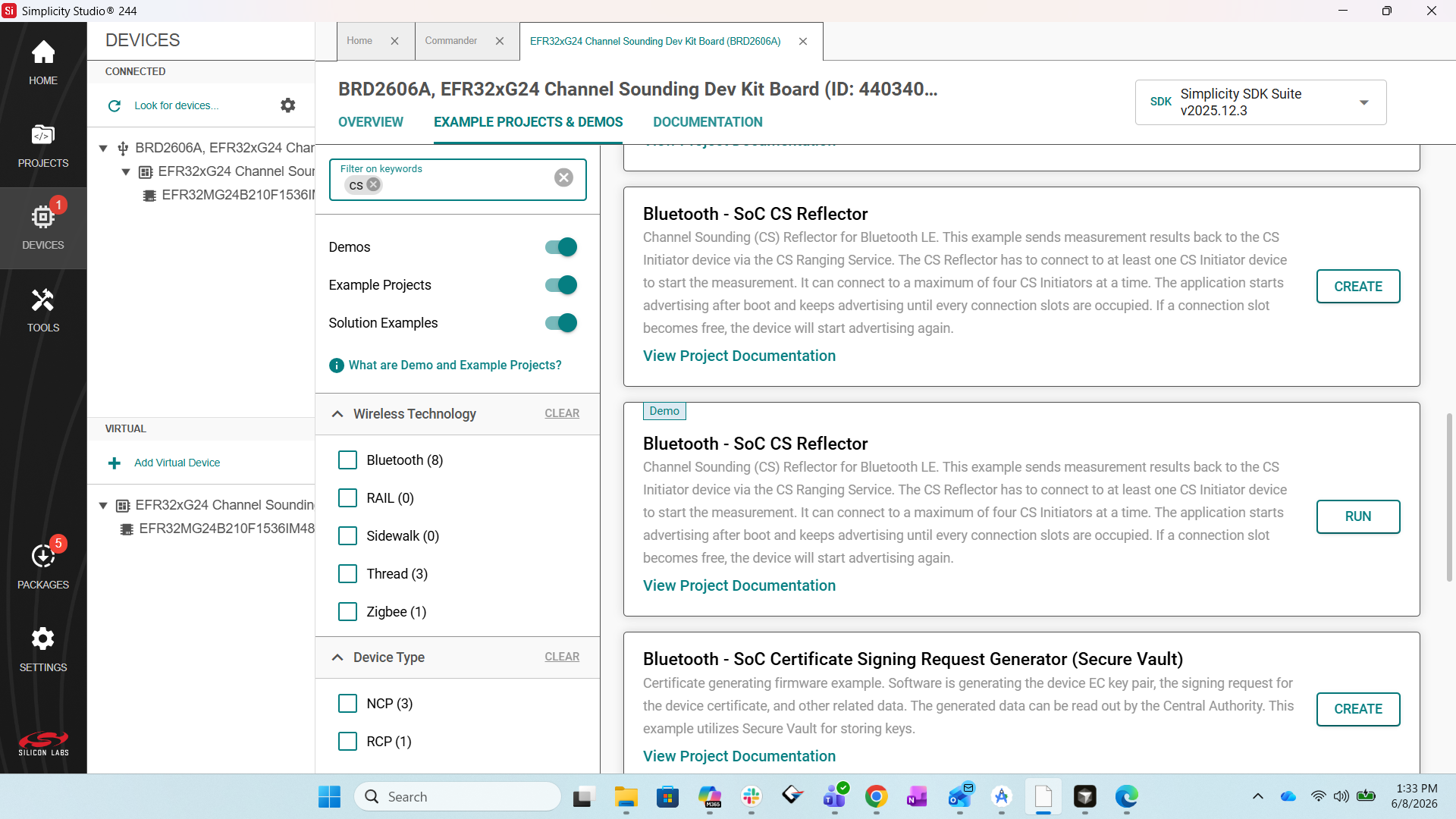
After programming is complete, the board starts advertising as a Channel Sounding Reflector and is ready to connect to the Simplicity Connect mobile app.
Set Up the Simplicity Connect Mobile App as a CS Initiator#
Open the Simplicity Connect mobile app on your smartphone.
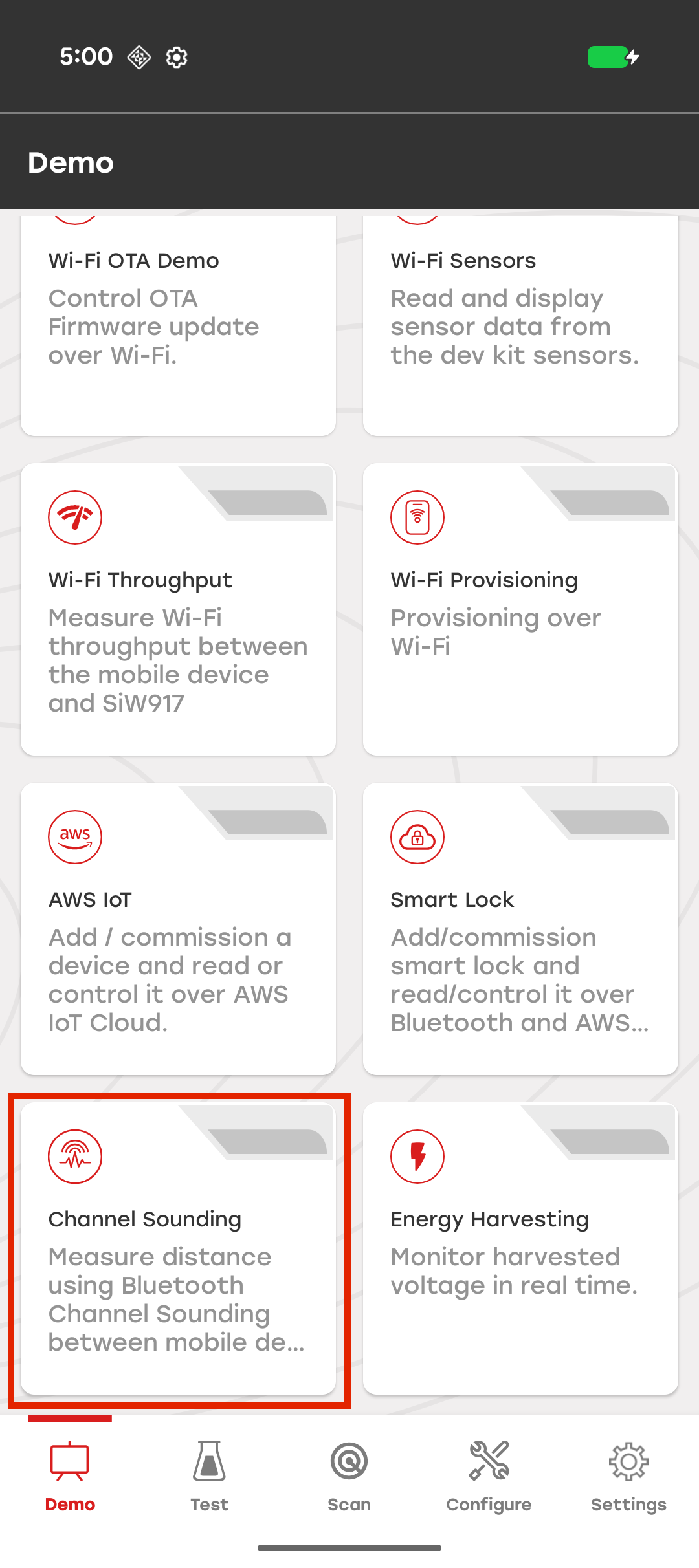
Tap the Demo icon in the navigation bar.
Locate the Channel Sounding demo tile and tap it.
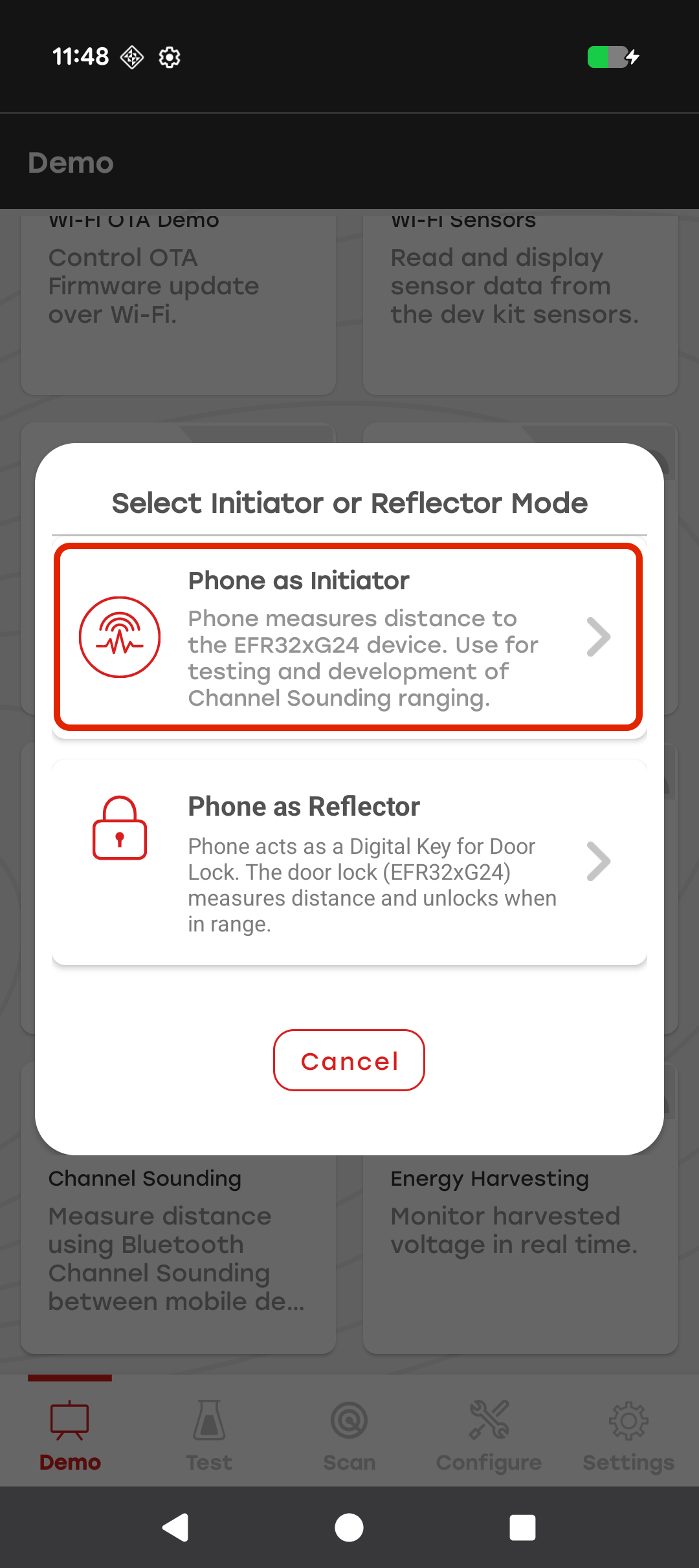
In the mode selection dialog, select Phone as Initiator.
In this mode, the mobile app acts as the Channel Sounding (CS) Initiator and measures the distance to a paired EFR32xG24 Development Kit acting as the CS Reflector.
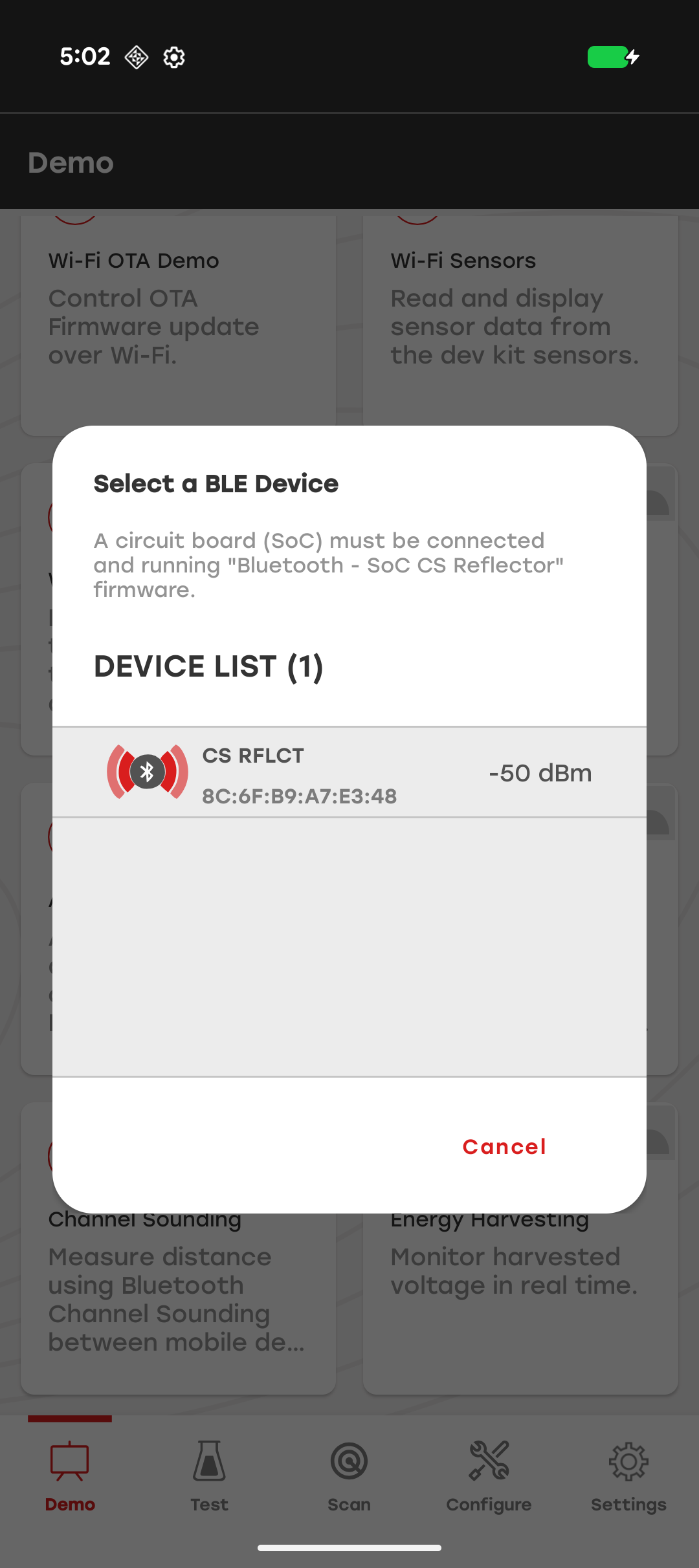
In the device selection window, select the Channel Sounding Reflector device to connect to.
Note: If the smartphone does not support Bluetooth Channel Sounding, an alert appears when you tap the Channel Sounding demo.
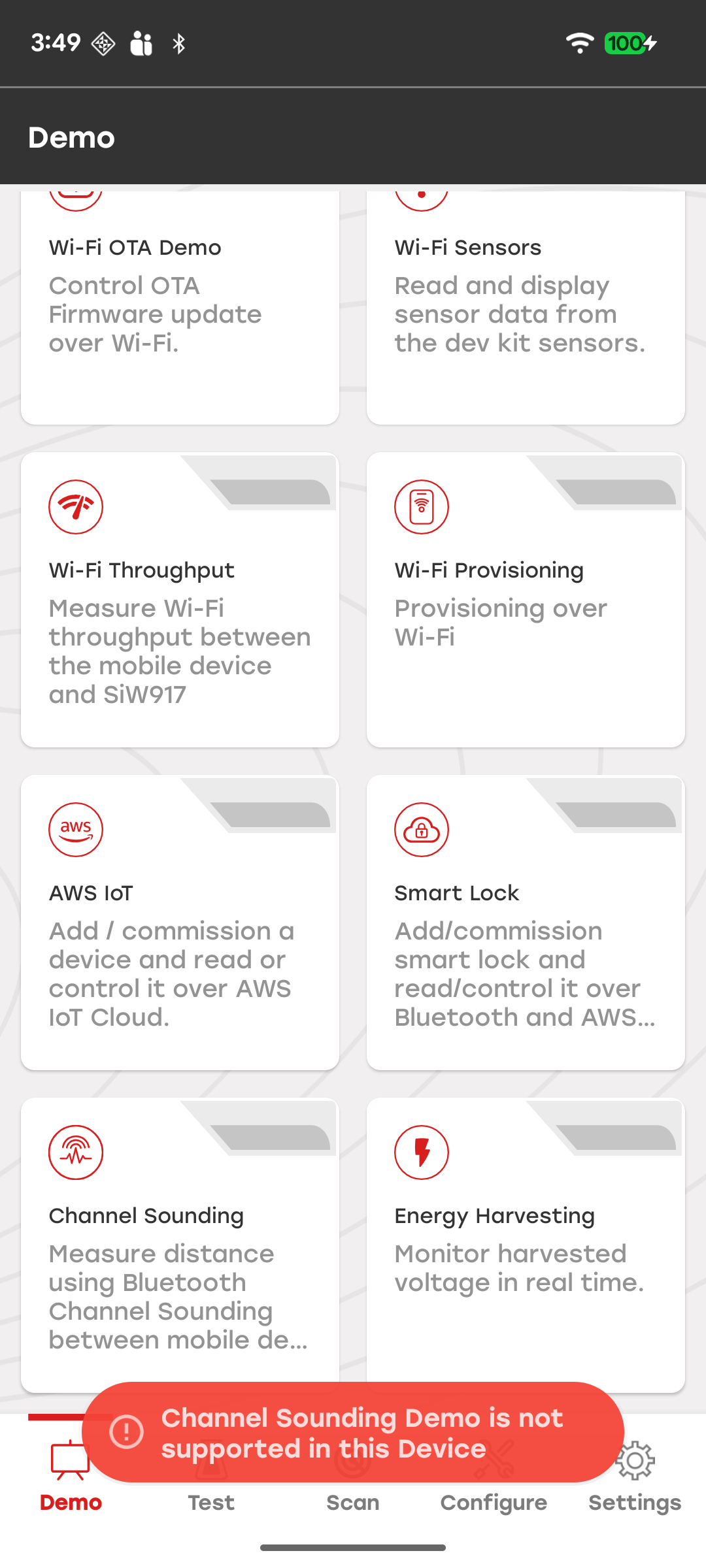
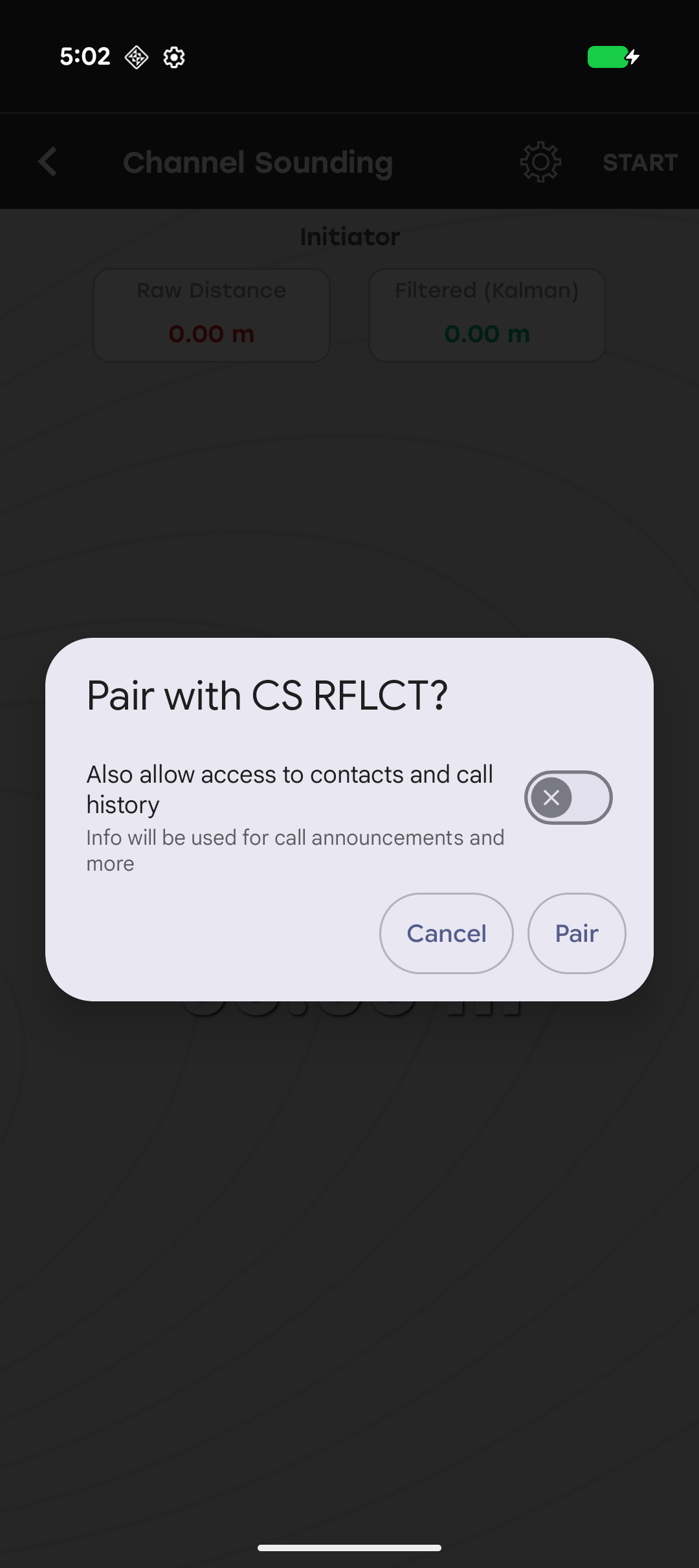
After the smartphone connects to the Channel Sounding Reflector (CS Reflector), the app redirects you to the Channel Sounding home screen and starts the Bluetooth pairing process. Tap Pair in the pairing dialog to complete pairing and bonding with the reflector device.
After pairing and bonding are complete, the CS Reflector starts sending Channel Sounding measurement data to the smartphone. The mobile app calculates and displays the measured distance.
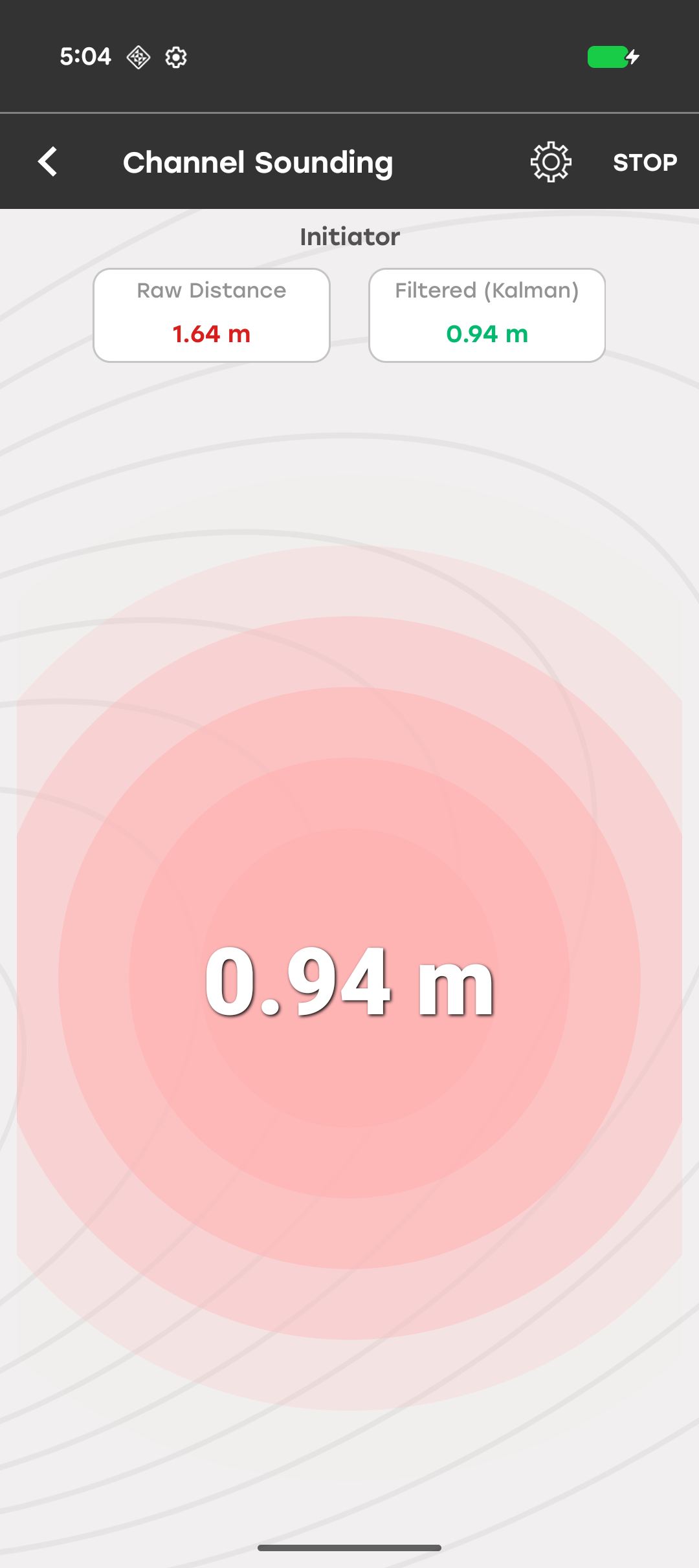
Tap Start/Stop in the top-right corner of the screen to start or stop Channel Sounding operations.
To modify the Channel Sounding configuration, tap the Settings icon in the top-right corner of the screen.
Note: If the smartphone has already saved the Channel Sounding Reflector in the connected devices list, the app prompts you to remove the device from the phone settings before continuing.
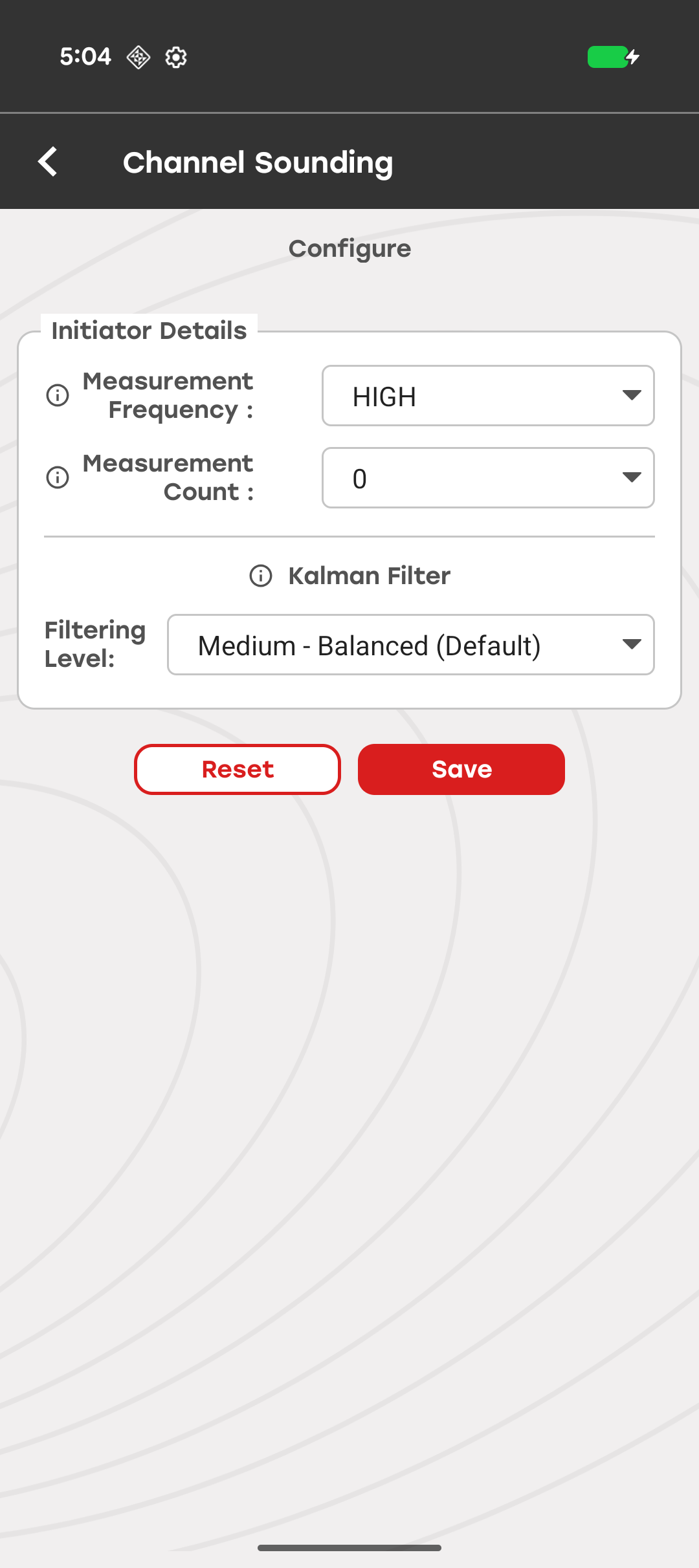
From the Configuration screen, modify the following settings:
Measure Frequency – Selects the Bluetooth signal frequency range used for Channel Sounding measurements. The default value is High.
Measurement Count – Specifies the number of measurements collected during Channel Sounding operations. The default value is 0.
Tap Save to apply the selected settings. The configuration remains in effect until you change it.
Tap Reset to restore the default configuration values.
Kalman Filter#
The Channel Sounding demo (Phone as Initiator) includes a Kalman Filter that smooths raw BLE distance measurements to improve measurement stability and reduce the effect of noise. The filter is enabled by default and continuously processes Channel Sounding measurement data.
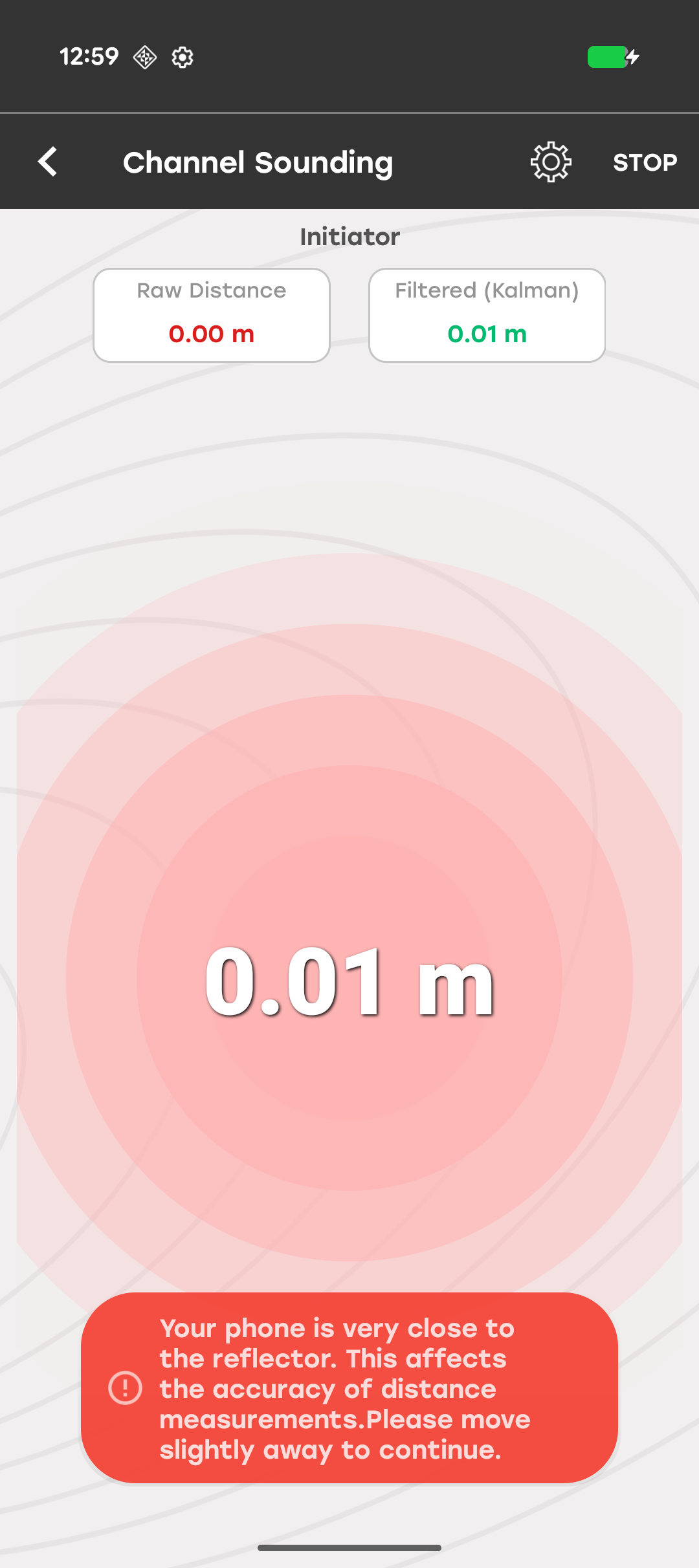
The measurement screen displays both the raw and filtered distance values:
Raw Distance (red): The unprocessed distance reported by the Bluetooth Channel Sounding API.
Filtered (green): The distance estimate after Kalman filtering.
Configure the Kalman Filter#
To configure the Kalman filter:
Tap the Settings icon in the top-right corner of the measurement screen.
In the Configuration screen, locate the Kalman Filter section.
Select the desired Filtering Level from the drop-down list.
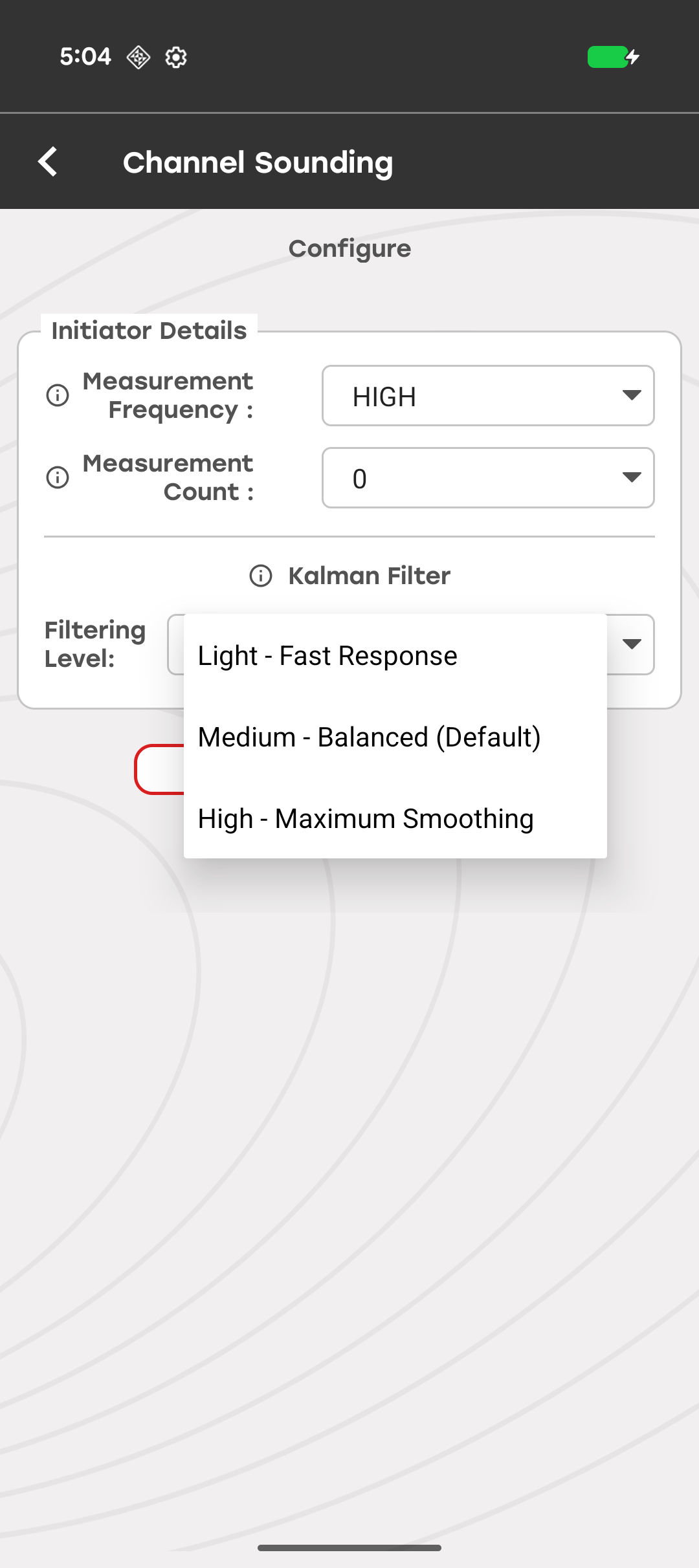
The Filtering Level setting controls how aggressively the Kalman filter smooths distance measurements. Lower filtering levels provide faster response to distance changes, while higher filtering levels provide greater measurement stability by reducing noise and fluctuations.
The following table describes the available filtering levels.
| Level | Description | Behavior | When to Use |
|---|---|---|---|
| Light (fast response) | Minimal smoothing, fastest reaction to distance changes. Best for dynamic scenarios where quick tracking is needed. | Lower latency, more noise visible. | When you need the filtered distance to track rapid movements closely. |
| Medium (balanced, default) | Balanced trade-off between smoothing and responsiveness. Recommended for most use cases. | Moderate latency, good stability. | Provides a good balance between measurement stability and response time. |
| High (maximum smoothing) | Maximum noise reduction with aggressive outlier rejection. Best for stationary or slow-moving scenarios where stability is critical. | Higher latency, smoothest output. | To get the most stable distance readings. |
Save or Reset Configuration#
After selecting a filtering level:
Tap Save to apply and retain the selected filtering level. The configuration persists across app sessions.
Tap Reset to restore all settings, including the filtering level, to their default values.
The Kalman filter includes adaptive outlier rejection to reduce the impact of noisy or unexpected measurements. When a raw measurement deviates significantly from the current distance estimate, the filter automatically reduces the influence of that measurement instead of discarding it completely. This helps prevent sudden spikes from affecting the filtered distance while still allowing gradual distance changes to be tracked.
Note: Distance measurements may become less accurate when the smartphone is very close to the Channel Sounding Reflector. In this situation, a warning banner appears at the bottom of the screen:
"Your phone is very close to the reflector. This affects the accuracy of distance measurements. Please move slightly away to continue."
Troubleshoot Distance Measurement Issues#
| Issue | Resolution |
|---|---|
| Filtered distance seems slow to react | Switch to Light - Fast Response filtering level in the Configuration screen. |
| Distance readings are noisy | Switch to High - Maximum Smoothing filtering level for more aggressive smoothing. |
| Proximity warning appears | Move the smartphone farther from the reflector. Measurements below ~0.2 m may be unreliable. |
| Raw and filtered values differ significantly | This is expected. The filter is smoothing out noise and rejecting outlier measurements. The Filtered (Kalman) value is the recommended reading. |
Channel Sounding Demo (Phone as Reflector)#
The Channel Sounding demo demonstrates a proximity-based digital lock and unlock use case in which a Google Pixel smartphone functions as the Channel Sounding (CS) Reflector and serves as a Digital Key. In this mode, the EFR32xG24 Development Kit (BRD2606A) functions as the CS Initiator and acts as the door lock.
Prerequisites#
Simplicity SDK: v2025.12.0 (required)
Supported Smartphones: Google Pixel 9 and later
Supported Android Version: Android 16 or later
Channel Sounding Board: EFR32xG24 Development Kit (BRD2606A)
Set Up the EFR32xG24 Development Kit as a Channel Sounding Initiator#
To use the EFR32xG24 Development Kit (BRD2606A) as a Channel Sounding Initiator:
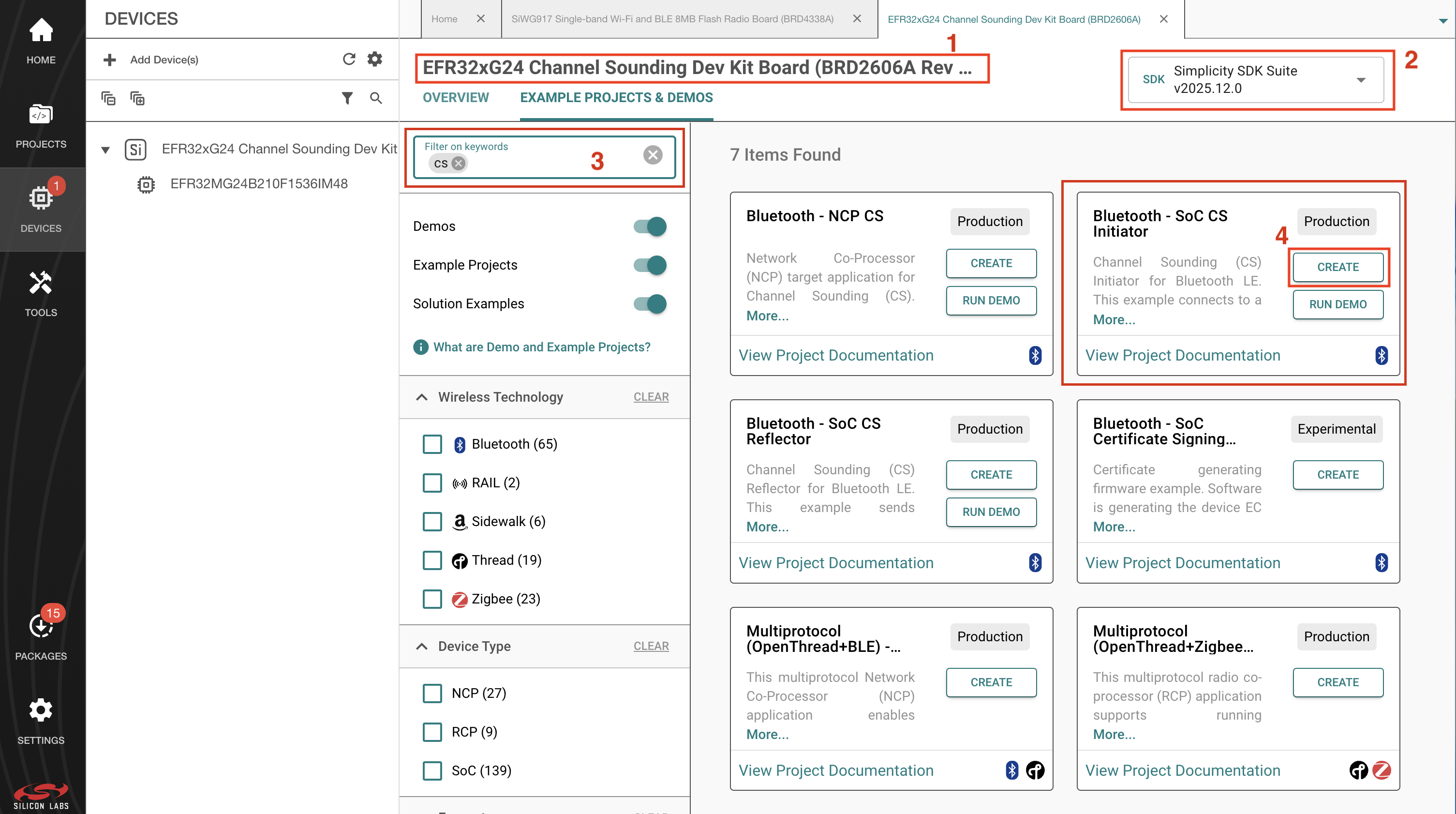
1. Connect the EFR32xG24 Development Kit (BRD2606A) to the PC. 2. Launch Simplicity Studio 6 and ensure it is configured to use Simplicity SDK version 2025.12.0. 3. Create the Bluetooth - SoC CS Initiator example project as shown in the screenshot below.
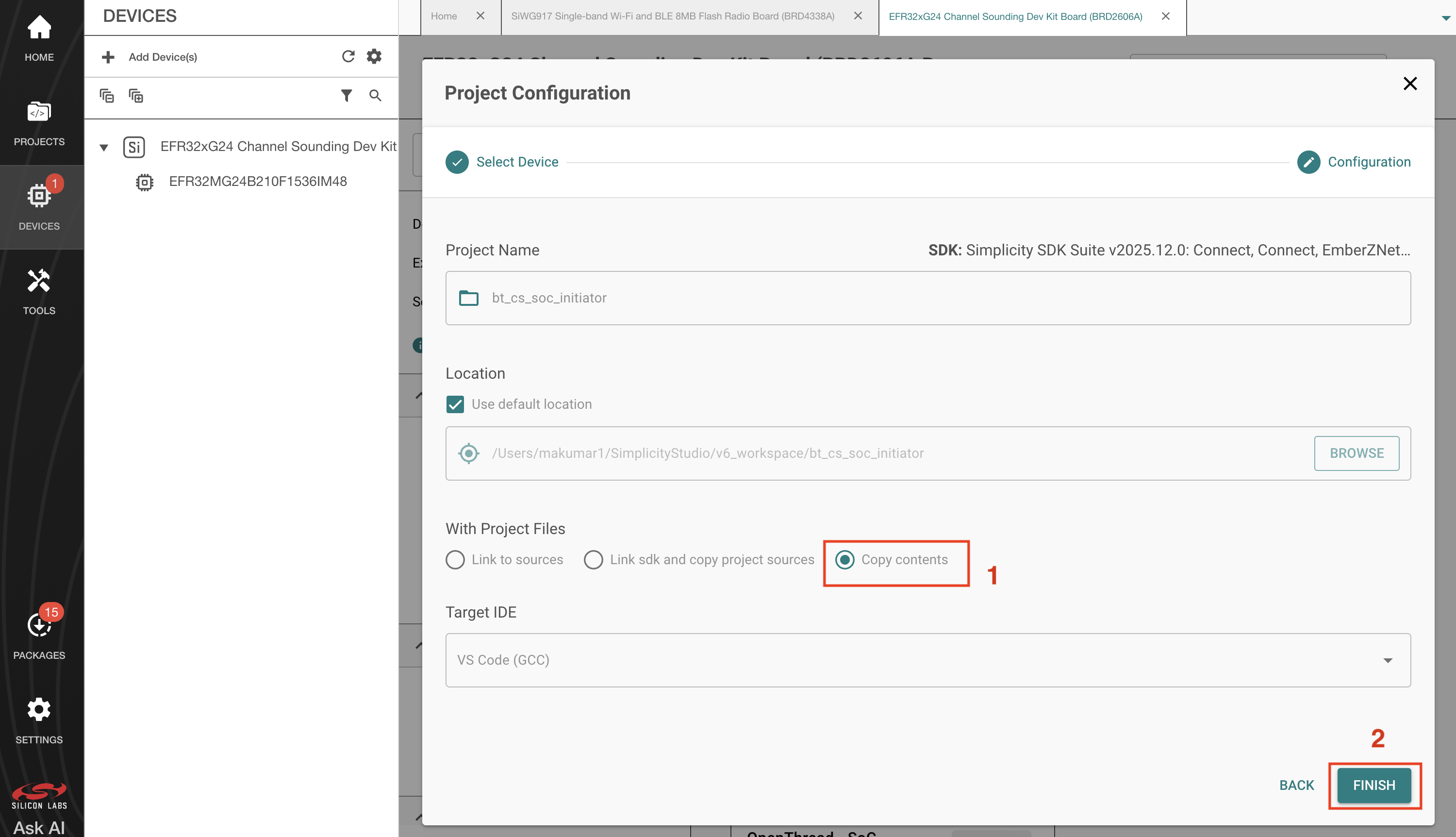
4. Select Copy contents to copy the SDK source files so that any SDK modifications remain local to the project and do not persist across projects.
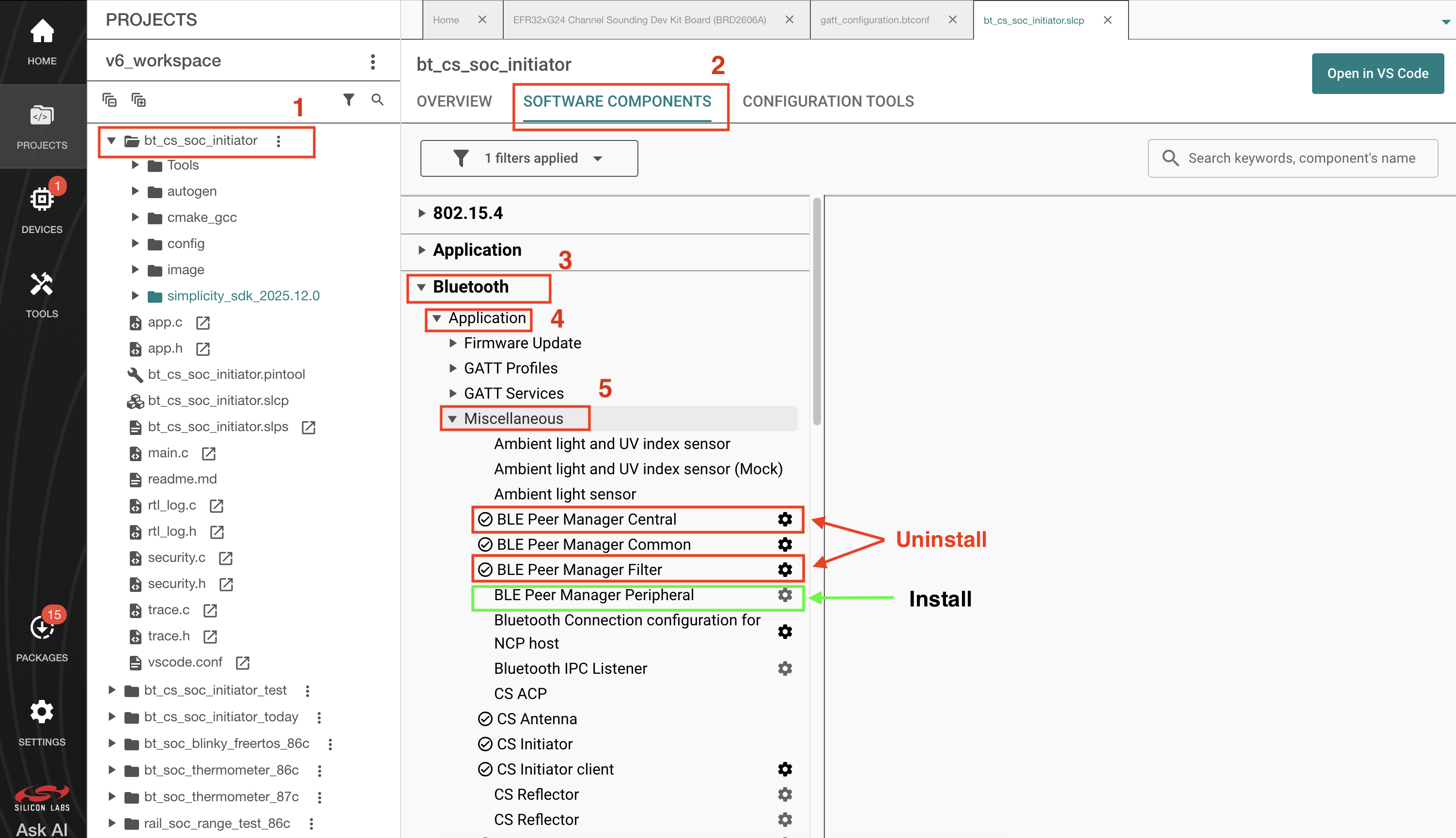
5. Open the .slcp file of the project, select the Software Components tab, and install the BLE Peer Manager Peripheral component under Bluetooth → Application → Miscellaneous. Uninstall the BLE Peer Manager Central and BLE Peer Manager Filter components, because they are not required.
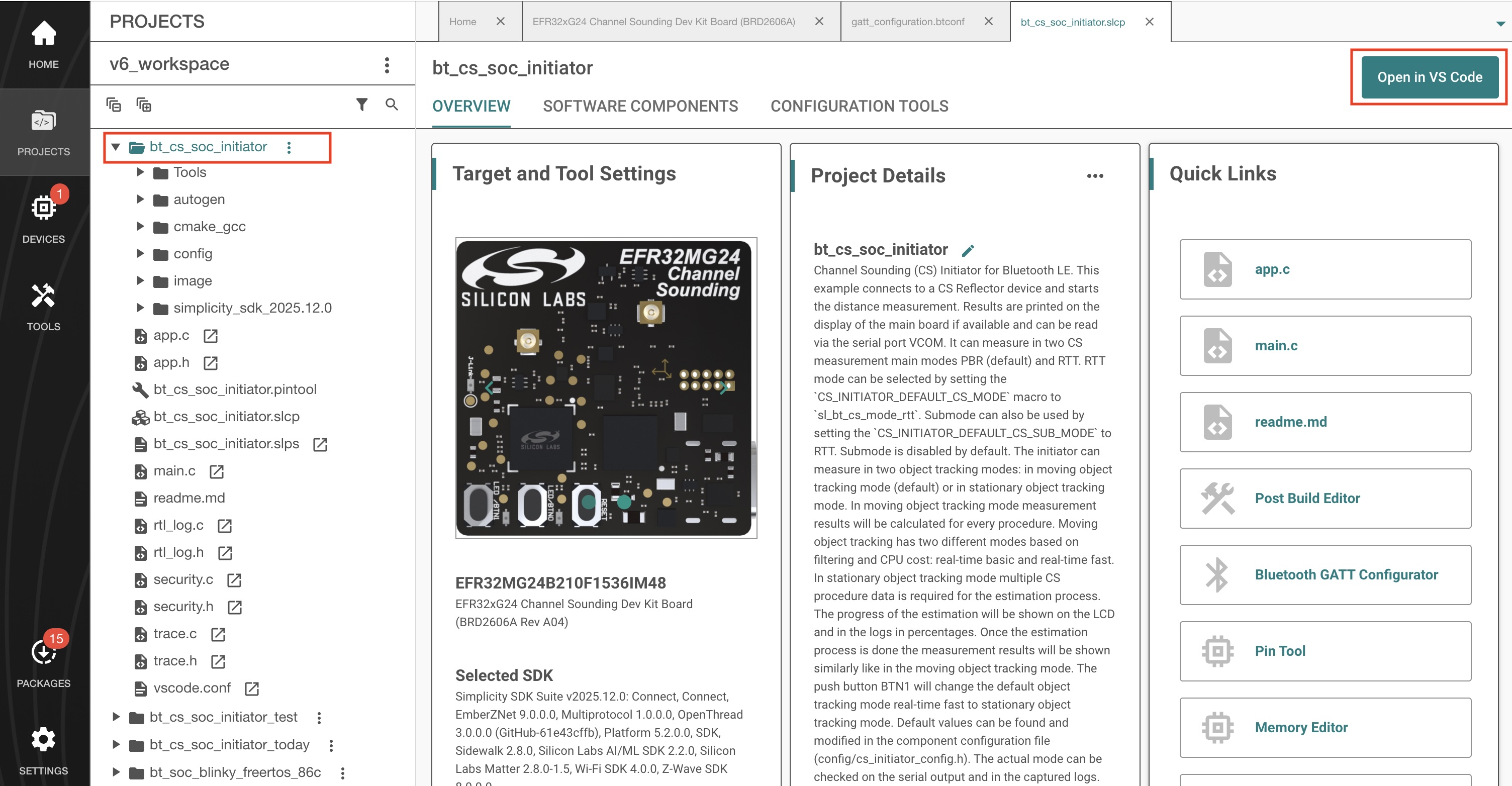
6. Open this project in VS Code.
7. Because CS security must be initiated by the central device, prevent the peripheral initiator from attempting to enable CS security. In simplicity_sdk_2025.12.0/bluetooth_le_middleware/common/cs_initiator/src/cs_initiator.c, disable the CS security enable step in init_cs_configuration().
Find the following code in the function init_cs_configuration() and comment it out.
/*initiator_log_debug(INSTANCE_PREFIX "CS - enable security" LOG_NL,
initiator->conn_handle);
sc = sl_bt_cs_security_enable(initiator->conn_handle);
if (sc != SL_STATUS_OK) {
initiator_log_error(INSTANCE_PREFIX "CS - security enable failed! [sc: 0x%lx]" LOG_NL,
initiator->conn_handle,
(unsigned long)sc);
initiator_err = CS_ERROR_EVENT_INITIATOR_FAILED_TO_ENABLE_CS_SECURITY;
on_error(initiator,
initiator_err,
sc);
return;
} else {
initiator_log_debug(INSTANCE_PREFIX "CS - security enabled." LOG_NL,
initiator->conn_handle);
}*/
8. Complete the Pixel device compatibility setup.
To ensure compatibility with Pixel devices, modify the initiator configuration and MTU size. These changes were verified with Pixel 10 and Pixel Watch 4.
Replace the contents of the existing config/cs_initiator_config.h file with the code provided below.
/***************************************************************************//**
* @file
* @brief CS initiator - configuration header
*******************************************************************************
* # License
* <b>Copyright 2024 Silicon Laboratories Inc. www.silabs.com</b>
*******************************************************************************
*
* SPDX-License-Identifier: Zlib
*
* The licensor of this software is Silicon Laboratories Inc.
*
* This software is provided 'as-is', without any express or implied
* warranty. In no event will the authors be held liable for any damages
* arising from the use of this software.
*
* Permission is granted to anyone to use this software for any purpose,
* including commercial applications, and to alter it and redistribute it
* freely, subject to the following restrictions:
*
* 1. The origin of this software must not be misrepresented; you must not
* claim that you wrote the original software. If you use this software
* in a product, an acknowledgment in the product documentation would be
* appreciated but is not required.
* 2. Altered source versions must be plainly marked as such, and must not be
* misrepresented as being the original software.
* 3. This notice may not be removed or altered from any source distribution.
*
******************************************************************************/
#ifndef CS_INITIATOR_CONFIG_H
#define CS_INITIATOR_CONFIG_H
#include "sl_bt_api.h"
#include "sl_rtl_clib_api.h"
#include "cs_sync_antenna.h"
/***********************************************************************************************//**
* @addtogroup cs_initiator
* @{
**************************************************************************************************/
// <<< Use Configuration Wizard in Context Menu >>>
// <h> Logging
// <e CS_INITIATOR_LOG> Initiator component
// <i> Default: 1
// <i> Enable Initiator component logging
#ifndef CS_INITIATOR_LOG
#define CS_INITIATOR_LOG (1)
#endif
// <q CS_INITIATOR_CONFIG_LOG_DATA> Data logging
// <i> Default: 1
// <i> Enable Initiator component data logging
#ifndef CS_INITIATOR_CONFIG_LOG_DATA
#define CS_INITIATOR_CONFIG_LOG_DATA (0)
#endif
// <s CS_INITIATOR_LOG_PREFIX> Log prefix
// <i> Default: "[Initiator]"
#ifndef CS_INITIATOR_LOG_PREFIX
#define CS_INITIATOR_LOG_PREFIX "[Initiator]"
#endif
// </e>
// <q CS_INITIATOR_RTL_LOG> RTL logging
// <i> Default: 1
#ifndef CS_INITIATOR_RTL_LOG
#define CS_INITIATOR_RTL_LOG (1)
#endif
// </h>
// <h> General
// <o CS_INITIATOR_MAX_CONNECTIONS> Maximum initiator connections <1..4>
// <i> If more than 1 initiator instances are created SL_BT_CONFIG_BUFFER_SIZE shall be increased.
// <i> Default: 1
#ifndef CS_INITIATOR_MAX_CONNECTIONS
#define CS_INITIATOR_MAX_CONNECTIONS (1)
#endif
// <o CS_INITIATOR_MAX_RANGING_DATA_SIZE> Maximum ranging data size <32..2500>
// <i> The optimal value of "Maximum ranging data size" is dependent on several configuration values,
// <i> and can be calculated by the following equation:
// <i> ranging_max_size = 4 + (subevents * 8) + (mode0_steps * mode0_size) +
// <i> channels * ( ( 1 + ( antenna_paths + 1 ) * 4) + 1 )
// <i> where
// <i> - subevents value is constant 1 since one subevent per procedure is supported,
// <i> - mode0_size is
// <i> - 4 for Reflector and
// <i> - 6 for Initiator,
// <i> - mode0_steps value is the configuration "Mode 0 steps",
// <i> - channels value means the number of channels from the channel mask that can be
// <i> derived from the "Channel map preset" settings:
// <i> - "High" - 72 (default),
// <i> - "Medium" - 37,
// <i> - "Low" - 20,
// <i> - "Custom" - Number of 1s in channel mask,
// <i> - antenna_paths value is controlled by the "Antenna configuration", and limited by number of
// <i> antennas presented on each board (capabilities). Maximum can be calculated using the product
// <i> of used Initiator and Reflector antennae. The default maximum value for antenna_paths is 4.
// <i> These settings were selected by assuming that the controller creates only one subevent per procedure,
// <i> and the measuring mode is PBR. In RTT mode there are far less data is created.
// <i> The default is calculated by using the constants and settings above using the worst case scenario,
// <i> which gives 1614 bytes.
// <i> Addition to that, if you use RTT as submode, you should add the following equation to calculate the
// <i> size.
// <i> (1 + mode1_size) * channels / main_mode_steps
// <i> where
// <i> mode1_size is 6, and main_mode_steps is 2. The later can be changed in cs_initiator_client.h.
// <i> RAM consumption can be reduced by changing the affected settings and reducing
// <i> "Procedure maximum length" accordingly.
// <i> Default: 1866
#ifndef CS_INITIATOR_MAX_RANGING_DATA_SIZE
#define CS_INITIATOR_MAX_RANGING_DATA_SIZE (1866)
#endif
// <o CS_INITIATOR_MAX_DROP> Maximum dropped procedures <2..10>
// <i> Maximum number of dropped procedures if current ranging data is not received.
// <i> Default: 10
#ifndef CS_INITIATOR_MAX_DROP
#define CS_INITIATOR_MAX_DROP 10
#endif
// <o CS_INITIATOR_ERROR_TIMEOUT_MS> Error timeout [msec] <100..5000>
// <i> Timeout value in order to avoid stuck in error state indefinitely.
// <i> Once the time elapses the initiator instance's error callback executes to
// <i> inform the user about the issue.
// <i> Default: 3000
#define CS_INITIATOR_ERROR_TIMEOUT_MS 3000
// <o CS_INITIATOR_PROCEDURE_TIMEOUT_MS> CS procedure timeout [msec] <100..5000>
// <i> Timeout value for procedures - in order to avoid getting stuck in a procedure indefinitely.
// <i> Once the time elapses the initiator instance's error callback executes to
// <i> inform the user about the issue.
// <i> Default: 3000
#define CS_INITIATOR_PROCEDURE_TIMEOUT_MS 3000
// <o CS_INITIATOR_DEFAULT_CONNECTION_PERIPHERAL_LATENCY> Connection peripheral latency
// <i> Peripheral latency, which defines how many connection
// <i> intervals the peripheral can skip if it has no data to send
// <i> Default: 0
#define CS_INITIATOR_DEFAULT_CONNECTION_PERIPHERAL_LATENCY 0
// <o CS_INITIATOR_DEFAULT_TIMEOUT> Supervision timeout <10..3200>
// <i> Connection supervision timeout in the units of 10 ms (from 100 ms to 32 s)
// <i> Default: 500
#define CS_INITIATOR_DEFAULT_TIMEOUT 500
// <o CS_INITIATOR_DEFAULT_MIN_CE_LENGTH> Minimum length of the connection event <1..65535>
// <i> Value in units of 0.625 ms
// <i> Default: 0
#define CS_INITIATOR_DEFAULT_MIN_CE_LENGTH 0
// <o CS_INITIATOR_DEFAULT_MAX_CE_LENGTH> Maximum length of the connection event <1..65535>
// <i> Value in units of 0.625 ms
// <i> Default: 65535
#define CS_INITIATOR_DEFAULT_MAX_CE_LENGTH 65535
// </h>
// <h> Distance estimation
// <o CS_INITIATOR_DEFAULT_ALGO_MODE> Object tracking mode
// <SL_RTL_CS_ALGO_MODE_REAL_TIME_BASIC=> Real-time basic
// <SL_RTL_CS_ALGO_MODE_STATIC_HIGH_ACCURACY=> Static high accuracy
// <SL_RTL_CS_ALGO_MODE_REAL_TIME_FAST=> Real-time fast
// <i> Default: SL_RTL_CS_ALGO_MODE_REAL_TIME_FAST
#define CS_INITIATOR_DEFAULT_ALGO_MODE SL_RTL_CS_ALGO_MODE_REAL_TIME_FAST
// </h>
// <h> Channel Sounding
// <h> Modes
// <o CS_INITIATOR_DEFAULT_CS_MAIN_MODE> Main mode
// <sl_bt_cs_mode_rtt=> RTT
// <sl_bt_cs_mode_pbr=> PBR
#define CS_INITIATOR_DEFAULT_CS_MAIN_MODE sl_bt_cs_mode_pbr
// <o CS_INITIATOR_DEFAULT_CS_SUB_MODE> Submode
// <sl_bt_cs_mode_rtt=> RTT
// <sl_bt_cs_submode_disabled=> No submode
// <i> Default: sl_bt_cs_submode_disabled
#define CS_INITIATOR_DEFAULT_CS_SUB_MODE sl_bt_cs_submode_disabled
// </h>
// <h> Scheduling
// <o CS_INITIATOR_DEFAULT_MAX_PROCEDURE_COUNT> Procedure execution
// <0=> Free-running
// <1=> Synchronized
// <i> Default: 0
#define CS_INITIATOR_DEFAULT_MAX_PROCEDURE_COUNT 0
// <o CS_INITIATOR_DEFAULT_PROCEDURE_SCHEDULING> Procedure scheduling
// <CS_PROCEDURE_SCHEDULING_OPTIMIZED_FOR_FREQUENCY=> Optimized for frequency update
// <CS_PROCEDURE_SCHEDULING_OPTIMIZED_FOR_ENERGY=> Optimized for energy consumption
// <CS_PROCEDURE_SCHEDULING_CUSTOM=> Use custom procedure scheduling
// <i> Set your custom connection and procedure intervals in the 'Custom Scheduling' section when selecting 'Use custom procedure scheduling' (CS_PROCEDURE_SCHEDULING_CUSTOM).
// <i> Default: CS_PROCEDURE_SCHEDULING_OPTIMIZED_FOR_FREQUENCY
#define CS_INITIATOR_DEFAULT_PROCEDURE_SCHEDULING CS_PROCEDURE_SCHEDULING_CUSTOM
// </h>
// <h> Custom scheduling
// <o CS_INITIATOR_DEFAULT_MIN_CONNECTION_INTERVAL> Minimum connection interval (in 1.25 ms steps) <6..3200>
// <i> Default: 6
#define CS_INITIATOR_DEFAULT_MIN_CONNECTION_INTERVAL 24
// <o CS_INITIATOR_DEFAULT_MAX_CONNECTION_INTERVAL> Maximum connection interval (in 1.25 ms steps) <6..3200>
// <i> Default: 6
#define CS_INITIATOR_DEFAULT_MAX_CONNECTION_INTERVAL 24
// <o CS_INITIATOR_DEFAULT_MIN_PROCEDURE_INTERVAL> Minimum delay between CS measurements [connection events] <1..255>
// <i> Default: 38
// <i> Minimum duration in number of connection events between consecutive CS measurement procedures
#ifndef CS_INITIATOR_DEFAULT_MIN_PROCEDURE_INTERVAL
#define CS_INITIATOR_DEFAULT_MIN_PROCEDURE_INTERVAL (7)
#endif
// <o CS_INITIATOR_DEFAULT_MAX_PROCEDURE_INTERVAL> Maximum delay between CS measurements [connection events] <1..255>
// <i> Default: 38
// <i> Maximum duration in number of connection events between consecutive CS measurement procedures
#ifndef CS_INITIATOR_DEFAULT_MAX_PROCEDURE_INTERVAL
#define CS_INITIATOR_DEFAULT_MAX_PROCEDURE_INTERVAL (7)
#endif
// </h>
// <h> Channels
// <o CS_INITIATOR_DEFAULT_CHANNEL_MAP_PRESET> Channel map preset
// <CS_CHANNEL_MAP_PRESET_LOW=> Low
// <CS_CHANNEL_MAP_PRESET_MEDIUM=> Medium
// <CS_CHANNEL_MAP_PRESET_HIGH=> High
// <CS_CHANNEL_MAP_PRESET_CUSTOM=> Custom
// <i> Default: CS_CHANNEL_MAP_PRESET_HIGH
#define CS_INITIATOR_DEFAULT_CHANNEL_MAP_PRESET CS_CHANNEL_MAP_PRESET_MEDIUM
// <a.10 CS_CUSTOM_CHANNEL_MAP> Custom channel map <0..255> <f.h>
// <i> Default: { 0xFC, 0xFF, 0x7F, 0xFC, 0xFF, 0xFF, 0xFF, 0xFF, 0xFF, 0x1F }
#define CS_CUSTOM_CHANNEL_MAP { 0xFC, 0xFF, 0x7F, 0xFC, 0xFF, 0xFF, 0xFF, 0xFF, 0xFF, 0x1F }
// </h>
// <h> PHYs
// <o CS_INITIATOR_DEFAULT_CONN_PHY> Connection PHY
// <sl_bt_gap_phy_1m=> 1M
// <sl_bt_gap_phy_2m=> 2M
// <i> Default: 2M
#define CS_INITIATOR_DEFAULT_CONN_PHY sl_bt_gap_phy_2m
// <o CS_INITIATOR_DEFAULT_CS_SYNC_PHY> CS sync PHY
// <sl_bt_gap_phy_1m=> 1M
// <sl_bt_gap_phy_2m=> 2M
// <i> Default: sl_bt_gap_phy_1m
#define CS_INITIATOR_DEFAULT_CS_SYNC_PHY sl_bt_gap_phy_1m
// </h>
// <h> Antenna configuration
// <o CS_INITIATOR_DEFAULT_CS_TONE_ANTENNA_CONFIG_IDX_REQ> CS tone antenna configuration requested
// <i> Use all the available antennas that can be supported
// <i> Value: 0. 1 antenna path, [1:1] antenna [initiator:reflector]
// <i> Value: 1. 2 antenna path, [2:1] antenna
// <i> Value: 2. 3 antenna path, [3:1] antenna (not supported)
// <i> Value: 3. 4 antenna path, [4:1] antenna (not supported)
// <i> Value: 4. 2 antenna path, [1:2] antenna
// <i> Value: 5. 3 antenna path, [1:3] antenna (not supported)
// <i> Value: 6. 4 antenna path, [1:4] antenna (not supported)
// <i> Value: 7. 4 antenna path, [2:2] antenna
// <CS_ANTENNA_CONFIG_INDEX_SINGLE_ONLY=> 1 antenna path, [1:1] antenna
// <CS_ANTENNA_CONFIG_INDEX_DUAL_I_SINGLE_R=> 2 antenna path, [2:1] antenna
// <CS_ANTENNA_CONFIG_INDEX_SINGLE_I_DUAL_R=> 2 antenna path, [1:2] antenna
// <CS_ANTENNA_CONFIG_INDEX_DUAL_ONLY=> 4 antenna path, [2:2] antenna
// <i> Default: CS_ANTENNA_CONFIG_INDEX_DUAL_ONLY
#define CS_INITIATOR_DEFAULT_CS_TONE_ANTENNA_CONFIG_IDX_REQ CS_ANTENNA_CONFIG_INDEX_DUAL_ONLY
// <o CS_INITIATOR_DEFAULT_CS_SYNC_ANTENNA_REQ> CS sync antenna configuration requested
// <i> Use all the available antennas that can be supported
// <CS_SYNC_ANTENNA_1=> Antenna 1
// <CS_SYNC_ANTENNA_2=> Antenna 2
// <CS_SYNC_SWITCHING=> Switching
// <i> Default: CS_SYNC_SWITCHING
#define CS_INITIATOR_DEFAULT_CS_SYNC_ANTENNA_REQ CS_SYNC_SWITCHING
// <o CS_INITIATOR_DEFAULT_PREFERRED_PEER_ANTENNA> Preferred peer antenna
// <i> The preferred peer-ordered antenna elements to be used by the remote device
// <i> for the antenna configuration denoted by the tone antenna config selection.
// <i> Default: 1
#define CS_INITIATOR_DEFAULT_PREFERRED_PEER_ANTENNA 3
// <o CS_INITIATOR_ANTENNA_OFFSET> Specify antenna offset
// <0=> Wireless antenna offset
// <1=> Wired antenna offset
// <i> Default: 0
#ifndef CS_INITIATOR_ANTENNA_OFFSET
#define CS_INITIATOR_ANTENNA_OFFSET 0
#endif
// </h>
// <h> TX power
// <o CS_INITIATOR_DEFAULT_MAX_TX_POWER> Maximum transmit power level to be used in all CS transmissions <-127..10>
// <i> Default: 10
#define CS_INITIATOR_DEFAULT_MAX_TX_POWER 10
// <o CS_INITIATOR_DEFAULT_RSSI_REF_TX_POWER> RSSI reference TX power <-110..30>
// <i> Reference RSSI value of the remote Reflector device at 1.0 m distance in dBm
// <i> Default: -40.0F
#define CS_INITIATOR_DEFAULT_RSSI_REF_TX_POWER -40.0F
// </h>
// <h> Details
// <o CS_INITIATOR_DEFAULT_CREATE_CONTEXT> Create context
// <i> Write CS configuration in the local controller only
// <i> or both local and remote controller using a configuration procedure
// <0=> Local controller only
// <1=> Both local and remote
// <i> Default: 1
#define CS_INITIATOR_DEFAULT_CREATE_CONTEXT 1
// <o CS_INITIATOR_DEFAULT_MODE0_STEPS> Mode 0 steps
// <i> Number of Mode 0 steps to be included at the beginning of the test CS subevent
// <i> Default: 3
#define CS_INITIATOR_DEFAULT_MODE0_STEPS 3
// <o CS_INITIATOR_DEFAULT_RTT_TYPE> RTT Type
// <sl_bt_cs_rtt_type_aa_only=> RTT Access Address (AA) only
// <sl_bt_cs_rtt_type_fractional_32_bit_sounding=> RTT Fractional with 32-bit Sounding Sequence
// <sl_bt_cs_rtt_type_fractional_96_bit_sounding=> RTT Fractional with 96-bit Sounding Sequence
// <sl_bt_cs_rtt_type_fractional_32_bit_random=> RTT Fractional with 32-bit Random Sequence
// <sl_bt_cs_rtt_type_fractional_64_bit_random=> RTT Fractional with 64-bit Random Sequence
// <sl_bt_cs_rtt_type_fractional_96_bit_random=> RTT Fractional with 96-bit Random Sequence
// <sl_bt_cs_rtt_type_fractional_128_bit_random=> RTT Fractional with 128-bit Random Sequence
// <i> Default: sl_bt_cs_rtt_type_fractional_96_bit_sounding
#define CS_INITIATOR_DEFAULT_RTT_TYPE sl_bt_cs_rtt_type_fractional_96_bit_sounding
// <o CS_INITIATOR_DEFAULT_CHANNEL_SELECTION_TYPE> Channel selection type
// <sl_bt_cs_channel_selection_algorithm_3b=> Algorithm 3b
// <sl_bt_cs_channel_selection_algorithm_3c=> Algorithm 3c
// <sl_bt_cs_channel_selection_algorithm_user_shape_interleaved=> Algorithm user shape interleaved
// <i> Default: sl_bt_cs_channel_selection_algorithm_3b
#define CS_INITIATOR_DEFAULT_CHANNEL_SELECTION_TYPE sl_bt_cs_channel_selection_algorithm_3b
// <o CS_INITIATOR_DEFAULT_CH3C_SHAPE> Ch3c shape
// <sl_bt_cs_ch3c_shape_hat=> Ch3c shape hat
// <sl_bt_cs_chc3_shape_interleaved=> Ch3c shape interleaved
// <i> Default: sl_bt_cs_ch3c_shape_hat
#define CS_INITIATOR_DEFAULT_CH3C_SHAPE sl_bt_cs_ch3c_shape_hat
// </h>
// </h>
// <h> Ranging Service
// <q CS_INITIATOR_RAS_MODE_USE_REAL_TIME_MODE> Use Real-Time RAS mode
// <i> Default: 1
#ifndef CS_INITIATOR_RAS_MODE_USE_REAL_TIME_MODE
#define CS_INITIATOR_RAS_MODE_USE_REAL_TIME_MODE 1
#endif
// <q CS_INITIATOR_RAS_REAL_TIME_INDICATION> Use real-time ranging data indication
// <i> Default: 0
#ifndef CS_INITIATOR_RAS_REAL_TIME_INDICATION
#define CS_INITIATOR_RAS_REAL_TIME_INDICATION (0)
#endif
// <q CS_INITIATOR_RAS_ON_DEMAND_INDICATION> Use on-demand ranging data indication
// <i> Default: 0
#ifndef CS_INITIATOR_RAS_ON_DEMAND_INDICATION
#define CS_INITIATOR_RAS_ON_DEMAND_INDICATION (0)
#endif
// <q CS_INITIATOR_RAS_DATA_READY_NOTIFICATION> Use ranging data ready notification
// <i> This is only applicable for On-Demand Ranging Data mode
// <i> Default: 1
#ifndef CS_INITIATOR_RAS_DATA_READY_NOTIFICATION
#define CS_INITIATOR_RAS_DATA_READY_NOTIFICATION (1)
#endif
// <q CS_INITIATOR_RAS_DATA_OVERWRITTEN_NOTIFICATION> Use ranging data overwritten notification
// <i> This is only applicable for On-Demand Ranging Data mode
// <i> Default: 1
#ifndef CS_INITIATOR_RAS_DATA_OVERWRITTEN_NOTIFICATION
#define CS_INITIATOR_RAS_DATA_OVERWRITTEN_NOTIFICATION (1)
#endif
// </h>
// <<< end of configuration section >>>
// Ch3c jump <2..8>
// Number of channels skipped in each rising and falling sequence.
// Default: 2
#define CS_INITIATOR_DEFAULT_CH3C_JUMP 2
// Max procedure duration <1..65535>
// Maximum duration for each measurement procedure.
// Value in units of 0.625 ms
// Default: 65535
#define CS_INITIATOR_DEFAULT_MAX_PROCEDURE_DURATION 150
// Transmit power delta, in signed dB.
// Default: 0
#define CS_INITIATOR_DEFAULT_TX_PWR_DELTA 0
// Config ID
// Only one channel is supported
// Default: 1
#define CS_INITIATOR_DEFAULT_CONFIG_ID 1
// Minimum subevent length. <1250..3999999>
// Minimum suggested duration for each CS subevent in microseconds.
// Default: 1250
#define CS_INITIATOR_DEFAULT_MIN_SUBEVENT_LEN 9820
// Maximum subevent length. <1250..3999999>
// Maximum suggested duration for each CS subevent in microseconds.
// Default: 3999999
#define CS_INITIATOR_DEFAULT_MAX_SUBEVENT_LEN 9820
// Internal define to skip RTL processing
#define CS_INITIATOR_INTERNAL_SKIP_RTL_PROCESS 0
#ifndef CS_INITIATOR_ALLOW_PERIPHERAL_ROLE
#define CS_INITIATOR_ALLOW_PERIPHERAL_ROLE 1
#endif
/** @} (end addtogroup cs_initiator) */
#endif // CS_INITIATOR_CONFIG_H
9. Open the app.c file and replace its current contents with the code provided below.
/***************************************************************************//**
* @file
* @brief CS Initiator example application logic
*******************************************************************************
* # License
* <b>Copyright 2025 Silicon Laboratories Inc. www.silabs.com</b>
*******************************************************************************
*
* SPDX-License-Identifier: Zlib
*
* The licensor of this software is Silicon Laboratories Inc.
*
* This software is provided 'as-is', without any express or implied
* warranty. In no event will the authors be held liable for any damages
* arising from the use of this software.
*
* Permission is granted to anyone to use this software for any purpose,
* including commercial applications, and to alter it and redistribute it
* freely, subject to the following restrictions:
*
* 1. The origin of this software must not be misrepresented; you must not
* claim that you wrote the original software. If you use this software
* in a product, an acknowledgment in the product documentation would be
* appreciated but is not required.
* 2. Altered source versions must be plainly marked as such, and must not be
* misrepresented as being the original software.
* 3. This notice may not be removed or altered from any source distribution.
*
******************************************************************************/
// -----------------------------------------------------------------------------
// Includes
#include <stdint.h>
#include <stdbool.h>
#include <math.h>
#include "sl_bluetooth.h"
#include "sl_component_catalog.h"
#include "app_assert.h"
// app content
#include "sl_main_init.h"
#include "app.h"
#include "trace.h"
#include "app_config.h"
#include "app_timer.h"
// initiator content
#include "cs_antenna.h"
#include "cs_result.h"
#include "cs_result_config.h"
#include "cs_initiator.h"
#include "cs_initiator_client.h"
#include "cs_initiator_config.h"
#include "cs_initiator_display_core.h"
#include "cs_initiator_display.h"
// RAS
#include "cs_ras_client.h"
// other required content
#include "ble_peer_manager_common.h"
#include "ble_peer_manager_connections.h"
#include "ble_peer_manager_peripheral.h"
#ifdef SL_CATALOG_CS_INITIATOR_CLI_PRESENT
#include "cs_initiator_cli.h"
#endif // SL_CATALOG_CS_INITIATOR_CLI_PRESENT
#ifdef SL_CATALOG_SIMPLE_BUTTON_PRESENT
#include "sl_simple_button.h"
#include "sl_simple_button_instances.h"
#endif // SL_CATALOG_SIMPLE_BUTTON_PRESENT
// Security
#include "security.h"
#include "gatt_db.h"
// -----------------------------------------------------------------------------
// Macros
#define MAX_PERCENTAGE 100u
#define NL APP_LOG_NL
#define APP_PREFIX "[APP] "
#define INSTANCE_PREFIX "[%u] "
#define APP_INSTANCE_PREFIX APP_PREFIX INSTANCE_PREFIX
#define BT_ADDR_LEN sizeof(bd_addr)
#define DISPLAY_REFRESH_RATE 1000u // ms
#define ABS(x) ((x < 0) ? ((-1) * x) : x)
// Subfeature bitmask for CS Channel Selection Algorithm #3c
#define CS_CHANNEL_SELECTION_ALGORITHM_3C_SUBFEATURE_BITMASK 2
// Subfeature bitmask for CS Role Initiator
#define CS_ROLE_INITIATOR_SUBFEATURE_BITMASK 0
// Subfeature bitmask for CS Role Reflector
#define CS_ROLE_REFLECTOR_SUBFEATURE_BITMASK 1
// Custom GATT: CS proximity lock/unlock notifications
#define CUSTOM_GATT_PREFIX "[CustomGATT] "
#define CUSTOM_GATT_SERVICE_UUID 0xAABB
#define CUSTOM_GATT_CHARACTERISTIC_UUID 0xBBCC
#define CUSTOM_GATT_CHARACTERISTIC_HANDLE gattdb_custom_characteristic
#define CUSTOM_GATT_CCCD_NOTIFICATION_ENABLED 0x0001
#define CUSTOM_GATT_CMD_UNLOCK 0x00u
#define CUSTOM_GATT_CMD_LOCK 0x01u
#define CUSTOM_GATT_STATE_INVALID 0xFFu
// -----------------------------------------------------------------------------
// Enums, structs, typedef
// Measurement structure
typedef struct {
float distance_filtered;
float distance_raw;
float likeliness;
float distance_estimate_rssi;
float velocity;
float bit_error_rate;
} cs_measurement_data_t;
// CS initiator instance
typedef struct {
uint8_t conn_handle;
uint32_t measurement_cnt;
uint32_t ranging_counter;
cs_measurement_data_t measurement_mainmode;
cs_measurement_data_t measurement_submode;
cs_intermediate_result_t measurement_progress;
bool measurement_arrived;
bool measurement_progress_changed;
bool read_remote_capabilities;
bool security_increased;
uint8_t number_of_measurements;
} cs_initiator_instances_t;
// Custom GATT per-connection lock/unlock state
typedef struct {
uint8_t connection;
bool notify_enabled;
uint8_t lock_command;
} custom_gatt_slot_t;
// -----------------------------------------------------------------------------
// Static function declarations
static uint8_t get_algo_mode(void);
static const char *antenna_usage_to_str(const cs_initiator_config_t *config);
static const char *algo_mode_to_str(uint8_t algo_mode);
static void cs_on_result(const uint8_t conn_handle,
const uint16_t ranging_counter,
const uint8_t *result,
const cs_result_session_data_t *result_data,
const cs_ranging_data_t *ranging_data,
const void *user_data);
static void cs_on_intermediate_result(const cs_intermediate_result_t *intermediate_result,
const void *user_data);
static void cs_on_error(uint8_t conn_handle,
cs_error_event_t err_evt,
sl_status_t sc);
static sl_status_t get_instance_number(uint8_t conn_handle, uint8_t *instance_num);
static sl_status_t save_connection(uint8_t conn_handle);
static void check_cli_values(void);
static sl_status_t create_new_initiator_instance(uint8_t conn_handle);
static void delete_initiator_instance(uint8_t conn_handle);
static void app_timer_callback(app_timer_t *timer, void *data);
static void check_supported_capabilities(const sl_bt_msg_t *evt);
static custom_gatt_slot_t *custom_gatt_find_slot(uint8_t connection);
static custom_gatt_slot_t *custom_gatt_alloc_slot(uint8_t connection);
static uint8_t custom_gatt_distance_to_command(float distance_m);
static void custom_gatt_push_lock_command(custom_gatt_slot_t *slot, bool allow_notify);
static void custom_gatt_init(void);
static void custom_gatt_on_connection_opened(uint8_t connection);
static void custom_gatt_on_connection_closed(uint8_t connection);
static void custom_gatt_on_distance_sample(uint8_t connection, float distance_m);
static void custom_gatt_on_bt_event(sl_bt_msg_t *evt);
// -----------------------------------------------------------------------------
// Static variables
static bool antenna_set_pbr = false;
static bool antenna_set_rtt = false;
static cs_initiator_config_t initiator_config = INITIATOR_CONFIG_DEFAULT;
static rtl_config_t rtl_config = RTL_CONFIG_DEFAULT;
static uint8_t num_reflector_connections = 0u;
static cs_initiator_instances_t cs_initiator_instances[CS_INITIATOR_MAX_CONNECTIONS];
static app_timer_t display_timer;
static uint8_t measurement_counter = 0u;
static custom_gatt_slot_t s_custom_gatt[CS_INITIATOR_MAX_CONNECTIONS];
/******************************************************************************
* Application Init
*****************************************************************************/
void app_init(void)
{
sl_status_t sc = SL_STATUS_OK;
trace_init();
// initialize initiator instances
for (uint32_t i = 0u; i < CS_INITIATOR_MAX_CONNECTIONS; i++) {
cs_initiator_instances[i].conn_handle = SL_BT_INVALID_CONNECTION_HANDLE;
cs_initiator_instances[i].measurement_cnt = 0u;
cs_initiator_instances[i].ranging_counter = 0u;
memset(&cs_initiator_instances[i].measurement_mainmode, 0u, sizeof(cs_measurement_data_t));
memset(&cs_initiator_instances[i].measurement_submode, 0u, sizeof(cs_measurement_data_t));
memset(&cs_initiator_instances[i].measurement_progress, 0u, sizeof(cs_intermediate_result_t));
cs_initiator_instances[i].measurement_arrived = false;
cs_initiator_instances[i].measurement_progress_changed = false;
cs_initiator_instances[i].read_remote_capabilities = false;
cs_initiator_instances[i].security_increased = false;
cs_initiator_instances[i].number_of_measurements = 0u;
}
security_set_config_flags();
// Set configuration parameters
rtl_config.algo_mode = get_algo_mode();
cs_initiator_apply_channel_map_preset(initiator_config.channel_map_preset,
initiator_config.channel_map.data);
if ((initiator_config.cs_main_mode == sl_bt_cs_mode_pbr)
&& (initiator_config.cs_sub_mode == sl_bt_cs_mode_rtt)) {
// Currently, only main mode = pbr and submode = rtt is supported
initiator_config.channel_map_preset = CS_CHANNEL_MAP_PRESET_HIGH;
app_log_info(APP_PREFIX "Channel map preset set to high" APP_LOG_NL);
}
// Log configuration parameters
log_info("+-[CS initiator by Silicon Labs]--------------------------+" NL);
log_info("+---------------------------------------------------------+" NL);
if (initiator_config.procedure_scheduling != CS_PROCEDURE_SCHEDULING_CUSTOM) {
log_info(APP_PREFIX "Using %s based procedure scheduling." NL,
initiator_config.procedure_scheduling == CS_PROCEDURE_SCHEDULING_OPTIMIZED_FOR_FREQUENCY
? "frequency update" : "energy consumption");
} else {
log_info(APP_PREFIX "Using custom procedure scheduling." NL);
}
log_info(APP_PREFIX "%s" NL,
(initiator_config.max_procedure_count == 0) ? "Free running." : "Start new procedure after one finished.");
log_info(APP_PREFIX "Antenna offset: wire%s" NL,
CS_INITIATOR_ANTENNA_OFFSET ? "d" : "less");
log_info(APP_PREFIX "Default CS procedure interval: %u" NL, initiator_config.min_procedure_interval);
log_info(APP_PREFIX "CS main mode: %s (%u)" NL,
(initiator_config.cs_main_mode == sl_bt_cs_mode_pbr) ? "PBR" : "RTT",
initiator_config.cs_main_mode);
log_info(APP_PREFIX "CS sub mode: %s (%u)" NL,
(initiator_config.cs_sub_mode == sl_bt_cs_submode_disabled) ? "Disabled" : "RTT",
initiator_config.cs_sub_mode);
log_info(APP_PREFIX "Requested antenna usage: %s" NL, antenna_usage_to_str(&initiator_config));
log_info(APP_PREFIX "Object tracking mode: %s" NL, algo_mode_to_str(rtl_config.algo_mode));
log_info(APP_PREFIX "CS channel map preset: %d" NL, initiator_config.channel_map_preset);
log_info(APP_PREFIX "CS channel map: %02X %02X %02X %02X %02X %02X %02X %02X %02X %02X" NL,
initiator_config.channel_map.data[0],
initiator_config.channel_map.data[1],
initiator_config.channel_map.data[2],
initiator_config.channel_map.data[3],
initiator_config.channel_map.data[4],
initiator_config.channel_map.data[5],
initiator_config.channel_map.data[6],
initiator_config.channel_map.data[7],
initiator_config.channel_map.data[8],
initiator_config.channel_map.data[9]);
log_info(APP_PREFIX "RSSI reference TX power @ 1m: %d dBm" NL,
(int)initiator_config.rssi_ref_tx_power);
log_info("+-------------------------------------------------------+" NL);
sc = cs_initiator_display_init();
app_assert_status_f(sc, "cs_initiator_display_init failed");
cs_initiator_display_set_measurement_mode(initiator_config.cs_main_mode, rtl_config.algo_mode);
app_timer_start(&display_timer, DISPLAY_REFRESH_RATE, app_timer_callback, NULL, true);
custom_gatt_init();
/////////////////////////////////////////////////////////////////////////////
// Put your additional application init code here! //
// This is called once during start-up. //
/////////////////////////////////////////////////////////////////////////////
}
/******************************************************************************
* Application Process Action
*****************************************************************************/
void app_process_action(void)
{
sl_status_t sc = security_send_confirmation();
if (sc != SL_STATUS_OK) {
log_error(APP_PREFIX "Failed to send security confirmation: 0x%04lx" NL, (unsigned long)sc);
}
for (uint8_t i = 0u; i < CS_INITIATOR_MAX_CONNECTIONS; i++) {
if (cs_initiator_instances[i].measurement_arrived) {
// write results to the display & to the iostream
measurement_counter++;
cs_initiator_instances[i].measurement_arrived = false;
const bd_addr *bt_address = ble_peer_manager_get_bt_address(cs_initiator_instances[i].conn_handle);
PRINT_HEAD_AND_DATA(measurement_counter, is_data) {
log_info(APP_INSTANCE_PREFIX, cs_initiator_instances[i].conn_handle);
cs_initiator_print_bt_address(!is_data, bt_address);
cs_initiator_print_result(CS_RESULT_FIELD_DISTANCE_MAINMODE,
!is_data,
&(cs_initiator_instances[i].measurement_mainmode.distance_filtered));
// Distance submode
if (initiator_config.cs_sub_mode != sl_bt_cs_submode_disabled) {
cs_initiator_print_result(CS_RESULT_FIELD_DISTANCE_SUBMODE,
!is_data,
&(cs_initiator_instances[i].measurement_submode.distance_filtered));
}
// Distance RAW
cs_initiator_print_result(CS_RESULT_FIELD_DISTANCE_RAW_MAINMODE,
!is_data,
&(cs_initiator_instances[i].measurement_mainmode.distance_raw));
// Distance submode RAW
if (initiator_config.cs_sub_mode != sl_bt_cs_submode_disabled) {
cs_initiator_print_result(CS_RESULT_FIELD_DISTANCE_RAW_SUBMODE,
!is_data,
&(cs_initiator_instances[i].measurement_submode.distance_raw));
}
// Likeliness
cs_initiator_print_result(CS_RESULT_FIELD_LIKELINESS_MAINMODE,
!is_data,
&(cs_initiator_instances[i].measurement_mainmode.likeliness));
// Likeliness submode
if (initiator_config.cs_sub_mode != sl_bt_cs_submode_disabled) {
cs_initiator_print_result(CS_RESULT_FIELD_LIKELINESS_SUBMODE,
!is_data,
&(cs_initiator_instances[i].measurement_submode.likeliness));
}
// RSSI distance
cs_initiator_print_result(CS_RESULT_FIELD_DISTANCE_RSSI,
!is_data,
&(cs_initiator_instances[i].measurement_mainmode.distance_estimate_rssi));
// Velocity
cs_initiator_print_result(CS_RESULT_FIELD_VELOCITY_MAINMODE,
!is_data,
&(cs_initiator_instances[i].measurement_mainmode.velocity));
// BER
cs_initiator_print_result(CS_RESULT_FIELD_BIT_ERROR_RATE,
!is_data,
&(cs_initiator_instances[i].measurement_mainmode.bit_error_rate));
log_info(NL);
}
cs_initiator_display_update_data(i,
cs_initiator_instances[i].conn_handle,
CS_INITIATOR_DISPLAY_STATUS_CONNECTED,
cs_initiator_instances[i].measurement_mainmode.distance_filtered,
cs_initiator_instances[i].measurement_mainmode.distance_estimate_rssi,
cs_initiator_instances[i].measurement_mainmode.likeliness,
cs_initiator_instances[i].measurement_mainmode.bit_error_rate,
cs_initiator_instances[i].measurement_mainmode.distance_raw,
cs_initiator_instances[i].measurement_progress.progress_percentage,
rtl_config.algo_mode,
initiator_config.cs_main_mode);
custom_gatt_on_distance_sample(
cs_initiator_instances[i].conn_handle,
cs_initiator_instances[i].measurement_mainmode.distance_filtered);
} else if (cs_initiator_instances[i].measurement_progress_changed) {
// write measurement progress to the display without changing the last valid
// measurement results
cs_initiator_instances[i].measurement_progress_changed = false;
log_info(APP_INSTANCE_PREFIX "# %04lu ---" NL,
cs_initiator_instances[i].measurement_progress.connection,
cs_initiator_instances[i].measurement_cnt);
log_info(APP_INSTANCE_PREFIX "Estimation in progress: %3u.%02u %%" NL,
cs_initiator_instances[i].measurement_progress.connection,
((uint8_t)cs_initiator_instances[i].measurement_progress.progress_percentage),
(uint16_t)((uint32_t)(cs_initiator_instances[i].measurement_progress.progress_percentage * 100.f)) % 100);
cs_initiator_display_update_data(i,
cs_initiator_instances[i].conn_handle,
CS_INITIATOR_DISPLAY_STATUS_CONNECTED,
cs_initiator_instances[i].measurement_mainmode.distance_filtered,
cs_initiator_instances[i].measurement_mainmode.distance_estimate_rssi,
cs_initiator_instances[i].measurement_mainmode.likeliness,
cs_initiator_instances[i].measurement_mainmode.bit_error_rate,
cs_initiator_instances[i].measurement_mainmode.distance_raw,
cs_initiator_instances[i].measurement_progress.progress_percentage,
rtl_config.algo_mode,
initiator_config.cs_main_mode);
}
}
/////////////////////////////////////////////////////////////////////////////
// Put your additional application code here! //
// This is called infinitely. //
// Do not call blocking functions from here! //
/////////////////////////////////////////////////////////////////////////////
}
// -----------------------------------------------------------------------------
// Static function definitions
static void app_timer_callback(app_timer_t *timer, void *data)
{
(void)timer;
(void)data;
cs_initiator_display_update();
}
/******************************************************************************
* Custom GATT: find slot for connection
*****************************************************************************/
static custom_gatt_slot_t *custom_gatt_find_slot(uint8_t connection)
{
for (uint8_t i = 0u; i < CS_INITIATOR_MAX_CONNECTIONS; i++) {
if (s_custom_gatt[i].connection == connection) {
return &s_custom_gatt[i];
}
}
return NULL;
}
/******************************************************************************
* Custom GATT: allocate slot for connection
*****************************************************************************/
static custom_gatt_slot_t *custom_gatt_alloc_slot(uint8_t connection)
{
custom_gatt_slot_t *slot = custom_gatt_find_slot(connection);
if (slot != NULL) {
return slot;
}
for (uint8_t i = 0u; i < CS_INITIATOR_MAX_CONNECTIONS; i++) {
if (s_custom_gatt[i].connection == SL_BT_INVALID_CONNECTION_HANDLE) {
return &s_custom_gatt[i];
}
}
return NULL;
}
/******************************************************************************
* Custom GATT: map filtered distance to LOCK/UNLOCK command
*****************************************************************************/
static uint8_t custom_gatt_distance_to_command(float distance_m)
{
if (distance_m > CUSTOM_GATT_PROXIMITY_THRESHOLD_M) {
return CUSTOM_GATT_CMD_LOCK;
}
if (distance_m < CUSTOM_GATT_PROXIMITY_THRESHOLD_M) {
return CUSTOM_GATT_CMD_UNLOCK;
}
return CUSTOM_GATT_STATE_INVALID;
}
/******************************************************************************
* Custom GATT: write attribute and optionally notify
*****************************************************************************/
static void custom_gatt_push_lock_command(custom_gatt_slot_t *slot, bool allow_notify)
{
const uint8_t value = slot->lock_command;
(void)sl_bt_gatt_server_write_attribute_value(CUSTOM_GATT_CHARACTERISTIC_HANDLE,
0,
1u,
&value);
if (!allow_notify || !slot->notify_enabled) {
return;
}
const sl_status_t sc = sl_bt_gatt_server_send_notification(slot->connection,
CUSTOM_GATT_CHARACTERISTIC_HANDLE,
1u,
&value);
if (sc != SL_STATUS_OK && sc != SL_STATUS_INVALID_STATE && sc != SL_STATUS_BUSY) {
log_error(CUSTOM_GATT_PREFIX "notify failed (cmd=0x%02X, sc=0x%04lx)" NL,
value,
(unsigned long)sc);
}
}
/******************************************************************************
* Custom GATT: init proximity lock/unlock state
*****************************************************************************/
static void custom_gatt_init(void)
{
for (uint8_t i = 0u; i < CS_INITIATOR_MAX_CONNECTIONS; i++) {
s_custom_gatt[i].connection = SL_BT_INVALID_CONNECTION_HANDLE;
s_custom_gatt[i].notify_enabled = false;
s_custom_gatt[i].lock_command = CUSTOM_GATT_CMD_LOCK;
}
log_info(CUSTOM_GATT_PREFIX "Proximity threshold %.2f m (LOCK=0x%02X, UNLOCK=0x%02X)" NL,
CUSTOM_GATT_PROXIMITY_THRESHOLD_M,
CUSTOM_GATT_CMD_LOCK,
CUSTOM_GATT_CMD_UNLOCK);
}
/******************************************************************************
* Custom GATT: connection opened
*****************************************************************************/
static void custom_gatt_on_connection_opened(uint8_t connection)
{
custom_gatt_slot_t *slot = custom_gatt_alloc_slot(connection);
if (slot == NULL) {
return;
}
slot->connection = connection;
slot->notify_enabled = false;
slot->lock_command = CUSTOM_GATT_CMD_LOCK;
custom_gatt_push_lock_command(slot, false);
}
/******************************************************************************
* Custom GATT: connection closed
*****************************************************************************/
static void custom_gatt_on_connection_closed(uint8_t connection)
{
custom_gatt_slot_t *slot = custom_gatt_find_slot(connection);
if (slot == NULL) {
return;
}
slot->connection = SL_BT_INVALID_CONNECTION_HANDLE;
slot->notify_enabled = false;
slot->lock_command = CUSTOM_GATT_CMD_LOCK;
}
/******************************************************************************
* Custom GATT: update lock/unlock from CS filtered distance
*****************************************************************************/
static void custom_gatt_on_distance_sample(uint8_t connection, float distance_m)
{
custom_gatt_slot_t *slot = custom_gatt_find_slot(connection);
if (slot == NULL) {
return;
}
const uint8_t command = custom_gatt_distance_to_command(distance_m);
if (command == CUSTOM_GATT_STATE_INVALID) {
return;
}
if (command == slot->lock_command) {
return;
}
slot->lock_command = command;
log_info(CUSTOM_GATT_PREFIX "[%u] distance=%.2f m -> %s (notify 0x%02X)" NL,
connection,
distance_m,
(command == CUSTOM_GATT_CMD_LOCK) ? "LOCK" : "UNLOCK",
command);
custom_gatt_push_lock_command(slot, true);
}
/******************************************************************************
* Custom GATT: handle GATT server BT events
*****************************************************************************/
static void custom_gatt_on_bt_event(sl_bt_msg_t *evt)
{
switch (SL_BT_MSG_ID(evt->header)) {
case sl_bt_evt_gatt_server_attribute_value_id:
if (evt->data.evt_gatt_server_attribute_value.attribute == CUSTOM_GATT_CHARACTERISTIC_HANDLE
&& evt->data.evt_gatt_server_attribute_value.att_opcode == sl_bt_gatt_read_request) {
log_info(CUSTOM_GATT_PREFIX "[%u] characteristic read" NL,
evt->data.evt_gatt_server_attribute_value.connection);
}
break;
case sl_bt_evt_gatt_server_characteristic_status_id:
{
const sl_bt_evt_gatt_server_characteristic_status_t *status =
&evt->data.evt_gatt_server_characteristic_status;
if (status->characteristic != CUSTOM_GATT_CHARACTERISTIC_HANDLE) {
break;
}
if ((status->status_flags & sl_bt_gatt_server_client_config) == 0u) {
break;
}
custom_gatt_slot_t *slot = custom_gatt_find_slot(status->connection);
if (slot == NULL) {
break;
}
slot->notify_enabled =
((status->client_config_flags & CUSTOM_GATT_CCCD_NOTIFICATION_ENABLED) != 0u);
log_info(CUSTOM_GATT_PREFIX "[%u] CCCD notify %s" NL,
status->connection,
slot->notify_enabled ? "enabled" : "disabled");
if (slot->notify_enabled) {
custom_gatt_push_lock_command(slot, true);
}
break;
}
default:
break;
}
}
/******************************************************************************
* Return runtime configurable value for object tracking mode
*****************************************************************************/
#if (SL_SIMPLE_BUTTON_COUNT > 1)
#if CS_INITIATOR_DEFAULT_ALGO_MODE == SL_RTL_CS_ALGO_MODE_REAL_TIME_FAST
#define CS_INITIATOR_ALTERNATIVE_ALGO_MODE SL_RTL_CS_ALGO_MODE_STATIC_HIGH_ACCURACY
#else
#define CS_INITIATOR_ALTERNATIVE_ALGO_MODE SL_RTL_CS_ALGO_MODE_REAL_TIME_FAST
#endif
static uint8_t get_algo_mode(void)
{
if (sl_button_get_state(SL_SIMPLE_BUTTON_INSTANCE(1)) == SL_SIMPLE_BUTTON_PRESSED) {
return CS_INITIATOR_ALTERNATIVE_ALGO_MODE;
}
return CS_INITIATOR_DEFAULT_ALGO_MODE;
}
#else
static uint8_t get_algo_mode(void)
{
return CS_INITIATOR_DEFAULT_ALGO_MODE;
}
#endif
/******************************************************************************
* Get requested antenna usage configuration as string
*****************************************************************************/
static const char *antenna_usage_to_str(const cs_initiator_config_t *config)
{
if (config->cs_main_mode == sl_bt_cs_mode_rtt) {
switch (config->cs_sync_antenna_req) {
case CS_SYNC_ANTENNA_1:
return "antenna ID 1";
case CS_SYNC_ANTENNA_2:
return "antenna ID 2";
case CS_SYNC_SWITCHING:
return "switch between all antenna IDs";
default:
return "unknown";
}
} else {
switch (config->cs_tone_antenna_config_idx_req) {
case CS_ANTENNA_CONFIG_INDEX_SINGLE_ONLY:
return "single antenna on both sides (1:1)";
case CS_ANTENNA_CONFIG_INDEX_DUAL_I_SINGLE_R:
return "dual antenna initiator & single antenna reflector (2:1)";
case CS_ANTENNA_CONFIG_INDEX_SINGLE_I_DUAL_R:
return "single antenna initiator & dual antenna reflector (1:2)";
case CS_ANTENNA_CONFIG_INDEX_DUAL_ONLY:
return "dual antennas on both sides (2:2)";
default:
return "unknown";
}
}
}
/******************************************************************************
* Get algo mode as string
*****************************************************************************/
static const char *algo_mode_to_str(uint8_t algo_mode)
{
switch (algo_mode) {
case SL_RTL_CS_ALGO_MODE_REAL_TIME_BASIC:
return "real time basic (moving)";
case SL_RTL_CS_ALGO_MODE_STATIC_HIGH_ACCURACY:
return "stationary object tracking";
case SL_RTL_CS_ALGO_MODE_REAL_TIME_FAST:
return "real time fast (moving)";
default:
return "unknown";
}
}
/******************************************************************************
* Get instance number based on connection handle
*****************************************************************************/
static sl_status_t get_instance_number(uint8_t conn_handle, uint8_t *instance_num)
{
for (uint8_t i = 0u; i < CS_INITIATOR_MAX_CONNECTIONS; i++) {
if (cs_initiator_instances[i].conn_handle == conn_handle) {
*instance_num = i;
return SL_STATUS_OK;
}
}
return SL_STATUS_FAIL;
}
/******************************************************************************
* Reserve a connection slot before the CS initiator instance exists
*****************************************************************************/
static sl_status_t save_connection(uint8_t conn_handle)
{
for (uint8_t i = 0u; i < CS_INITIATOR_MAX_CONNECTIONS; i++) {
if (cs_initiator_instances[i].conn_handle == SL_BT_INVALID_CONNECTION_HANDLE) {
cs_initiator_instances[i].conn_handle = conn_handle;
cs_initiator_instances[i].read_remote_capabilities = false;
cs_initiator_instances[i].security_increased = false;
return SL_STATUS_OK;
}
}
return SL_STATUS_FULL;
}
/******************************************************************************
* Extract measurement results
*****************************************************************************/
static void cs_on_result(const uint8_t conn_handle,
const uint16_t ranging_counter,
const uint8_t *result,
const cs_result_session_data_t *result_data,
const cs_ranging_data_t *ranging_data,
const void *user_data)
{
(void)ranging_data;
(void)user_data;
uint8_t initiator_num;
if (result != NULL) {
sl_status_t sc = get_instance_number(conn_handle, &initiator_num);
if (sc != SL_STATUS_OK) {
log_error(APP_INSTANCE_PREFIX "Failed to get instance number for connection! [sc: 0x%lx]" NL,
conn_handle,
sc);
return;
}
sc = cs_result_extract_field((cs_result_session_data_t *)result_data,
CS_RESULT_FIELD_DISTANCE_MAINMODE,
(uint8_t *)result,
(uint8_t *)&cs_initiator_instances[initiator_num].measurement_mainmode.distance_filtered);
if (sc != SL_STATUS_OK) {
log_error(APP_INSTANCE_PREFIX "Failed to extract distance! [sc: 0x%lx]" NL,
conn_handle,
sc);
}
if (initiator_config.cs_sub_mode != sl_bt_cs_submode_disabled) {
sc = cs_result_extract_field((cs_result_session_data_t *)result_data,
CS_RESULT_FIELD_DISTANCE_SUBMODE,
(uint8_t *)result,
(uint8_t *)&cs_initiator_instances[initiator_num].measurement_submode.distance_filtered);
if (sc != SL_STATUS_OK) {
log_error(APP_INSTANCE_PREFIX "Failed to extract sub mode distance! [sc: 0x%lx]" NL,
conn_handle,
sc);
}
}
sc = cs_result_extract_field((cs_result_session_data_t *)result_data,
CS_RESULT_FIELD_DISTANCE_RAW_MAINMODE,
(uint8_t *)result,
(uint8_t *)&cs_initiator_instances[initiator_num].measurement_mainmode.distance_raw);
if (sc != SL_STATUS_OK) {
log_error(APP_INSTANCE_PREFIX "Failed to extract RAW distance! [sc: 0x%lx]" NL,
conn_handle,
sc);
}
if (initiator_config.cs_sub_mode != sl_bt_cs_submode_disabled) {
sc = cs_result_extract_field((cs_result_session_data_t *)result_data,
CS_RESULT_FIELD_DISTANCE_RAW_SUBMODE,
(uint8_t *)result,
(uint8_t *)&cs_initiator_instances[initiator_num].measurement_submode.distance_raw);
if (sc != SL_STATUS_OK) {
log_error(APP_INSTANCE_PREFIX "Failed to extract sub mode RAW distance! [sc: 0x%lx]" NL,
conn_handle,
sc);
}
}
sc = cs_result_extract_field((cs_result_session_data_t *)result_data,
CS_RESULT_FIELD_LIKELINESS_MAINMODE,
(uint8_t *)result,
(uint8_t *)&cs_initiator_instances[initiator_num].measurement_mainmode.likeliness);
if (sc != SL_STATUS_OK) {
log_error(APP_INSTANCE_PREFIX "Failed to extract likeliness! [sc: 0x%lx]" NL,
conn_handle,
sc);
}
if (initiator_config.cs_sub_mode != sl_bt_cs_submode_disabled) {
sc = cs_result_extract_field((cs_result_session_data_t *)result_data,
CS_RESULT_FIELD_LIKELINESS_SUBMODE,
(uint8_t *)result,
(uint8_t *)&cs_initiator_instances[initiator_num].measurement_submode.likeliness);
if (sc != SL_STATUS_OK) {
log_error(APP_INSTANCE_PREFIX "Failed to extract sub mode likeliness! [sc: 0x%lx]" NL,
conn_handle,
sc);
}
}
if (rtl_config.algo_mode == SL_RTL_CS_ALGO_MODE_REAL_TIME_FAST
&& initiator_config.cs_main_mode == sl_bt_cs_mode_pbr
&& (initiator_config.channel_map_preset == CS_CHANNEL_MAP_PRESET_HIGH
|| initiator_config.channel_map_preset == CS_CHANNEL_MAP_PRESET_MEDIUM)) {
sc = cs_result_extract_field((cs_result_session_data_t *)result_data,
CS_RESULT_FIELD_VELOCITY_MAINMODE,
(uint8_t *)result,
(uint8_t *)&cs_initiator_instances[initiator_num].measurement_mainmode.velocity);
if (sc != SL_STATUS_OK) {
log_error(APP_INSTANCE_PREFIX "Failed to extract velocity! [sc: 0x%lx]" NL,
conn_handle,
sc);
}
}
// BER is only for RTT
if (initiator_config.cs_main_mode == sl_bt_cs_mode_rtt) {
sc = cs_result_extract_field((cs_result_session_data_t *)result_data,
CS_RESULT_FIELD_BIT_ERROR_RATE,
(uint8_t *)result,
(uint8_t *)&cs_initiator_instances[initiator_num].measurement_mainmode.bit_error_rate);
if (sc != SL_STATUS_OK) {
log_error(APP_INSTANCE_PREFIX "Failed to extract BER! [sc: 0x%lx]" NL,
conn_handle,
sc);
}
}
// Extract RSSI distance always
sc = cs_result_extract_field((cs_result_session_data_t *)result_data,
CS_RESULT_FIELD_DISTANCE_RSSI,
(uint8_t *)result,
(uint8_t *)&cs_initiator_instances[initiator_num].measurement_mainmode.distance_estimate_rssi);
if (sc != SL_STATUS_OK) {
log_error(APP_INSTANCE_PREFIX "Failed to extract RSSI distance! [sc: 0x%lx]" NL,
conn_handle,
sc);
}
cs_initiator_instances[initiator_num].measurement_arrived = true;
cs_initiator_instances[initiator_num].measurement_cnt++;
cs_initiator_instances[initiator_num].ranging_counter = ranging_counter;
} else {
log_info(APP_INSTANCE_PREFIX "RTL process skipped!" NL,
conn_handle);
}
}
/******************************************************************************
* Extract intermediate results between measurement results
* Note: only called when stationary object tracking used
*****************************************************************************/
static void cs_on_intermediate_result(const cs_intermediate_result_t * intermediate_result, const void *user_data)
{
(void) user_data;
uint8_t instance_num;
if (intermediate_result != NULL) {
sl_status_t sc = get_instance_number(intermediate_result->connection, &instance_num);
if (sc != SL_STATUS_OK) {
log_error(APP_INSTANCE_PREFIX "Failed to get instance number for connection" NL,
intermediate_result->connection);
return;
}
memcpy(&cs_initiator_instances[instance_num].measurement_progress,
intermediate_result,
sizeof(cs_intermediate_result_t));
cs_initiator_instances[instance_num].measurement_progress_changed = true;
}
}
/******************************************************************************
* Check if the CLI has changed any default values of the initiator
*****************************************************************************/
static void check_cli_values(void)
{
#ifdef SL_CATALOG_CS_INITIATOR_CLI_PRESENT
if (cs_initiator_cli_get_antenna_config_index() != initiator_config.cs_tone_antenna_config_idx_req) {
antenna_set_pbr = true;
}
initiator_config.cs_tone_antenna_config_idx_req = cs_initiator_cli_get_antenna_config_index();
if (cs_initiator_cli_get_cs_sync_antenna_usage() != initiator_config.cs_sync_antenna_req) {
antenna_set_rtt = true;
}
initiator_config.cs_sub_mode = cs_initiator_cli_get_sub_mode();
initiator_config.cs_sync_antenna_req = cs_initiator_cli_get_cs_sync_antenna_usage();
initiator_config.cs_main_mode = cs_initiator_cli_get_mode();
initiator_config.conn_phy = cs_initiator_cli_get_conn_phy();
initiator_config.max_procedure_count = cs_initiator_cli_get_procedure_counter();
rtl_config.algo_mode = cs_initiator_cli_get_algo_mode();
initiator_config.channel_map_preset = cs_initiator_cli_get_preset();
cs_initiator_apply_channel_map_preset(initiator_config.channel_map_preset,
initiator_config.channel_map.data);
#endif // SL_CATALOG_CS_INITIATOR_CLI_PRESENT
}
/******************************************************************************
* Create new initiator instance
*****************************************************************************/
static sl_status_t create_new_initiator_instance(uint8_t conn_handle)
{
sl_status_t sc;
cs_intermediate_result_t measurement_progress;
uint8_t i;
log_info(APP_INSTANCE_PREFIX "Creating new initiator instance" NL, conn_handle);
if (num_reflector_connections >= CS_INITIATOR_MAX_CONNECTIONS) {
log_error(APP_PREFIX "Maximum number of initiator instances (%u) reached, "
"dropping connection..." NL,
CS_INITIATOR_MAX_CONNECTIONS);
return SL_STATUS_FULL;
}
sc = get_instance_number(conn_handle, &i);
if (sc != SL_STATUS_OK) {
log_error(APP_PREFIX "Failed to get instance number for new connection! [sc: 0x%lx]" NL,
(unsigned long)sc);
return sc;
}
cs_initiator_instances[i].measurement_cnt = 0u;
memset(&cs_initiator_instances[i].measurement_mainmode, 0u, sizeof(cs_measurement_data_t));
memset(&cs_initiator_instances[i].measurement_submode, 0u, sizeof(cs_measurement_data_t));
memset(&cs_initiator_instances[i].measurement_progress, 0u, sizeof(measurement_progress));
num_reflector_connections++;
sc = cs_initiator_create(conn_handle,
&initiator_config,
&rtl_config,
cs_on_result,
cs_on_intermediate_result,
cs_on_error,
NULL);
if (sc != SL_STATUS_OK) {
log_error(APP_INSTANCE_PREFIX "Failed to create initiator instance, "
"error:0x%lx" NL,
conn_handle,
sc);
(void)ble_peer_manager_peripheral_close_connection(conn_handle);
}
return sc;
}
/******************************************************************************
* Check if the remote device supports the required capabilities
*****************************************************************************/
static void check_supported_capabilities(const sl_bt_msg_t *evt)
{
sl_status_t sc;
uint8_t local_cs_sync_phy;
uint16_t local_subfeatures;
uint8_t local_roles;
uint8_t local_rtt_aa_only;
uint8_t local_rtt_sounding;
uint8_t local_rtt_random;
sc = sl_bt_cs_read_local_supported_capabilities(NULL,
NULL,
&initiator_config.num_antennas,
NULL,
&local_roles,
NULL,
NULL,
&local_rtt_aa_only,
&local_rtt_sounding,
&local_rtt_random,
NULL,
NULL,
&local_cs_sync_phy,
&local_subfeatures,
NULL,
NULL,
NULL,
NULL,
NULL,
NULL);
app_assert_status(sc);
// initiator config is set to CS_SYNC_PHY 2M
// but local/remote device only supports CS_SYNC_PHY 1M
if (initiator_config.cs_sync_phy == sl_bt_gap_phy_2m
&& (local_cs_sync_phy == 0 || evt->data.evt_cs_read_remote_supported_capabilities_complete.cs_sync_phys == 0)) {
app_log_error(APP_PREFIX "Requested CS SYNC PHY (%d) is not supported by the local/remote device (%d)" APP_LOG_NL,
initiator_config.cs_sync_phy,
local_cs_sync_phy);
initiator_config.cs_sync_phy = sl_bt_gap_phy_1m;
app_log_info(APP_PREFIX "Using CS SYNC PHY %d instead" APP_LOG_NL,
initiator_config.cs_sync_phy);
}
// initiator config algorithm #3c is selected but local/remote device doesn't support it
if (initiator_config.channel_selection_type == sl_bt_cs_channel_selection_algorithm_3c
&& ((local_subfeatures >> CS_CHANNEL_SELECTION_ALGORITHM_3C_SUBFEATURE_BITMASK & 0x01) == 0
|| (evt->data.evt_cs_read_remote_supported_capabilities_complete.subfeatures
>> CS_CHANNEL_SELECTION_ALGORITHM_3C_SUBFEATURE_BITMASK & 0x01) == 0)) {
app_assert(false, APP_PREFIX "Requested CS channel selection algorithm #3c is not supported by the local/remote device" APP_LOG_NL);
}
// local device doesn't support initiator role
// or remote device doesn't support reflector role
if ((local_roles >> CS_ROLE_INITIATOR_SUBFEATURE_BITMASK & 0x01) == 0
|| (evt->data.evt_cs_read_remote_supported_capabilities_complete.roles
>> CS_ROLE_REFLECTOR_SUBFEATURE_BITMASK & 0x01) == 0) {
app_assert(false, APP_PREFIX "Requested CS role is not supported by the local/remote device" APP_LOG_NL);
}
// if mode is RTT check the RTT capabilities
if (initiator_config.cs_main_mode == sl_bt_cs_mode_rtt) {
// [RTT AA only] is set but local/remote device doesn't support it
if ((initiator_config.rtt_type == sl_bt_cs_rtt_type_aa_only)
&& (local_rtt_aa_only == 0
|| evt->data.evt_cs_read_remote_supported_capabilities_complete.rtt_aa_only == 0)) {
app_assert(false, APP_PREFIX "RTT AA only is not supported by the local/remote device" APP_LOG_NL);
}
// [RTT Sounding] is set but local/remote device doesn't support it
if ((initiator_config.rtt_type == sl_bt_cs_rtt_type_fractional_32_bit_sounding
|| initiator_config.rtt_type == sl_bt_cs_rtt_type_fractional_96_bit_sounding)
&& (local_rtt_sounding == 0
|| evt->data.evt_cs_read_remote_supported_capabilities_complete.rtt_sounding == 0)) {
app_assert(false, APP_PREFIX "RTT sounding is not supported by the local/remote device" APP_LOG_NL);
}
// [RTT Random] is set but local/remote device doesn't support it
if ((initiator_config.rtt_type == sl_bt_cs_rtt_type_fractional_32_bit_random
|| initiator_config.rtt_type == sl_bt_cs_rtt_type_fractional_64_bit_random
|| initiator_config.rtt_type == sl_bt_cs_rtt_type_fractional_96_bit_random
|| initiator_config.rtt_type == sl_bt_cs_rtt_type_fractional_128_bit_random)
&& (local_rtt_random == 0
|| evt->data.evt_cs_read_remote_supported_capabilities_complete.rtt_random_payload == 0)) {
app_assert(false, APP_PREFIX "RTT random is not supported by the local/remote device" APP_LOG_NL);
}
}
}
/******************************************************************************
* Delete initiator instance
*****************************************************************************/
static void delete_initiator_instance(uint8_t conn_handle)
{
for (uint32_t i = 0u; i < CS_INITIATOR_MAX_CONNECTIONS; i++) {
if (cs_initiator_instances[i].conn_handle == conn_handle) {
cs_initiator_instances[i].conn_handle = SL_BT_INVALID_CONNECTION_HANDLE;
cs_initiator_instances[i].measurement_cnt = 0u;
memset(&cs_initiator_instances[i].measurement_mainmode, 0u, sizeof(cs_measurement_data_t));
memset(&cs_initiator_instances[i].measurement_submode, 0u, sizeof(cs_measurement_data_t));
memset(&cs_initiator_instances[i].measurement_progress, 0u, sizeof(cs_intermediate_result_t));
cs_initiator_instances[i].measurement_arrived = false;
cs_initiator_instances[i].measurement_progress_changed = false;
cs_initiator_instances[i].read_remote_capabilities = false;
cs_initiator_instances[i].security_increased = false;
num_reflector_connections--;
break;
}
}
}
/******************************************************************************
* CS error handler
*****************************************************************************/
static void cs_on_error(uint8_t conn_handle, cs_error_event_t err_evt, sl_status_t sc)
{
switch (err_evt) {
// Assert
case CS_ERROR_EVENT_CS_PROCEDURE_STOP_TIMER_FAILED:
case CS_ERROR_EVENT_CS_PROCEDURE_UNEXPECTED_DATA:
app_assert(false,
APP_INSTANCE_PREFIX "Unrecoverable CS procedure error happened!"
"[E: 0x%x sc: 0x%lx]" NL,
conn_handle,
err_evt,
(unsigned long)sc);
break;
// Discard
case CS_ERROR_EVENT_RTL_PROCESS_ERROR:
log_error(APP_INSTANCE_PREFIX "RTL processing error happened!"
"[E: 0x%x rtl_err: 0x%lx]" NL,
conn_handle,
err_evt,
(unsigned long)sc);
break;
case CS_ERROR_EVENT_INITIATOR_FAILED_TO_SET_INTERVALS:
log_error(APP_INSTANCE_PREFIX "Failed to set CS procedure scheduling!"
"[E: 0x%x sc: 0x%lx]" NL,
conn_handle,
err_evt,
(unsigned long)sc);
break;
// Antenna usage not supported
case CS_ERROR_EVENT_INITIATOR_PBR_ANTENNA_USAGE_NOT_SUPPORTED:
if (antenna_set_pbr) {
log_error(APP_INSTANCE_PREFIX "The requested PBR antenna configuration is not supported!"
" Will use the closest one and continue."
"[E: 0x%x sc: 0x%lx]" NL,
conn_handle,
err_evt,
(unsigned long)sc);
} else {
log_info(APP_INSTANCE_PREFIX "Default PBR antenna configuration not supported!"
" Will use the closest one and continue."
"[E: 0x%x sc: 0x%lx]" NL,
conn_handle,
err_evt,
(unsigned long)sc);
}
break;
case CS_ERROR_EVENT_INITIATOR_RTT_ANTENNA_USAGE_NOT_SUPPORTED:
if (antenna_set_rtt) {
log_error(APP_INSTANCE_PREFIX "The requested RTT antenna configuration is not supported!"
" Will use the closest one and continue."
"[E: 0x%x sc: 0x%lx]" NL,
conn_handle,
err_evt,
(unsigned long)sc);
} else {
log_info(APP_INSTANCE_PREFIX "Default RTT antenna configuration not supported!"
" Will use the closest one and continue."
"[E: 0x%x sc: 0x%lx]" NL,
conn_handle,
err_evt,
(unsigned long)sc);
}
break;
// Close connection
default:
log_error(APP_INSTANCE_PREFIX "Error happened! Closing connection."
"[E: 0x%x sc: 0x%lx]" NL,
conn_handle,
err_evt,
(unsigned long)sc);
// Common errors
if (err_evt == CS_ERROR_EVENT_TIMER_ELAPSED) {
log_error(APP_INSTANCE_PREFIX "Operation timeout." NL, conn_handle);
} else if (err_evt == CS_ERROR_EVENT_INITIATOR_FAILED_TO_INCREASE_SECURITY) {
log_error(APP_INSTANCE_PREFIX "Security level increase failed." NL, conn_handle);
}
// Close the connection
(void)ble_peer_manager_peripheral_close_connection(conn_handle);
break;
}
}
// -----------------------------------------------------------------------------
// Event / callback definitions
/**************************************************************************//**
* Bluetooth stack event handler
*
* @param[in] evt Event coming from the Bluetooth stack.
*****************************************************************************/
void sl_bt_on_event(sl_bt_msg_t * evt)
{
sl_status_t sc;
uint8_t instance_num;
//const char* device_name = REFLECTOR_DEVICE_NAME;
sc = on_event_security(evt);
if (sc != SL_STATUS_OK) {
log_error(APP_PREFIX "Security event handler failed: 0x%04lx" NL, (unsigned long)sc);
}
custom_gatt_on_bt_event(evt);
switch (SL_BT_MSG_ID(evt->header)) {
// -------------------------------
// This event indicates the device has started and the radio is ready.
// Do not call any stack command before receiving this boot event!
case sl_bt_evt_system_boot_id:
{
// Set TX power
int16_t min_tx_power_x10 = SYSTEM_MIN_TX_POWER_DBM * 10;
int16_t max_tx_power_x10 = SYSTEM_MAX_TX_POWER_DBM * 10;
sc = sl_bt_system_set_tx_power(min_tx_power_x10,
max_tx_power_x10,
&min_tx_power_x10,
&max_tx_power_x10);
app_assert_status(sc);
log_info(APP_PREFIX "Minimum system TX power is set to: %d dBm" NL, min_tx_power_x10 / 10);
log_info(APP_PREFIX "Maximum system TX power is set to: %d dBm" NL, max_tx_power_x10 / 10);
// Reset to initial state
ble_peer_manager_peripheral_init();
cs_initiator_init();
// Print the Bluetooth address
bd_addr address;
uint8_t address_type;
sc = sl_bt_gap_get_identity_address(&address, &address_type);
app_assert_status(sc);
log_info(APP_PREFIX "Bluetooth %s address: %02X:%02X:%02X:%02X:%02X:%02X\n",
address_type ? "static random" : "public device",
address.addr[5],
address.addr[4],
address.addr[3],
address.addr[2],
address.addr[1],
address.addr[0]);
sc = cs_antenna_configure(CS_INITIATOR_ANTENNA_OFFSET);
app_assert_status(sc);
// Filter for advertised name (CS_RFLCT)
/*sc = ble_peer_manager_set_filter_device_name(device_name,
strlen(device_name),
false);
app_assert_status(sc);
uint16_t ras_service_uuid = CS_RAS_SERVICE_UUID;
sc = ble_peer_manager_set_filter_service_uuid16((sl_bt_uuid_16_t *)&ras_service_uuid);
app_assert_status(sc);*/
#ifndef SL_CATALOG_CS_INITIATOR_CLI_PRESENT
sc = ble_peer_manager_peripheral_create_connection();
app_assert_status(sc);
cs_initiator_display_start_scanning();
// Start advertising for reflector connections
log_info(APP_PREFIX "Advertising started for reflector connections..." NL);
#else
log_info("CS CLI is active." NL);
#endif // SL_CATALOG_CS_INITIATOR_CLI_PRESENT
break;
}
case sl_bt_evt_connection_parameters_id:
{
uint8_t connection = evt->data.evt_connection_parameters.connection;
sc = get_instance_number(connection, &instance_num);
// Wait until peer manager reserves a connection slot
if (sc != SL_STATUS_OK) {
break;
}
#if CS_INITIATOR_PREFER_CS_CONFIG_BEFORE_SECURITY
if (!cs_initiator_instances[instance_num].read_remote_capabilities) {
log_info(APP_INSTANCE_PREFIX "Reading CS remote capabilities (interop order)..." NL,
connection);
sc = sl_bt_cs_read_remote_supported_capabilities(connection);
if (sc == SL_STATUS_OK || sc == SL_STATUS_BUSY) {
cs_initiator_instances[instance_num].read_remote_capabilities = true;
} else {
log_error(APP_INSTANCE_PREFIX "Failed to read CS capabilities, sc=0x%lx" NL,
connection, (unsigned long)sc);
}
} else if ((evt->data.evt_connection_parameters.security_mode == sl_bt_connection_mode1_level1)
&& !cs_initiator_instances[instance_num].security_increased) {
log_info(APP_INSTANCE_PREFIX "Increasing security..." NL, connection);
sc = sl_bt_sm_increase_security(connection);
if (sc == SL_STATUS_OK || sc == SL_STATUS_INVALID_STATE || sc == SL_STATUS_BUSY) {
cs_initiator_instances[instance_num].security_increased = true;
} else {
log_error(APP_INSTANCE_PREFIX "Failed to increase security, sc=0x%lx" NL,
connection, (unsigned long)sc);
}
}
#else
if (evt->data.evt_connection_parameters.security_mode != sl_bt_connection_mode1_level1) {
if (!cs_initiator_instances[instance_num].read_remote_capabilities) {
sc = sl_bt_cs_read_remote_supported_capabilities(connection);
if (sc == SL_STATUS_OK || sc == SL_STATUS_BUSY) {
cs_initiator_instances[instance_num].read_remote_capabilities = true;
log_info(APP_INSTANCE_PREFIX "Reading capabilities..." NL, connection);
} else {
log_error(APP_INSTANCE_PREFIX "Failed to read CS capabilities, sc=0x%lx" NL,
connection, (unsigned long)sc);
}
}
} else if (!cs_initiator_instances[instance_num].security_increased) {
log_info(APP_INSTANCE_PREFIX "Increasing security..." NL, connection);
sc = sl_bt_sm_increase_security(connection);
if (sc == SL_STATUS_OK || sc == SL_STATUS_INVALID_STATE || sc == SL_STATUS_BUSY) {
cs_initiator_instances[instance_num].security_increased = true;
} else {
log_error(APP_INSTANCE_PREFIX "Failed to increase security, sc=0x%lx" NL,
connection, (unsigned long)sc);
}
}
#endif // CS_INITIATOR_PREFER_CS_CONFIG_BEFORE_SECURITY
break;
}
// --------------------------------
// MTU exchange event
case sl_bt_evt_gatt_mtu_exchanged_id:
{
initiator_config.mtu = CS_INITIATOR_GATT_MAX_MTU;
log_info(APP_PREFIX "MTU set to: %u" NL,
initiator_config.mtu);
}
break;
case sl_bt_evt_cs_read_remote_supported_capabilities_complete_id:
{
uint16_t proc_interval;
uint16_t conn_interval;
uint8_t cs_tone_antenna_config_index_temp = initiator_config.cs_tone_antenna_config_idx;
uint8_t connection = evt->data.evt_cs_read_remote_supported_capabilities_complete.connection;
check_supported_capabilities(evt);
if (initiator_config.max_procedure_count == 0) {
sc = cs_initiator_get_intervals(initiator_config.cs_main_mode,
initiator_config.cs_sub_mode,
initiator_config.procedure_scheduling,
initiator_config.channel_map_preset,
rtl_config.algo_mode,
initiator_config.cs_tone_antenna_config_idx,
initiator_config.use_real_time_ras_mode,
&conn_interval,
&proc_interval);
if (sc == SL_STATUS_NOT_SUPPORTED) {
log_info(APP_INSTANCE_PREFIX "Parameter optimization is not supported with the given input parameters" NL, connection);
} else if (sc == SL_STATUS_IDLE) {
log_info(APP_PREFIX "No optimization - using custom procedure scheduling" NL);
} else if (sc == SL_STATUS_OK) {
initiator_config.max_connection_interval = initiator_config.min_connection_interval = conn_interval;
initiator_config.max_procedure_interval = initiator_config.min_procedure_interval = proc_interval;
log_info(APP_INSTANCE_PREFIX "Optimized parameters for connection interval and procedure interval." NL, connection);
} else {
log_error(APP_INSTANCE_PREFIX "Invalid input, cannot optimize parameters." NL, connection);
}
float period_ms = initiator_config.max_connection_interval * 1.25f * initiator_config.max_procedure_interval;
log_info(APP_INSTANCE_PREFIX "Connection interval: %u Procedure interval: %u Period: %d ms Frequency: %u.%03u Hz" NL,
connection,
initiator_config.max_connection_interval,
initiator_config.max_procedure_interval,
(int)period_ms,
(uint16_t)(1000.0f / period_ms),
(((uint16_t)(1000000.0f / period_ms)) % 1000));
// put remote antenna num into cs_tone_antenna_config_idx
initiator_config.cs_tone_antenna_config_idx = evt->data.evt_cs_read_remote_supported_capabilities_complete.num_antennas;
}
sc = create_new_initiator_instance(connection);
if (sc != SL_STATUS_OK) {
log_error(APP_INSTANCE_PREFIX "Failed to create initiator instance, "
"error:0x%lx" NL,
connection,
sc);
(void)ble_peer_manager_peripheral_close_connection(connection);
} else {
log_info(APP_INSTANCE_PREFIX "New initiator instance created" NL,
connection);
}
// set cs_tone_antenna_config_idx to default
initiator_config.cs_tone_antenna_config_idx = cs_tone_antenna_config_index_temp;
sc = get_instance_number(connection, &instance_num);
if (sc != SL_STATUS_OK) {
log_error(APP_INSTANCE_PREFIX "Failed to get instance number for connection" NL,
connection);
return;
}
// Advertise for new reflector connections if we have room for more
if (num_reflector_connections < CS_INITIATOR_MAX_CONNECTIONS) {
sc = ble_peer_manager_peripheral_create_connection();
app_assert_status(sc);
//cs_initiator_display_start_scanning();
log_info(APP_PREFIX "Advertising restarted for new reflector connections..." NL);
}
break;
}
default:
break;
}
}
#if (SL_SIMPLE_BUTTON_COUNT > 1)
void sl_button_on_change(const sl_button_t *handle)
{
if (security_is_confirmation_in_progress()) {
if (handle == SL_SIMPLE_BUTTON_INSTANCE(0)) {
security_set_confirmation(SECURITY_ALLOW_CONFIRMATION);
} else if (handle == SL_SIMPLE_BUTTON_INSTANCE(1)) {
security_set_confirmation(SECURITY_DENY_CONFIRMATION);
}
}
}
#endif // SL_SIMPLE_BUTTON_COUNT > 1
/******************************************************************************
* BLE peer manager event handler
*
* @param[in] evt Event coming from the peer manager.
*****************************************************************************/
void ble_peer_manager_on_event_initiator(ble_peer_manager_evt_type_t * event)
{
sl_status_t sc;
bd_addr *address;
switch (event->evt_id) {
case BLE_PEER_MANAGER_ON_CONN_OPENED_PERIPHERAL:
sc = save_connection(event->connection_id);
if (sc != SL_STATUS_OK) {
log_error(APP_INSTANCE_PREFIX "Error finding a slot for connection: "
"dropping connection..." NL,
event->connection_id);
(void)ble_peer_manager_peripheral_close_connection(event->connection_id);
break;
}
address = ble_peer_manager_get_bt_address(event->connection_id);
log_info(APP_INSTANCE_PREFIX "Connection opened as peripheral with CS Reflector"
" '%02X:%02X:%02X:%02X:%02X:%02X'" NL,
event->connection_id,
address->addr[5],
address->addr[4],
address->addr[3],
address->addr[2],
address->addr[1],
address->addr[0]);
check_cli_values();
cs_initiator_display_set_measurement_mode(initiator_config.cs_main_mode, rtl_config.algo_mode);
custom_gatt_on_connection_opened(event->connection_id);
break;
/*case BLE_PEER_MANAGER_ON_CONN_OPENED_PERIPHERAL:
{
log_info(APP_INSTANCE_PREFIX "Test");
}
break;*/
case BLE_PEER_MANAGER_ON_CONN_CLOSED:
log_info(APP_INSTANCE_PREFIX "Connection closed" NL, event->connection_id);
sc = cs_initiator_delete(event->connection_id);
if ((sc == SL_STATUS_NOT_FOUND) || (sc == SL_STATUS_INVALID_HANDLE)) {
log_info(APP_INSTANCE_PREFIX "Initiator instance not found" NL, event->connection_id);
} else {
app_assert_status(sc);
log_info(APP_INSTANCE_PREFIX "Initiator instance removed" NL, event->connection_id);
}
delete_initiator_instance(event->connection_id);
custom_gatt_on_connection_closed(event->connection_id);
// Restart advertising for new reflector connections
(void)ble_peer_manager_peripheral_create_connection();
cs_initiator_display_start_scanning();
log_info(APP_PREFIX "Advertising started for reflector connections..." NL);
break;
case BLE_PEER_MANAGER_ERROR:
log_error(APP_INSTANCE_PREFIX "Peer Manager error" NL,
event->connection_id);
break;
default:
log_info(APP_INSTANCE_PREFIX "Unhandled Peer Manager event (%u)" NL,
event->connection_id,
event->evt_id);
break;
}
}
10. Open gatt_configuration.btconf at config/btconf/gatt_configuration.btconf.
Open gatt_configuration.btconf as text.
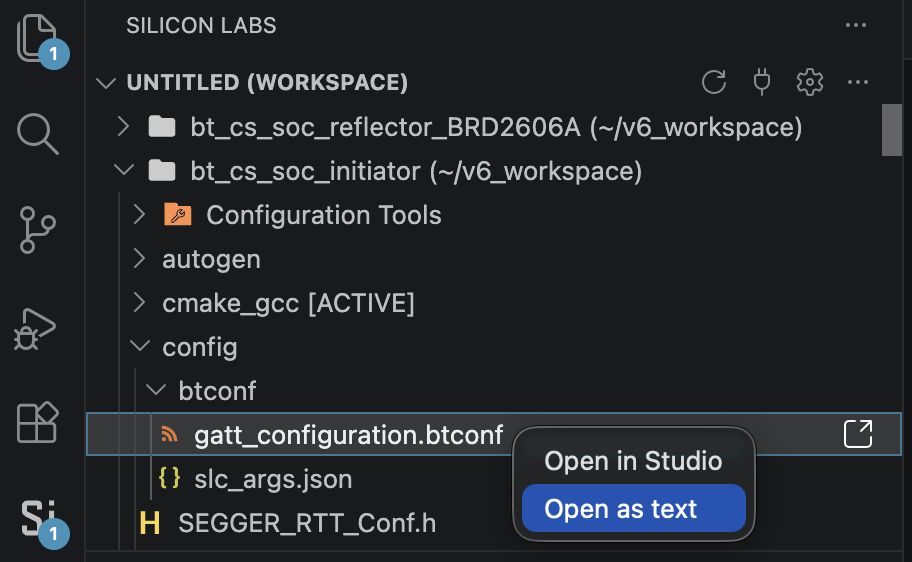
This step adds a small custom BLE service to the GATT database so the phone demo can use a custom characteristic (Read + Notify).
Go to the end of this file and paste the following code only between the final </service> and </gatt> tags.
<service advertise="false" id="custom_service" name="Custom Service" requirement="optional" type="primary" uuid="AABB">
<characteristic id="custom_characteristic" name="Custom Characteristic" uuid="BBCC">
<informativeText>Read + Notify with Client Characteristic Configuration (CCCD).</informativeText>
<value length="20" type="hex" variable_length="true">00</value>
<properties read="true" notify="true"/>
</characteristic>
</service>
11. Open app_config.h at config/app_config.h and update it as described below.
This step updates the application configuration for Pixel/Android CS Reflector interoperability: GATT MTU, CS-config-before-security preference, and custom GATT proximity lock/unlock threshold.
Find and delete the following code:
// <o CS_APP_CAPABILITY> Capabilities
// <i> These values define the security management related I/O capabilities
// <i> supported by the device.
// <sl_bt_sm_io_capability_noinputnooutput=> No input no output
// <sl_bt_sm_io_capability_displayonly=> Display only
// <sl_bt_sm_io_capability_displayyesno=> Display with yes/no buttons
// <sl_bt_sm_io_capability_keyboardonly=> Keyboard only
// <sl_bt_sm_io_capability_keyboarddisplay=> Display with keyboard
// <i> Default: sl_bt_sm_io_capability_noinputnooutput
#ifndef CS_APP_CAPABILITY
#define CS_APP_CAPABILITY sl_bt_sm_io_capability_noinputnooutput
#endif // CS_APP_CAPABILITY
After deleting the above code, add the following code in the same place:
// <o CS_INITIATOR_GATT_MAX_MTU> GATT MTU for RAS ranging data
// <i> Lab workaround for some Android reflectors (e.g. Pixel): use 245.
// <i> Default: 245
#ifndef CS_INITIATOR_GATT_MAX_MTU
#define CS_INITIATOR_GATT_MAX_MTU 245
#endif
// <q CS_INITIATOR_PREFER_CS_CONFIG_BEFORE_SECURITY> CS capabilities before SM security
// <i> When set, sl_bt_cs_read_remote_supported_capabilities runs before
// <i> sl_bt_sm_increase_security on the first connection_parameters events.
// <i> Improves interop with Android CS reflectors (e.g. Pixel). Default: 1
#ifndef CS_INITIATOR_PREFER_CS_CONFIG_BEFORE_SECURITY
#define CS_INITIATOR_PREFER_CS_CONFIG_BEFORE_SECURITY 0
#endif
// <o CUSTOM_GATT_PROXIMITY_THRESHOLD_M> Custom GATT proximity threshold (m)
// <i> Filtered CS distance above this value notifies LOCK (0x01).
// <i> Below this value notifies UNLOCK (0x00). Default: 1.0
#ifndef CUSTOM_GATT_PROXIMITY_THRESHOLD_M
#define CUSTOM_GATT_PROXIMITY_THRESHOLD_M (1.0f)
#endif
// <o CS_APP_CAPABILITY> Capabilities
// <i> These values define the security management related I/O capabilities
// <i> supported by the device.
// <sl_bt_sm_io_capability_noinputnooutput=> No input no output
// <sl_bt_sm_io_capability_displayonly=> Display only
// <sl_bt_sm_io_capability_displayyesno=> Display with yes/no buttons
// <sl_bt_sm_io_capability_keyboardonly=> Keyboard only
// <sl_bt_sm_io_capability_keyboarddisplay=> Display with keyboard
// <i> Default: sl_bt_sm_io_capability_noinputnooutput
#ifndef CS_APP_CAPABILITY
#define CS_APP_CAPABILITY sl_bt_sm_io_capability_noinputnooutput
#endif // CS_APP_CAPABILITY
12. Build the application and flash it to BRD2606A.
Save all modified files and build the project.
Confirm the build completes successfully with no errors.
Connect the EFR32xG24 Development Kit board (BRD2606A) to your PC.
Flash the image onto BRD2606A.
After flashing, continue with the Channel Sounding demo steps using the phone as the CS Reflector.
Set Up the Simplicity Connect Mobile App as a Digital Key#
Launch the Simplicity Connect mobile application on a Google Pixel device with Android 16 or later.
Tap the Demo icon in the navigation bar.
Locate the Channel Sounding demo tile and tap it.
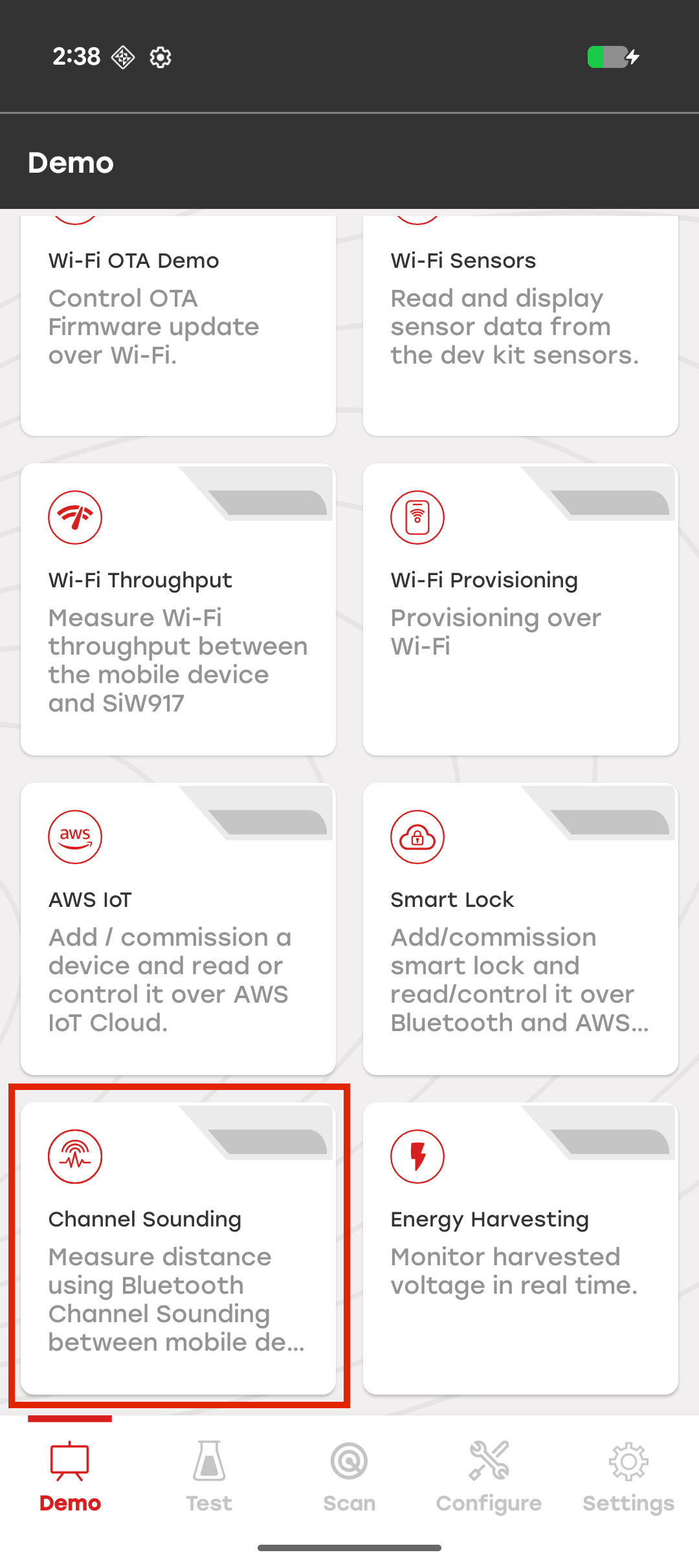
In the mode selection dialog, select Phone as Reflector.
Phone as Initiator – The mobile app measures the distance to a paired CS Reflector.
Phone as Reflector – The mobile app acts as the CS Reflector (Digital Key). The EFR32xG24 Development Kit functions as a door lock, measures the distance to the smartphone, and unlocks when the smartphone is within range.
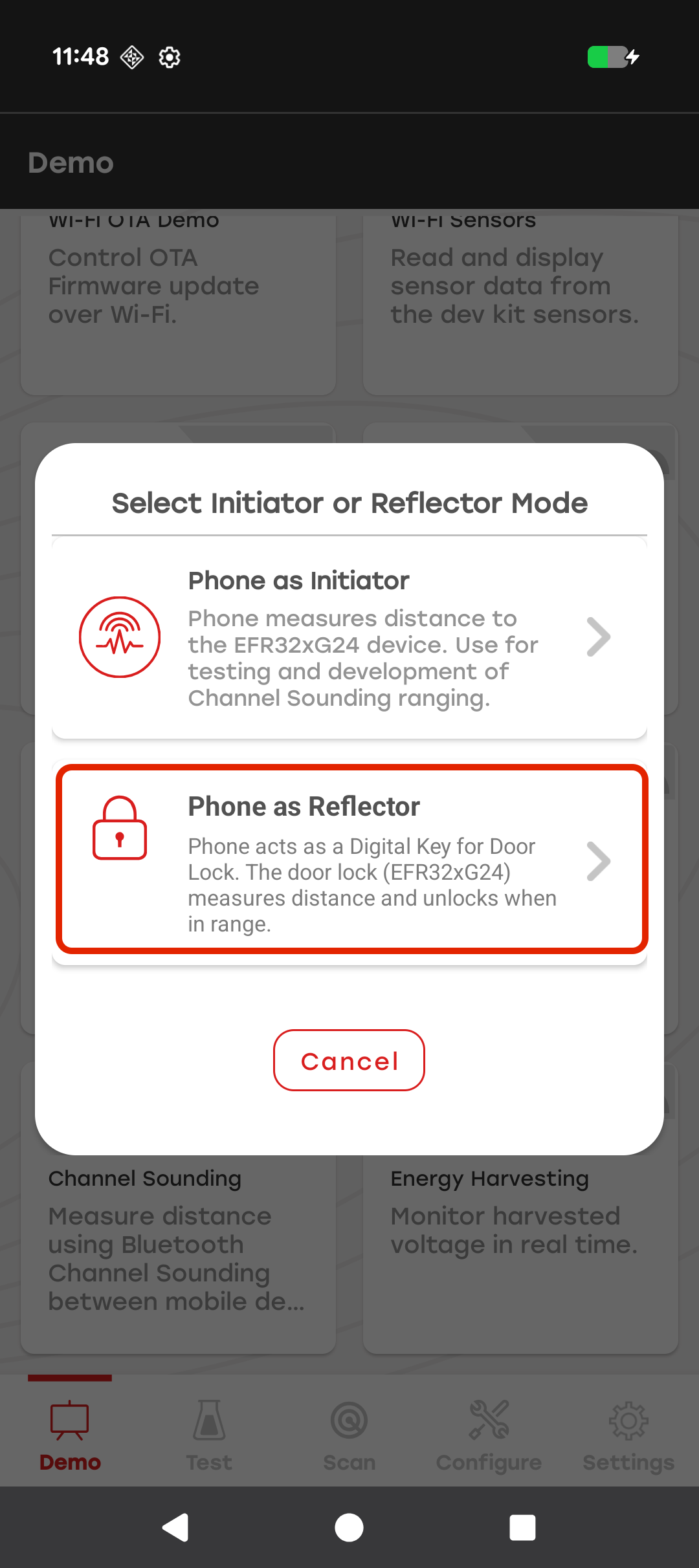
In the device selection window, select the door lock device advertising as Silabs Example.
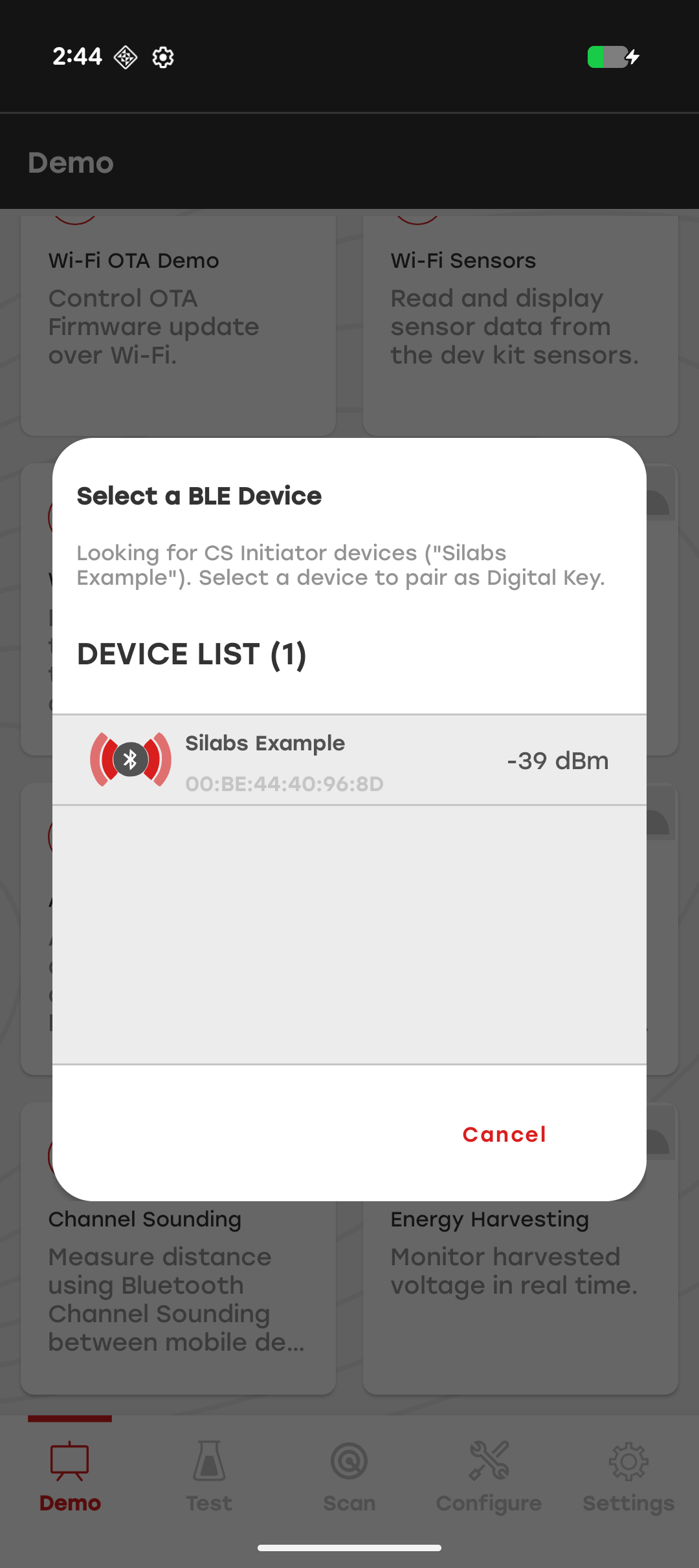
Note: If no devices appear, ensure that the development kit is powered on, running the CS Initiator firmware, and within Bluetooth range. Tap Refresh Scan to search again.
In the Pairing with Door Lock dialog, complete the pairing process.
Device Found – The app connects to the selected door lock.
Pairing & Bonding – Security keys are exchanged and the devices are bonded.
Channel Sounding Setup – The smartphone is configured as the CS Reflector.
Digital Key Ready – GATT notifications are enabled for lock-state updates.
When the system Bluetooth pairing dialog appears, tap Pair to complete bonding.
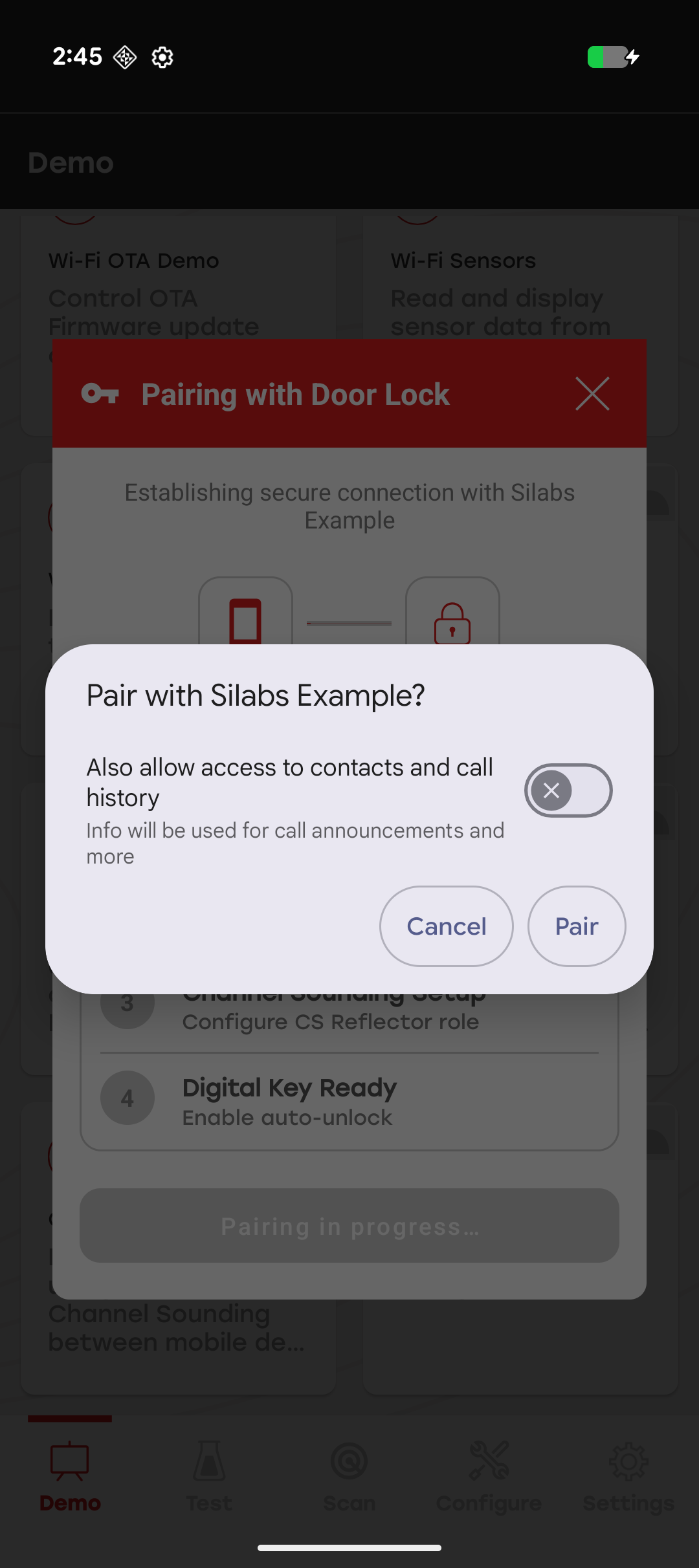
When all setup steps complete successfully and the status displays Digital Key Ready!, tap Go to Digital Key Dashboard.
The app starts a foreground service so the Digital Key session remains active while you use other screens or lock the phone.
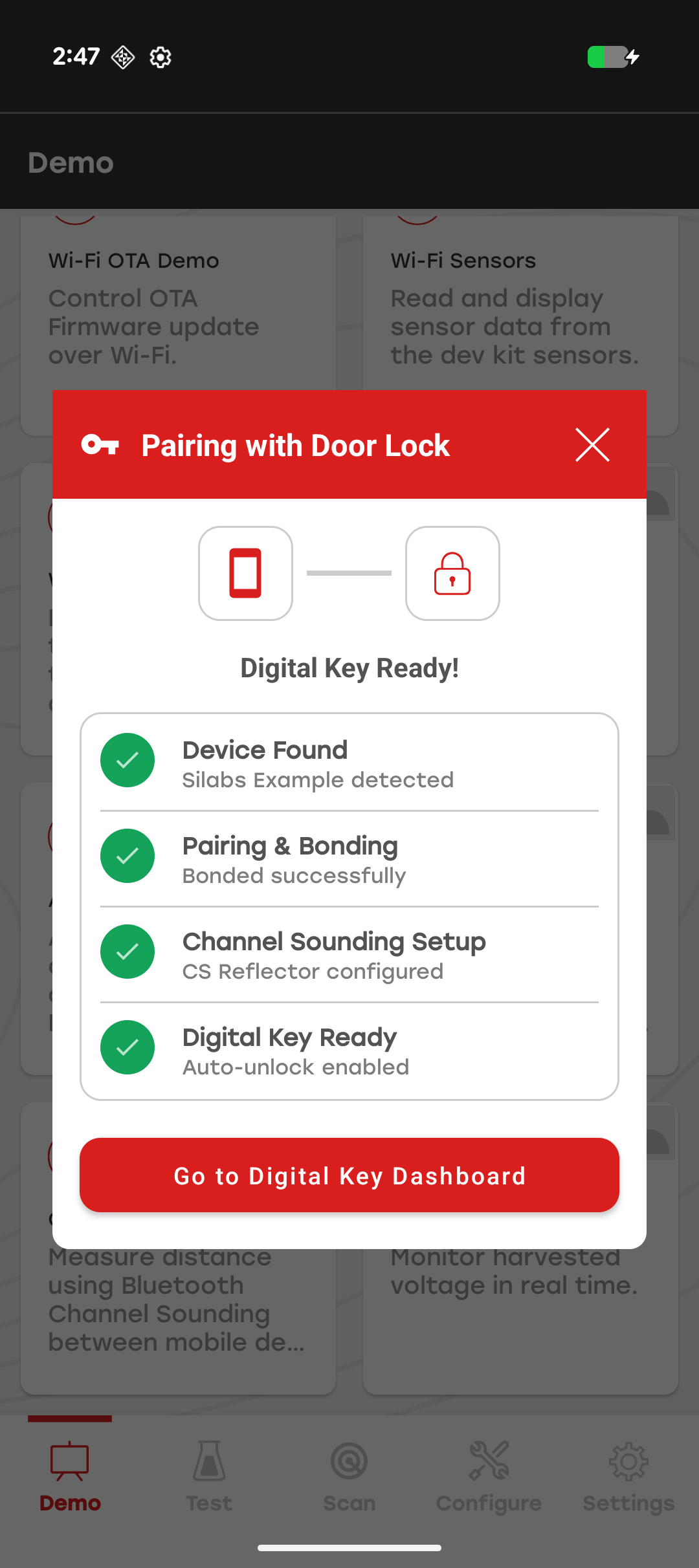
Use the Digital Key Dashboard#
The Digital Key Dashboard displays the connection status of the paired door lock and the current lock state reported by the firmware through GATT notifications. The padlock icon indicates whether the door lock considers the Digital Key to be within range.
View the Lock Status#
Move toward the door lock to enter the unlock zone. When Channel Sounding determines that the smartphone is within the configured range, the door lock reports an unlocked state (0x00) and the dashboard displays an unlocked padlock.
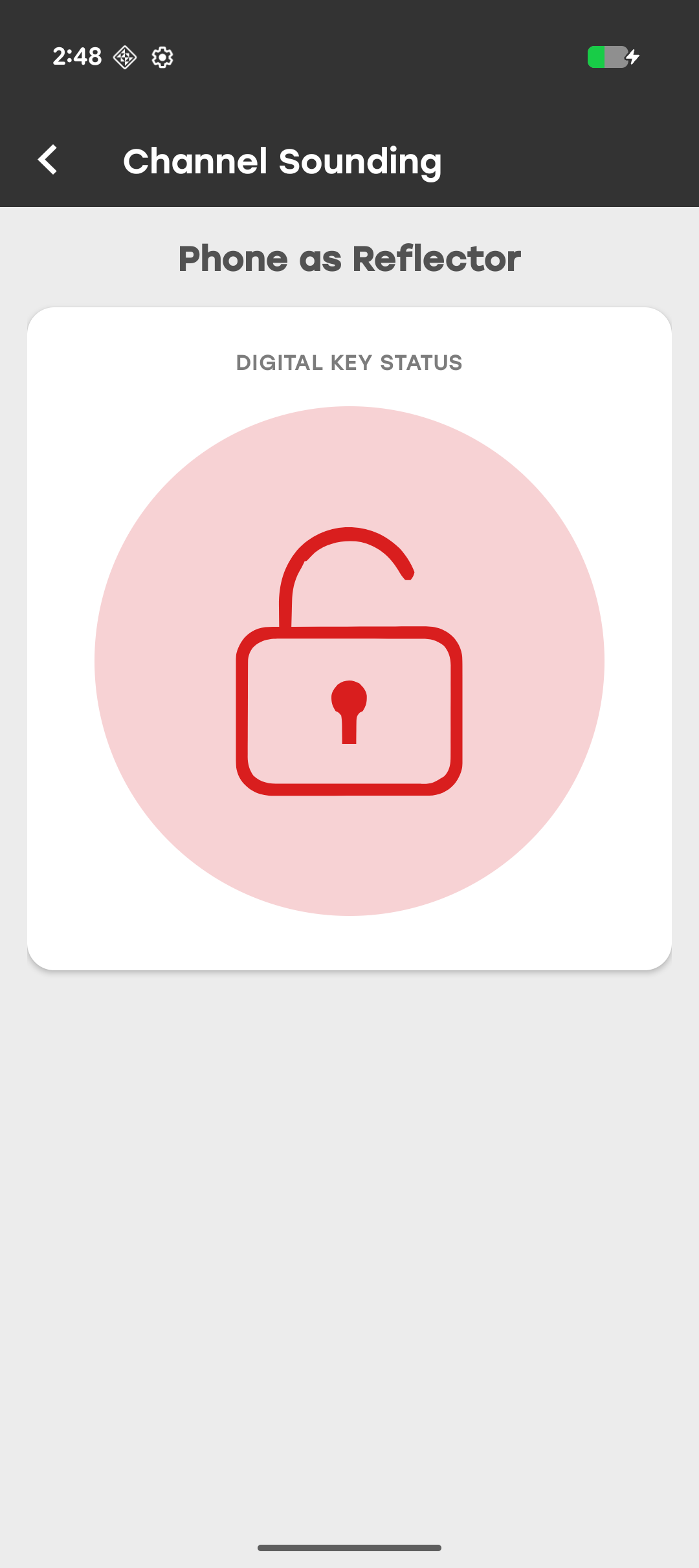
Move away from the door lock to leave the unlock zone. When the smartphone moves outside the configured range, the door lock reports a locked state (0x01) and the dashboard displays a locked padlock.
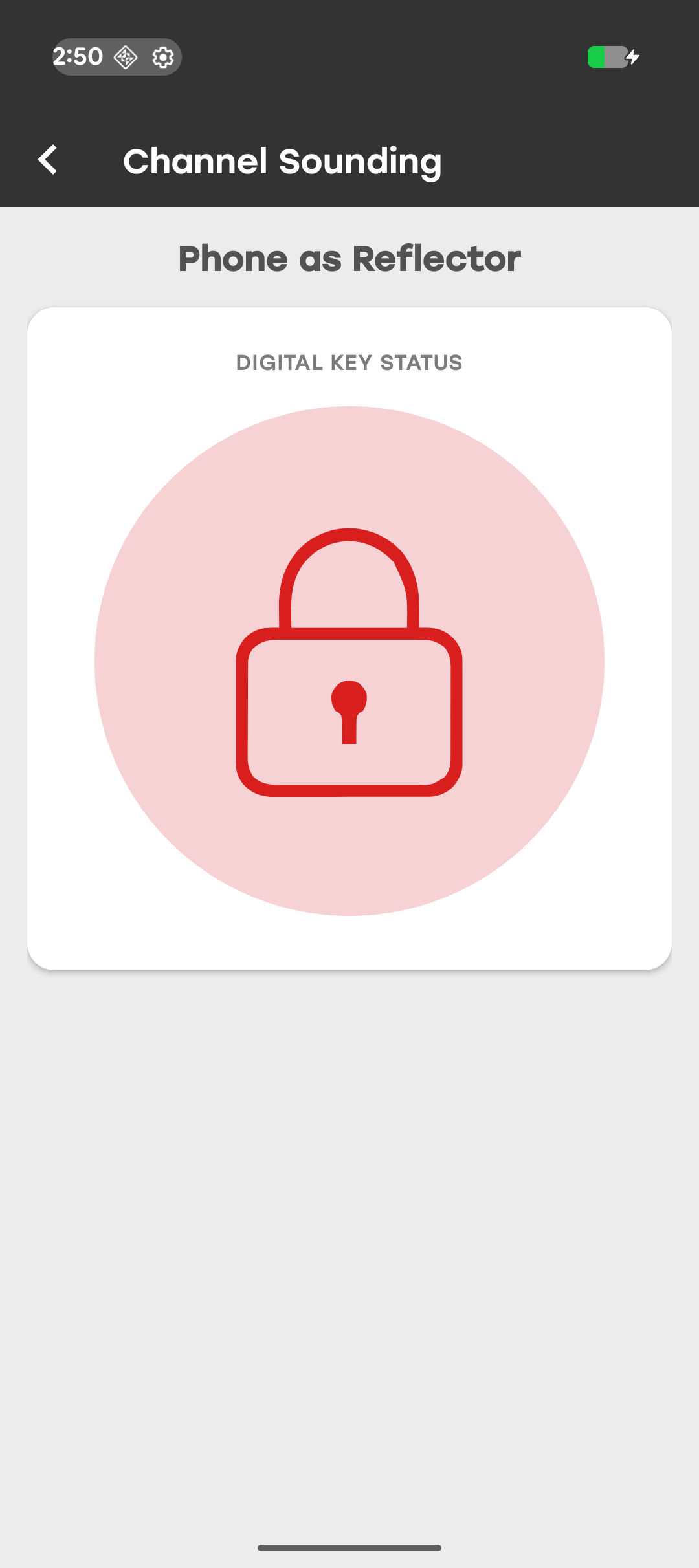
Run the Digital Key in the Background#
After pairing completes, a foreground service maintains the GATT connection and Digital Key notifications in the background. A persistent notification displays the current lock state.
Leaving the dashboard does not end the Digital Key session. You can return to the Channel Sounding demo and reopen the dashboard while the bond remains valid.
Handle Connection Loss#
If the door lock is reset, the pairing is removed from the phone's Bluetooth settings, or the session is otherwise permanently lost, the app displays a Connection Lost dialog and returns you to the demo screen. Repeat the pairing procedure to re-establish the Digital Key session.
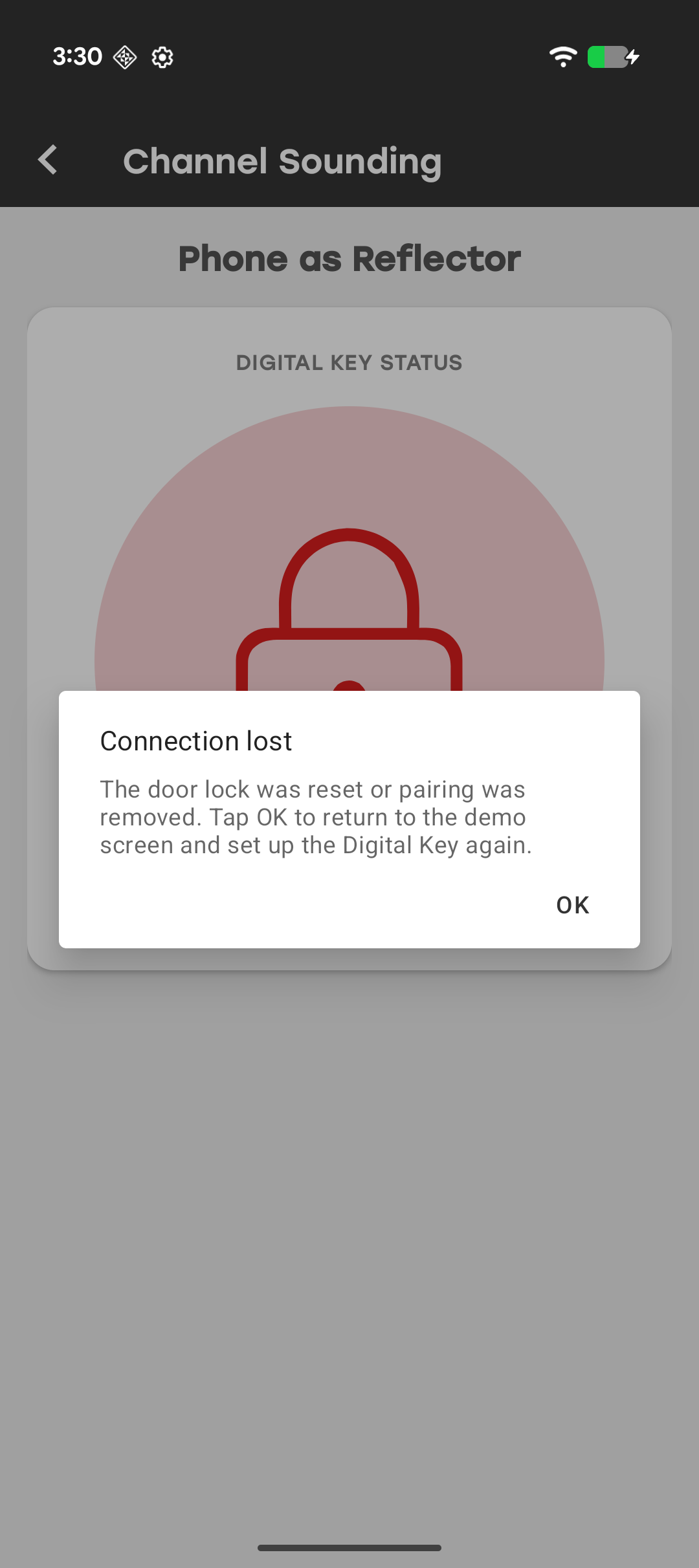
Troubleshoot Digital Key Issues#
| Issue | Resolution |
|---|---|
| No door locks found during scan | Verify that the development kit is flashed with the CS Initiator firmware, powered on, and advertising as **Silabs Example**. Move closer and tap **Refresh Scan**. |
| Bonding or pairing fails | Remove the device from the phone's Bluetooth settings, power-cycle the development kit, and repeat the pairing process. |
| Digital Key GATT not found (0xAABB / 0xBBCC) | Verify that the firmware exposes the Digital Key service and Lock State characteristic. Stay near the door lock and retry from the dashboard. |
| Dashboard shows disconnected | Move back within range. The app automatically reconnects when the device becomes available. |
| Lock state remains unknown | Wait for service discovery, notification configuration, and Channel Sounding setup to complete. Retry if setup fails. |
| Session lost dialog appears | Re-pair the smartphone and door lock after resetting the board or removing the bond. |