


Updating XiP Images#
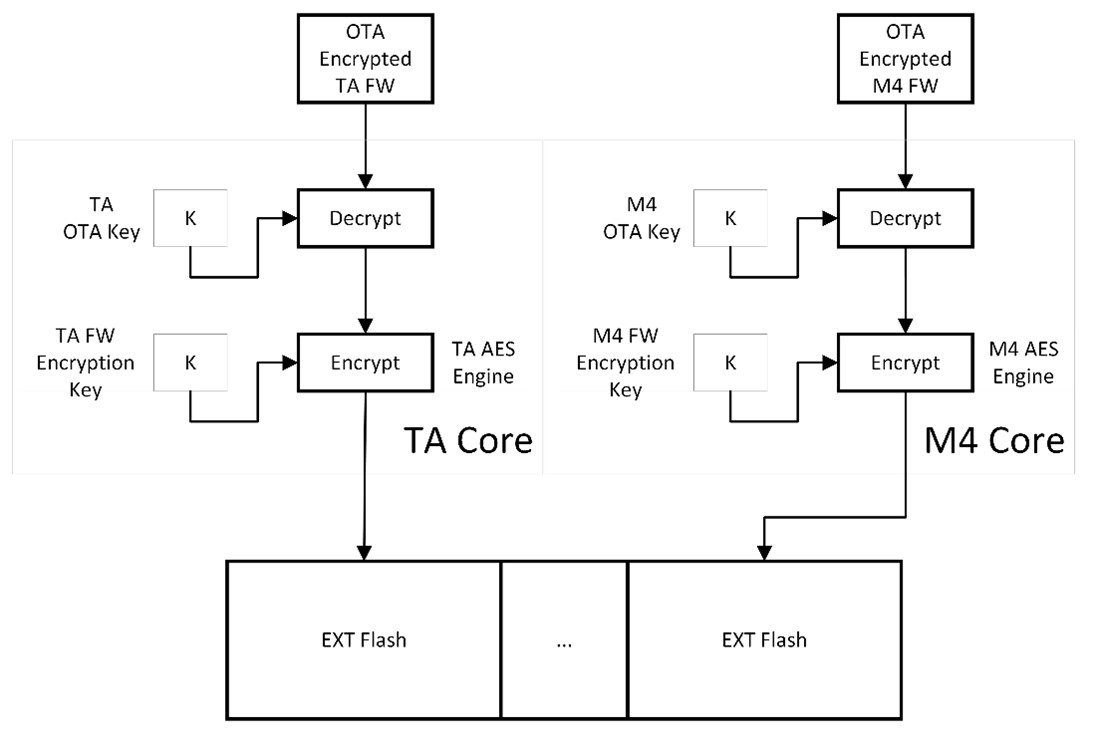
During firmware update for either core, the SiWx917 Bootloader checks if the encrypted XiP feature is enabled in the MBR for that core. If enabled, the bootloader reads the firmware for that core from the download location and encrypts it with that core’s intrinsic XiP key and then saves it at the static target location from where the firmware must execute. If the firmware image in the download location (this encryption is done using the per-core OTA keys, which are different from the per-core XiP encryption keys), the Bootloader decrypts firmware images for a specific core using that core’s OTA key and then again encrypts with that core’s corresponding XiP key before saving it in the executable region. Firmware images are stored in flash based on device flash configuration. To determine where firmware is stored, consult the following table for your device configuration:
Configuration | Firmware Image Start Address | Size |
|---|---|---|
NWP 4 [MB] / 8 [MB] | 0x4011000 | 1.871 [MB] |
NWP Dual Flash | 0x4011000 | 3.87 [MB] |
NWP Optimized Common Flash | 0x4011000 | 1.309 [MB] |
M4 Common Flash 4 [MB] | 0x41C1000 | 444 [kB] |
M4 Common Flash 8 [MB] | 0x4201000 | 2044 [kB] |
M4 Common Flash | 0x4201000 | 3004 [kB] |
M4 Dual Flash 8 [MB] | 0x8011000 | 3964 [kB] |
M4 Optimized Common Flash | 0x4171000 | 1084 [kB] |