Command Classes#
An essential feature of the ZAF is the communication through Command Classes. For this purpose, each of the Command Classes has a C module where incoming commands are handled, and outgoing commands are transmitted.
General Interfacing to CCs#
The application will typically use CCs in the two following ways:
Send an unsolicited command, or
Respond to a received command
Unsolicited Transmission#
Migrated to Doxygen: "How to implement a new command class".
Respond to Received Command#
Each CC implementation defines a handler, e.g. CC_ManufacturerSpecific_handler(). This function extracts the received frame for a given Command Class. The function must be registered using a REGISTER_CC macro, preferably the latest. Normally, the frame is carrying a “Set” or “Get” Command that results in a function call for reading or writing data. For some command classes, these commands are handled by the command class itself, but for others, it is up to the application to implement these functions provided as external functions in the CC header file.
When the handler of the corresponding Command Class has been triggered, it will process the received frame further:
/* CC_Binary_Switch.c */
switch (pCmd->ZW_Common.cmd)
{
case SWITCH_BINARY_GET:
if (FALSE == Check_not_legal_response_job(rxOpt))
{
:
/* Get the values from the application */
pTxBuf->ZW_SwitchBinaryReportV2Frame.currentValue = appBinarySwitchGetCurrentValue(rxOpt->destNode.endpoint);
:The CC handler will prepare the Report frame and then go back to the application to get application–specific data:
CMD_CLASS_BIN_SW_VAL
appBinarySwitchGetCurrentValue(uint8_t endpoint)
{
UNUSED(endpoint);
return onOffState;
}Reporting the Version of a Command Class#
Migrated to Doxygen: "How to implement a new command class".
True Status Support#
Starting from Z-Wave+ V2, if CC is on the list of mandatory command classes defined in [16], it must support True Status Engine (TSE). For more information, see True Status Engine.
Implementing a CC#
Not all CCs have been implemented in the ZAF yet. Hence, in some cases, the required Command Class must be developed for the application.
Association Group Information CC (AGI CC)#
The implementation of AGI CC serves two purposes:
Advertise capabilities of each association group, and
Find associated devices to which the application wants to send an unsolicited command.
For a general introduction to AGI CC, refer to [12].
Refer to Z-Wave Command Class Configurator. output for a description on how the AGI CC is configured.
Battery CC#
Battery CC is implemented in module CC_Battery. Additional functionality may be added to the application, if needed. See CC_Battery_BatteryGet_handler() in SensorPIR.c as an example.
Indicator CC#
Indicator CC is mandatory since Z-Wave+ V2. It can be used to identify a device in the network, by sending command that will, for example, set the LED indicator to ON over a certain period.
Indicator CC is implemented in module CC_Indicator.
Notification CC Version 8#
This information was moved to the Doxygen output: Notification.
Supervision CC#
This information was moved to the Doxygen output: Supervision.
Configuration Scenarios#
Default Configuration#
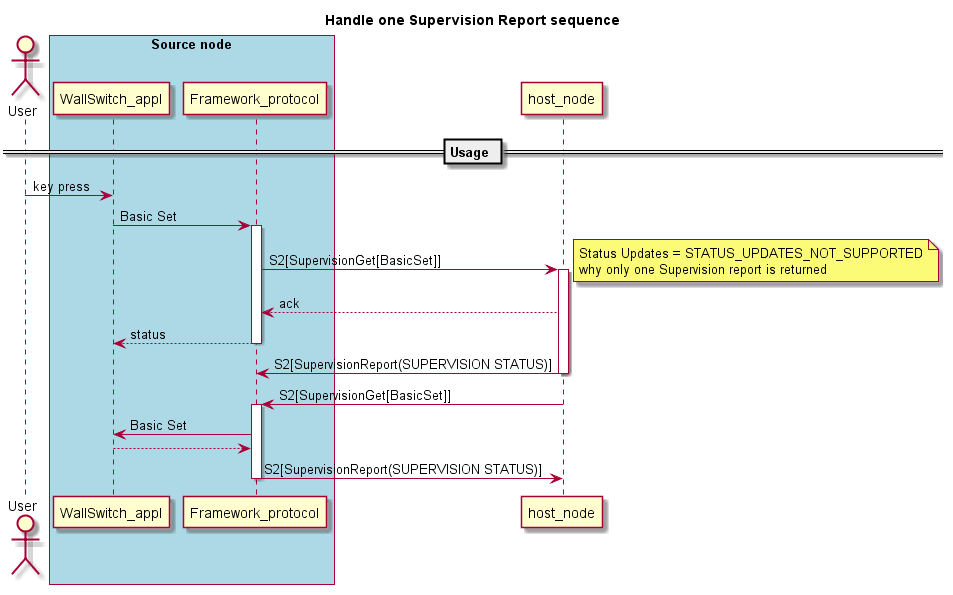
The application does not handle more than one Supervision report. The device receives a Supervision Get and replies with a Supervision Report containing CC_SUPERVISION_STATUS_SUCCESS.
Handle More Supervision Reports#
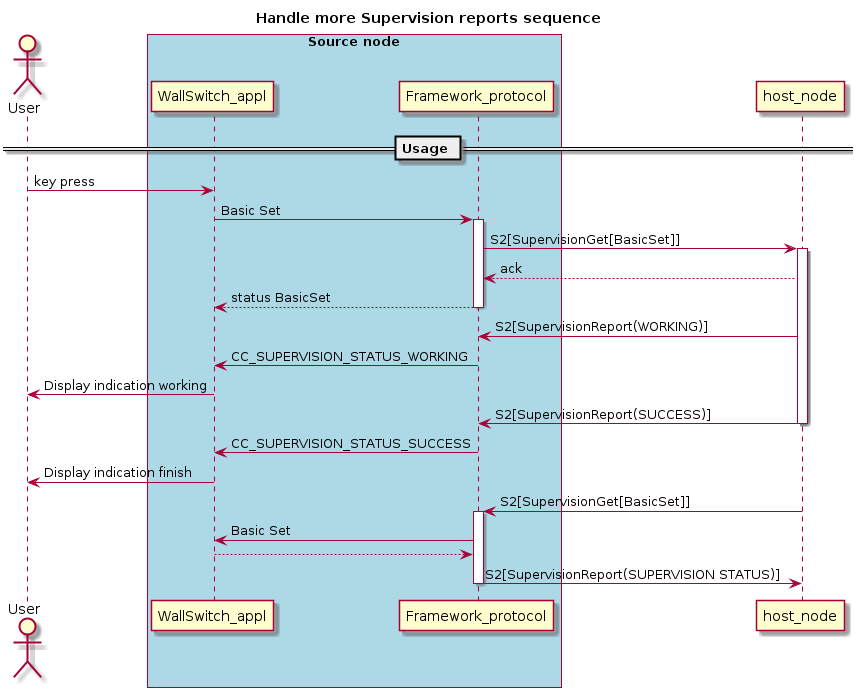
The application has the capability to display that a destination node is processing the transmitted command. An example is a Wall Controller with a display that shows a working device (CC_SUPERVISION_STATUS_WORKING) until a given command has been performed (CC_SUPERVISION_STATUS_SUCCESS).
Control Supervision Reports#
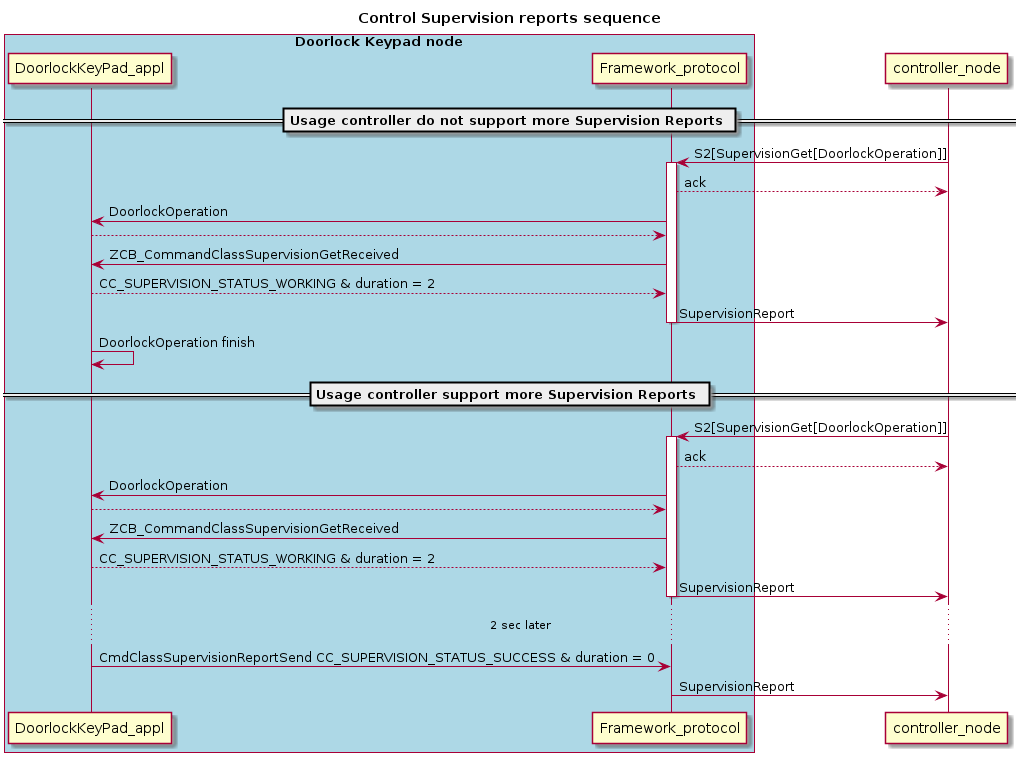
The application has the capability to send several Supervision Reports to report on an ongoing activity. An example is a Door Lock Key Pad that reports when a Door Lock Operation is started and when it is finished.