


Firmware Fallback Example Suite#
The WiSeConnect SDK contains reference example applications to demonstrate firmware fallback feature implementation and managing multiple firmware slots.
Reference Example | Overview |
|---|---|
SoC M4 Firmware Fallback Slot-B | Executing from slot-B flash location, demonstrates OTA firmware update of the inactive slot (here slot-B), via (Transmit Control Protocol) TCP connection |
SoC M4 Firmware Fallback Updater | Fetches the M4 firmware slot information, controls the firmware slot image selection for bootup. |
SoC M4 Firmware Fallback Updater Security | Fetches the M4 firmware slot information, controls the firmware slot image selection for bootup, on security enabled devices. |
M4 Firmware Fallback Slot A#
An example OTA application stored in slot-A flash location. The slot-A firmware can be updated via OTA or via Simplicity Studio Commander. Slot-A M4 firmware uses slot-A NWP firmware.
M4 Firmware Fallback Slot B#
An example OTA application stored in slot-B flash location. The slot-B firmware can be updated only via OTA. Slot-B M4 firmware loads slot-B NWP firmware.
Functionality of slot-A or slot-B example:
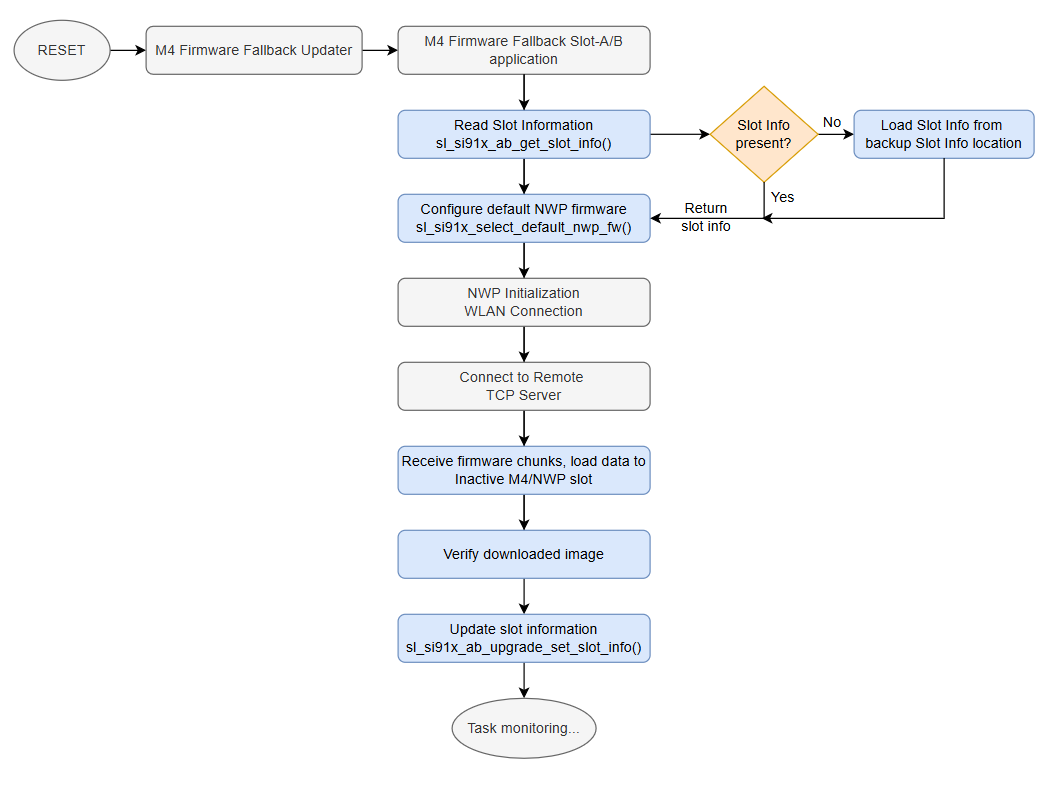
M4 Firmware Fallback Updater#
A minimal M4 application that manages firmware slot execution and handles the boot process for fallback scenarios.
Functionality of the M4 Firmware Fallback Updater:
Retrieve the slot information from flash
Verify the integrity of the M4 application firmware to be loaded
Branch to the Active M4 application offset
M4 Firmware Fallback Updater Security#
A minimal M4 application that performs secure firmware management and handles the boot process for fallback scenarios.
Functionality of the M4 Firmware Fallback Updater Security:
Retrieve the slot information from flash
Verify both NWP and M4 firmware images at Active slot addresses
Load Quad SPI (QSPI) keys for secure operations
Perform NWP soft reset
Branch to the Active M4 application offset
Note: Fallback feature must be enabled (via MBR update) in the SiWG917 before loading the Fallback updater example application.