Firmware Fallback Feature - Enable#
The Master Boot Record (MBR) defines flash-partition layout. Enabling fallback rewrites the partition table to include dual-slot regions and slot metadata, so reprovisioning the MBR is mandatory to enable/disable the Firmware Fallback feature.
Important:
After enabling the Firmware Fallback feature, only host-based or M4-based Over-the-Air (OTA) firmware updates are supported. Other firmware update methods mentioned in AN1431: SiWx917 Firmware Update App Note, such as HTTP OTAF and Kermit/Simplicity flashing, are not supported.
Devices with default MBR#
To enable firmware fallback feature, update the MBR following the below steps:
Update the NWP firmware in SiWG917, to the latest version available.
The NWP firmware version must be greater than or equal to
v1711.2.14.5.2.0.7
Note: Ensure the Simplicity Commander is updated to the latest version (1.19.2)
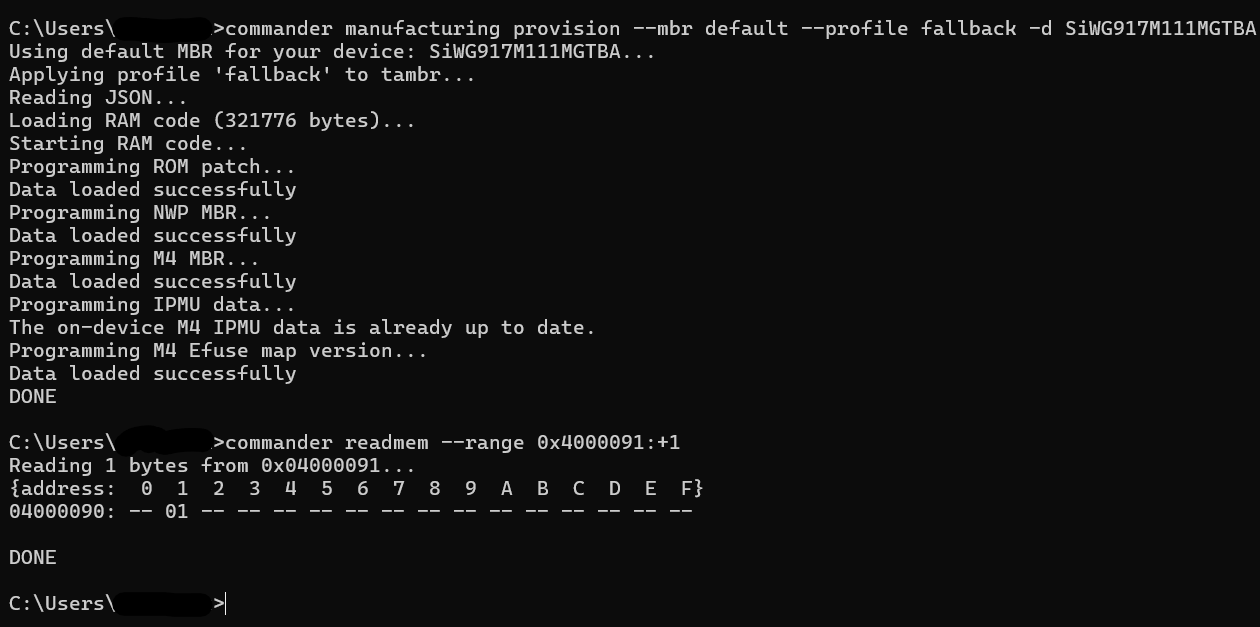
Update the MBR using the command below in Simplicity Commander CLI, to enable Firmware Fallback feature:
commander manufacturing provision --mbr default --profile fallback -d SiWG917M111MGTBA
To check whether the firmware fallback feature is enabled, read value at flash location 0x4000091, using the below Commander CLI command. Value 1 indicates firmware fallback feature is enabled:
commander readmem --range 0x4000091:+1Devices with custom MBR#
The MBR provisioning gives multiple options to user such as enabling different levels of security, enabling/disabling anti-rollback. To enable firmware fallback feature in such scenarios, follow the below steps:
Load the standard slot-A NWP firmware in SoC, via Simplicity Commander (or any other firmware update process)
The NWP firmware version must be greater than or equal to
SiWG917-B.2.14.5.0.0.8.rps
Note: Ensure the Simplicity Commander is updated to the latest version (1.18.2)
Append
--profile fallbackto the MBR provisioning command used for the SiWG917 according to your usercase. An example command is given below for reference.commander manufacturing provision --mbr device_mbr.bin --keys device_keys.json --device SiWG917Y111MGABA --profile fallbackNote: In the above command,
device_mbr.binis the MBR file, anddevice_keys.jsonfile contains fields of MBR that needs an update, such as security levels. Refer UG574: SiWx917 SoC Manufacturing Utility Userguide for more information.
To check whether the firmware fallback feature is enabled, read value at flash location 0x4000091, using the below CLI command. Value 1 indicates firmware fallback feature is enabled:
commander readmem --range 0x4000091:+1Refer to the image below to enable the Firmware Fallback Feature using the default MBR: