


Firmware Fallback Setup and Slot Management#
Initial Setup - Using Default SDK Examples#
The three reference examples provided in the wiseconnect SDK needs to be loaded in a certain sequence, when using the Firmware Fallback feature for the first time in a device. The following image shows how to load the M4 and NWP firmware.
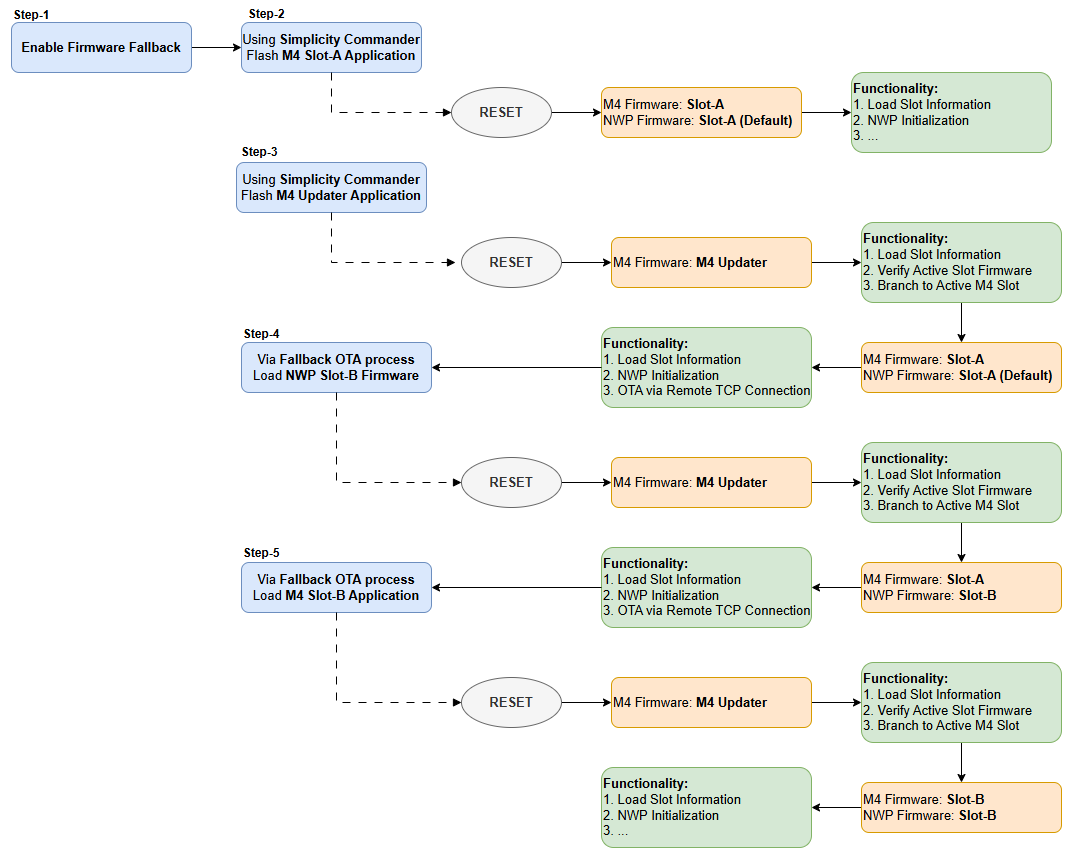
Important: After the Initial Setup, firmware images must be updated only via OTA. Usage of any other methods to flash the firmware images would disrupt the firmware fallback feature.
Generating Firmware for Different Slots#
Firmware fallback feature allows users to have two different M4 firmware images in the flash. These firmware images must be generated with proper flash address, configured in the <project_name>/autogen/linkerfile_SoC.ld file.
M4 updater application, which is responsible for updating the slots, will be present at the default M4 application start address. Linkerfile address would be
0x8202000M4 slot-A and slot-B application start addresses are to be decided by the user based on the application size and M4 space remaining
Flash addresses of the reference examples in wiseconnect SDK are tabulated below:
| Example | Start Address | End Address | Size in Hex | Size in Decimal | Linkerfile representation |
|---|---|---|---|---|---|
| M4 Fallback updater | 0x8202000 |
0x827EFFF |
0x07D000 |
512000 bytes (500 KB) |
|
| M4 Slot-A example | 0x827F000 |
0x842EFFF |
0x1B0000 |
17268472 bytes (1.69 MB) |
|
| M4 Slot-B example | 0x842F000 |
0x85DFFFF |
0x1AF000 |
1720320 bytes (1.64 MB) |
|