


Appendix B: Configuring the Development Kit as a Network Sniffer#
The Z-Wave 800 Pro Kit does not contain a UZB-S USB stick Z-Wave network sniffer. However, a second development kit can be configured as a network sniffer with identical functionality.
This section describes how to program a development kit to enable it to be used as a Z-Wave network sniffer.
In Simplicity Studio, navigate to the Devices page.
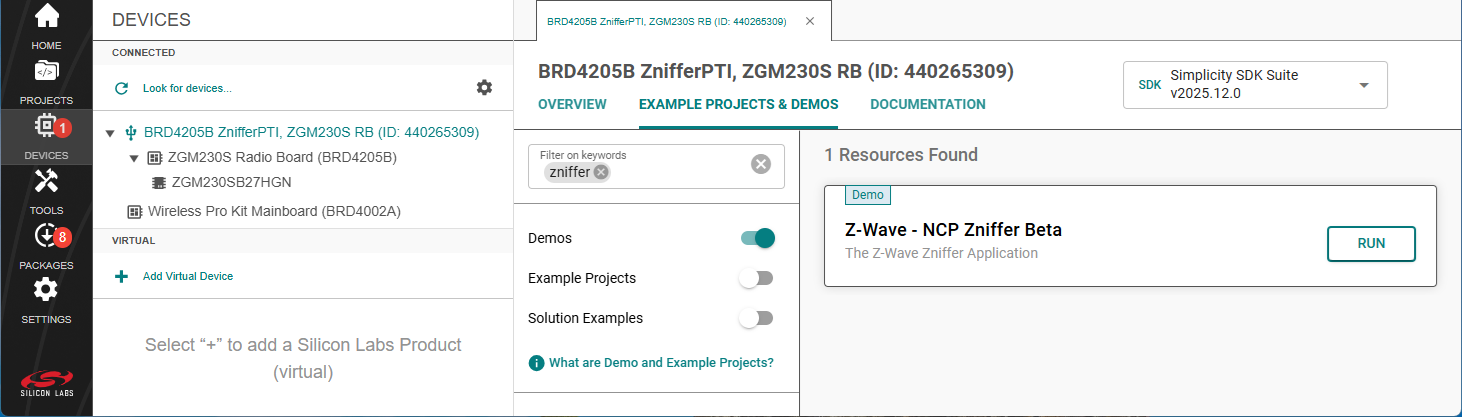
Select the device that you would like to use as the network sniffer, then go to the Example Projects & Demos tab.
Look for Z-Wave - NCP Zniffer Beta demo application then click Run, as shown below.
If needed, change the region as described in the section Changing the Region. The default region is EU. When USB connection is used, the region can also be set using the Z-Wave Zniffer application [3].
The Zniffer application can capture and forward Z-Wave network traffic to the host computer for analysis using USB or Ethernet connection. Ethernet connection is only supported on kits with a mainboard (e.g. WSTK) and a radio board.
After the program has been flashed, the development kit is ready for use as a Z-Wave network sniffer.
For instructions on how to establish a connection and use the Z-Wave Zniffer application, refer to the section Z-Wave Zniffer or the application manual [3].