Import Custom Wrapped Keys#
To import a custom wrapped key into CPMS, have the following field values available:
Value
Address
Auth
Metadata
The following examples show how to obtain the metadata value for asymmetric and symmetric keys:
Example 1: Import Custom Wrapped Asymmetric Keys#
Prepare Custom Wrapped Keys for CPMS#
The following steps demonstrate how to generate the wrapped key and required metadata for CPMS:
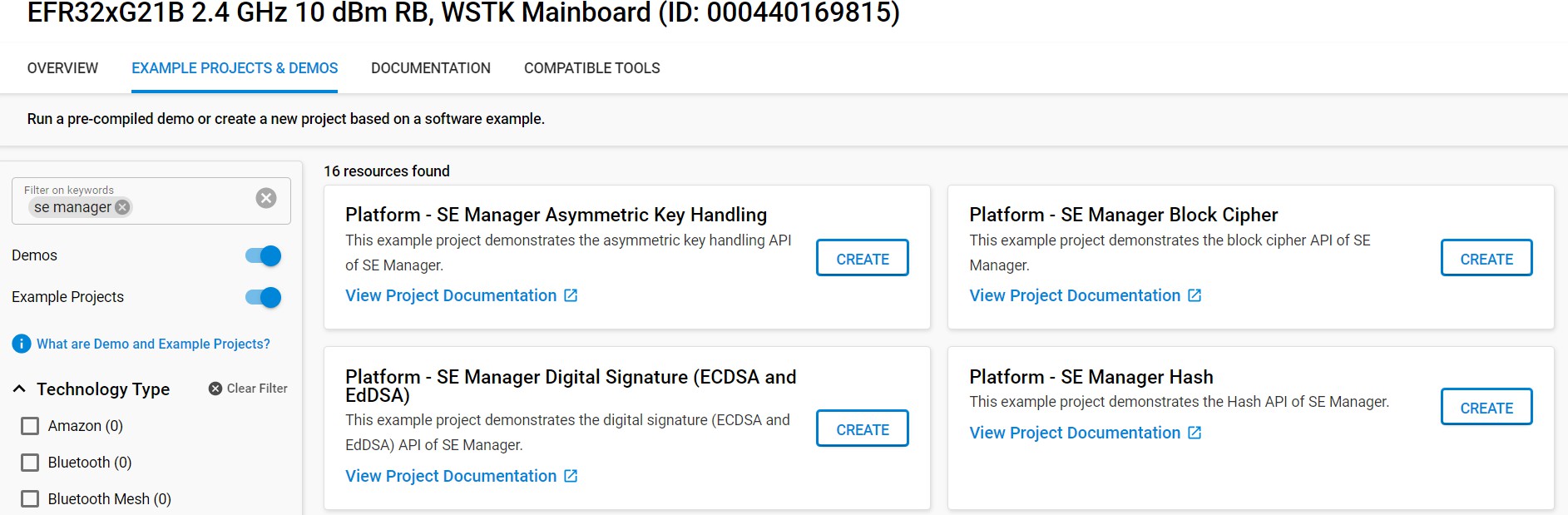
In Simplicity Studio, open the Launcher view, and then click EXAMPLE PROJECTS & DEMOS.
Search for SE Manager.
Create a project from the Platform - SE Manager Digital Signature (ECDSA and EdDSA) example.
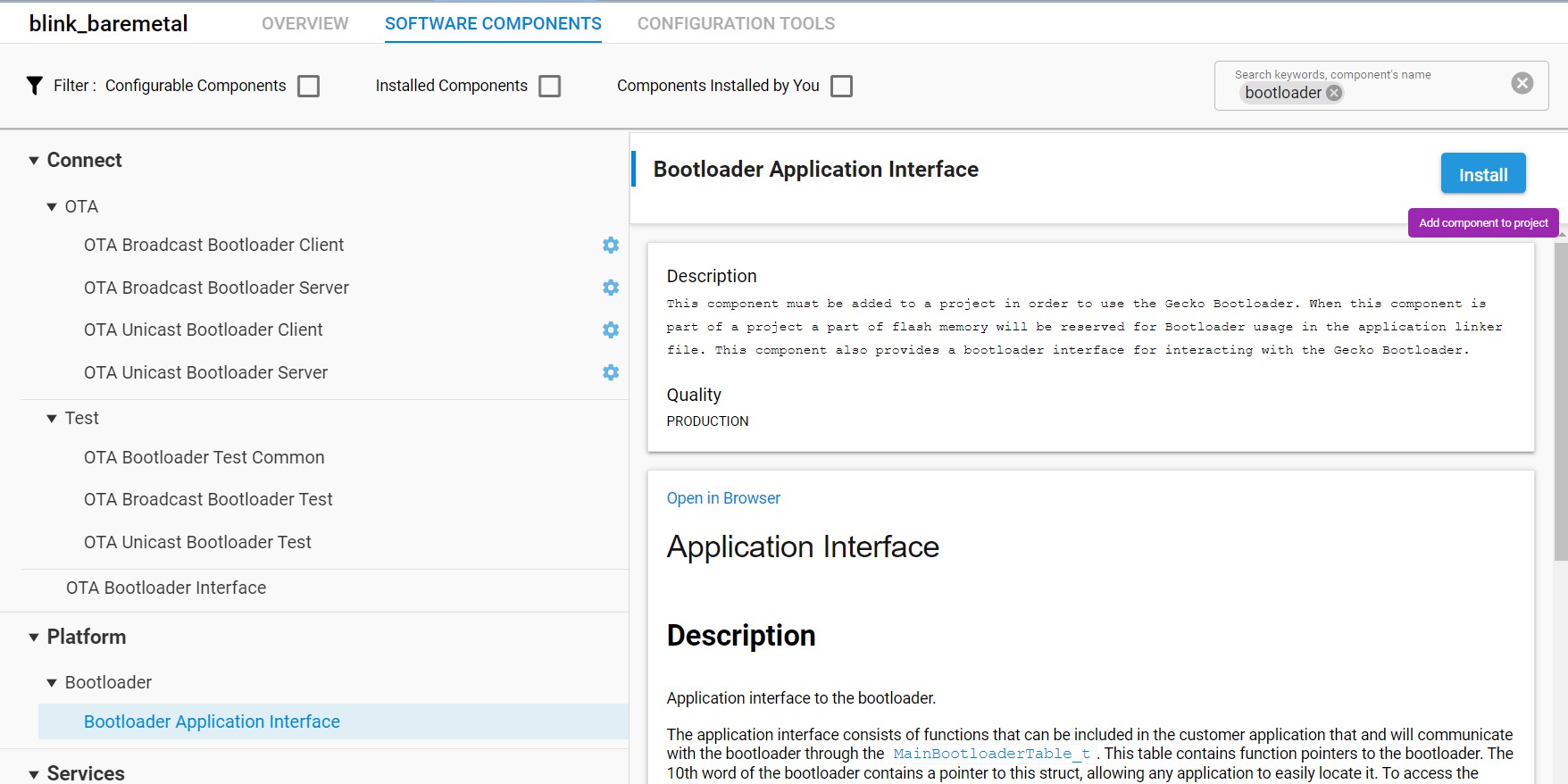
CPMS automatically wraps the key and writes it to flash. To emulate this behavior for testing, use the Memory System Controller (MSC) to write the key to flash. To enable the MSC, open se_manager_signature.slcp.
Open the SOFTWARE COMPONENTS tab.
Search for msc.
Click MSC Peripheral, and then click Install.
Modify the
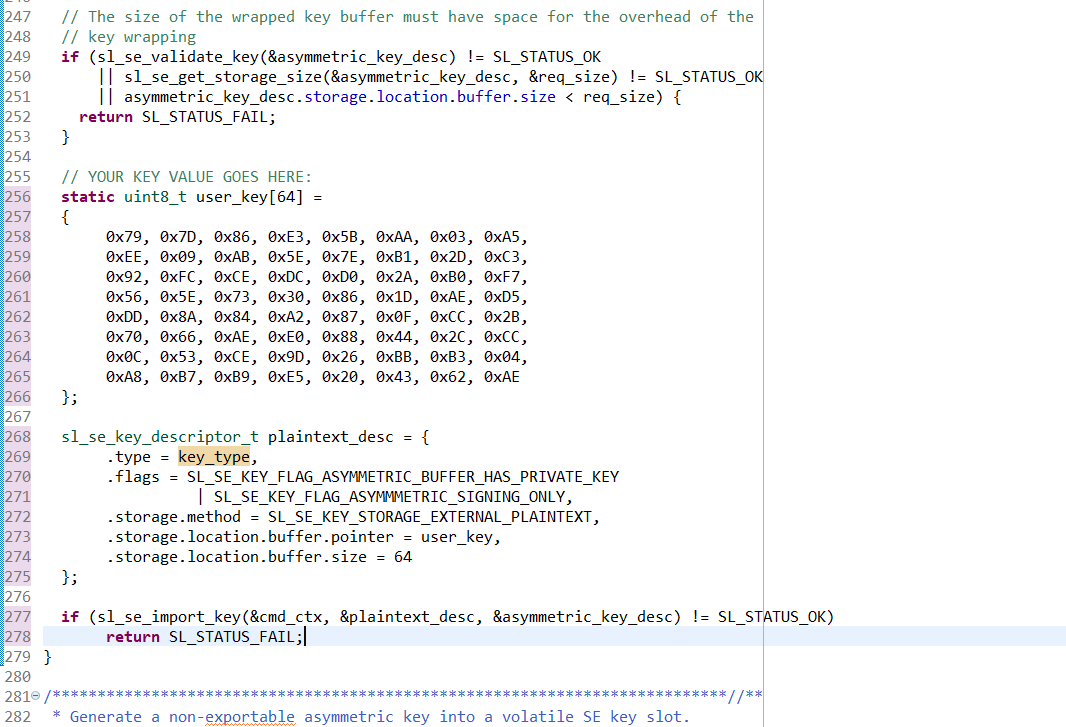
create_wrap_asymmetric_keyfunction in app_se_manager_signature.c to use the CPMS key. Instead of generating a key, import the ECC key. In app_se_manager_signature.c, line 255, replace the following line:
print_error_cycle(sl_se_generate_key(&cmd_ctx, &asymmetric_key_desc), &cmd_ctx);with:
// YOUR KEY VALUE GOES HERE:
static uint8_t user_key[64] =
{
0x79, 0x7D, 0x86, 0xE3, 0x5B, 0xAA, 0x03, 0xA5,
0xEE, 0x09, 0xAB, 0x5E, 0x7E, 0xB1, 0x2D, 0xC3,
0x92, 0xFC, 0xCE, 0xDC, 0xD0, 0x2A, 0xB0, 0xF7,
0x56, 0x5E, 0x73, 0x30, 0x86, 0x1D, 0xAE, 0xD5,
0xDD, 0x8A, 0x84, 0xA2, 0x87, 0x0F, 0xCC, 0x2B,
0x70, 0x66, 0xAE, 0xE0, 0x88, 0x44, 0x2C, 0xCC,
0x0C, 0x53, 0xCE, 0x9D, 0x26, 0xBB, 0xB3, 0x04,
0xA8, 0xB7, 0xB9, 0xE5, 0x20, 0x43, 0x62, 0xAE
};
sl_se_key_descriptor_t plaintext_desc = {
.type = key_type,
.flags = SL_SE_KEY_FLAG_ASYMMETRIC_BUFFER_HAS_PRIVATE_KEY
| SL_SE_KEY_FLAG_ASYMMMETRIC_SIGNING_ONLY,
.storage.method = SL_SE_KEY_STORAGE_EXTERNAL_PLAINTEXT,
.storage.location.buffer.pointer = user_key,
.storage.location.buffer.size = 64
};
if (sl_se_import_key(&cmd_ctx, &plaintext_desc, &asymmetric_key_desc) != SL_STATUS_OK) return SL_STATUS_FAIL;This code imports the key into the Secure Engine, wraps it, and stores the wrapped key in asymmetric_key_buf, which is referenced by asymmetric_key_desc.storage.location.buffer.pointer.
Write the wrapped key blob to flash. Add the following lines to
create_wrap_asymmetric_key:// YOUR KEY ADDRESS GOES HERE: unsigned int wrapped_key_address = 0x00080000; printf("\nWriting key into flash at 0x%08x...\n", wrapped_key_address); // Clear out the old wrapped key MSC_ErasePage((uint32_t*)wrapped_key_address); // Flash the new wrapped key MSC_WriteWord((uint32_t*)wrapped_key_address, asymmetric_key_buf, sizeof(asymmetric_key_buf)); // Update the key descriptor to point to the key in flash asymmetric_key_desc.storage.location.buffer.pointer = (uint8_t*)wrapped_key_address; This code will import your key into the Secure Engine, wrap it, then store the wrapped key to the **asymmetric\_key\_buf** that **asym- metric\_key\_desc.storage.location.buffer.pointer** is pointing to. Print the keyspec required by CPMS. Add the following lines to
create_wrap_asymmetric_key: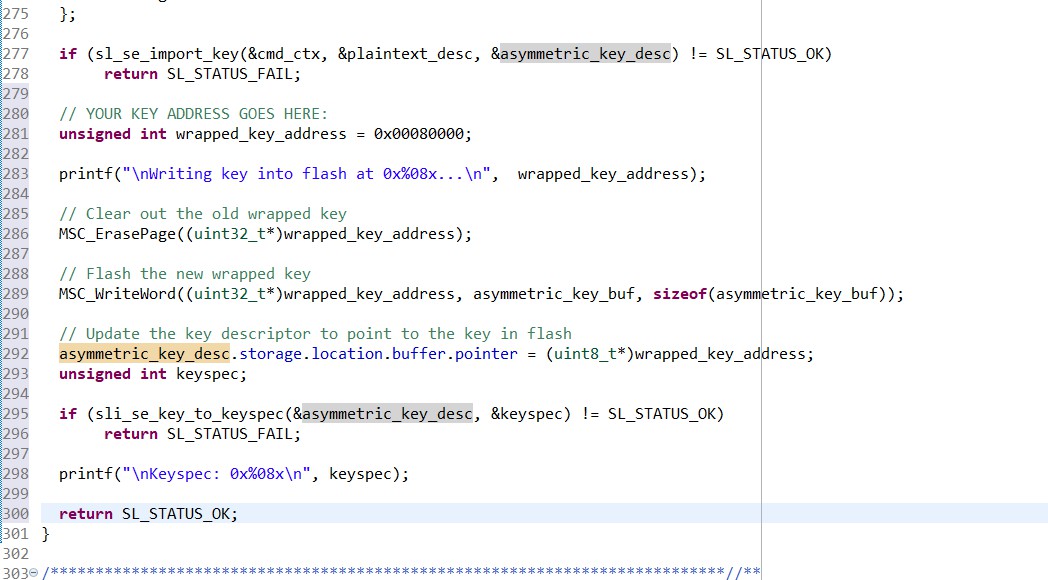
unsigned int keyspec; if (sli_se_key_to_keyspec(&asymmetric_key_desc, &keyspec) != SL_STATUS_OK) return SL_STATUS_FAIL; printf("\nKeyspec: 0x%08x\n", keyspec); return SL_STATUS_OK;Keys imported using CPMS use a different bus master than the CPU, so the key descriptor must be updated. In
create_wrap_symmetric_key, edit thesymmetric_key_desc.flagsfield to removeSL_SE_FLAG_ASYMMETRIC_BUFFER_HAS_PUBLIC_KEYand addSL_SE_KEY_FLAG_ALLOW_ANY_ACCESS(line 229):asymmetric_key_desc.flags = SL_SE_KEY_FLAG_ASYMMETRIC_BUFFER_HAS_PRIVATE_KEY | SL_SE_KEY_FLAG_ASYMMMETRIC_SIGNING_ONLY | SL_SE_KEY_FLAG_NON_EXPORTABLE | SL_SE_KEY_FLAG_ALLOW_ANY_ACCESS;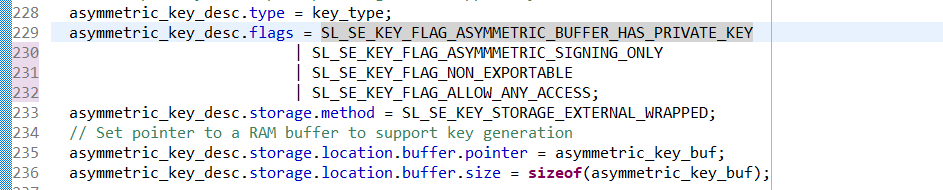
Build the project.

Flash the project to the target device.

In the Debug Adapters window, right-click the adapter for your device, and then click Launch Console.
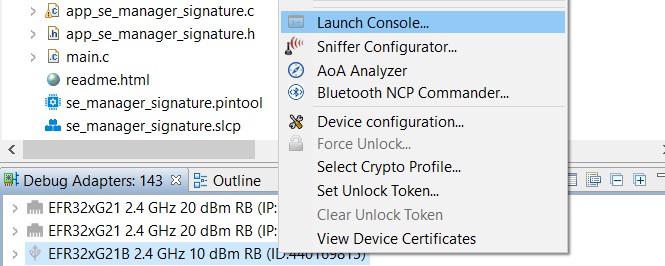
Click the Serial 1 tab, and then press Enter to start the console.
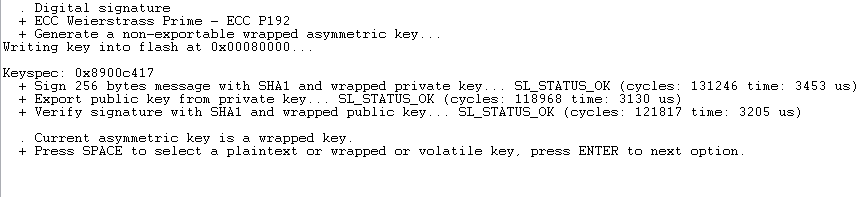
Reset the device. The program prompts you to select a key type: plaintext, wrapped, or volatile. Type a space, and then press Enter to select wrapped.
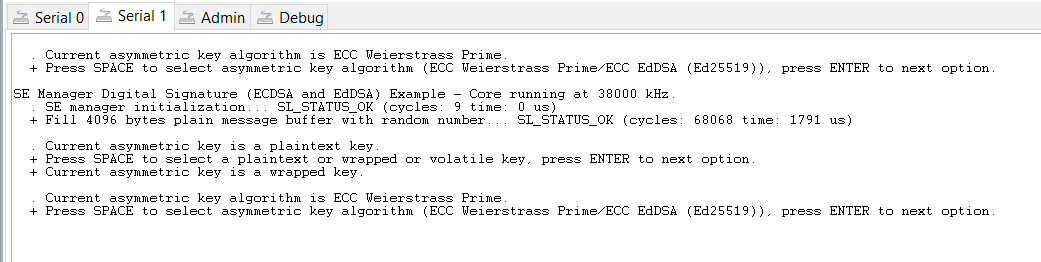
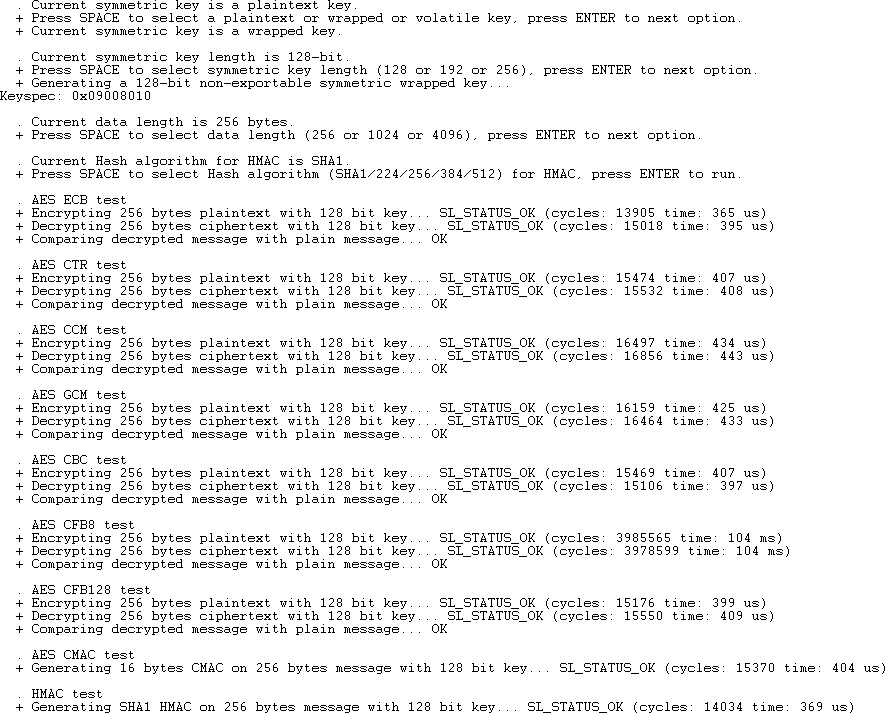
Press Enter four more times to display the keyspec in the console. When importing a custom wrapped key into CPMS, use this value as the Key Metadata value.
Use the Wrapped Key in the Application#
The following steps show how to use the wrapped key in the application without the plaintext key:
After the key is wrapped and stored in flash, verify that the application can use it without including the plaintext key. In app_se_manager_signature.c, comment out lines 255 to 278 and lines 283 to 289.
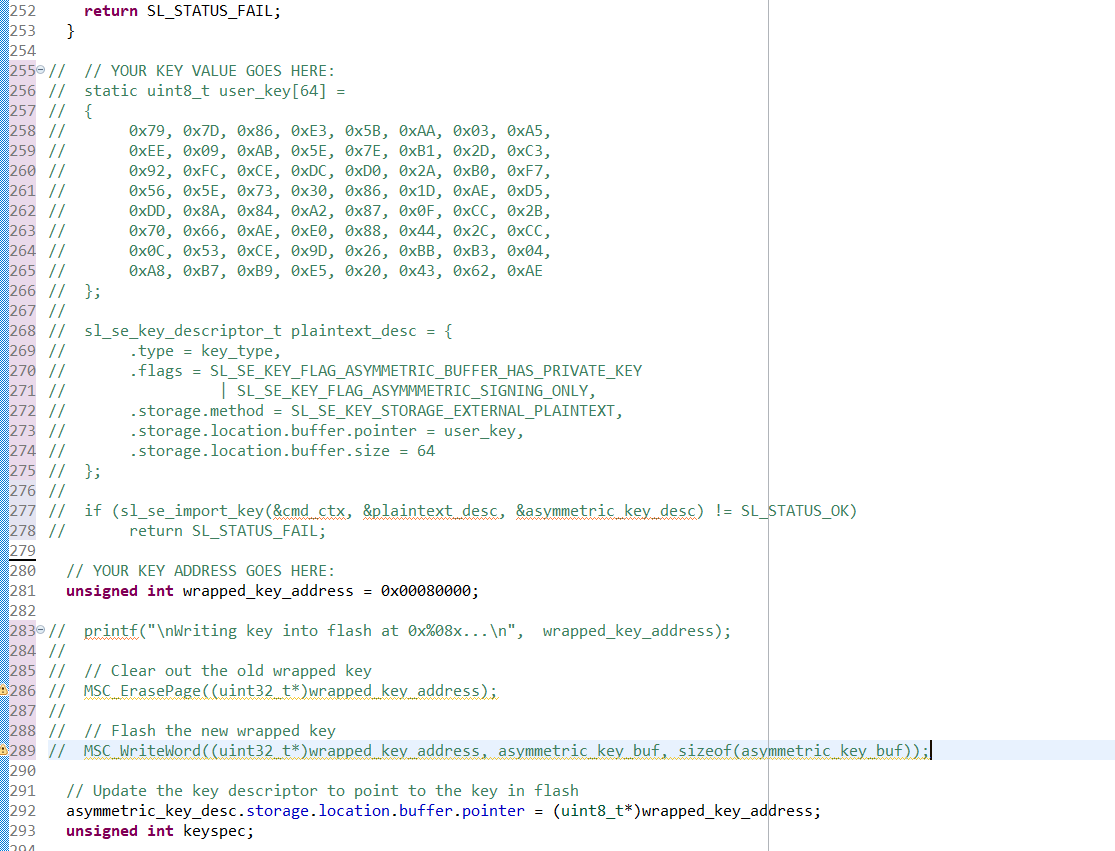
The application now sets up the key descriptor to point to the location of the wrapped key in flash without requiring knowledge of the key value.
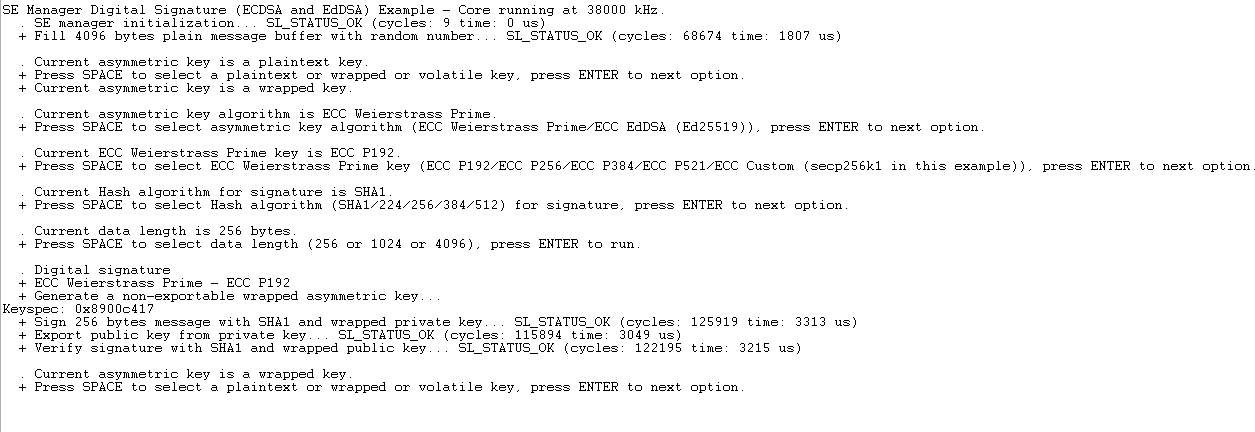
Repeat steps 12 through 17 to verify that the wrapped key can still be used. If the flash is erased (for example, by using a Commander device unlock command), the application fails because the wrapped key is no longer available in flash. The wrapped key must be stored in flash by a previous process.
Example 2: Import a Custom Wrapped Symmetric Key#
Prepare Custom Wrapped Keys for CPMS#
The following steps demonstrate how to generate the wrapped key and required metadata for CPMS:
In Simplicity Studio, open the Launcher view, and then click EXAMPLE PROJECTS & DEMOS.
Search for SE Manager.
Create a project from the Platform - SE Manager Block Cipher example.
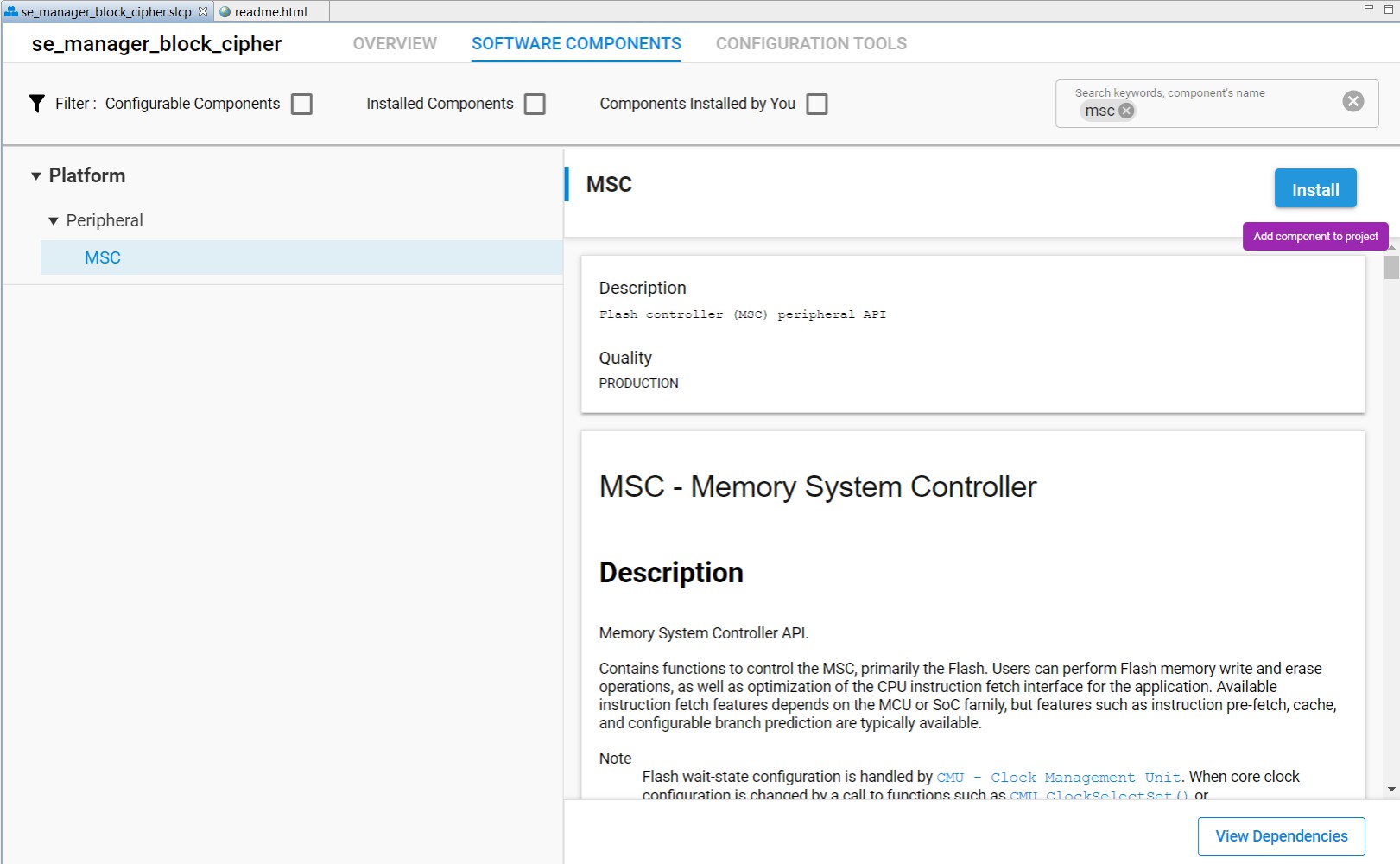
CPMS automatically wraps the key and writes it to flash. To emulate this behavior for testing, use the Memory System Controller (MSC) to write the key to flash. To enable the MSC, open se_manager_block_cipher.slcp.
Open the SOFTWARE COMPONENTS tab.
Search for msc.
Click MSC Peripheral, and then click Install.
Modify the
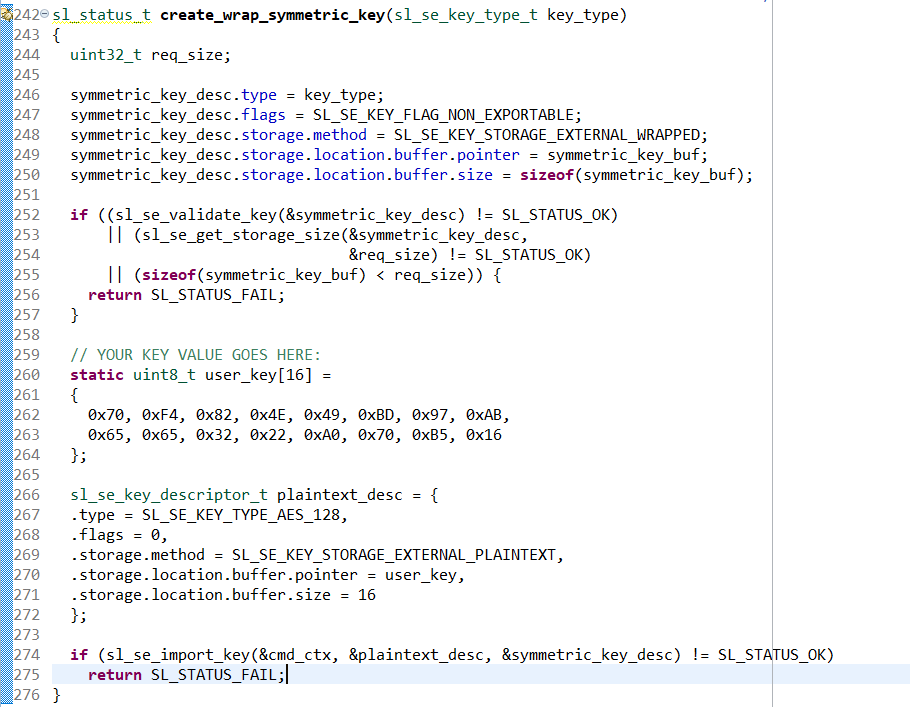
create_wrap_symmetric_keyfunction in app_se_manager_block_cipher.c to use the CPMS key. Instead of generating a key, import the AES key. In app_se_manager_block_cipher.c, line 259, replace the following line:print_error_cycle(sl_se_generate_key(&cmd_ctx, &symmetric_key_desc), &cmd_ctx);with:
// YOUR KEY VALUE GOES HERE: static uint8_t user_key[16] = { 0x70, 0xF4, 0x82, 0x4E, 0x49, 0xBD, 0x97, 0xAB, 0x65, 0x65, 0x32, 0x22, 0xA0, 0x70, 0xB5, 0x16 }; sl_se_key_descriptor_t plaintext_desc = { .type = SL_SE_KEY_TYPE_AES_128, .flags = 0, .storage.method = SL_SE_KEY_STORAGE_EXTERNAL_PLAINTEXT, .storage.location.buffer.pointer = user_key, .storage.location.buffer.size = 16 }; if (sl_se_import_key(&cmd_ctx, &plaintext_desc, &symmetric_key_desc) != SL_STATUS_OK) return SL_STATUS_FAIL;This code imports the key into the Secure Engine, wraps it, and stores the wrapped key in symmetric_key_buf, which is referenced by symmetric_key_desc.storage.location.buffer.pointer.
Write the wrapped key blob to flash. Add the following lines to
create_wrap_symmetric_key:// YOUR KEY ADDRESS GOES HERE: unsigned int wrapped_key_address = 0x00080000; printf("Writing key into flash at 0x%08x...\n", wrapped_key_address); // Clear out the old wrapped key MSC_ErasePage((uint32_t*)wrapped_key_address); // Flash the new wrapped key MSC_WriteWord((uint32_t*)wrapped_key_address, symmetric_key_buf, sizeof(symmetric_key_buf)); // Update the key descriptor to point to the key in flash symmetric_key_desc.storage.location.buffer.pointer = (uint8_t*)wrapped_key_address;Print the keyspec required by CPMS. Add the following lines to
create_wrap_symmetric_key:unsigned int keyspec; if (sli_se_key_to_keyspec(&symmetric_key_desc, &keyspec) != SL_STATUS_OK) return SL_STATUS_FAIL; printf("\nKeyspec: 0x%08x\n", keyspec); return SL_STATUS_OK;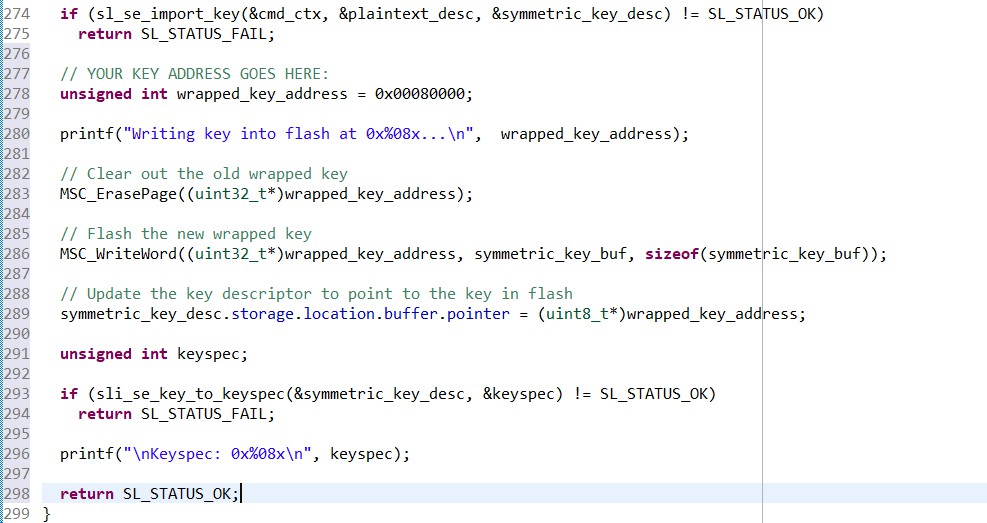
Keys imported using CPMS use a different bus master than the CPU, so the key descriptor must be updated. In
create_wrap_symmetric_key, edit thesymmetric_key_desc.flagsfield to includeSL_SE_KEY_FLAG_ALLOW_ANY_ACCESS(line 247):symmetric_key_desc.flags = SL_SE_KEY_FLAG_NON_EXPORTABLE | SL_SE_KEY_FLAG_ALLOW_ANY_ACCESS;
Build the project.

Flash the project to the target device.
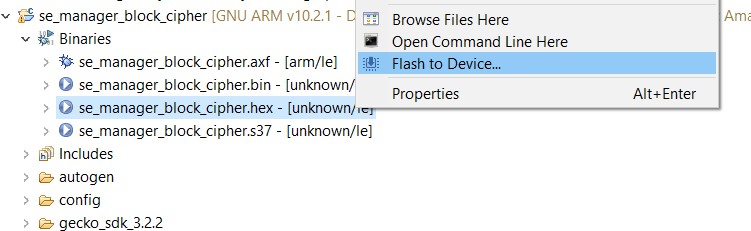
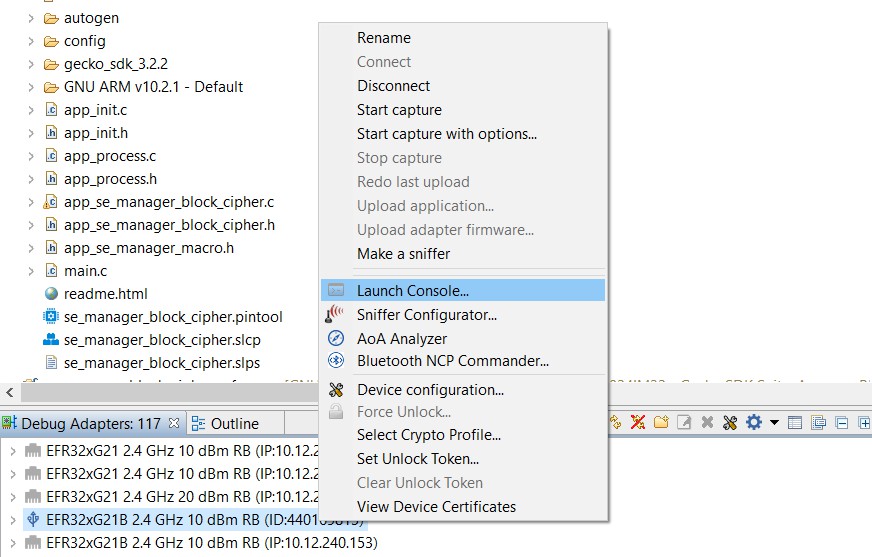
In the Debug Adapters window, right-click the adapter for your device, and then click Launch Console.
Click the Serial 1 tab, and then reset the device. The program prompts you to select a key type: plaintext, wrapped, or volatile. Type a space, and then press Enter to select wrapped.
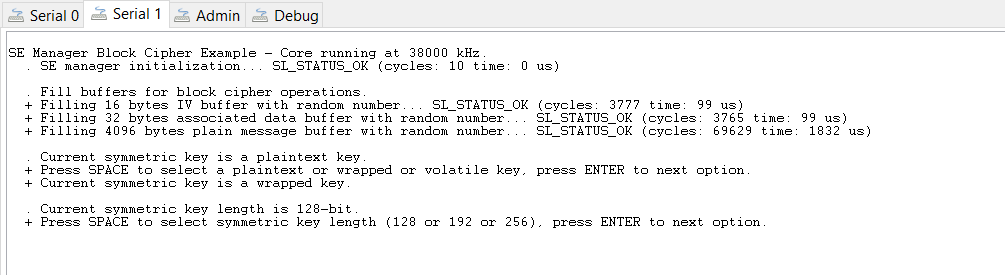
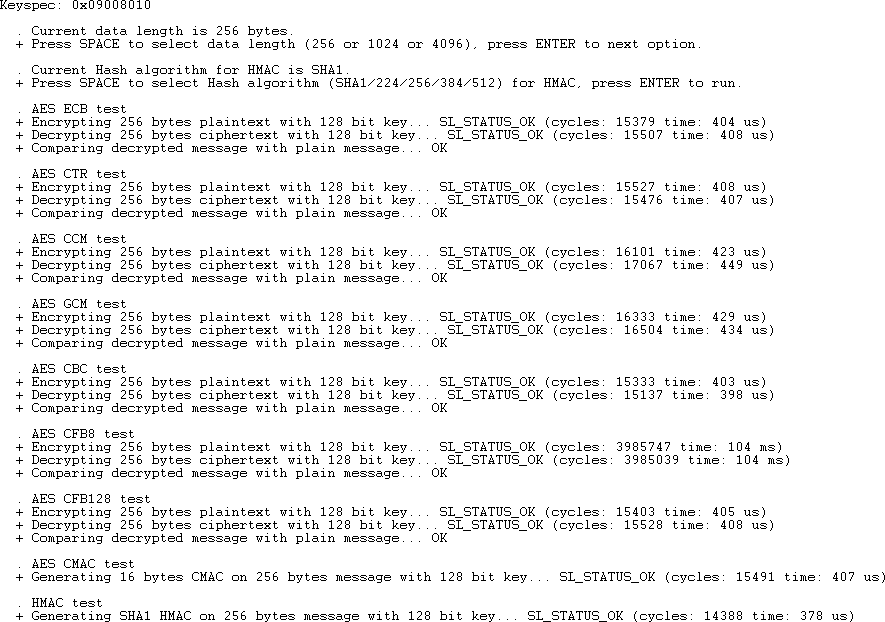
Press Enter once more to display the keyspec in the console. When importing a custom wrapped key into CPMS, use this value as the Key Metadata value.

Press Enter two more times to verify that the key can be used successfully. If you press Enter again after this, the program attempts to use the key as a ChaCha20-Poly1305 key, which causes the operation to fail.
Use the Wrapped Key in the Application#
The following steps show how to use the wrapped key in the application without the plaintext key:
After the key is wrapped and stored in flash, verify that the application can use it without including the plaintext key. In app_se_manager_block_cipher.c, comment out lines 259 to 275 and lines 280 to 286.
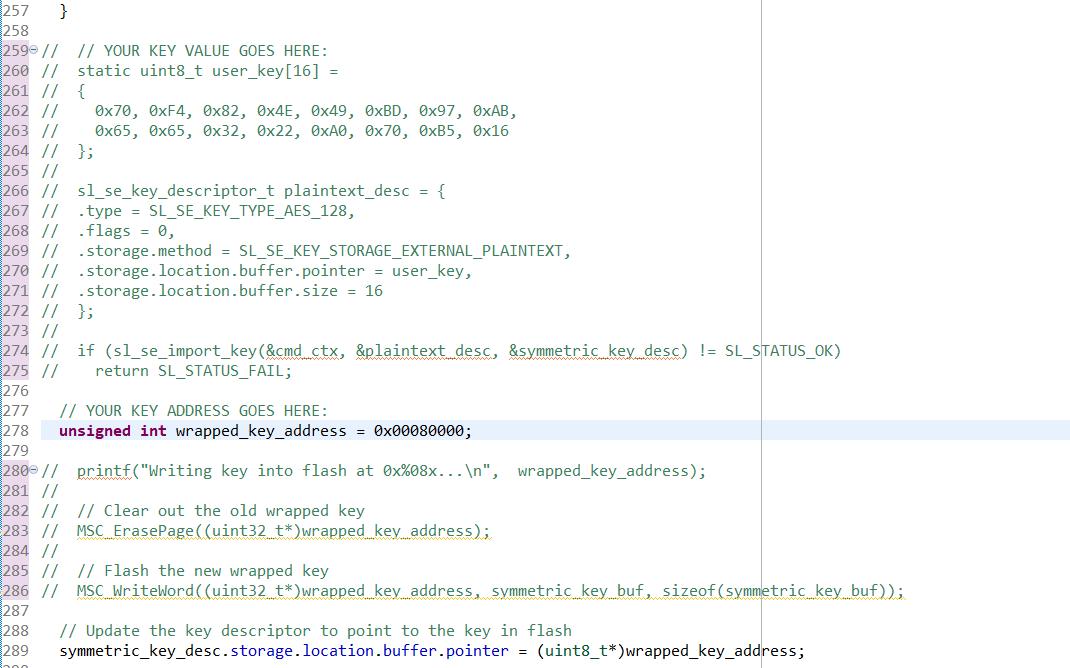
The application now sets up the key descriptor to point to the location of the wrapped key in flash without requiring knowledge of the key value.
Repeat steps 11 through 15 to verify that the wrapped key can still be used. If the flash is erased (for example, by using a Commander device unlock command), the application fails because the wrapped key is no longer available in flash. The wrapped key must be stored in flash by a previous process.